Key takeaways
- Find the best wall mount for your monitor, from compact 13-inch arms to heavy-duty ultrawide brackets, with VESA fit and weight limits explained.
A wall mount changes a desk more than a new monitor does, because it lifts the screen off the surface and puts it exactly where your eyes want it. The desk gains back the space a stand used to eat, and cables can run straight down the wall instead of across the desktop. The real decision is not which bracket looks neatest in a photo. It is whether the mount matches your monitor’s VESA holes and weight, whether your wall can hold it, and how much you need to move the screen once it is up.


This guide is for gamers, home-office workers and anyone with a small desk who wants the screen off the surface. Every mount below was chosen from the name and specifications on its Amazon page, and every one bolts to a wall rather than clamping to a desk. The five picks cover small screens, standing desks, ultrawide panels and heavy displays, so most setups will find a match.
Quick Picks
As an Amazon Associate we earn from qualifying purchases
| Product | Best for | Key spec from title |
|---|---|---|
| WALI 1330LM | A 13 to 32 inch screen in a small room | 13-32 inch, VESA up to 100x100mm, 15 inch extension |
| VIVO MOUNT-VW01A | A single monitor at a standing workstation | 17-32 inch, up to 17.6 lbs, VESA 75×75/100x100mm |
| HUANUO HNWSS1 | A gaming monitor that tilts and rotates often | 13-32 inch, up to 17.6 lbs, tilt 35 degrees |
| VIVO MOUNT-V101G1 | A 49 inch ultrawide that needs gas-spring lift | Up to 49 inch, up to 44 lbs, VESA 100x100mm |
| Mounting Dream MD2413-MX | A large heavy screen on a single stud | 26-55 inch, up to 77 lbs, VESA up to 400x400mm |
How to Choose
VESA Pattern and Monitor Weight
Turn the monitor around before you shop, because the four threaded holes on its back decide everything. Most monitors use a 75x75mm or 100x100mm VESA pattern, while larger screens sometimes use 200x100mm or 200x200mm, and a mount that only covers the smaller patterns will not fit them. Weigh the panel with its factory stand removed, since the stand often adds a kilogram or more. Screen size alone misleads: a light 32-inch panel can sit under a 17.6-pound limit, while a dense 27-inch gaming screen with a metal back can pass it. Match both numbers, pattern and weight, before you look at anything else.
Wall Type and Fixing
A monitor mount is only as strong as the wall behind it, so find out what you are drilling into before the box arrives. A wood stud, solid concrete or brick takes the load well, and most wall mounts in this guide are made for exactly those surfaces. Drywall alone will not hold a monitor arm, no matter how good the fixings look, because the board itself gives way under a levered load. Use a stud finder to locate the timber, or drill into masonry with the right plugs, and check that no pipes or cables run through the spot. A mount rated for a single stud saves you hunting for two, but it still needs a solid stud.
Movement: Tilt, Swivel, Extension and Rotation
How much the screen moves after installation matters more than it seems on the box. Tilt handles glare from a window or a ceiling light: a few degrees down is usually enough, and a mount that only tilts a little can leave a glossy panel unreadable at midday. Swivel turns the screen toward a second chair or a bed, extension pulls it closer for reading small text, and rotation flips it into portrait for code or long documents. Gas-spring and tension arms adjust with one hand, while simple fixed arms need a tool and a firm grip. Think about which of these you will actually use weekly, because every extra joint is another thing to keep tight.
Height, Distance and Cables
Wall mounting lets you set the height once and forget it, so take the time to get it right. The top of the screen should sit at or just below eye level when you sit in your normal chair, with the panel about an arm’s length away. Mounting too high strains the neck within an hour, and mounting too low brings back the hunch a wall mount was meant to fix. Check the arm’s extension range against your desk depth, and leave slack in the cables so the screen can pull out and swivel without tugging a connector. Built-in cable clips help, but a short HDMI lead will still limit how far the screen travels.
The 5 Best Options
WALI 1330LM
The 1330LM is the simplest mount here, and that is its appeal. A short articulated arm bolts to the wall and carries screens from 13 to 32 inches, folding nearly flat when the monitor is pushed back and extending 15 inches when you want it closer. Tilt and swivel cover the usual adjustments for glare and viewing angle, and the VESA plate fits the 75x75mm and 100x100mm patterns found on most monitors. It suits a bedroom, a dorm room or a second screen in a corner, where a big gas-spring arm would be overkill and the wall space is tight.
Specs
- Fits 13 to 32 inch screens
- VESA mounting holes up to 100x100mm
- 15 inch full-motion extension arm with tilt and swivel
- Holds up to 33 lbs (15 kg)
- Model 1330LM, black finish
Best for: A small monitor in a bedroom or dorm room where the arm should fold flat against the wall.
Watch out for: VESA support stops at 100x100mm, so monitors with wider hole patterns need a different mount.
VIVO MOUNT-VW01A
VIVO’s VW01A is built for a single monitor at a workstation that changes height through the day. The arm slides up and down its wall rail, so the screen can sit at eye level whether you are sitting or standing, and the articulating joints add tilt, swivel and rotation for the rest of the adjustment. It holds screens from 17 to 32 inches up to 17.6 pounds, with VESA 75x75mm and 100x100mm plates, and the steel frame folds back close to the wall when the desk is not in use. It is a practical pick for a standing desk that has no room for a monitor stand.
Specs
- Fits 17 to 32 inch screens
- Holds up to 17.6 lbs
- Max VESA 100x100mm (75x75mm and 100x100mm)
- Height-adjustable articulating wall mount
- Tilt, swivel and 360-degree rotation
- Black finish, model MOUNT-VW01A
Best for: A standing workstation where the screen must move up and down through the day.
Watch out for: The 17.6-pound limit rules out heavier 32-inch screens, so weigh the panel first.
HUANUO HNWSS1
The HNWSS1 is the mount to pick when the screen moves a lot. Its tension-adjustable arm tilts 35 degrees either way, swivels 90 degrees to each side and rotates a full 360 degrees, so the monitor flips between landscape and portrait without coming off the wall. Height adjusts across 11.08 inches, which covers the difference between a low chair and a tall one. It fits 13 to 32 inch screens up to 17.6 pounds on VESA 75x75mm and 100x100mm, and the alloy steel arm is backed by a 5-year warranty. The trade-off is a little setup time: the tension needs tuning by hand until the arm holds the screen steady.
Specs
- Fits 13 to 32 inch screens
- Holds up to 17.6 lbs
- VESA 75x75mm and 100x100mm
- Tilt 35 degrees, swivel 90 degrees each side, 360-degree rotation
- Height adjustment range 11.08 inches
- Alloy steel construction, 5-year warranty
Best for: A gaming or work monitor that gets tilted, swivelled and rotated through the day.
Watch out for: The spring tension must be tuned by hand, and the arm only holds screens up to 17.6 pounds.
VIVO MOUNT-V101G1
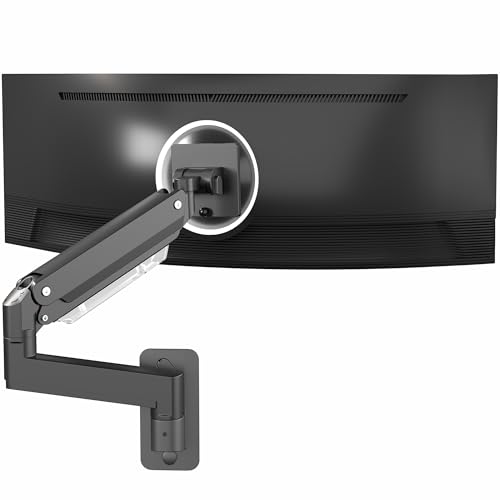
Ultrawide monitors need a different class of mount, and the V101G1 is built for them. Its pneumatic arm lifts screens up to 49 inches and 44 pounds, so a wide curved panel glides up and down instead of needing to be wrestled into place. Tilt runs 45 degrees either way, swivel reaches 180 degrees and rotation covers a full circle, with 13 inches of height adjustment from the gas spring. VESA support is 75x75mm and 100x100mm, and the aluminium frame with a quick-release plate makes a heavy screen a one-person job to hang. It is the right call when a standard 17.6-pound arm is simply not enough.
Specs
- Fits ultrawide screens up to 49 inches
- Holds up to 44 lbs
- Max VESA 100x100mm (75x75mm and 100x100mm)
- Pneumatic height adjustment, 13 inches
- Tilt 45 degrees, swivel 180 degrees, rotation 360 degrees
- Premium aluminium construction, black finish
Best for: A 49-inch ultrawide or heavy curved monitor that needs smooth gas-spring lift.
Watch out for: VESA support stops at 100x100mm despite the large screen size, and the arm itself weighs 9.42 pounds, so the wall fixing must be solid.
Mounting Dream MD2413-MX
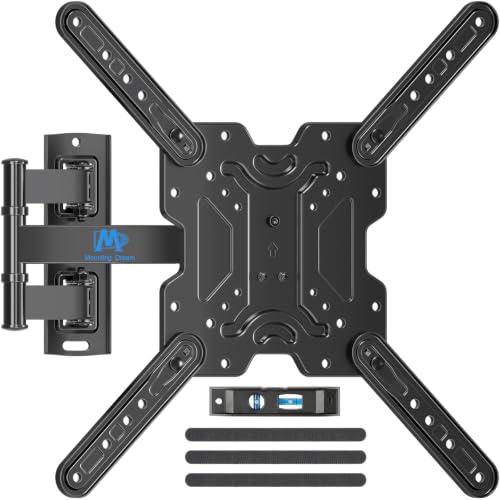
The MD2413-MX is the heavy lifter of this guide, made for screens far bigger than a typical monitor. It carries displays from 26 to 55 inches up to 77 pounds, with VESA patterns from 75x75mm all the way to 400x400mm, so it covers large monitors and small TVs alike. The full-motion arm tilts 5 degrees up and 15 degrees down, swivels to either side and extends 17.1 inches from the wall, and the whole bracket is designed to sit on a single stud with its centre-shifted plate. It is overkill for a 24-inch office screen, but it is the safe choice when the display is large, heavy, or both.
Specs
- Fits 26 to 55 inch displays
- Holds up to 77 lbs
- VESA 75x75mm to 400x400mm
- Full-motion articulating arm: tilt, swivel, 17.1 inch extension
- UL listed, single-stud design with perfect centre plate
Best for: A large or heavy display, from a big monitor to a small TV, mounted on a single stud.
Watch out for: It is built for large screens, so a small monitor can look lost on the wide bracket, and it still needs a stud or masonry wall, not drywall alone.
Which One Fits Your Situation
A small desk in a bedroom or dorm room
Pick the WALI 1330LM. Its short arm folds almost flat against the wall, so a 13 to 32 inch screen takes no desk space at all and the room keeps its floor area. The 15-inch extension is enough to pull the monitor toward the bed or chair when you sit down to work or play, and the simple tilt and swivel handle glare from the window. There is no gas spring to tune, which keeps installation short.
A sit-stand desk or shared workstation
Pick the VIVO MOUNT-VW01A. Its sliding rail moves the screen up and down with the desk, so eye level stays right whether you sit or stand. The HUANUO HNWSS1 is the alternative when the screen also needs frequent tilting and rotating, since its arm adjusts across 11.08 inches of height and flips the panel into portrait. Either way, check the monitor’s weight first, because both mounts stop at 17.6 pounds.
An ultrawide gaming setup
Pick the VIVO MOUNT-V101G1. A 49-inch ultrawide is too heavy and too wide for a standard arm, and this mount’s pneumatic lift carries up to 44 pounds while letting you raise or lower the panel with one hand. The 180-degree swivel turns the screen toward a second seat for co-op play or a film, and the quick-release VESA plate makes hanging a wide curved panel manageable on your own.
A large, heavy display in the living room
Pick the Mounting Dream MD2413-MX. Its 77-pound limit and VESA range up to 400x400mm cover the big screens the monitor arms cannot, and the single-stud design means you only need to find one solid fixing point. The 17.1-inch extension pulls a large display out from the wall for viewing, then folds it back flat. Measure the wall first: a display this size needs real timber or masonry behind it.
Common Mistakes
- Buying by screen size alone and ignoring the weight limit, then watching the arm sag or drift.
- Screwing a mount into drywall with no stud behind it, trusting the fixings instead of the wall.
- Assuming every monitor uses 100x100mm VESA, and only discovering a 200x200mm pattern after the bracket arrives.
- Mounting the screen too high, so the neck tilts back all day instead of resting level.
- Running cables too tight, so pulling the arm out yanks a connector or limits how far the screen moves.
Frequently Asked Questions
Do all monitors fit a wall mount?
Most do, but not all. A monitor needs four threaded VESA holes on its back, in a pattern the mount supports, 75x75mm or 100x100mm. Some slim or curved models hide the holes behind a cover, and a few budget screens have no VESA holes at all. Check the back of the panel and the mount’s VESA range before ordering, and look for an adapter bracket if the holes are missing.
Can I mount a monitor on drywall?
No, not on drywall alone. The board cannot carry a levered load, so the mount must anchor into a wood stud, solid concrete or brick. Use a stud finder to locate the timber, or drill into masonry with plugs rated for the weight. If the only available spot has no stud, move the mount or fit a backing board across two studs instead of risking the screen.
What is the difference between a wall mount and a desk arm?
A wall mount bolts to the wall and frees the desk completely, while a desk arm clamps to the desktop edge or a grommet hole and still occupies that edge. Wall mounts suit permanent setups and small desks, since nothing touches the surface. Desk arms suit rented rooms where drilling is not allowed, and they move with the desk. Both use the same VESA plates.
How high should I mount my monitor?
Set the top of the screen at or just below eye level in your usual chair, with the panel about an arm’s length away. That keeps the neck level and the eyes looking slightly down. Mount it higher only for a standing desk or a bed, and recheck after a week, since a position that felt fine on day one can still cause strain.
FAQ
Do all monitors fit a wall mount?
Can I mount a monitor on drywall?
What is the difference between a wall mount and a desk arm?
How high should I mount my monitor?
More from Amazon
Programs that pair well with the guide above. Offers and eligibility are set by Amazon and may change.
Free shipping on eligible items, Prime Video and more. Eligible new members can start with a free trial.
Start a Prime free trialAd-free music streaming. Eligible new subscribers can start with a free trial.
Try Music Unlimited freeA Prime membership for ages 18-24 with a trial period. Eligibility is set by Amazon.
See Prime for Young AdultsAudiobooks and podcasts to listen to on the go. Eligible new members can start with a free trial.
Try Audible freeAs an Amazon Associate we earn from qualifying purchases.