Key takeaways
- Compare the best laptop trays for monitor arms, from bolt-on VESA trays to monitor-and-laptop combos, with fit, capacity and clamp checks first.
A gaming laptop that lives beside a desktop rig usually ends up in the worst spot on the desk: flat on the surface, vents pressed against the wood, screen far below eye level next to a properly mounted monitor. A laptop tray for a monitor arm fixes all three problems at once. The tray bolts to the same VESA plate a monitor would use, lifts the laptop off the desk, opens up the underside vents, and raises the screen to match the rest of the setup.
The category splits into two kinds of product. Tray-only mounts assume you already own a monitor arm or pole stand and simply replace the monitor plate with a platform. Combo mounts bundle the tray with an arm, or with a full monitor-plus-laptop pole, for desks with no mounting hardware yet. Each pick below suits a different desk situation, from a spare arm on a dual mount to a three-screen battlestation on one pole.
Disclosure: As an Amazon Associate, we earn from qualifying purchases made through links in this article, at no extra cost to you.
Quick Picks
| Product | Best for | ASIN |
|---|---|---|
| Mount-It! Laptop VESA Mount Tray | Adding a tray to an arm you own | B086336Z6C |
| HumanCentric Laptop VESA Mount Tray | Clamp-down security for smaller laptops | B07RJZJVHF |
| VIVO Single Laptop Notebook Desk Mount (STAND-V001L) | A floating laptop-only setup | B00CM9NG1W |
| VIVO Monitor and Laptop Desk Mount Combo (STAND-V002C) | One monitor plus one laptop on a single pole | B00FOTABWY |
| HUANUO Dual Monitor and Laptop Mount (HNTS4B) | Two monitors plus a laptop on one mount | B08DNTVY8Y |
How to Choose a Laptop Tray for a Monitor Arm
Match the VESA pattern first
Every tray in this guide mounts through the VESA hole pattern on the back of an arm or stand. The two patterns that matter are 75×75 mm and 100×100 mm. Most trays accept both, but a few tray-only models are drilled for the 100×100 mm pattern alone, so an arm with only a 75×75 mm plate will not take them. Check your arm’s plate before ordering, including whether it is removable.
Tray only, or tray with an arm
A tray-only mount is the simpler route when a spare arm is already on the desk, for example the unused side of a dual monitor mount. A combo makes more sense when the desk has no arm at all, or when the laptop and monitor need to share one pole to keep the desk edge clear. Combos also solve the weight question, since the arm in the box is matched to the tray it carries.
Check size and listed capacity together
Tray fit is stated two ways: the laptop screen size the platform accepts, and the footprint of the platform itself. A 17 inch gaming laptop is much wider and heavier than a 17 inch thin notebook, so compare your machine’s dimensions against the tray size where published. Then check the listed capacity: laptop and tray together count against the arm’s limit, and a heavy notebook can push a light arm past what it can hold without slow sag.
Look at how the laptop is held
Flat trays rely on a raised front lip or ledge stopper to keep the laptop from sliding forward when the arm tilts. Clamp-style trays grip the sides of the machine and hold it even at steep angles, suiting smaller laptops moved often. A safety strap adds a third layer of security. Whichever style you pick, make sure the lip, clamps, or strap do not cover daily ports or block the side vents many gaming laptops depend on.
Mind the desk clamp and the airflow
Combo mounts clamp to the desk edge or bolt through a grommet hole, and each design has a desk thickness range. Measure your desktop before buying, especially on thick butcher-block tops and desks with a frame under the edge that can block a clamp. Finally, favor vented trays: cutouts let the laptop’s underside fans breathe during long gaming sessions at full load.
The Best Laptop Trays for Monitor Arms
Mount-It! Laptop VESA Mount Tray

Specs
- Model MI-5352T, tray only; monitor arm sold separately
- Fits most laptops from 11 to 17 inches
- VESA patterns: 75×75 mm and 100×100 mm
- Ventilated tray surface to support airflow under the laptop
- Corner ledge stopper with silicone pads, plus a safety strap
This is the straightforward add-on for a desk that already runs a monitor arm. The Mount-It! tray bolts to a standard VESA plate in place of a monitor, so the empty second arm of a dual mount can carry the gaming laptop instead. The ventilated platform keeps the underside exposed to the room rather than sealed against a solid shelf, and the ledge stopper stops the laptop creeping forward when the arm tilts.
The safety strap sets it apart from plain platforms, giving a second hold for desks that get bumped and arms that swing around often. Accepting both VESA patterns, it pairs with most arms, from basic pole stands to gas spring models, provided the arm’s listed capacity covers the laptop plus the tray.
Best for: gamers who already own a monitor arm and want the simplest tray upgrade.
HumanCentric Laptop VESA Mount Tray
Specs
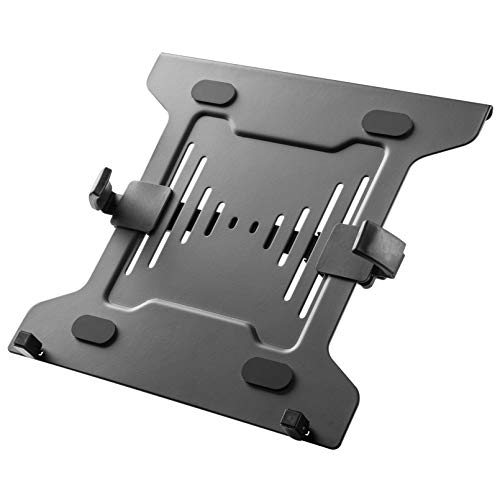
- Model 101-2074, tray only; monitor arm or stand sold separately
- Fits laptops and notebooks from 10 to 15.6 inches
- Adjustable side clamps with a 9.5 to 16.5 inch width range
- VESA patterns: 75×75 mm and 100×100 mm
- Alloy steel plate measuring 11.54 x 12.64 inches; item weight 3.1 pounds
- Rubber pads on the clamps; mounting hardware included
Where open trays trust a front lip, the HumanCentric design grips the laptop from both sides. The clamps slide across a wide adjustment range and close on the edges of the machine, so the laptop stays put when the arm moves, and cannot slide off the front when the tray tilts. Rubber pads on the clamp faces protect the laptop’s finish.
The trade-off is size. The clamp range caps out at 15.6 inches, ruling out most 17 inch gaming laptops, and the plate adds a little over three pounds against the arm’s capacity. For a 13 to 15 inch laptop or compact gaming notebook, though, this is the most secure hold in the guide.
Best for: smaller laptops that get repositioned often and need a clamp-down hold.
VIVO Single Laptop Notebook Desk Mount (STAND-V001L)

Specs
- Fits laptops and notebooks up to 17 inches
- Vented metal tray measuring 14 x 11.8 inches
- Listed capacity of 22 pounds
- Pole height of 17 inches; maximum arm extension of 16.5 inches
- Tilt +90 to -90 degrees, 180 degree swivel, 360 degree rotation
- C-clamp fits desks 0.4 to 3.4 inches thick; grommet option fits 0.4 to 3 inches
- Tray removes so the stand can hold a monitor up to 32 inches
The STAND-V001L is the pick when the laptop is the only screen going on the mount. It bundles the vented tray with a pole and an articulating arm, so the laptop floats at eye level with nothing under it, and the wide tilt range lets you angle the keyboard deck toward you or flatten the tray like a shelf. Height adjusts along the pole to line the screen up with a monitor beside it.
The convertible design adds flexibility. Remove the tray and the same stand accepts a monitor up to 32 inches through its VESA plate, so the mount survives a desk rethink. Clamp and grommet options cover most desk edges, and the 22 pound listed capacity is generous headroom for any 17 inch notebook.
Best for: a laptop-only floating setup that may convert to a monitor mount later.
VIVO Monitor and Laptop Desk Mount Combo (STAND-V002C)

Specs
- Monitor arm fits screens from 13 to 32 inches
- Vented tray holds laptops up to 17 inches
- Listed capacity of 22 pounds per arm
- Pole height of 17 inches; height adjusts along the center pole
- Tilt +15 to -15 degrees, 180 degree swivel, 360 degree rotation
- VESA patterns: 75×75 mm and 100×100 mm with detachable plates
- C-clamp fits desks up to 3.4 inches thick; grommet option included
- Detachable cable clips along the arms and pole
The STAND-V002C answers the most common version of this upgrade: one gaming monitor and one laptop, both off the desk, sharing a single pole and a single desk clamp. One arm carries the monitor, the other the vented laptop tray, and the matched 22 pound listed capacity on each arm means neither side is an afterthought.
Because both devices ride the same pole, the screens hold a consistent height relationship and the arrangement turns as one unit. The tilt range is narrower than on the laptop-only mount above, suiting a set-and-forget battlestation more than a desk rearranged daily.
Best for: a monitor-plus-laptop battlestation built around one pole and one clamp.
HUANUO Dual Monitor and Laptop Mount (HNTS4B)

Specs
- Three-in-one mount: two monitor arms plus one laptop tray
- Monitor arms fit screens up to 32 inches, up to 17.6 pounds each
- Laptop tray fits notebooks up to 17 inches
- VESA patterns: 75×75 mm and 100×100 mm
- Tray arm offers tilt, swivel, and rotation adjustment
- C-clamp or grommet mounting; steel construction
The HNTS4B scales the same idea to a three-screen desk. Two monitor arms and a laptop tray share one mounting base, so a dual-monitor setup gains a laptop screen without a second clamp eating desk edge. Each arm adjusts on its own, so the laptop can sit lower and angled as a chat or stream screen while the main displays stay level.
A three-device mount asks more of the desk than the combos above it. Check the clamp or grommet fit, keep the combined weight in mind when positioning the arms, and expect a longer first setup while all three VESA plates are aligned. For a desk that runs two monitors and a laptop daily, it replaces three stands with one footprint.
Best for: dual-monitor desks that also run a laptop as a third screen.
FAQ
Will a laptop tray fit the monitor arm I already own?
Usually, yes, provided two things line up. The tray’s VESA pattern, 75×75 mm or 100×100 mm, must match the plate on your arm, and the arm’s listed capacity must cover the weight of the laptop plus the tray. Measure the hole spacing on your arm’s plate before ordering.
Can I play games on a laptop while it sits on a tray?
Yes, usually with an external keyboard and mouse on the desk while the laptop acts as screen and system unit. A vented tray helps because the underside fans draw air freely, which is harder when a gaming laptop sits flat on a desk. Keep the rear and side vents clear of the tray’s lip and clamps, and avoid tilting the tray so far that the laptop rests on its lid hinge.
What size laptop fits most monitor arm trays?
Open platform trays commonly accept laptops up to 17 inches, while clamp-style trays top out around 15.6 inches because the clamps need to close on the machine’s edges. Screen size is only a rough guide, though: compare your laptop’s width and depth with the tray dimensions, since a thick 15 inch gaming laptop can be wider than a thin 17 inch notebook.
Should I buy a tray only or a mount that includes the arm?
Buy the tray only when you already have a spare arm with a matching VESA plate and enough listed capacity, such as the unused side of a dual monitor mount. Buy a combo when the desk has no arm yet, or when you want the arm and tray matched by the maker instead of mixing brands.
Conclusion
A laptop tray turns the monitor arm you already trust with your display into a home for the gaming laptop as well. Pick the tray-only Mount-It! or clamp-grip HumanCentric if an arm is already on your desk, the VIVO STAND-V001L for a floating laptop-only setup, and the VIVO STAND-V002C or HUANUO HNTS4B when monitor and laptop should share one mount. Match the VESA pattern and respect the listed capacity, and the laptop gets the same eye-level treatment as the rest of the battlestation.
FAQ
Will a laptop tray fit the monitor arm I already own?
Can I play games on a laptop while it sits on a tray?
What size laptop fits most monitor arm trays?
Should I buy a tray only or a mount that includes the arm?
More from Amazon
Programs that pair well with the guide above. Offers and eligibility are set by Amazon and may change.
Free shipping on eligible items, Prime Video and more. Eligible new members can start with a free trial.
Start a Prime free trialAd-free music streaming. Eligible new subscribers can start with a free trial.
Try Music Unlimited freeA Prime membership for ages 18-24 with a trial period. Eligibility is set by Amazon.
See Prime for Young AdultsAudiobooks and podcasts to listen to on the go. Eligible new members can start with a free trial.
Try Audible freeAs an Amazon Associate we earn from qualifying purchases.