Key takeaways
- Compare five gaming mice for coding work, from button-packed MMO mice to a long-life wireless pick, and find the one that fits long days at the keyboard.
A mouse for coding is judged by a different scorecard than a mouse for competitive shooters. Programmers spend eight or more hours a day moving a cursor between an editor, a terminal, and a browser, so the features that matter are extra buttons for shortcuts and macros, a shape that stays comfortable through a long shift, and a sensor that tracks precisely at the low speeds of text work. A featherweight shell and a sky-high polling rate buy you little when your hardest task is selecting a block of code without straining your wrist.
This roundup is for developers who write code all day and still want a mouse that plays well after hours, for programmers switching from a plain office mouse, and for students setting up a first serious desk. Every mouse below was picked from the names and specifications on its Amazon product page, with button count, sensor, battery life, and connection type checked against the listing.
Quick Picks
As an Amazon Associate we earn from qualifying purchases
| Product | Best for | Key spec from title |
|---|---|---|
| Logitech G502 HERO | A wired workhorse with 11 buttons | HERO 25K sensor, up to 25,600 DPI |
| Logitech G604 LIGHTSPEED | Wireless freedom with 15 controls | 15 programmable controls, up to 240-hour battery |
| Razer Basilisk V3 Pro | Ergonomic comfort for long sessions | Focus Pro 30K sensor, 13 programmable controls |
| Corsair Scimitar RGB Elite | The most shortcut buttons | 17 programmable buttons, 12 side buttons |
| Razer Naga V2 Pro | Swappable button layouts | 19+1 programmable buttons, swappable side plates |
How to Choose
Count the Buttons You Will Actually Use
A coding mouse earns its keep through shortcuts. Two side buttons cover forward and back in a browser, but a programmer who maps build, run, debug, copy, paste, and window switching to the mouse wants six or more. The Logitech G604 puts 15 controls under your thumb and fingers, while the Corsair Scimitar offers 17, including a 12-button side grid that can hold a whole row of IDE commands. More buttons only help if you can reach them without looking, so a mouse with a thumb grid or a row of well-spaced side buttons beats one with buttons scattered across the shell. Pick a layout you can learn in days.
Shape and Weight Decide All-Day Comfort
A mouse that feels fine for an hour can hurt after eight. Palm-grip programmers do best with a tall, right-handed shell that fills the hand, like the Razer Basilisk V3 Pro or the Logitech G502 HERO, because the hand rests instead of hovering. Claw and fingertip grips suit lower, narrower bodies, but those grips tire faster during long editing sessions. Weight matters too: a 121-gram mouse stays planted and steady for precise text selection, while a lighter shell suits quick flicks between monitors. If your wrist aches by Friday, the shape is wrong, not your technique. Try to match the shell to your hand size before you worry about the sensor.
Wired or Wireless, and What the Battery Costs You
A wired mouse never runs out of charge in the middle of a deploy. Wireless mice free the desk from cables, and modern ones keep up with wired models for latency, but they add a battery to watch. The Logitech G604 runs up to 240 hours on one AA battery in LIGHTSPEED mode, so a coder who hates charging can go months, while the Razer Basilisk V3 Pro offers up to 110 hours on HyperSpeed wireless and up to 150 hours on Bluetooth. If you pick wireless, check the battery figure for the mode you will actually use, because Bluetooth and dongle modes often differ widely.
Software and Onboard Memory Matter for Programmers
A coding mouse is only as useful as the shortcuts you can save on it. Logitech G HUB, Razer Synapse, and Corsair iCUE all let you remap buttons, build macros, and tune sensitivity, and each one stores profiles you can carry between machines. Onboard memory is the detail to check: the Logitech G502 HERO stores profiles on the mouse itself, so your bindings survive a move to a fresh laptop or a shared workstation. Macros that paste boilerplate or trigger a build save real time across a week. Before you buy, confirm the software runs on your operating system, since some features are Windows-only.
The 5 Best Options
Logitech G502 HERO

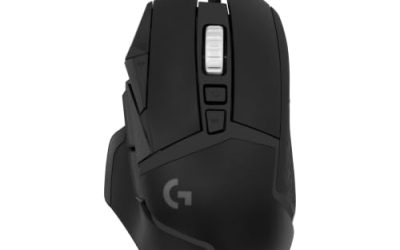
The G502 HERO is the classic button-heavy wired mouse, and it fits a coding desk because every one of its 11 programmable buttons sits where a finger already rests. The HERO 25K sensor tracks up to 25,600 DPI with no smoothing, so precise text selection feels steady at low speeds. A dual-mode hyper-fast scroll wheel switches between free spin and click steps, which helps when scrolling through long files, and five 3.6-gram weights let you tune the balance. Onboard memory keeps your profiles on the mouse, and the right-handed ergonomic shape suits palm grips through long sessions.
Specs
- Sensor: HERO 25K optical, up to 25,600 DPI
- Buttons: 11 programmable buttons
- Scroll wheel: Dual-mode hyper-fast with tilt
- Weight: 121 grams, plus five removable 3.6-gram weights
- Connectivity: Wired, braided USB cable
- Memory: Onboard memory for profiles
Best for: A programmer who wants a wired mouse with plenty of buttons and no battery to manage.
Watch out for: The 121-gram body is heavy for small hands, and the cable can drag if your desk has no cable management.
Logitech G604 LIGHTSPEED
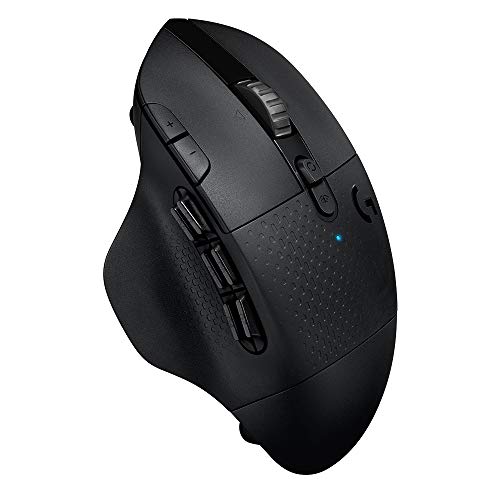
The G604 is the wireless pick for programmers who want the most buttons without a cable. Its 15 programmable controls include six thumb buttons in two rows, so build, debug, and window-switching shortcuts sit under one thumb. Dual connectivity switches between LIGHTSPEED wireless and Bluetooth, which lets one mouse serve a work laptop and a personal machine. The HERO sensor tracks up to 25,600 DPI, and a single AA battery lasts up to 240 hours in LIGHTSPEED mode. The wide, right-handed shell with a thumb rest suits palm grips during long coding days.
Specs
- Buttons: 15 programmable controls, including 6 thumb buttons
- Sensor: HERO sensor, up to 25,600 DPI
- Battery: Up to 240 hours on one AA battery in LIGHTSPEED mode
- Connectivity: LIGHTSPEED wireless and Bluetooth
- Scroll wheel: Hyper-fast scroll wheel
Best for: A programmer who wants a wireless mouse with the most programmable controls and months of battery life.
Watch out for: The wide shell is built for right hands and larger palms, and the mouse runs on a replaceable AA battery rather than a rechargeable cell.
Razer Basilisk V3 Pro

The Basilisk V3 Pro is the comfort pick in this roundup. Its tall, right-handed ergonomic shell fills the palm, and the HyperScroll tilt wheel spins freely through long files or clicks in steps for precise movement. The Focus Pro 30K optical sensor tracks on glass as well as cloth pads, and 13 programmable controls give room for the shortcuts a programmer actually uses. Battery life reaches up to 110 hours on HyperSpeed wireless and up to 150 hours on Bluetooth, and the mouse connects by HyperSpeed, Bluetooth, or a wired USB-C cable.
Specs
- Sensor: Focus Pro 30K optical sensor
- Buttons: 13 programmable controls
- Scroll wheel: HyperScroll tilt wheel
- Battery: Up to 110 hours on HyperSpeed wireless, up to 150 hours on Bluetooth
- Connectivity: HyperSpeed wireless, Bluetooth, wired USB-C
- Switches: Gen-3 optical switches, 90-million click lifecycle
Best for: A programmer with a palm grip who wants the most comfortable mouse for long coding sessions.
Watch out for: The full 8,000 Hz polling rate needs the Mouse Dock Pro or HyperPolling dongle, sold separately.
Corsair Scimitar RGB Elite

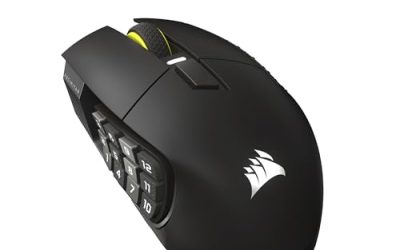
The Scimitar RGB Elite is the button king for coders who map everything to the mouse. A patented Key Slider lets you slide the 12-button side panel forward or back to fit your thumb, and 17 programmable buttons in total cover macros, IDE commands, and window management. The PixArt PMW3391 sensor reaches 18,000 DPI in 1 DPI steps, and 50-million-click Omron switches are built for years of daily use. Corsair iCUE handles macro programming and profile storage, and the onboard memory carries your setup to another machine.
Specs
- Buttons: 17 programmable buttons, 12 side buttons
- Side panel: Patented Key Slider repositions the 12 side buttons
- Sensor: PixArt PMW3391 optical, up to 18,000 DPI
- Switches: 50-million-click Omron switches
- Weight: 122 grams
- Connectivity: Wired, braided cable
Best for: A programmer who wants the most buttons on the mouse for macros and IDE shortcuts.
Watch out for: The 12-button side grid takes practice to use without looking, and the wired design ties you to the desk.
Razer Naga V2 Pro

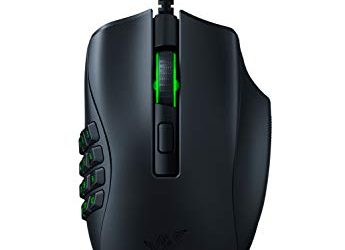
The Naga V2 Pro is the adaptable pick, because its magnetic side plates swap between 12, 6, and 2 buttons. A coder can run the 12-button plate during a heavy editing week, then switch to the 2-button plate for a cleaner feel on light days. With the 12-button plate fitted, the mouse offers up to 22 programmable commands, and the HyperScroll Pro wheel handles long documents. The Focus Pro 30K sensor tracks up to 30,000 DPI, and the battery lasts up to 300 hours on Bluetooth, so charging rarely interrupts a work week.
Specs
- Buttons: 19+1 programmable buttons, up to 22 commands with the 12-button plate
- Side plates: Swappable magnetic plates with 12, 6, and 2 buttons
- Sensor: Focus Pro 30K optical sensor, up to 30,000 DPI
- Scroll wheel: HyperScroll Pro wheel
- Battery: Up to 300 hours on Bluetooth
- Connectivity: HyperSpeed wireless, Bluetooth, wired USB-C
Best for: A programmer who wants to change the button layout to match the workload of the week.
Watch out for: The large shell and heavier build suit big hands best, and the side plates are small parts to keep track of.
Which One Fits Your Situation
You Live in Shortcuts and Macros
Pick the Corsair Scimitar RGB Elite. Its 12-button side grid plus five more programmable buttons hold a whole set of IDE commands, and the Key Slider moves the grid to fit your thumb. If you want the same idea without a cable, the Razer Naga V2 Pro with its 12-button plate is the wireless answer.
You Want One Mouse for Work and Play
Pick the Logitech G502 HERO. Its 11 programmable buttons cover coding shortcuts by day and game commands by night, the HERO 25K sensor is precise for both, and the wired connection means no battery to think about. The Razer Basilisk V3 Pro is the wireless alternative, with the same dual life and a more comfortable shell.
You Code for Eight Hours Straight
Pick the Razer Basilisk V3 Pro. Its tall ergonomic shell supports a palm grip through a full workday, the HyperScroll wheel glides through long files, and the battery lasts up to 150 hours on Bluetooth. The Logitech G604 is the backup pick, with a thumb rest and up to 240 hours of battery life.
You Switch Between Two Machines
Pick the Logitech G604 LIGHTSPEED. Its dual connectivity pairs LIGHTSPEED wireless with one machine and Bluetooth with another, and a single button switches between them. The Razer Naga V2 Pro offers the same trick with HyperSpeed and Bluetooth, plus a wired USB-C fallback for a desk setup.
Common Mistakes
- Buying the lightest esports mouse and finding it has too few buttons for shortcuts.
- Mapping every shortcut on day one instead of learning a few buttons at a time.
- Ignoring hand size and grip style, then blaming the sensor for wrist pain.
- Choosing a mouse whose software needs Windows when the work machine runs macOS or Linux.
- Picking a wireless mouse without checking battery life in the mode you will use.
Frequently Asked Questions
Do I need a gaming mouse for coding?
A plain office mouse works, but a gaming mouse adds programmable buttons, a better sensor, and onboard memory that an office mouse usually lacks. Extra buttons turn repeated keystrokes into one click, and a precise sensor makes text selection steadier. If your day is mostly typing with little cursor work, a simple mouse is enough, but heavy IDE users feel the difference fast.
How many buttons does a coding mouse need?
Six programmable buttons cover the basics: copy, paste, build, run, and window switching, with room to grow. Eleven or more buttons suit programmers who map whole IDE command sets to the mouse, like the Logitech G502 HERO or the Razer Basilisk V3 Pro. Twelve-button side grids, found on the Corsair Scimitar RGB Elite and the Razer Naga V2 Pro, fit coders who want a shortcut for nearly everything.
Is a wired or wireless mouse better for programming?
Both work well for coding, because latency matters far less in an editor than in a shooter. A wired mouse never needs charging and costs less for the same buttons, which suits a fixed desk. A wireless mouse keeps the desk tidy and suits laptop users who move around, as long as the battery lasts through the week. Pick the connection that fits your desk, not the fastest spec sheet.
Can I use a gaming mouse with a Mac or Linux machine?
Most gaming mice work as a basic pointer on macOS and Linux, but the software that remaps buttons is often Windows-only. The Logitech G502 HERO stores profiles in onboard memory, so bindings set on Windows still work on another system. The Razer Naga V2 Pro lists Windows, macOS, and Linux in its operating system support. Check the listing for your system before you buy, and favor mice with onboard memory.
FAQ
Do I need a gaming mouse for coding?
How many buttons does a coding mouse need?
Is a wired or wireless mouse better for programming?
Can I use a gaming mouse with a Mac or Linux machine?
More from Amazon
Programs that pair well with the guide above. Offers and eligibility are set by Amazon and may change.
Free shipping on eligible items, Prime Video and more. Eligible new members can start with a free trial.
Start a Prime free trialAd-free music streaming. Eligible new subscribers can start with a free trial.
Try Music Unlimited freeA Prime membership for ages 18-24 with a trial period. Eligibility is set by Amazon.
See Prime for Young AdultsAudiobooks and podcasts to listen to on the go. Eligible new members can start with a free trial.
Try Audible freeAs an Amazon Associate we earn from qualifying purchases.