Our Top Picks
 Razer Orochi V2 Wireless Gaming Mouse4.26 x 1.52 inch (Pack of 1)4.26 x 1.52 x 2.47 inches0.13 poundsCheck on Amazon
Pros & cons
- Up to 250 hours of play on a single AA battery
- Lightweight 3.4-ounce body aids fast, precise movement
- Built-in receiver storage keeps the dongle from getting lost
- Relies on a AA battery rather than a built-in rechargeable cell
- Endurance mode trade-off needed to stretch battery life further

A portable gaming mouse has to solve a different problem from a desk mouse. It must slide into a laptop sleeve, survive a crowded bag, connect in seconds at a hotel desk, and still aim well when the match starts. A heavy shell or a cable that tangles around a charger turns a short session into a chore, so the shape, the weight, and the way the mouse connects matter as much as the sensor inside it.
This guide is for laptop gamers, frequent travellers, students who move between rooms, and anyone who plays at a desk that is not their own. Each mouse below was chosen from its Amazon listing name and listed specifications, with attention to listed weight, wireless modes, battery figures, sensor range, and button layout.
Quick Picks
As an Amazon Associate we earn from qualifying purchases.
| Product | Best for | Key spec from title |
|---|---|---|
| Razer Orochi V2 | The lightest carry in this guide | Ultra lightweight, up to 950 hours battery life |
| Logitech G305 LIGHTSPEED | Long trips without a charger nearby | HERO 12K sensor, 12,000 DPI, 250 hours battery life |
| Corsair Katar Pro Wireless | Claw and fingertip grips in small bags | Lightweight FPS and MOBA mouse, 10,000 DPI |
| Glorious Model O Wireless | Ambidextrous play with a honeycomb shell | 69g lightweight wireless mouse, up to 71 hours battery |
How to Choose
Size and Weight You Can Carry Every Day
A portable mouse should disappear into your bag rather than dictate how you pack it. Look at the listed length and weight together, because a short shell with a heavy battery still drags on your wrist during long sessions. Mice under 100 grams feel noticeably easier to lift and flick, while a compact body leaves room for a laptop, a notebook, and a charging cable in the same sleeve. Check whether the receiver stores inside the mouse, since a loose dongle is easy to lose between a bag pocket and a hotel desk.
Wireless Connection and Battery Routine
Wireless freedom is the point of a travel mouse, but the connection type changes how it behaves away from home. A dedicated 2.4GHz receiver gives the most consistent link for games, while Bluetooth lets the same mouse pair with a laptop or tablet without occupying a USB port. Some mice in this guide run on a replaceable AA or AAA battery, so you can swap in a fresh cell when no outlet is near. Others recharge over USB, which suits travellers who already carry a cable. Before you choose, decide which routine fits your trips: carrying spare batteries, or remembering to top up the mouse each night.
Sensor and DPI Settings From the Listing
The sensor decides how faithfully the mouse follows fast hand movements, and the listing is the place to confirm it. A DPI range that reaches 10,000 or higher gives plenty of headroom for high-sensitivity play, while a lower range can still suit slower, deliberate aiming. Look for the sensor name and the maximum tracking speed in the listing, and check whether DPI steps can be changed on the mouse itself or only through software. On a trip, on-mouse DPI control matters, because you may not want to install software on a borrowed laptop.
Click Durability and Shape in the Hand
A travel mouse takes more knocks than a desk mouse, so the switches and shell deserve a close look. Listings often state a click lifespan for the main switches, and a higher figure suggests the buttons should hold up through months of daily use. The shape matters just as much: a compact symmetrical body suits fingertip and claw grips, while a slightly taller right-handed shell supports the palm during longer sessions. Count the side buttons before you buy, because a mouse with only two side buttons can feel limiting in games that rely on extra commands.
The 4 Best Options
Razer Orochi V2
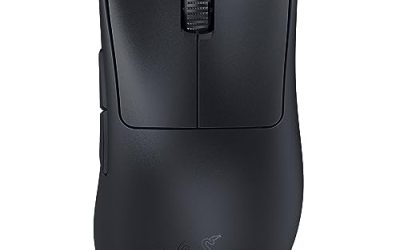
The Razer Orochi V2 is the most travel-focused mouse in this guide, built around a compact body that weighs under 60 grams before a battery is fitted. It connects through Razer HyperSpeed Wireless for games or Bluetooth for everyday use, so one mouse can move between a gaming laptop and a second device without a cable swap. The hybrid battery slot accepts one AA or AAA battery, which means you can use whichever cell you find while travelling. Its 18,000 DPI optical sensor gives ample room for fast aiming, and the symmetrical shape suits right-handed players who favour claw or fingertip grips.
Specs
- Weight under 60 grams, excluding battery
- Razer 5G Advanced 18K DPI optical sensor
- HyperSpeed Wireless and Bluetooth connectivity
- Up to 950 hours battery life on Bluetooth, up to 425 hours on HyperSpeed Wireless
- Runs on one AA or AAA battery
- 2nd-gen Razer mechanical mouse switches, rated for up to 60 million clicks
- 6 programmable buttons
Best for: Travellers who want the lightest mouse here and a battery they can swap anywhere.
Watch out for: The listed weight excludes the battery, so the mouse feels heavier once a cell is fitted; confirm the colour variant, since each colour has its own listing.
Logitech G305 LIGHTSPEED
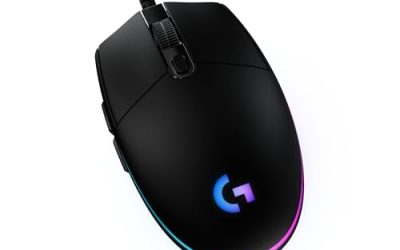
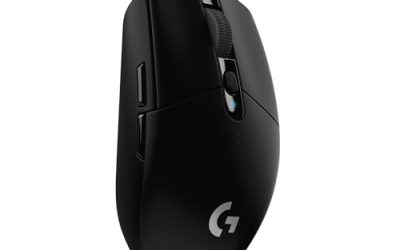
The Logitech G305 LIGHTSPEED is a compact wireless mouse that has become a common sight in laptop bags, and the listing explains why. It weighs 99 grams, uses a HERO 12K sensor with up to 12,000 DPI, and runs for up to 250 hours on a single AA battery. The USB receiver stores inside the body, so nothing dangles from the mouse while it sits in a bag. LIGHTSPEED wireless reports at 1 millisecond, which keeps the cursor responsive during fast play. Six programmable buttons and on-board memory let you carry your button layout and DPI settings between computers without reinstalling software each time.
Specs
- Weight 99 grams
- HERO 12K sensor, up to 12,000 DPI
- LIGHTSPEED Wireless with 1 millisecond report rate
- Up to 250 hours of continuous gameplay on a single AA battery
- Compact, portable design with built-in storage for the USB wireless receiver
- 6 programmable buttons
- On-board memory
- Tracking speed over 400 IPS
Best for: Long trips where you want a proven wireless mouse and months of use from one battery.
Watch out for: The symmetrical body suits claw and fingertip grips best, so palm-grip players with large hands should check the shape first.
Corsair Katar Pro Wireless
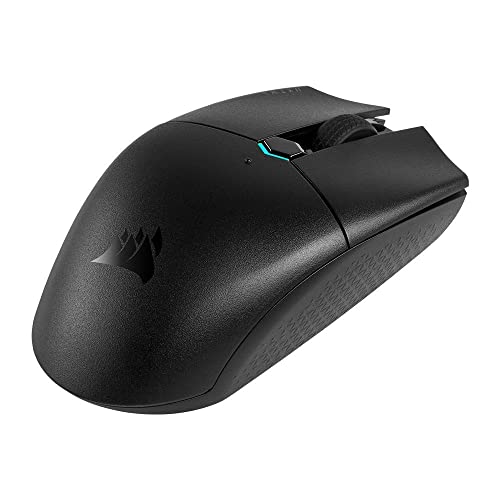
The Corsair Katar Pro Wireless is a small, symmetrical mouse aimed at fast-paced FPS and MOBA play, and its compact shape packs easily beside a laptop. It weighs 96 grams and connects through sub-1ms SLIPSTREAM wireless or low-latency Bluetooth, so you can choose the link that fits the device in front of you. The PixArt PMW3325 optical sensor reaches 10,000 DPI, and six programmable buttons cover the commands most travellers need. A single AA battery powers the mouse for up to 135 hours, which suits short trips and weekend stays.
Specs
- Weight 96 grams
- Compact symmetric shape for claw and fingertip grips
- SLIPSTREAM Wireless and low-latency Bluetooth
- PixArt PMW3325 optical sensor, up to 10,000 DPI
- 1,000 Hz polling rate
- Up to 135 hours on a single AA battery
- 6 programmable buttons
- Dynamic RGB lighting
Best for: Claw and fingertip players who want a small, light wireless mouse for fast games on the road.
Watch out for: The shape is compact, so players with large hands may find it cramped during long sessions; check the grip size before you commit.
Glorious Model O Wireless
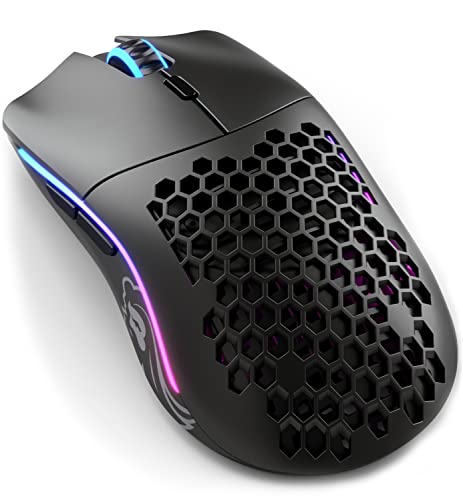
The Glorious Model O Wireless brings a honeycomb shell and an ambidextrous shape to a travel setup, keeping the weight to 69 grams. Its perforated design sheds grams without shrinking the length as much as some compact mice, so players who like a fuller grip still get room for their fingers. The mouse connects over lag-free 2.4GHz wireless and runs for up to 71 hours on a charge, which covers several evenings of play before the cable comes out. RGB lighting runs through the honeycomb pattern, and the ambidextrous layout suits left- and right-handed players alike.
Specs
- Weight 69 grams
- Honeycomb shell design
- Ambidextrous shape
- Lag-free 2.4GHz wireless connectivity
- Up to 71 hours battery life
- RGB lighting
- Matte Black finish
Best for: Players who want a very light ambidextrous mouse with a honeycomb shell for travel and home play.
Watch out for: The honeycomb holes can collect dust on the road, so keep the mouse in a sleeve or pouch; confirm the recharge routine, since this mouse charges over a cable rather than swapping a battery.
Which One Fits Your Situation
If Your Mouse Lives in a Laptop Bag
Choose the Razer Orochi V2 when the mouse spends most of its life packed away. Its sub-60-gram body and compact shell take up the least room, and the AA or AAA battery slot means you are not tied to a charging cable. Bluetooth covers everyday tasks, while the HyperSpeed receiver handles games when you sit down to play.
If You Play Fast Shooters on Hotel Desks
Choose the Logitech G305 LIGHTSPEED for quick, responsive play in unfamiliar rooms. Its 1-millisecond wireless report rate and 12,000 DPI sensor keep aiming immediate, the receiver stores inside the body, and the long battery figure means a forgotten charger does not end the session early. The compact shape also fits small hotel desks where a full-size mouse would crowd the keyboard.
If Your Hands Are Small or You Use a Claw Grip
Choose the Corsair Katar Pro Wireless when a compact symmetrical shape fits your grip better than a full-size shell. Its 96-gram body and claw-friendly design suit small and medium hands, and the choice of SLIPSTREAM wireless or Bluetooth covers both gaming laptops and other devices you meet on a trip.
If You Want One Mouse for Games and Everyday Tasks
Choose the Glorious Model O Wireless when one mouse must cover work, browsing, and evening games. Its ambidextrous honeycomb shell is light enough for long days, the 2.4GHz link keeps games responsive, and the rechargeable battery suits travellers who already carry a USB cable everywhere. The wider body also gives palm-grip players more support than the smallest mice in this guide.
Safety Notes
Treat a travel mouse gently and it will last longer on the road. Use the cable that came with a rechargeable mouse, or a cable that matches the port and the maker’s guidance, and unplug it once charging is done. Keep lithium batteries and rechargeable mice away from strong heat, such as a car dashboard in direct sun, and do not charge a mouse that feels unusually hot. For mice that use AA or AAA cells, remove the battery if the mouse will sit unused for weeks, and carry spare cells in a case so the terminals cannot touch metal objects in your bag.
Common Mistakes
- Choosing a mouse by weight alone, without checking whether the listed figure includes the battery.
- Picking a Bluetooth-only link for fast games, when the dedicated 2.4GHz receiver gives a steadier connection.
- Assuming a compact mouse suits every hand, then finding the shell too narrow for a palm grip.
- Forgetting to check where the receiver stores, and losing a loose dongle on the first trip.
- Packing a honeycomb or perforated shell loose in a bag, where dust and crumbs collect in the holes.
Frequently Asked Questions
What makes a gaming mouse portable?
A portable gaming mouse combines a compact body, a light listed weight, and a wireless connection that works away from a desk. Built-in receiver storage, a battery routine that fits your travel habits, and a shape that packs flat all help. The mice in this guide weigh 99 grams or less, and each one connects without a cable during play.
Is wireless fast enough for games on the road?
Yes, when you use the dedicated 2.4GHz receiver that comes with the mouse. The models here list report rates or wireless modes built for gaming, and Bluetooth is better kept for browsing and everyday tasks. Keep the receiver close to the mouse, use a flat surface, and switch to the gaming wireless mode before a match starts.
How should I manage battery life while travelling?
Match the mouse to your routine. A mouse that runs on AA or AAA batteries lets you swap in a fresh cell anywhere, while a rechargeable mouse needs a cable and a little time each evening. Check the battery figure in the listing, carry a spare cell or cable as a backup, and switch the mouse off when you pack it away.
Can a small mouse suit a large hand?
It can, but only if the shape and grip style fit. A compact mouse works well for fingertip and claw grips, even with a larger hand, because the fingers do most of the control. Palm-grip players with large hands should look for a slightly longer or taller shell, such as the Model O Wireless here, and check the listed dimensions before buying.
FAQ
What makes a gaming mouse portable?
Is wireless fast enough for games on the road?
How should I manage battery life while travelling?
Can a small mouse suit a large hand?
More from Amazon
Programs that pair well with the guide above. Offers and eligibility are set by Amazon and may change.
Free shipping on eligible items, Prime Video and more. Eligible new members can start with a free trial.
Start a Prime free trialAd-free music streaming. Eligible new subscribers can start with a free trial.
Try Music Unlimited freeA Prime membership for ages 18-24 with a trial period. Eligibility is set by Amazon.
See Prime for Young AdultsAudiobooks and podcasts to listen to on the go. Eligible new members can start with a free trial.
Try Audible freeAs an Amazon Associate we earn from qualifying purchases.