Our Top Picks
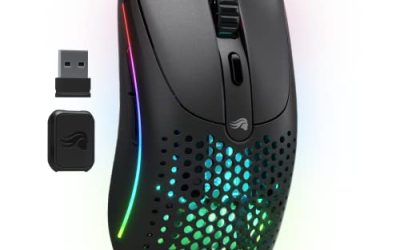
 Razer Naga V2 HyperSpeed Wireless MMO Gaming MouseNaga V2 HyperSpeed (Mouse)4.71 x 2.96 x 1.71 inches0.2 poundsCheck on Amazon
Pros & cons
- 11 programmable buttons add extensive control customization
- Adjustable weights let you fine-tune balance and feel
- LIGHTSYNC RGB syncs lighting with other Logitech gear
- Wired connection limits cable-free desk setups
- Heavier than typical lightweight esports mice at 0.27 pounds

Disclosure: As an Amazon Associate, we may earn from qualifying purchases made through links on this page, at no additional cost to you.
Dota 2 asks more of a mouse than most games. A single match can run past an hour, and in that hour you will issue thousands of right-clicks to last-hit, deny and reposition, fire item actives under pressure, and snap the camera between lanes with edge pans and minimap clicks. The mouse that suits Dota 2 is not simply the lightest FPS mouse on the shelf. It needs a sensor that tracks small, controlled movements without smoothing, enough programmable buttons to move key item slots off the keyboard, and a shape your hand can hold through a long best-of-three without cramping.
This guide compares four gaming mice that fit the way Dota 2 is actually played, using the specifications published on their Amazon product pages: sensor and DPI range, programmable button count, weight, shape and connection type. The picks range from a modular mouse with swappable side plates to a wired multi-genre design with a dedicated side-button cluster, and the sections after the product notes cover how to bind items and control groups, which settings matter in Dota 2’s options menu, and the mistakes that hold MOBA players back.
Quick Picks
| Product | ASIN | Best For |
|---|---|---|
| Razer Naga Trinity | B0788MCRGC | Maximum buttons with swappable side plates |
| Razer Naga V2 HyperSpeed | B0BGJT87N2 | Wireless play with a full thumb grid |
| SteelSeries Rival 5 | B093LSMKL3 | Wired multi-genre play with quick-action side buttons |
| Logitech G502 HERO | B07GBZ4Q68 | Item actives and macros on a proven wired shell |
Razer Naga Trinity (ASIN: B0788MCRGC)

The Naga Trinity was designed around MOBA and MMO play, and its defining feature is a set of three interchangeable side plates that change the thumb-side layout: a two-button plate for a clean FPS-style grip, a seven-button circular plate arranged for MOBA ability and item layouts, and a twelve-button grid that brings the total to 19 programmable buttons. Razer positions the seven-button plate directly at MOBA players, and in Dota 2 it maps naturally to item slots, control-group selects and push-to-talk.
The sensor is Razer’s 5G optical unit rated to 16,000 DPI with tracking that suits the moderate sensitivities most Dota 2 players use, and the primary buttons use mechanical switches. The mouse is wired, right-handed and comparatively large, with enhanced rubber side grips and a gaming-grade tactile scroll wheel. Through Razer Synapse you can store profiles and assign every button, including the tilt-click wheel inputs, which gives supports and micro-heavy hero players a lot of room to build a layout around heroes such as Meepo or Chen.
Highlights
- Three swappable side plates: 2, 7 or 12 thumb buttons
- Up to 19 programmable buttons in the full-grid layout
- 5G optical sensor rated to 16,000 DPI
- Right-handed ergonomic shell with rubber side grips
Considerations
- Wired only, with a larger and heavier shell than FPS-focused mice
- The twelve-button grid takes practice to use without mis-clicks
- Best suited to palm and relaxed claw grips
Best for: Dota 2 players who want item actives and control groups under the thumb.
Razer Naga V2 HyperSpeed (ASIN: B0BGJT87N2)
The Naga V2 HyperSpeed takes the Naga formula wireless. It carries 19 programmable buttons, including a full thumb grid, and pairs them with Razer’s Focus Pro 30K optical sensor, which tracks far beyond the sensitivity range a MOBA player will use and adds smart tracking features such as asymmetric cut-off for consistent lift-off behaviour. The scroll wheel uses HyperScroll technology with switchable free-spin and tactile modes, handy for zooming the camera or scrolling the shop.
Connection options are Razer HyperSpeed wireless over a USB dongle or Bluetooth, and battery life is rated at up to 400 hours in Bluetooth mode, with shorter endurance on the faster HyperSpeed connection. The primary buttons use Razer Mechanical Mouse Switches Gen-2. For Dota 2, the appeal is the combination of a complete thumb grid for items and quick cast binds with the freedom of a wireless desk, plus enough battery endurance that charging rarely interrupts a session.
Highlights
- 19 programmable buttons with a full thumb grid
- Focus Pro 30K optical sensor
- HyperSpeed wireless or Bluetooth connection
- Battery life rated up to 400 hours in Bluetooth mode
Considerations
- Heavier than minimalist FPS mice because of the button hardware
- Thumb grid layout needs a learning period
- HyperSpeed mode uses the battery faster than Bluetooth
Best for: players who want a MOBA thumb grid without a cable.
SteelSeries Rival 5 (ASIN: B093LSMKL3)

The Rival 5 is SteelSeries’ multi-genre mouse, built for players who split time between Dota 2, shooters and battle royale titles. It has nine programmable buttons, five of them arranged as quick-action side buttons including a sniper-style thumb button and an up-down flick switch, which maps well to Dota 2 duties such as selecting your hero, calling control groups or triggering a saved item. The TrueMove Air optical sensor is rated to 18,000 CPI with 400 IPS tracking and 40 G acceleration.
At 85 grams the Rival 5 is noticeably lighter than the Naga models, and its ergonomic right-handed shape supports claw and fingertip grips as well as palm. The primary switches are SteelSeries Golden Micro IP54 mechanical switches rated at 80 million clicks, with IP54 dust and water resistance that suits long sessions. PrismSync RGB lighting covers ten zones, and SteelSeries GG software handles button assignment, CPI steps and lighting. It is wired, so there is no battery to manage during a tournament run.
Highlights
- Nine buttons with a five-button quick-action side cluster
- TrueMove Air sensor rated to 18,000 CPI and 400 IPS
- Light 85 gram wired design
- Switches rated at 80 million clicks with IP54 protection
Considerations
- Fewer thumb buttons than the Naga models for micro-heavy heroes
- Wired connection only
- Side flick switch takes a session or two to learn
Best for: players who split time between Dota 2 and FPS titles and want one wired mouse for both.
Logitech G502 HERO (ASIN: B07GBZ4Q68)

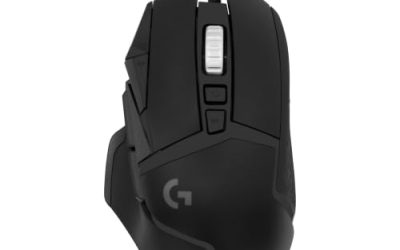
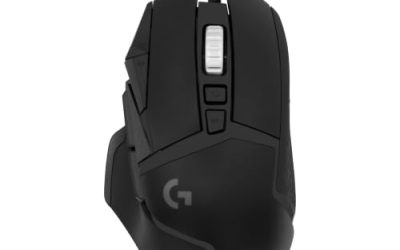
The G502 HERO is a long-standing favourite among MOBA players who want more buttons than a standard mouse but a more conventional layout than a full thumb grid. Its 11 programmable buttons include two beside the left click, a DPI shift button and a dual-mode scroll wheel with tilt inputs, which gives enough extra inputs for three or four item actives, a courier command and push-to-talk without moving your left hand off its home keys.
The HERO 25K sensor tracks from 100 to 25,600 DPI with zero smoothing, filtering or acceleration, and onboard memory stores up to five profiles, so a support layout and a carry layout can live on the mouse itself. Five removable 3.6 gram weights let you tune the 121 gram shell’s balance, and the metal spring tensioning system keeps the primary clicks crisp over long sessions. In Logitech G HUB, every button can carry a command, a keystroke or a macro, and profiles can switch per application.
Highlights
- HERO 25K sensor with 1:1 tracking up to 25,600 DPI
- 11 programmable buttons including wheel tilt inputs
- Onboard memory for up to five profiles
- Adjustable weight and balance system
Considerations
- Heavy by current standards, even without the tuning weights
- Right-handed shape only
- Wired cable benefits from a bungee in fast camera work
Best for: Dota 2 players who want extra item buttons on a familiar, heavier shell.
How to Choose
Button count is the first filter for Dota 2, but more is not automatically better. Count the commands you genuinely want off the keyboard: most players land on four to eight, covering the most-used item actives, hero and courier selection, and voice chat. A twelve-button grid only helps if you will practise until the positions are automatic; otherwise a seven-button plate or a five-button side cluster produces fewer mis-clicks in a team fight.
Shape and endurance come next. Dota 2 sessions are long, and matches cannot be paused at will, so a mouse that fits your grip for three hours matters more than a few grams saved. Palm and relaxed claw players usually prefer the larger ergonomic shells here; fingertip players who make constant small corrections often prefer the lighter Rival 5.
Sensor demands in Dota 2 are modest compared with FPS. Any sensor in this guide tracks small movements cleanly at the 800 to 2,400 DPI range most MOBA players use. Spend your attention on switch feel and button placement instead: you will right-click constantly, so a primary switch with a clean, consistent break is worth more than a higher maximum DPI.
Key Specifications Explained
DPI sets how far the cursor travels for a given hand movement. Dota 2 is played in a fixed camera view, so consistency matters more than speed; most players settle between 800 and 2,400 DPI and then leave it alone across heroes. Programmable buttons are inputs the software lets you reassign. In this guide they range from nine on the Rival 5 to nineteen on the Naga models, and the useful number for you is the count you can reach without shifting your grip.
Polling rate and connection type decide how often the mouse reports. All four mice report at gaming standard rates, and the wired models remove battery management from the equation entirely. Switch life figures, stated in millions of clicks, describe the rated lifespan of the primary buttons; the Rival 5’s 80 million click Golden Micro switches and the mechanical switches in the Razer and Logitech models are all built for years of high-volume right-clicking.
Weight affects camera work. Heavier mice such as the G502 HERO feel planted during fine last-hit adjustments, while lighter mice reduce fatigue during constant edge panning. Neither is objectively better in a MOBA; match the weight to how you move the camera.
Setup and Settings Tips
Bind your items before your abilities. Quick cast on item slots is the single biggest speed upgrade for heroes with active items, and moving two or three actives to mouse buttons frees your keyboard hand for ability keys and control groups. In Dota 2’s settings, enable quick cast per slot rather than globally if you are transitioning, and keep one normal-cast slot for abilities where range indicators matter, such as wards.
Set a single DPI level and turn off any operating system pointer acceleration so the cursor path stays 1:1 with your hand. In the mouse software, assign a thumb button to select hero and another to select courier; those two binds alone remove a lot of keyboard reaching during the laning stage. Store the finished layout to onboard memory where the mouse supports it, so your binds survive a PC change.
For wheel users, the free-spin mode on the Naga V2 HyperSpeed and the dual-mode wheel on the G502 HERO are useful for fast shop scrolling; switch back to tactile mode in game if you bind the wheel to camera zoom, so each notch is deliberate.
Common Mistakes to Avoid
The classic Dota 2 mistake is copying a professional player’s full keybind layout, including a twelve-button grid, before your thumb knows the positions. Mis-clicking a Black King Bar activation costs more than the milliseconds saved. Build the layout in layers: items first, then selection keys, then macros.
A second mistake is changing DPI between heroes. Sensitivity is a motor skill; swapping it for a micro hero and back for a carry breaks the consistency your last-hitting depends on. Keep one setting and adjust only in-game camera speed if a hero needs it. Finally, avoid stacking mouse acceleration from multiple sources — Windows enhanced pointer precision, vendor software and in-game settings can overlap. One raw input path is what you want.
FAQ
How many buttons does a Dota 2 mouse need?
Six to eight reachable buttons cover most players: left and right click, wheel, and three to five extra inputs for item actives and selection keys. Players of micro-intensive heroes benefit from the larger grids on the Naga models, up to 19 programmable buttons.
What DPI do Dota 2 players usually use?
Most play between 800 and 2,400 DPI. The game rewards consistent, repeatable cursor movement for last-hitting and camera control rather than very high sensitivity, so pick a value in that range and keep it fixed across heroes and roles.
Is a wireless mouse reliable enough for ranked Dota 2?
Yes, on current gaming wireless. The Naga V2 HyperSpeed’s HyperSpeed connection reports at gaming rates with no cable drag, and its battery endurance is measured in hundreds of hours in Bluetooth mode. Keep the receiver close to the mouse for the cleanest signal.
Should I use quick cast in Dota 2?
For most items and abilities, yes: quick cast removes the confirmation click and speeds up reactions in fights. Keep normal cast on a few slots where seeing the range indicator matters, such as placing observer wards or aiming long-range skillshots.
Wired or wireless for long Dota 2 sessions?
Both work. Wired mice such as the Rival 5 and G502 HERO never need charging mid-series. Wireless models free up camera movement and, with the battery figures in this guide, can run for weeks of evening sessions between charges.
Final Verdict
If buttons are your priority, the Razer Naga Trinity and its swappable side plates are the most Dota 2-specific tools in this guide, and the Naga V2 HyperSpeed delivers the same idea wirelessly. The SteelSeries Rival 5 is the balanced choice for players who also play shooters, while the Logitech G502 HERO remains a proven wired option with deep software support. Choose the layout your thumb can learn, set one DPI, and let consistency do the rest.
FAQ
How many buttons does a Dota 2 mouse need?
What DPI do Dota 2 players usually use?
Is a wireless mouse reliable enough for ranked Dota 2?
Should I use quick cast in Dota 2?
Wired or wireless for long Dota 2 sessions?
More from Amazon
Programs that pair well with the guide above. Offers and eligibility are set by Amazon and may change.
Free shipping on eligible items, Prime Video and more. Eligible new members can start with a free trial.
Start a Prime free trialAd-free music streaming. Eligible new subscribers can start with a free trial.
Try Music Unlimited freeA Prime membership for ages 18-24 with a trial period. Eligibility is set by Amazon.
See Prime for Young AdultsAudiobooks and podcasts to listen to on the go. Eligible new members can start with a free trial.
Try Audible freeAs an Amazon Associate we earn from qualifying purchases.