Key takeaways
- Best gaming mouse switches you can buy as replacement parts, comparing Kailh GM 8.0, TTC Dustproof Gold, Omron D2F-01F and Kailh GX packs by feel and life.
Disclosure: As an Amazon Associate, we may earn from qualifying purchases made through links on this page, at no additional cost to you.
This guide is about the switches themselves — the micro switches that sit under the left and right buttons of a gaming mouse — sold as replacement and upgrade parts. Nothing in the product list below is a complete mouse. Replacement switches are how you fix the most common gaming mouse failure, the double-click, and how you change click feel without replacing a mouse whose shape and sensor you already love. The four product families that dominate this hobby are all here: Kailh’s GM series, TTC’s gold-contact dustproof switches, Omron’s long-running D2F line, and the pre-soldered switch packs made for hot-swappable mice.
Every product below is a retail pack of mouse micro switches, compared using the specifications on its Amazon product page: rated click lifespan, operating force where published, contact material, pin format and pack contents. The sections after the product notes explain how to match a switch to your mouse, what the lifespan and force numbers really mean, how a swap is done, and the mistakes that turn a simple repair into a dead mouse. Read the compatibility notes carefully: most gaming mice use the same rectangular three-pin footprint, but not all do.
Quick Picks
| Product | ASIN | Best For |
|---|---|---|
| Kailh GM 8.0 and GM 4.0 Micro Switch Pack | B0BMK4WB1N | Trying both flagship Kailh feels in one pack |
| NoirVogel TTC Dustproof Gold Micro Switch | B0CT44N5DY | Long life and dust resistance for soldered swaps |
| Omron D2F-01F Microswitch Pack of 4 | B0062WNDLI | The classic Japanese Omron feel and easy sourcing |
| Endgame Gear Switch Pack Kailh GX | B0CSPLP1FK | Hot-swap OP1 owners who want a light, crisp click |
Kailh GM 8.0 and GM 4.0 Micro Switch Pack (ASIN: B0BMK4WB1N)
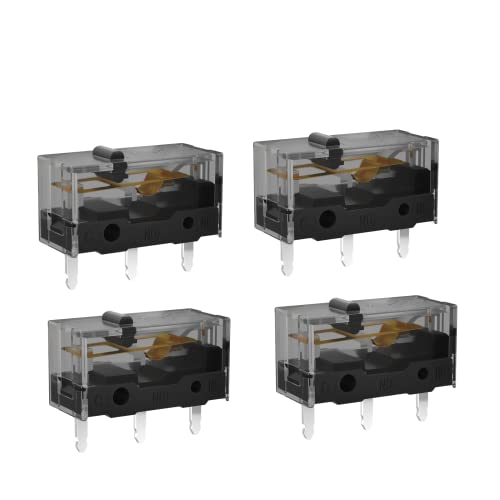
This pack bundles the two best-known gaming mouse switches Kailh makes: four GM 8.0 switches in black and four GM 4.0 switches in red, eight switches in total. The GM 8.0 is rated at 80 million clicks and the GM 4.0 at 60 million clicks, both using gold alloy contacts in the standard rectangular three-pin format that fits the great majority of gaming mice with soldered switches. Having both in one pack lets you put the crisper, heavier GM 8.0 under the main buttons of one mouse and keep the lighter GM 4.0 set for a second mouse or as spares.
In feel terms, the GM 8.0 is the switch most often chosen to replace a worn Omron in a performance mouse: a firm, well-defined break with a short, clean reset. The GM 4.0 is a step lighter and softer, closer to the stock feel of many Logitech and Razer models from the mechanical-switch era. The listing rates the switches at 50 milliamps and 12 volts with a normally open contact arrangement, standard micro switch territory, and the gold contact material is there to resist the oxidation that eventually makes older switches register double-clicks.
Highlights
- Both Kailh flagships in one pack: GM 8.0 rated 80 million clicks, GM 4.0 rated 60 million
- Gold alloy contacts for oxidation resistance
- Standard three-pin rectangular footprint for wide mouse compatibility
- Eight switches total, enough for several mice or spares
Considerations
- Requires soldering in most mice — these are bare switches, not plug-in parts
- GM 8.0 firmness is a taste choice; players who like a soft click should start with the GM 4.0
- Check your mouse’s switch footprint before ordering
Best for: modders who want to compare the two benchmark Kailh feels in a single purchase.
NoirVogel TTC Dustproof Gold Micro Switch (ASIN: B0CT44N5DY)

TTC is the switch maker behind many enthusiast-favourite click feels, and this four-pack of TTC Dustproof Gold micro switches is built around longevity. The switches are rated at over 80 million clicks, use gold contacts, and add a dustproof housing design intended to keep debris away from the contact points — a meaningful detail, because dust and oxidation at the contacts are what gradually turn a clean click into a double-click. The published operating force is 0.74 newtons, a moderate, uniform force with a short-to-medium stroke and a compact, rapid rebound according to the product description.
The listing states compatibility with the rectangular three-pin micro switch format used by the overwhelming majority of gaming mice, naming the major mouse brands as examples, and the pack contains four switches — enough for the primary buttons of two mice. TTC’s gold series is often chosen by players who found Kailh switches slightly too sharp and Omron switches slightly too soft; the dustproof gold sits between them with a crisp but not brittle break.
Highlights
- Rated lifespan of over 80 million clicks
- Dustproof housing design protects the contact points
- 0.74 newton operating force with a compact, rapid rebound
- Four switches per pack in the universal three-pin format
Considerations
- Soldering required in most mice
- Force and feel differ subtly from Kailh and Omron equivalents, so expect an adjustment period
- Sold under a retailer brand name, so check the pack contents on arrival
Best for: players repairing a double-click who want maximum rated life from the replacement.
Omron D2F-01F Microswitch Pack of 4 (ASIN: B0062WNDLI)

Omron’s D2F series is the original gaming mouse switch family, and the D2F-01F in this pack of four is the Japanese-made variant that enthusiasts have sought out for years for its consistent, light and clean click. It is a subminiature snap-action micro switch with an SPDT contact arrangement, rated at 0.1 amps and 30 volts, in the same rectangular three-pin footprint used across the industry. Generations of gaming mice shipped with Omron switches from the factory, so for many mice this is the closest available match to the original click feel.
The D2F-01F is valued for uniformity: Omron’s manufacturing tolerances are famously tight, so the left and right buttons feel matched, which is not guaranteed with every switch brand. Its actuation is on the lighter, softer side of the switches in this guide, suiting players who click rapidly and lightly, including MOBA and RTS players who issue hundreds of commands per match. Because the D2F footprint is the reference standard, fitment information for almost any mouse model is easy to find before you open the shell.
Highlights
- The reference-standard Omron switch feel: light, clean and consistent
- Japanese D2F-01F variant prized for tight manufacturing tolerances
- SPDT subminiature snap-action design in the standard three-pin footprint
- Pack of four covers the primary buttons of two mice
Considerations
- Lighter feel will disappoint players who want a firm, heavy click
- Rated lifespan is more modest than the 80 million click gaming-specific switches here
- Soldering required in most mice, as with all bare switches in this guide
Best for: players who want to restore a mouse to its original Omron click feel.
Endgame Gear Switch Pack Kailh GX (ASIN: B0CSPLP1FK)

This pack takes a different approach: instead of bare switches for soldering, Endgame Gear supplies Kailh GX switches pre-mounted for the hot-swappable switch system in its OP1 mouse line. The pack contains a pair of switches with an actuation force of 50 to 55 grams-force — the light end of the gaming range — giving the OP1 a feather-light, very fast click without opening a soldering iron’s case. Endgame Gear states the pack is compatible with any OP1 that uses mechanical switches, excluding the OP1we series.
The Kailh GX is an enthusiast switch designed for short, well-defined actuation, and because the OP1 system is hot-swappable, you can mix forces between the left and right buttons or swap back to the stock switches in minutes. That makes this pack the lowest-risk way in this guide to experiment with switch feel. The trade-off is scope: these are purpose-built for one mouse family, not universal three-pin replacements, so confirm your exact OP1 model before ordering.
Highlights
- Pre-mounted switches for hot-swap installation, no soldering
- Light 50 to 55 grams-force actuation for a fast click
- Kailh GX switches with a short, defined actuation
- Easy to swap back or mix forces between buttons
Considerations
- Only fits Endgame Gear OP1 mice with mechanical switches, not the OP1we series
- Not a universal replacement for soldered-switch mice
- A pair per pack, matched to one mouse
Best for: OP1 owners who want to tune click feel in minutes with zero soldering risk.
How to Choose
Start with your mouse, not with a switch. Open a reference for your exact model and confirm two things: the switch footprint and whether the switches are soldered or hot-swappable. Most gaming mice use the standard rectangular three-pin footprint shared by Kailh GM, TTC Gold and Omron D2F switches in this guide. Hot-swappable designs such as the Endgame Gear OP1 use dedicated packs instead. Ordering before checking is how switches end up in a drawer.
Next, choose a feel. Operating force and internal geometry decide whether a click is light and soft, like the Omron D2F-01F, balanced and crisp, like the TTC Dustproof Gold at 0.74 newtons, or firm and sharp, like the Kailh GM 8.0. There is no best feel, only the one that matches how hard you click and how many clicks your games demand per minute.
Then weigh lifespan honestly. Ratings of 60 to 80 million clicks describe contact durability under test conditions; a higher figure is a good tiebreaker between switches you like equally, not a reason to choose a feel you dislike. Finally, buy spares. Switches are small and inexpensive in packs, and having a matched second pair means a future repair takes minutes.
Key Specifications Explained
Rated lifespan, in millions of clicks, is the manufacturer’s rated actuations before failure rates climb. In real mice, the common failure is not a dead switch but a worn contact that bounces and registers two clicks for one press — the double-click fault. Gold alloy contacts, used by the Kailh GM and TTC Gold switches here, resist the oxidation behind that fault better than silver contacts, which is one reason gaming-specific switches carry higher life figures than general-purpose micro switches.
Operating force is the pressure needed to actuate, expressed in newtons or grams-force. The TTC pack publishes 0.74 newtons; the Endgame Gear Kailh GX pack publishes 50 to 55 grams-force. Lighter forces suit rapid clicking and long sessions; heavier forces give a more deliberate break and can reduce accidental clicks. Pretravel and overtravel describe how far the button moves before and after actuation; shorter travel feels faster and is part of why the GM 8.0 feels crisp.
Pin format is the compatibility spec. The industry-standard gaming mouse switch is a rectangular three-pin through-hole part, roughly 12.8 mm long and 5.8 mm wide in its common form, soldered to the mouse’s button PCB. SPDT, single pole double throw, describes the contact arrangement inside switches such as the Omron D2F-01F. If a listing does not state the footprint, do not assume it fits.
Setup and Settings Tips
For a soldered swap, the workflow is simple but unforgiving: photograph the PCB before desoldering, note each switch’s orientation, remove the old switches with a solder sucker or wick, seat the new switches fully flush, and solder quickly to avoid cooking the plastic housing. Work on one button at a time so the other remains a reference. Test both buttons with the mouse reassembled loosely before the final screws go in, using any online click test to confirm single, clean registrations.
For hot-swappable mice such as the OP1, follow the maker’s guide, keep the spare stock switches, and label any packs you remove so forces do not get mixed up. After any swap, expect a short adjustment period: your click timing was trained on the old force curve, and a day of play is a fair trial before judging a new switch.
Whichever route you take, replace switches as a matched pair across left and right buttons. Mixing a worn switch on one side with a fresh, firmer switch on the other produces an uneven feel that is hard to un-notice.
Common Mistakes to Avoid
The most common mistake is ordering switches for the wrong footprint or the wrong system — bare three-pin switches for a hot-swap mouse, or a brand-specific pack for a universal board. Confirm fitment for your exact model first. The second mistake is blaming the switch for every double-click: a failing switch is the usual cause, but debris under the button plunger and worn plungers produce similar symptoms, and a switch swap will not fix a mechanical plunger problem.
Heat damage is the third. Lingering with a soldering iron melts switch housings and lifts PCB pads, turning a repair into a write-off; use short, confident joints and let parts cool between them. Finally, do not judge a new switch in the first ten minutes. Click feel is a motor habit, and switches that feel strange at first often become the preference after a few sessions.
FAQ
Can I replace just one switch, or should I swap both?
Swap both primary buttons with a matched pair from the same pack. A fresh switch beside a worn one feels uneven, and the worn switch is usually close to failing anyway. Packs in this guide contain enough switches for at least one full pair.
Will Kailh, TTC or Omron switches fit my mouse?
Most gaming mice with soldered switches use the standard rectangular three-pin footprint that all three brands share, but exceptions exist. Check a teardown or fitment reference for your exact model before ordering, and note that hot-swappable mice need their own dedicated packs.
Do I need to solder to change mouse switches?
In most mice, yes: the switches are soldered to a small button PCB, and the swap needs a soldering iron and a way to remove the old solder. Hot-swappable designs such as the Endgame Gear OP1 are the exception, using pre-mounted packs that change by hand.
Which switch feel is best for FPS games?
Players who click rapidly and lightly often prefer a crisp, well-defined break such as the Kailh GM 8.0 or the TTC Dustproof Gold. Players with a heavier click sometimes find firm switches fatiguing and prefer the GM 4.0 or the Omron D2F-01F. It is a comfort choice, not a performance ranking.
How long do gaming mouse switches last?
Gaming-specific switches in this guide are rated from 60 million to over 80 million clicks, which is years of heavy play. Real lifespan varies with click force, dust and humidity, which is why dustproof housings and gold contacts exist.
Final Verdict
For most soldered repairs and upgrades, the Kailh GM 8.0 and GM 4.0 pack is the most flexible purchase in this guide, covering both benchmark feels in one box. The TTC Dustproof Gold is the longevity pick, the Omron D2F-01F restores the classic feel many mice shipped with, and the Endgame Gear Kailh GX pack is the zero-solder route for OP1 owners. Confirm your footprint, pick the feel that matches your click, and a switch swap will give a favourite mouse a second life.
FAQ
Can I replace just one switch, or should I swap both?
Will Kailh, TTC or Omron switches fit my mouse?
Do I need to solder to change mouse switches?
Which switch feel is best for FPS games?
How long do gaming mouse switches last?
More from Amazon
Programs that pair well with the guide above. Offers and eligibility are set by Amazon and may change.
Free shipping on eligible items, Prime Video and more. Eligible new members can start with a free trial.
Start a Prime free trialAd-free music streaming. Eligible new subscribers can start with a free trial.
Try Music Unlimited freeA Prime membership for ages 18-24 with a trial period. Eligibility is set by Amazon.
See Prime for Young AdultsAudiobooks and podcasts to listen to on the go. Eligible new members can start with a free trial.
Try Audible freeAs an Amazon Associate we earn from qualifying purchases.