Key takeaways
- Three gaming keyboards with RGB lighting, media controls, and solid switches — compare the Redragon K552, Logitech G213, and HyperX Alloy Core RGB.
A cheap gaming keyboard is not the same as a bad one, but the gap between a bargain and a disappointment is easy to miss. The real decision is which corners the maker cut: some low-cost boards keep mechanical switches and RGB lighting while skipping wireless and hot-swappable sockets, while others keep a full layout and media keys but use membrane switches. Knowing which trade-offs matter for your games keeps a tight budget from turning into a board you want to replace in a month.
This guide compares three low-cost gaming keyboards from their Amazon product pages: a compact mechanical board, a full-size membrane board with dedicated media controls, and a quiet full-size membrane board with RGB effects. They suit first-time PC builders, players upgrading from a bundled keyboard, and anyone who wants RGB lighting and gaming features without spending on a flagship. Each pick below lists only the features shown on its own product page.
Quick Picks
As an Amazon Associate we earn from qualifying purchases
| Product | Best for | Key spec from title |
|---|---|---|
| Redragon K552 RGB | Compact mechanical play | 87-key TKL, hot-swappable red switches |
| Logitech G213 Prodigy | Full-size gaming with media controls | LIGHTSYNC RGB, dedicated multi-media keys |
| HyperX Alloy Core RGB | Quiet late-night sessions | Membrane keys, RGB LED lighting effects |
How to Choose
Decide between mechanical and membrane switches
Mechanical switches give each key its own switch, which usually means a crisper feel and a longer life, while membrane keyboards use a rubber layer under the keys and cost less to make. The Redragon K552 in this guide uses hot-swappable red switches, so you can change switches later without soldering. The Logitech G213 uses Mech-Dome keys that feel close to mechanical, and the HyperX Alloy Core RGB uses soft-touch membrane keys built for quiet typing. If you type a lot or play fast games, mechanical switches are worth the small step up in cost. Players who press keys hard or mash buttons during tense moments will notice the difference most.
Check the layout before you buy
A tenkeyless board like the K552 drops the number pad and saves desk space, which helps if your mouse sits close to the keyboard or your desk is narrow. Full-size boards like the G213 and the Alloy Core RGB keep the number pad and a full function row, which suits players who bind keys across the whole board or use the keyboard for work as well. Think about whether you use the number pad daily, and measure your desk so the board and mouse do not fight for space.
Look for the features that cost extra elsewhere
RGB lighting, media keys, and anti-ghosting show up on all three boards here, which is why they stand out at the low end. The G213 adds dedicated media controls for play, pause, and volume, while the Alloy Core RGB adds quick-access buttons for brightness and lighting modes plus a keyboard lock mode. The K552 adds software-programmable macros and N-key rollover, so every keypress registers during fast play. Compare these extras against what you actually use, since a board with the right extras beats a flashier one with the wrong layout.
Read the listing for what is actually included
Low-cost keyboards vary in what ships in the box, and the listing is the only reliable source. Some boards include a wrist rest or a detachable cable, while others include neither, and the switch type can change between listings of the same model. Check the key count, the switch type, the connection type, and the layout language on the exact listing you plan to order. A tenkeyless board with red switches is a different purchase from a full-size board with brown switches, even when the model name looks similar.
The 3 Best Options
Redragon K552 RGB

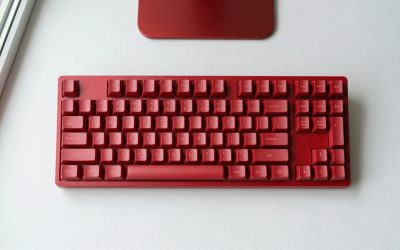
The Redragon K552 RGB is the mechanical pick in this group, and it suits players who want a compact board with real mechanical switches at a low cost. Its 87-key tenkeyless layout drops the number pad and frees desk space for the mouse, while the hot-swappable red switches let you change switches later without soldering. Eighteen backlight modes run across the RGB keys, N-key rollover keeps every press registered during fast play, and the software supports programmable macros. The compact ergonomic design and metal frame give the board a solid feel that cheaper plastic boards often lack. The metal frame keeps the board steady during intense play.
Specs
- 87-key tenkeyless layout
- Hot-swappable red switches
- 18 backlight modes
- RGB backlighting
- N-key rollover
- Software programmable macro
- Compact ergonomic design
Best for: Players who want a compact mechanical board with switch-swapping options.
Watch out for: The tenkeyless layout has no number pad, so skip it if you use the number pad daily.
Logitech G213 Prodigy
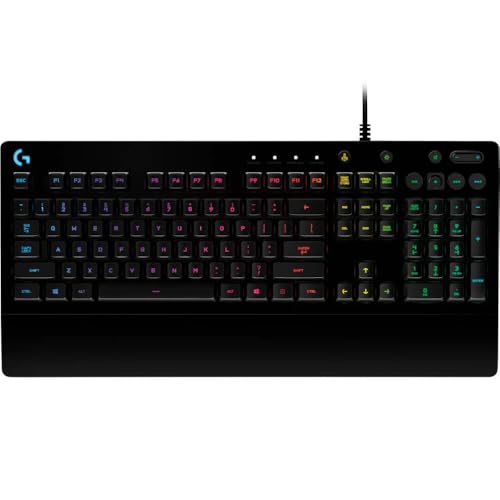
The Logitech G213 Prodigy is the full-size pick here, and it suits players who want media controls and a comfortable typing feel in one board. Its Mech-Dome keys are tuned to feel close to mechanical switches while staying quieter, and LIGHTSYNC RGB lighting runs across five zones with a wide range of colors. Dedicated multi-media keys handle play, pause, and volume without leaving the game, and the spill-resistant design protects against desk accidents. The full-size layout keeps the number pad and a full function row, so the board works as well for work and browsing as it does for games. Setup is simple: plug in the USB cable and play.
Specs
- LIGHTSYNC RGB backlit keys
- 16.8 million lighting colors
- Dedicated multi-media keys
- Spill-resistant design
- Mech-Dome keys
- Customizable keys
- USB wired connection
- 104 keys
Best for: Players who want a full-size board with media controls for gaming and everyday use.
Watch out for: The Mech-Dome keys feel close to mechanical but are not true mechanical switches, so expect a softer keystroke.
HyperX Alloy Core RGB

The HyperX Alloy Core RGB is the quiet pick in this group, built around soft-touch membrane keys that stay silent during late-night sessions. Its RGB LED lighting effects run across the board with a signature light bar, and dedicated media keys sit along the top for quick volume and playback control. The spill-resistant frame handles small desk accidents, and anti-ghosting keeps simultaneous keypresses registered during fast play. The full-size layout keeps the number pad, and the board works with Windows systems out of the box, so setup is a matter of plugging in the cable and playing. The number pad stays within easy reach for quick binds.
Specs
- Membrane gaming keyboard
- Quiet silent keys
- RGB LED lighting effects
- Spill resistant
- Dedicated media keys
- Anti-ghosting
- Compatible with Windows 10, 8.1, 8, and 7
Best for: Players who want a quiet full-size board with RGB lighting for shared rooms.
Watch out for: Membrane keys feel different from mechanical switches, so the keystroke is softer and less crisp.
Which One Fits Your Situation
You want mechanical switches and a compact desk
Pick the Redragon K552 RGB. Its hot-swappable red switches give you a true mechanical feel, and the tenkeyless layout leaves room for the mouse on a narrow desk. The eighteen backlight modes and programmable macros add features that usually cost more, and N-key rollover keeps fast inputs registered during rapid firefights and long ranked matches.
You want one board for gaming and everyday work
Pick the Logitech G213 Prodigy. The full-size layout keeps the number pad for work, the dedicated media keys handle music and video, and the Mech-Dome keys feel close to mechanical without the noise. The spill-resistant design adds protection for a board that stays on the desk all day through work calls, study sessions, and evening games.
You play late at night near other people
Pick the HyperX Alloy Core RGB. Its soft-touch membrane keys stay quiet, and the RGB lighting effects still give the desk a gaming look. The dedicated media keys let you adjust volume without leaving the game, and the spill-resistant frame handles accidents during long sessions, so a spilled drink does not end your night.
You are building a first gaming PC on a tight budget
Pick the Redragon K552 RGB if you play fast games and want mechanical switches, or the HyperX Alloy Core RGB if you want a full-size board with quiet keys. Both leave room in the budget for a better mouse or headset, and both cover the basics of RGB lighting, anti-ghosting, and solid construction.
Common Mistakes
- Buying a tenkeyless board without checking whether you use the number pad every day
- Assuming a low-cost board has mechanical switches when the listing shows membrane keys
- Ignoring the switch type on the listing and getting a clicky board for a shared room
- Skipping the layout check and finding the board crowds the mouse on a small desk
- Expecting wireless or hot-swappable sockets on a board that ships wired with fixed switches
Frequently Asked Questions
Are cheap gaming keyboards good enough for competitive play?
Yes, if you pick the right one. The Redragon K552 uses mechanical switches with N-key rollover, so every keypress registers during fast play, and its hot-swappable sockets let you change switches later. The Logitech G213 and HyperX Alloy Core RGB use membrane-style keys, which work well for casual and mid-level play but feel softer than mechanical boards. The key is matching the switch type to how seriously you play.
What is the difference between mechanical and membrane keyboards?
Mechanical keyboards give each key its own switch, which usually means a crisper feel, a distinct sound, and a longer life. Membrane keyboards use a rubber layer under the keys, which makes them quieter and cheaper to build but gives a softer keystroke. The K552 in this guide is mechanical, while the G213 and Alloy Core RGB use membrane-style keys with different feels.
Do budget gaming keyboards have RGB lighting?
Yes, all three boards in this guide have RGB lighting. The K552 offers eighteen backlight modes across its keys, the G213 uses LIGHTSYNC RGB across five zones with a wide range of colors, and the Alloy Core RGB runs dynamic RGB lighting effects with a light bar. The lighting is controlled through the board or its software, depending on the model.
Which budget keyboard is quietest?
The HyperX Alloy Core RGB is the quietest pick here, since its soft-touch membrane keys are built for quiet typing and its marketing calls out silent keys. The Logitech G213 is also quiet, with Mech-Dome keys that feel close to mechanical without the click. The Redragon K552 uses mechanical red switches, which are quieter than clicky switches but still louder than membrane boards.
FAQ
Are cheap gaming keyboards good enough for competitive play?
What is the difference between mechanical and membrane keyboards?
Do budget gaming keyboards have RGB lighting?
Which budget keyboard is quietest?
More from Amazon
Programs that pair well with the guide above. Offers and eligibility are set by Amazon and may change.
Free shipping on eligible items, Prime Video and more. Eligible new members can start with a free trial.
Start a Prime free trialAd-free music streaming. Eligible new subscribers can start with a free trial.
Try Music Unlimited freeA Prime membership for ages 18-24 with a trial period. Eligibility is set by Amazon.
See Prime for Young AdultsAudiobooks and podcasts to listen to on the go. Eligible new members can start with a free trial.
Try Audible freeAs an Amazon Associate we earn from qualifying purchases.