Key takeaways
- Five DOCSIS 3.1 modem-router combos for cable internet, from a Wi-Fi 7 flagship to compact gateways for Xfinity, Spectrum and Cox gigabit plans.
A cable router is not a normal router with a different label. It is a DOCSIS cable modem and a Wi-Fi router built into one box, so it replaces both the modem your cable provider rents to you and a separate router. That single fact drives the whole buying decision: the unit has to sit on your provider’s approved-device list, match the speed tier you actually pay for, and still deliver Wi-Fi strong enough for gaming and streaming. Buy the wrong generation and you either cap your plan or pay for headroom you can never use.
The five gateways below suit different households: multi-gigabit homes that want one flagship box, gigabit-plan families who need solid mid-range Wi-Fi, smaller apartments where a compact combo is plenty, and budget installs where an older Wi-Fi standard is an acceptable trade. Every pick is a DOCSIS 3.1 modem-router combo chosen from its Amazon listing name and stated specifications.
Quick Picks
As an Amazon Associate we earn from qualifying purchases.
| Product | Best for | Key spec from title |
|---|---|---|
| ARRIS SURFboard G54 | Multi-gigabit homes wanting one flagship gateway | DOCSIS 3.1, Wi-Fi 7 BE18000 |
| NETGEAR Nighthawk CAX30 | Gigabit plans in mid-size homes | DOCSIS 3.1, Wi-Fi 6 AX2700 |
| ARRIS SURFboard G34 | Smaller homes on plans up to 1 Gbps | DOCSIS 3.1, Wi-Fi 6 AX3000 |
| Motorola MG8702 | Buyers who want app-based setup and controls | DOCSIS 3.1, AC3200 Wi-Fi |
| ARRIS SURFboard G36 | Wired gaming rigs needing a 2.5 Gbps port | DOCSIS 3.1, Wi-Fi 6 AX3000 |
How to Choose
Confirm the DOCSIS standard and your provider’s approval list
Every gateway in this roundup is DOCSIS 3.1, and that matters because cable providers are steadily retiring older DOCSIS 3.0 hardware from their fastest tiers. A combo unit only works once your provider activates it, and activation requires the exact model to appear on the approved list for your plan. ARRIS lists Xfinity, Spectrum and Cox support on the G54, while Motorola names Comcast Xfinity, Cox and Charter Spectrum for the MG8702. Before ordering, search your provider’s compatibility checker with the precise model number, because a near-identical model name is not a guarantee of approval.
Match the modem side to your plan speed
The modem half of a gateway has a ceiling, and your plan can never run faster than that ceiling. NETGEAR lists the CAX30 for Xfinity plans up to 800 Mbps and Spectrum or Cox plans up to 1 Gbps, so it fits gigabit households without wasted capacity. The G34’s title states 1 Gbps maximum internet speeds, which suits the most common cable tiers. At the top end, the G54 supports plans up to 10 Gbps according to its listing details. Compare the stated plan figure against your bill rather than against the Wi-Fi class number, which describes local wireless throughput instead.
Separate the Wi-Fi class from the internet speed
Wi-Fi generations describe how fast devices talk to the gateway inside your home, not how fast your cable line runs. The G54 carries Wi-Fi 7 at BE18000 with coverage listed up to 5,000 sq ft, while the CAX30’s Wi-Fi 6 AX2700 covers up to 2,000 sq ft and 25 or more devices. The MG8702 is the outlier here: its AC3200 rating is Wi-Fi 5, an older standard that still serves a modest device count but lacks the efficiency features of Wi-Fi 6. Pick the class that matches your device load and floor area, not the biggest number on the box.
Count the wired ports, not just the wireless rating
A modem-router combo is also the switch for your wired gear, and port speed decides whether a gaming PC or console gets the full line rate. The G54 lists four 1-Gigabit Ethernet ports plus one 10-Gigabit port, enough for a desk setup and a network storage box. The G36 pairs one dedicated 2.5 Gbps port with four 1-Gigabit ports, which suits a single fast rig alongside slower peripherals. The CAX30 and G34 each provide four Gigabit ports. If you plan to hardwire a PC, check that at least one port matches or exceeds your plan speed.
The 5 Best Options
ARRIS SURFboard G54

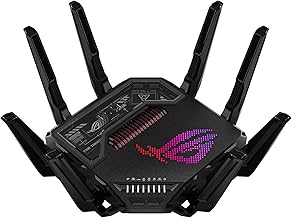
The G54 is the flagship of this group and the natural lead pick for anyone on a multi-gigabit cable plan. ARRIS combines a DOCSIS 3.1 modem with a quad-band Wi-Fi 7 router rated BE18000, and the listing credits the pair with coverage up to 5,000 sq ft, so one box can serve a large house without a mesh add-on. Its wired side is equally serious, with a 10-Gigabit Ethernet port for a high-end PC or switch alongside four Gigabit ports. For households consolidating rented equipment into a single owned gateway, this is the most capable option here.
Specs
- DOCSIS 3.1 cable modem with built-in Wi-Fi router
- Wi-Fi 7, BE18000, quad-band
- Coverage up to 5,000 sq ft
- Four 1-Gigabit Ethernet ports and one 10-Gigabit Ethernet port
- Approved for Xfinity, Spectrum and Cox; supports plans up to 10 Gbps
Best for: Multi-gigabit households replacing both a rented modem and a router with one flagship gateway.
Watch out for: Confirm your provider approves the G54 for your specific plan tier before ordering, since activation depends on their list.
NETGEAR Nighthawk CAX30

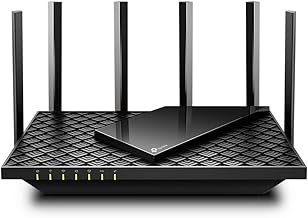
The CAX30 targets the most common cable setup: a gigabit or sub-gigabit plan in a mid-size home. NETGEAR rates its Wi-Fi 6 AX2700 radio for up to 2,000 sq ft and more than 25 devices, which covers a typical family load of consoles, laptops and streaming boxes. The listing spells out provider ceilings clearly — Xfinity up to 800 Mbps, Spectrum and Cox up to 1 Gbps — so there is little guesswork about fit. Four Gigabit Ethernet ports handle wired devices. It is the balanced middle option for buyers who want current Wi-Fi without paying for multi-gigabit hardware.
Specs
- DOCSIS 3.1 cable modem, model CAX30-200NAS
- Wi-Fi 6, AX2700, dual-band, 2.7 Gbps
- Coverage up to 2,000 sq ft and 25+ devices
- Four Gigabit Ethernet ports
- Compatible with Xfinity, Spectrum and Cox; not compatible with Verizon, AT&T, CenturyLink, DirecTV or DISH
Best for: Gigabit-plan families in mid-size homes who want Wi-Fi 6 and clear provider speed limits.
Watch out for: Only ASIN B0D6GZDYS3 is the current listing — an older CAX30 record has been discontinued, so check the ASIN on the product page before ordering.
ARRIS SURFboard G34

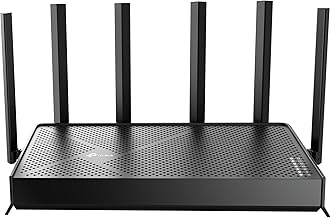
The G34 is the compact ARRIS option for smaller homes and apartments on plans up to 1 Gbps, the maximum internet speed stated in its listing title. Its Wi-Fi 6 AX3000 radio is a step above the CAX30’s class on paper, and ARRIS lists coverage up to 2,500 sq ft, generous for the footprint this gateway is aimed at. Four 1 GbE ports cover a console, a PC and a couple of extras. The listing also notes CableLabs certification and testing for Cox, Xfinity and Spectrum. Buyers on the most common cable tiers get a modern combo here without flagship pricing territory.
Specs
- DOCSIS 3.1 cable modem, model G34
- Wi-Fi 6, AX3000, dual-band
- Four 1 GbE Ethernet ports
- Coverage up to 2,500 sq ft
- Approved for Comcast Xfinity, Cox, Spectrum and more; 1 Gbps max internet speeds
Best for: Apartments and smaller homes on cable plans up to 1 Gbps that still want Wi-Fi 6.
Watch out for: The listing’s feature text elsewhere mentions higher plan figures, but the title for this ASIN states 1 Gbps maximum — treat 1 Gbps as the ceiling and verify on the live page.
Motorola MG8702
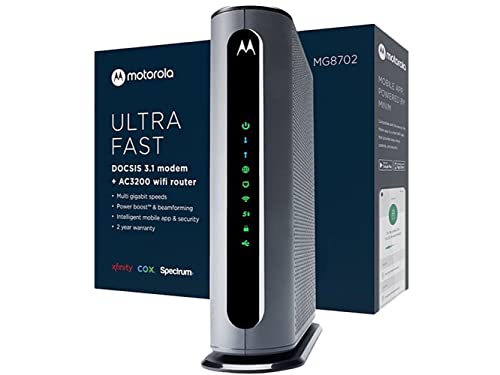
The MG8702 is the software-led pick in this lineup. Motorola pairs its DOCSIS 3.1 modem with an AC3200 router and a Smart WiFi app that handles setup, guest networks, usage monitoring, speed testing, parental controls and security alerts, which makes day-to-day management simpler. The listing also names Power Boost, Range Boost and AnyBeam beamforming on the wireless side. The trade-off is the Wi-Fi generation: AC3200 is Wi-Fi 5, older than the Wi-Fi 6 radios in the ARRIS and NETGEAR picks. For a household that values guided setup over the newest radio standard, it still earns its place.
Specs
- DOCSIS 3.1 cable modem plus Wi-Fi router combo, model MG8702
- AC3200 Wi-Fi with Power Boost, Range Boost and AnyBeam beamforming
- Smart WiFi app for setup, guest network, usage monitoring, speed testing, parental controls and security alerts
- Approved for Comcast Xfinity, Cox and Charter Spectrum
Best for: Households that want app-guided setup and parental controls from their gateway.
Watch out for: Re-confirm a live Amazon offer for this exact ASIN before ordering, and note the Wi-Fi is AC-class (Wi-Fi 5), not Wi-Fi 6.
ARRIS SURFboard G36

On specifications, the G36 is easy to like: a DOCSIS 3.1 modem with Wi-Fi 6 AX3000, approval for plans up to 1.2 Gbps, and a port layout built for wired gaming — one dedicated 2.5 Gbps Ethernet port plus four 1-Gigabit ports, which ARRIS describes as 6.5 Gigabit of combined wired speed. It also carries a 2-year limited warranty. The problem is availability rather than hardware. Recent checks of this listing have produced conflicting signals about whether a featured offer is actually live, so this pick belongs on hold until the product page itself settles the question.
Specs
- DOCSIS 3.1 cable modem, model G36
- Wi-Fi 6, AX3000
- Approved for cable internet plans up to 1.2 Gbps
- One dedicated 2.5 Gbps Ethernet port plus four 1-Gigabit Ethernet ports
- Compatible with Cox, Spectrum, Xfinity and others; 2-year limited warranty
Best for: Wired gaming setups that want a 2.5 Gbps port for the main rig on a plan up to 1.2 Gbps.
Watch out for: Hold off and confirm first — availability signals for this ASIN conflict, and recent listing reproductions showed no featured offer. Only order when the live product page shows a clear, purchasable offer for B096W6X41Y.
Which One Fits Your Situation
You pay for a multi-gigabit plan in a large house
Choose the ARRIS SURFboard G54. It is the only gateway here whose listing supports plans up to 10 Gbps, and its Wi-Fi 7 coverage figure of 5,000 sq ft matches a big floor plan. The 10-Gigabit Ethernet port also means a wired gaming PC or a fast switch is not bottlenecked by the gateway itself.
Your family is on a gigabit plan with lots of devices
The NETGEAR Nighthawk CAX30 fits this brief most directly. Its listing states coverage up to 2,000 sq ft for 25 or more devices, with explicit ceilings for Xfinity, Spectrum and Cox plans. Wi-Fi 6 keeps a crowded device list orderly, and four Gigabit ports cover the wired basics without overspending on multi-gigabit hardware.
You live in an apartment on a standard cable tier
Look at the ARRIS SURFboard G34. Its title caps internet speeds at 1 Gbps, which matches the tiers most apartment households actually buy, and the Wi-Fi 6 AX3000 radio with coverage listed up to 2,500 sq ft is more than enough for a compact space. It keeps the setup to one box and one activation call.
You want the gateway to manage itself through an app
The Motorola MG8702 is the pick when ease of management outranks the newest Wi-Fi standard. Its Smart WiFi app covers setup, guest access, usage monitoring and parental controls in one place. Accept the AC3200 Wi-Fi 5 radio as the compromise, and confirm a live offer for the listing before you buy.
Common Mistakes
- Buying a plain Wi-Fi router and expecting it to replace a cable modem — without a built-in DOCSIS modem, the router has nothing to connect to the cable line.
- Skipping the provider’s approved-device list, then discovering during activation that the exact model is not certified for your plan tier.
- Judging a gateway by its Wi-Fi class number alone, when the modem’s plan-speed ceiling is what actually limits your internet connection.
- Ordering a similar-looking model or a discontinued listing variant instead of checking that the ASIN on the page matches the current product.
- Assuming a combo gateway suits fiber, DSL or satellite service — these DOCSIS units only work on cable internet.
Frequently Asked Questions
Will a cable modem router work with any internet provider?
No. A DOCSIS gateway only works on cable internet, and only with providers that approve that exact model. The gateways here list Xfinity, Spectrum and Cox support, but none of them works with fiber, DSL or satellite services such as Verizon, AT&T or CenturyLink connections. Always confirm the model on your provider’s compatibility list before buying.
Do I still need to contact my provider after buying a gateway?
Yes. The provider has to activate the modem side of the unit on your account before it will pass traffic. Activation is usually handled through the provider’s app, website or a support call using the gateway’s MAC address. Until that step is done, even a correctly wired combo box will not get you online.
Is Wi-Fi 7 worth it in a modem router combo?
Wi-Fi 7 helps most in large homes with many modern devices competing for local bandwidth, which is the scenario the G54 is built for with its BE18000 rating and wide coverage figure. For a gigabit plan in a smaller home, Wi-Fi 6 gateways such as the CAX30 or G34 already exceed what the cable line delivers, so the extra radio headroom rarely changes gaming performance.
Can I use a cable router with a separate mesh system later?
Generally yes, though the cleanest setup puts one device in charge of routing. Many owners keep the combo as the modem and router, then add access points, or switch the gateway to a pass-through arrangement where the listing supports it. Check the specific model’s manual for its bridge or pass-through options before planning a mesh upgrade around it.
FAQ
Will a cable modem router work with any internet provider?
Do I still need to contact my provider after buying a gateway?
Is Wi-Fi 7 worth it in a modem router combo?
Can I use a cable router with a separate mesh system later?
More from Amazon
Programs that pair well with the guide above. Offers and eligibility are set by Amazon and may change.
Free shipping on eligible items, Prime Video and more. Eligible new members can start with a free trial.
Start a Prime free trialAd-free music streaming. Eligible new subscribers can start with a free trial.
Try Music Unlimited freeA Prime membership for ages 18-24 with a trial period. Eligibility is set by Amazon.
See Prime for Young AdultsAudiobooks and podcasts to listen to on the go. Eligible new members can start with a free trial.
Try Audible freeAs an Amazon Associate we earn from qualifying purchases.