Key takeaways
- Two portable Wi-Fi routers compared: GL.iNet Beryl AX brings Wi-Fi 6 and router-wide VPN, TP-Link TL-WR902AC brings pocket-size multi-mode sharing.
A portable Wi-Fi router earns its place in a bag by solving one specific problem: the network you are handed on the road is shared, exposed and often limited to a single login, while your phone, laptop, tablet and streaming stick each expect a private connection of their own. The real decision is how much machinery you want between your devices and that public network — a simple multi-mode box that rebroadcasts the connection under your own name and password, or a faster Wi-Fi 6 unit that can also run a VPN for every gadget at once.
This guide is for hotel regulars who sign in once and connect everything, remote workers who cannot leave traffic open on café networks, and families or crews sharing one room connection across many devices. Both picks are genuine travel routers — compact, USB- or adapter-powered units with router, repeater and access point modes — and every name and figure below comes from the product pages on Amazon rather than from a spec sheet elsewhere.
Quick Picks
As an Amazon Associate we earn from qualifying purchases
| Product | Best for | Key spec from title |
|---|---|---|
| GL.iNet GL-MT3000 (Beryl AX) | A private VPN-covered network behind hotel Wi-Fi | Wi-Fi 6 dual band, 574 + 2402 Mbps |
| TP-Link TL-WR902AC | One hotel login shared by a room full of devices | AC750 dual band, up to 733 Mbps combined |
How to Choose
Wireless standard and band speeds
The headline figure on a travel router splits across two bands, and the split matters more than the total. The 2.4 GHz band reaches further through hotel walls and is the band most public networks still use for the initial connection, while the 5 GHz band carries the speed for video calls and streaming once your devices are linked to the router. Wi-Fi 6 units such as the Beryl AX pair a modest 2.4 GHz figure with a much larger 5 GHz one, which suits a single room well. Older Wi-Fi 5 designs split more evenly but top out sooner, something you notice only when several devices pull data at the same time.
Modes for shared and captive networks
A travel router needs more than a standard router mode. Repeater or hotspot mode lets it join an existing wireless network and rebroadcast it under your own network name, which is how one hotel login ends up covering every device you own. Access point mode turns a wired socket in the room into your private wireless network instead. Client or bridge mode runs the other way, feeding a wired-only device — a desktop, a console, a smart TV — from a wireless connection. Check the mode list on the listing before buying, because the mode you need for a captive portal is the repeater one, and not every compact router includes it.
VPN support and firmware depth
Putting a VPN on the router covers devices that cannot run VPN software themselves, including most streaming sticks and game consoles, and it encrypts traffic from the moment a device joins your network. Listings state the protocols supported — OpenVPN and WireGuard are the common pair — along with maximum VPN throughput figures, and those figures differ widely between models, so compare them if tunnelling is your main reason to buy. Firmware matters too: routers running OpenWrt-based systems accept plug-ins and security extras such as ad blocking, while simpler firmware trades that depth for a setup that finishes in a few screens.
Ports and power away from home
Count the wired ports before assuming a travel router behaves like the one at home. Many pocket models carry a single Ethernet socket that doubles as WAN and LAN, which is fine for one wired device but no more. WAN port speed also caps what a fast wired connection in a conference venue or rented apartment can deliver, and gigabit or multi-gigabit WAN is a genuine step up in this class. Power is the other travel check: units that run from USB can draw from a laptop, a power bank or the television in the room, while adapter-powered models need the right plug for the country you are visiting.
The 2 Best Options
GL.iNet GL-MT3000 (Beryl AX)

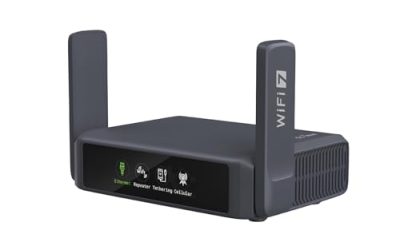
The Beryl AX is the pick for travellers who treat public networks as untrusted by default. Its listing leads with VPN: OpenVPN and WireGuard come pre-installed, it works with more than thirty VPN providers, and it can act as client and server at the same time, so your devices reach the internet through your account while you still reach equipment back home. Wi-Fi 6 dual-band wireless, a 2.5-gigabit WAN port and a gigabit LAN port give it wired headroom no pocket rival in this guide matches, and the OpenWrt firmware with its plug-in library suits users who like to adjust how their network behaves.
Specs
- Dual-band Wi-Fi 6: 574 Mbps (2.4 GHz) + 2402 Mbps (5 GHz)
- 2.5G WAN port and 1 gigabit LAN port
- USB 3.0 port
- OpenVPN and WireGuard pre-installed; 30+ VPN providers supported
- Maximum VPN speeds stated as 150 Mbps (OpenVPN) and 300 Mbps (WireGuard)
- OpenWrt 21.02 firmware with 5,000+ plug-ins
- WPA3 security, DNS over HTTPS and DNS over TLS, IPv6
- AdGuard Home built in, with a physical toggle switch for VPN or AdGuard
- Supplied with US, UK and EU plugs
Best for: Remote workers and privacy-focused travellers building a VPN-covered network behind hotel or café Wi-Fi.
Watch out for: The VPN speed figures are local-network test results, as the listing itself notes, so expect less over a distant server; the toggle switch also does nothing until you assign it a function in the admin panel.
TP-Link TL-WR902AC

The TL-WR902AC is the simpler tool for the classic travel problem: one login page, many devices. A hardware mode switch selects between router, hotspot, bridge, range extender, access point and client modes, so the same pocket unit can rebroadcast hotel Wi-Fi under your own password, turn a wired socket into a private network, or bridge a wired-only device onto a wireless connection. Dual-band AC750 wireless is Wi-Fi 5 rather than 6, but it is enough for the shared connections these units usually feed. Micro USB power is its quiet advantage — the listing states it can run from an adapter, a portable charger or a laptop.
Specs
- Dual-band AC750 Wi-Fi: 433 Mbps (5 GHz) + 300 Mbps (2.4 GHz), up to 733 Mbps combined
- Modes: Router, Hotspot, Bridge, Range Extender, Access Point and Client
- 1 × 10/100 Mbps WAN/LAN port
- 1 × USB 2.0 port for file and media sharing and for charging devices
- Micro USB power input; runs from an adapter, portable charger or laptop
- 64 MB memory
- Dimensions: 2.91 × 0.87 × 2.64 in
- 2-year limited warranty
Best for: Travellers who want one hotel or hotspot login to cover every device in the room with minimal setup.
Watch out for: The single Ethernet port is 10/100 Mbps, so a wired feed caps well below the wireless figures, and the same port cannot serve as WAN and LAN at once; the USB port is 2.0, which keeps file sharing slow.
Which One Fits Your Situation
You work from hotels and cafés
Take the Beryl AX. Its router-wide VPN covers the laptop, the phone and the tablet in one configuration, including any device that has no VPN app of its own, and WireGuard support keeps the speed penalty smaller than older protocols manage. The OpenWrt firmware also lets you add DNS encryption and ad blocking at the network level, which matters when the underlying connection belongs to a business you have never heard of.
You just need every gadget past one hotel login
Take the TL-WR902AC. Hotspot mode joins the property network once, your devices join your own network name instead, and the per-device login dance disappears for the rest of the stay. The mode switch on the case keeps this a thirty-second change rather than a settings project, and micro USB power means the television’s USB socket or your power bank can keep it running.
Your room or venue gives you a wired socket
Take the Beryl AX again. A 2.5-gigabit WAN port and a separate gigabit LAN port mean the wired feed runs at full strength while a desktop or console stays plugged in beside it. The TP-Link’s single shared 10/100 port works for this job in access point mode, but it leaves nothing spare for a second wired device and caps the feed at fast-ethernet speed.
You share files or stream from a drive in the room
Either unit can share a plugged-in drive with your devices, but they suit different libraries. The TL-WR902AC’s USB 2.0 port handles documents and music comfortably and doubles as a phone charger. The Beryl AX’s USB 3.0 port moves larger video files at a pace that keeps shared streaming practical, making it the better media hub of the two for longer stays.
Common Mistakes
- Expecting a travel router to create internet access where none exists — it only shares, secures or extends a connection that is already there.
- Buying a unit without repeater or hotspot mode, then discovering it cannot join the hotel network it was meant to share.
- Judging by the combined speed figure while ignoring the single Ethernet port, which on some models caps a wired feed at 100 Mbps.
- Leaving the default administrator password and network name unchanged on a device designed to sit on public networks.
- Forgetting that a VPN subscription is separate — routers with VPN clients pre-installed still need an account with a provider to connect.
Frequently Asked Questions
Does a portable Wi-Fi router provide its own internet connection?
No. A travel router redistributes a connection that already exists — a hotel network, a café hotspot, a wired socket in a rented apartment — and gives your devices a private network of their own behind it. With no upstream connection available, it can still link your devices to each other and share local files, but nothing reaches the internet until it has a feed.
Can one travel router get all my devices past a hotel login page?
Yes, that is the job repeater and hotspot modes exist for. The router joins the property network and completes the login once, then every phone, laptop and streaming stick connects to the router’s own network name and password instead. Devices that cannot handle a browser login page at all, such as most streaming sticks, get online this way without any workaround.
Is a VPN on the router better than VPN apps on each device?
It covers more ground: everything on the router’s network is encrypted, including consoles and streaming devices with no VPN app available. The trade-off is speed, because the router’s processor sets the ceiling and listings state maximum VPN throughput for exactly this reason. Travellers with one laptop often prefer the app; anyone with several devices usually prefers the router.
Can a portable Wi-Fi router run from a power bank?
Some can, and it is worth checking the power input on the listing before you pack. The TL-WR902AC in this guide uses a micro USB input and its listing states it can run from a portable charger or a laptop. Adapter-powered models are less flexible, so confirm the plug types supplied if you travel internationally, because a router you cannot power is dead weight.
FAQ
Does a portable Wi-Fi router provide its own internet connection?
Can one travel router get all my devices past a hotel login page?
Is a VPN on the router better than VPN apps on each device?
Can a portable Wi-Fi router run from a power bank?
More from Amazon
Programs that pair well with the guide above. Offers and eligibility are set by Amazon and may change.
Free shipping on eligible items, Prime Video and more. Eligible new members can start with a free trial.
Start a Prime free trialAd-free music streaming. Eligible new subscribers can start with a free trial.
Try Music Unlimited freeA Prime membership for ages 18-24 with a trial period. Eligibility is set by Amazon.
See Prime for Young AdultsAudiobooks and podcasts to listen to on the go. Eligible new members can start with a free trial.
Try Audible freeAs an Amazon Associate we earn from qualifying purchases.