Key takeaways
- Best routers for Xfinity internet: five Xfinity-approved modem router combos with DOCSIS 3.1 and Wi-Fi 6, compared by modem, wireless speed, ports, and plan.
Xfinity lets households use their own gateway instead of renting one, and the five routers in this guide are modem router combos — a cable modem and a Wi-Fi router in one box — that state Xfinity compatibility in the listing or appear on Xfinity’s approved-device list. Each one connects straight to the coaxial cable, so no separate modem is needed, and each one removes the monthly rental fee that comes with a rented gateway.
Every pick below was checked against the same rules: the listing must name Xfinity compatibility, the modem must match the plan it serves, and the ASIN must show a live buying option on Amazon US. Two well-known models were left out because their listings showed no live buying option in the most recent checks — the ARRIS G36 and the ARRIS SBG8300 — and renewed units were left out throughout. The five that remain cover the full range of Xfinity cable plans, from 800 Mbps plans up to multi-gig plans, with Wi-Fi 6 on the three newest models and Wi-Fi 5 on the two budget models.
One limit applies to the whole guide: none of these five supports Xfinity Voice, the cable digital voice service. Households that need phone service through Xfinity need a voice-capable gateway, which is a different device from the five below. All five are for Xfinity cable internet only — none of them works with fiber, DSL, or satellite service, and none of them works with Xfinity 5G fixed wireless internet.
What to Look For
Match the modem to the plan
The modem inside the gateway decides which Xfinity plan the box can serve. A DOCSIS 3.1 modem is the current cable standard and the right match for gigabit plans and multi-gig plans. A DOCSIS 3.0 modem with 24 downstream channels fits plans up to 800 Mbps. Buying a modem far above the plan wastes nothing except money, but buying below the plan caps the connection at the modem, so the plan speed is the first number to match. Xfinity publishes its own approved-device list with a wired download figure for each model, and this guide uses those figures where they are published.
DOCSIS 3.1 or DOCSIS 3.0
DOCSIS is the cable-industry specification that defines how a cable modem talks to the provider’s equipment over coax. DOCSIS 3.1 adds OFDM channels that carry more data per channel than the older SC-QAM channels, and every device on Xfinity’s current list uses it. DOCSIS 3.0 boxes still work on plans up to 800 Mbps, and they cost less, but they are the older generation and their makers have moved on to DOCSIS 3.1 for new models. Three picks in this guide use DOCSIS 3.1 and two use DOCSIS 3.0, so the trade is plain: newer modem and faster ceiling, or lower cost and an 800 Mbps ceiling.
Wi-Fi generation and coverage
Wi-Fi 6 (802.11ax) handles busy homes better than Wi-Fi 5 (802.11ac) because it schedules many devices at once instead of serving them one at a time. The AX number after the Wi-Fi generation is the combined wireless speed across bands — AX3000, AX6000, and AC1900 in this guide — and a higher number means more headroom when many devices stream, game, and video call at the same time. Coverage is the second number to watch: the CAX30 lists coverage up to 2,000 sq ft and the C7000 lists coverage up to 1,800 sq ft, while the other three listings give no coverage figure, so the comparison table marks those as not stated. A single gateway covers most apartments and smaller houses; larger homes may need a mesh system or an extender, which are different devices from the five below.
Ports and wired connections
Four Gigabit Ethernet ports is the usual layout for a gateway, and three picks in this guide have it. The MG8725 adds a 2.5 Gbps port for a multi-gig wired connection, which matters for gigabit and faster plans because a single Gigabit port caps a wired device at 1 Gbps. The C7000 adds a USB port for sharing a drive or a printer on the home network. Households with a desktop, a console, and a smart TV wired in should count the ports before ordering, because adding a switch later is one more box and one more cable.
Voice service and activation
None of the five picks carries a telephone port, so none of them supports Xfinity Voice. The G34 listing states the telephone port as none, and the C7000 box states that it does not support Home Phone Services. Activation is self-service on all five: connect the coax, connect the gateway to the Xfinity network, and follow the activation flow in the Xfinity app or on the Xfinity activation page. Xfinity’s approved-device list is the final word on activation — confirm the exact model number against it before ordering, because a look-alike model with a different suffix may not activate.
The Picks
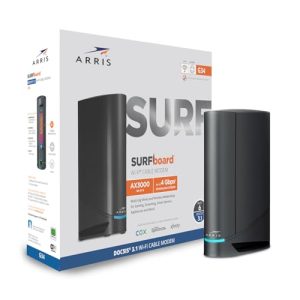
ARRIS SURFboard G34 DOCSIS 3.1 Gigabit Cable Modem and Wi-Fi 6 Router (AX3000)

The G34 is the value pick for Xfinity plans up to 1 Gbps, and it is the strongest pick in this guide. Its DOCSIS 3.1 modem pairs with an AX3000 Wi-Fi 6 radio that reaches up to 3 Gbps of combined wireless speed, and it carries four 1 Gbps Ethernet ports for wired devices. Xfinity’s approved-device list tags the G34 in its Next Gen Speed Tier with a wired download figure up to 934 Mbps, and the listing states approval for Xfinity Gigabit and Gigabit x2 plans as well as Cox and Spectrum. The SURFboard Central app handles setup and management, and ARRIS backs the unit with a 2-year warranty.
What the G34 does not have is just as clear. The listing states the telephone port as none, so it does not support Xfinity Voice, and it has no MoCA, so it cannot use the home’s coax wiring to extend the network to another room. The four Ethernet ports are all 1 Gbps, so a wired device cannot exceed 1 Gbps even on a faster plan — for that, the MG8725 below with its 2.5 Gbps port is the better match. The G34 is the pick for households on plans up to 1 Gbps that want the current modem standard, Wi-Fi 6, and a 2-year warranty in one box.
Recent tracker evidence shows the listing live on Amazon: a tracker checked Nov 24, 2026 shows it new on Amazon, and a second tracker one day ago shows Amazon with new units. The G34’s sibling, the G36, is the multi-gig version with a 2.5 Gbps port, but its listing showed no live buying option in the most recent checks, so it is not in this guide.
Motorola MG8725 WiFi 6 Router and Multi-Gig Cable Modem

The MG8725 is the fastest box in this guide and the pick for gigabit and multi-gig Xfinity plans. Its DOCSIS 3.1 modem pairs with an AX6000 Wi-Fi 6 radio — a 4×4 radio reaching up to 6,000 Mbps of combined wireless speed — and its wired side carries one 2.5 Gbps Ethernet port plus three 1 Gbps Ethernet ports, so a wired device can use a plan faster than 1 Gbps. Motorola’s Power Boost and AnyBeam beamforming aim the wireless signal at connected devices, and the motosync app handles setup and management. The listing states approval for Comcast Xfinity, Cox, and Spectrum, and Motorola backs the unit with a 2-year warranty.
Two limits need stating plainly. The listing notes that the MG8725 is not compatible with Xfinity 5G internet — it is a cable gateway for Xfinity cable internet only, and it does not work with fiber, DSL, or satellite service either. And while some roundups describe this box as Wi-Fi 6E, it is Wi-Fi 6; the listing names no 6 GHz band, so this guide describes it as Wi-Fi 6 only. Households on a gigabit plan get the most from this box, because its DOCSIS 3.1 modem and its 2.5 Gbps port are the two features that let a multi-gig plan reach the home network at full speed.
Recent tracker evidence shows the listing live on Amazon: a tracker one day ago shows a current Amazon US listing, and a camel tracker scanned the listing four hours ago. The MG8725 is the pick for households that push their network hard — many devices, 4K streaming on several screens, and large downloads — and want the fastest modem router combo in this guide.
NETGEAR Nighthawk Modem Router Combo CAX30 DOCSIS 3.1 Cable Modem and WiFi 6 Router

The CAX30 is NETGEAR’s Wi-Fi 6 gateway for Xfinity, and it sits between the value G34 and the faster MG8725. Its DOCSIS 3.1 modem pairs with an AX2700 Wi-Fi 6 radio reaching 2.7 Gbps of combined wireless speed, and NETGEAR lists coverage up to 2,000 sq ft with support for up to 25 devices at once. The listing states compatibility with Xfinity, Spectrum, and Cox, and NETGEAR’s own materials tag the CAX30 for Xfinity plans up to 949 Mbps. NETGEAR Armor security comes with the box, and the Nighthawk app handles setup, device management, and parental controls.
Confirm the exact model before ordering: this pick is the CAX30-200NAS. Its sibling, the CAX30S, is a different model with a faster modem side and NETGEAR Armor bundled differently, and the two should not be confused. The listing excerpts checked for this guide do not state the Ethernet port layout, so the comparison table marks the wired ports as not stated — confirm the port count on the listing if wired devices matter. The CAX30 is the pick for households that want a NETGEAR gateway with the current modem standard and Wi-Fi 6, with enough coverage for a mid-size home and enough device headroom for a busy household.
Recent evidence is thinner than for the two picks above: the most recent Amazon crawl is 194 days old, and the freshest mirror is a tracker four days ago. That is enough to keep the ASIN under the guide’s rules, but it is the reason to click the link and confirm a live buying option before ordering.
Motorola MG7700 Modem WiFi Router Combo with Power Boost
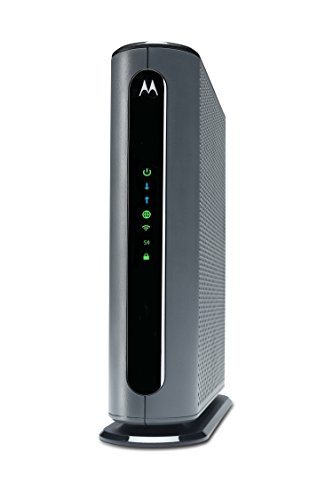
The MG7700 is the budget DOCSIS 3.0 pick in this guide, and the right match for Xfinity plans up to 800 Mbps. Its 24×8 DOCSIS 3.0 modem pairs with an AC1900 Wi-Fi 5 gigabit router, and Motorola’s Power Boost aims to strengthen the wireless signal at range. The listing states approval by Comcast Xfinity, Cox, and Spectrum, and it carries four Gigabit Ethernet ports for wired devices. Motorola backs the unit with a 2-year warranty. For a household on a mid-tier Xfinity plan that wants to stop renting a gateway, the MG7700 covers the plan with room to spare and costs less than the DOCSIS 3.1 boxes above.
The evidence for this ASIN is mixed, and the guide states the conflict plainly. One Amazon crawl shows an Add to Cart button with a third-party seller, while another crawl shows no live buying option at all. The most recent mirror — a stock tracker 22 hours ago — shows 16 units in stock and fulfilled by a third-party seller, and a buying guide one day ago shows it in stock on Amazon. The most recent evidence governs, so the ASIN stays in the guide, but it is the reason to click the link and confirm the listing shows a live buying option before ordering. Note the renewed MG7700 under a different ASIN: renewed units were left out of this guide throughout, so confirm the listing is the new MG7700 and not a renewed unit.
NETGEAR Nighthawk Modem Router Combo C7000

The C7000 is the oldest box in this guide and the second budget pick for Xfinity plans up to 800 Mbps. Its 24×8 DOCSIS 3.0 modem pairs with an AC1900 Wi-Fi 5 router reaching up to 1.9 Gbps of combined wireless speed, and NETGEAR lists coverage up to 1,800 sq ft. It carries four Ethernet ports plus a USB port, and its listing states compatibility with Xfinity, Spectrum, and Cox, with fast self-activation for Xfinity customers. The box states that it does not support Home Phone Services, so it does not support Xfinity Voice.
The C7000 carries the weakest evidence in this guide, and the guide states why. Third-party mirrors label the model discontinued, while the Amazon listing itself states that the manufacturer has not discontinued it — the two disagree, so confirm the exact model C7000-100NAS on the listing before ordering. The most recent Amazon crawl is 306 days old and shows an Add to Cart button, and a tracker 24 days ago shows it in stock on Amazon, with import mirrors in stock as well. The ASIN stays in the guide because the most recent evidence shows a live buying option, but it is the first link to click before publishing or ordering: if the link shows no live buying option, drop this pick and the guide still stands on four routers.
Comparison Table
| Model | Modem | Wi-Fi | Wired ports | Xfinity plan fit | Voice support |
|---|---|---|---|---|---|
| ARRIS SURFboard G34 | DOCSIS 3.1 | Wi-Fi 6 AX3000 | 4x 1 Gbps | Up to 1 Gbps; Xfinity list up to 934 Mbps | None |
| Motorola MG8725 | DOCSIS 3.1 | Wi-Fi 6 AX6000 | 1x 2.5 Gbps + 3x 1 Gbps | Multi-gig | None stated |
| NETGEAR Nighthawk CAX30 | DOCSIS 3.1 | Wi-Fi 6 AX2700 | Not stated in listing excerpts | Up to 949 Mbps (NETGEAR) | None stated |
| Motorola MG7700 | DOCSIS 3.0 24×8 | Wi-Fi 5 AC1900 | 4x 1 Gbps | Up to 800 Mbps | None stated |
| NETGEAR Nighthawk C7000 | DOCSIS 3.0 24×8 | Wi-Fi 5 AC1900 | 4x 1 Gbps + USB | Up to 800 Mbps | None |
Frequently Asked Questions
Do I need a separate modem with these routers?
No. All five picks are modem router combos — gateways — with a cable modem built in, so each one connects straight to the coaxial cable and replaces both the rented modem and the rented router. A standalone router is a different device: it has no modem inside, so it needs a separate modem between it and the wall. Households that already own a modem can use a standalone router, but none of the five picks here needs one.
Will these routers work with Xfinity Voice?
No. None of the five picks supports Xfinity Voice, the cable digital voice service. The G34 listing states the telephone port as none, and the C7000 box states that it does not support Home Phone Services. Households that need phone service through Xfinity need a voice-capable gateway, which is a different device from the five in this guide — confirm voice support in the listing before ordering if phone service matters.
Should I buy DOCSIS 3.0 or DOCSIS 3.1?
Buy DOCSIS 3.1 for gigabit plans and multi-gig plans, and for any household that wants the modem standard on Xfinity’s current approved-device list. The G34, the MG8725, and the CAX30 in this guide use DOCSIS 3.1. DOCSIS 3.0 still works on plans up to 800 Mbps, and the MG7700 and the C7000 in this guide fit those plans at a lower cost — but they are the older generation, and a later move to a gigabit plan would need a new gateway.
How to Choose
Begin with the Xfinity plan, because the plan decides the modem. Plans up to 800 Mbps fit the MG7700 or the C7000; plans up to 1 Gbps fit the G34 or the CAX30; gigabit and multi-gig plans fit the MG8725, whose 2.5 Gbps port is the only wired path in this guide faster than 1 Gbps. Next, count the devices and the rooms: Wi-Fi 6 handles busy homes better than Wi-Fi 5, and the CAX30 lists coverage up to 2,000 sq ft while the C7000 lists coverage up to 1,800 sq ft. Then count the wired devices, because four Gigabit Ethernet ports is the usual layout and only the MG8725 adds a multi-gig port.
Before ordering, confirm three things on the listing itself. Confirm the exact model number — C7000-100NAS, CAX30-200NAS, G34, MG7700, MG8725 — because look-alike models with different suffixes may not activate on Xfinity. Confirm the listing states Xfinity compatibility or appears on Xfinity’s approved-device list. And confirm the listing shows a live buying option, in this order: C7000 first, then MG7700, then CAX30. If any link shows no live buying option, drop that pick — the guide still stands on the remaining routers, and no household needs a gateway that cannot be bought.
Disclosure: As an Amazon Associate, we may earn a commission from qualifying purchases made through links in this article, at no additional cost to you.
FAQ
Do I need a separate modem with these routers?
Will these routers work with Xfinity Voice?
Should I buy DOCSIS 3.0 or DOCSIS 3.1?
More from Amazon
Programs that pair well with the guide above. Offers and eligibility are set by Amazon and may change.
Free shipping on eligible items, Prime Video and more. Eligible new members can start with a free trial.
Start a Prime free trialAd-free music streaming. Eligible new subscribers can start with a free trial.
Try Music Unlimited freeA Prime membership for ages 18-24 with a trial period. Eligibility is set by Amazon.
See Prime for Young AdultsAudiobooks and podcasts to listen to on the go. Eligible new members can start with a free trial.
Try Audible freeAs an Amazon Associate we earn from qualifying purchases.