Key takeaways
- Compare five mini piano keyboards with 25, 32, and 37 keys, from standalone models with built-in sounds to compact MIDI controllers for laptops.
A mini piano keyboard packs a playable set of keys into a bag-sized slab, and the real decision is not how small it can get. It is whether the keyboard should make sound on its own or only control software on a laptop. A standalone model with a built-in speaker and onboard sounds works the moment it is switched on, while a MIDI controller stays silent until it is plugged into a computer and a music app. Getting that choice wrong means buying a keyboard that cannot do the job you bought it for.
This guide is for beginners learning piano on a small keyboard, producers sketching melodies on a laptop, travelers who want a keyboard that fits in a backpack, and parents buying a first instrument for a child. The five keyboards below were chosen from the names and specifications on their Amazon product pages, covering 25-key, 32-key, and 37-key models with built-in sounds and pure MIDI controllers side by side.
Quick Picks
As an Amazon Associate we earn from qualifying purchases
| Product | Best for | Key spec from title |
|---|---|---|
| Akai MPK Mini Play MK3 | Playing anywhere without a computer | 25 keys with built-in speaker and 100 sounds |
| Arturia MiniLab 3 | Smooth keys and a full software bundle | 25 slim keys with 4 faders and 8 pads |
| Novation Launchkey Mini MK3 | Controlling Ableton Live from a small desk | 25 mini keys with 16 RGB pads |
| M-Audio Oxygen Pro Mini | Players who want more keys in a small board | 32 semi-weighted mini keys with pads and faders |
| Yamaha PSS-F30 | A first piano for kids and beginners | 37 mini keys with 120 built-in voices |
How to Choose
Standalone Sounds or MIDI Control
Start by deciding where sound comes from. A standalone keyboard like the Akai MPK Mini Play MK3 and the Yamaha PSS-F30 has a built-in speaker and onboard sounds, so it plays the moment it is switched on, with no computer nearby. A MIDI controller like the MiniLab 3, Launchkey Mini, and Oxygen Pro Mini makes no sound by itself; it sends notes to music software on a laptop or tablet. Standalone suits practice anywhere and first instruments, while MIDI control suits recording, beat making, and playing virtual instruments.
Key Count and Key Size
Mini keyboards come with 25, 32, or 37 keys, and each step changes what you can play. Twenty-five keys cover two octaves, which is enough for bass lines, melodies, and simple chords, but two-handed pieces need frequent octave shifts. Thirty-two keys add half an octave and make two-handed playing far more comfortable. Thirty-seven keys give three full octaves, which suits learners working through songs. Also check key width: mini keys are narrower than piano keys, so players with large hands should try the feel first if possible.
Pads, Knobs, and Extra Controls
Extra controls decide how much you can do without touching the computer. Drum pads let you tap out beats, and eight pads are enough for a basic kit, while sixteen pads suit clip launching and bigger drum layouts. Knobs and faders control volume, filters, and synth settings, and four faders are handy for mixing. An arpeggiator turns held notes into repeating patterns, and chord and scale modes help beginners play in key. A sustain pedal input and a MIDI Out matter if you plan to connect pedals or hardware synths later.
Power, Size, and Where You Will Play
A mini keyboard earns its keep by going where a full keyboard cannot. Check weight and depth before buying: the lightest boards here weigh under one kilogram and slide into a laptop bag, while the widest still fits a small desk. Battery power matters if you play away from outlets, and the Akai Play MK3 runs for over 14 hours on batteries. USB bus power is simpler at a desk because one cable handles power and data. If you practice at night, a headphone jack, which only the Yamaha has here, keeps sessions quiet.
The 5 Best Options
Akai MPK Mini Play MK3

The MPK Mini Play MK3 is the only keyboard here that makes sound without a computer, and that changes where it can be used. Its built-in speaker and more than 100 internal drum and instrument sounds, including acoustic and electric pianos, mean it works on a couch, a park bench, or a tour bus. When it is plugged into a laptop, it turns into a full MIDI controller with pads, knobs, and an arpeggiator. Battery power lasting over 14 hours keeps it going through long practice sessions away from an outlet.
Specs
- 25 velocity-sensitive mini keys
- Built-in speaker with over 100 internal drum and instrument sounds
- 8 velocity-sensitive backlit MPC drum pads
- OLED display, arpeggiator, and note repeat
- 4 encoder knobs
- Battery power for over 14 hours, or USB power
- 1.98 pounds; 7.1 x 12.5 x 1.9 inches
- MPC Beats software and Melodics lessons included
Best for: players who want to practice or sketch ideas anywhere without a computer.
Watch out for: batteries are not included, and the mini keys feel smaller than full-size piano keys.
Arturia MiniLab 3

The MiniLab 3 stands out for how its keys feel and how much software comes in the box. Its 25 slim velocity-sensitive keys are wider and more piano-like than most mini keys, and four faders plus eight encoders give direct control of volume and synth settings without reaching for a mouse. The bundle includes Analog Lab V, Ableton Live Lite, and NI Komplete Select, so a beginner can start making music the same day. A 5-pin MIDI Out also lets it drive hardware synths, which most mini controllers cannot do.
Specs
- 25 velocity-sensitive slim keys
- 8 RGB backlit pads in two banks
- 4 faders and 8 rotary encoders
- Mini display with browse knob
- USB-C bus powered with 5-pin MIDI Out
- Analog Lab V, Ableton Live Lite, and NI Komplete Select included
- 2.2 pounds; 1.97 x 14.17 x 10.24 inches
Best for: players who want the smoothest keys and the strongest software bundle.
Watch out for: it has no built-in speaker or sounds, so it stays silent without a computer and music software.
Novation Launchkey Mini MK3

The Launchkey Mini MK3 is built around Ableton Live, and it shows in every control. Sixteen RGB pads launch clips and scenes, eight knobs map to device settings, and Fixed Chord mode turns one finger into a full chord. An arpeggiator and a scale mode help players who are still learning music theory turn simple patterns into finished ideas. Touch strips handle pitch bend and modulation, and a sustain pedal input plus a 3.5mm MIDI Out connect it to pedals and hardware. It is light enough to live in a laptop bag.
Specs
- 25 mini keys
- 16 RGB backlit velocity-sensitive pads
- 8 rotary knobs
- Pitch and modulation touch strips
- Arpeggiator, Fixed Chord mode, and scale mode
- Sustain pedal input and 3.5mm MIDI Out
- USB bus powered
- 730 grams; 17.2 x 32.99 x 4.09 cm
Best for: Ableton Live users who want clip launching and chord tools in a tiny board.
Watch out for: a newer MK4 model exists, so confirm the MK3 listing before ordering; it makes no sound on its own.
M-Audio Oxygen Pro Mini

The Oxygen Pro Mini gives players half an octave more than the 25-key boards here, and that extra range matters for two-handed playing. Its 32 semi-weighted mini keys cover two and a half octaves, so melodies and bass lines fit without constant octave shifting. Eight RGB pads, four knobs, and four faders cover drums and mix control, while Smart Chord and Smart Scale turn single notes into full chords and keep playing inside a chosen scale. The OLED screen and auto-mapping make setup with major music software straightforward.
Specs
- 32 velocity-sensitive semi-weighted mini keys
- 8 RGB backlit drum pads with Note Repeat
- 4 assignable knobs, buttons, and faders
- OLED screen with auto-mapping
- Built-in arpeggiator, Smart Chord, and Smart Scale
- NKS integration with MPC Beats and Ableton Live Lite included
- 1.2 kilograms; 18.9 x 6.4 x 39.93 cm
Best for: players who want more keys and faders in a board that still fits a backpack.
Watch out for: the mini keys feel firmer than full piano keys, and the small pads suit simple triggering more than heavy drum work.
Yamaha PSS-F30
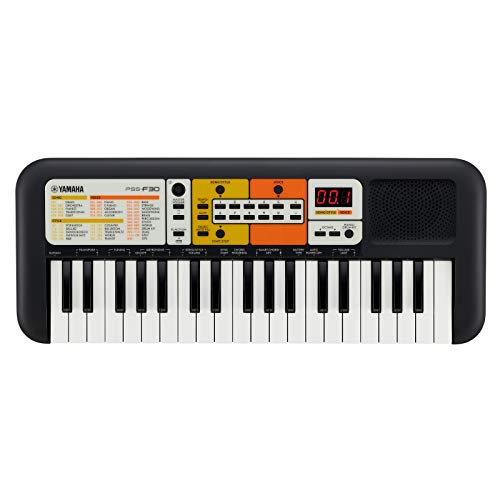
The PSS-F30 is the most piano-like pick here because it is a real keyboard with its own sounds, not a controller. Its 37 mini keys suit small hands, and 120 built-in voices plus 114 accompaniment styles give beginners a wide range of sounds to explore. Thirty built-in songs and a Smart Chord function help new players learn songs and play chords with one finger, while the metronome keeps practice steady. It runs on four AA batteries or USB power, and a headphone jack allows quiet practice anywhere.
Specs
- 37 mini keys
- 120 built-in voices and 114 auto accompaniment styles
- 30 built-in songs with Smart Chord
- Built-in metronome and speaker
- 3.5mm headphone jack with volume limit
- 4 AA batteries or USB power
- 1.2 kilograms; 20.1 x 50.6 x 5.4 cm
- 1-year manufacturer warranty
Best for: kids and adult beginners learning piano on a first keyboard with built-in sounds.
Watch out for: the keys are not touch-sensitive, so soft and loud playing sound the same, and the mini keys can feel cramped for large adult hands.
Which One Fits Your Situation
Learning Piano for the First Time
Pick the Yamaha PSS-F30. Its 37 mini keys, built-in songs, metronome, and Smart Chord function are made for learning, and it plays on its own with no computer or extra software. The Akai MPK Mini Play MK3 is the backup choice if you also want pads and beat making.
Producing Music on a Laptop
Pick the Arturia MiniLab 3 if key feel and software matter most, since its slim keys and Analog Lab bundle suit melody and chord work. Pick the Novation Launchkey Mini MK3 if you live in Ableton Live, where its pads and clip controls fit the workflow. The M-Audio Oxygen Pro Mini suits producers who want 32 keys and faders.
Playing on the Move
Pick the Akai MPK Mini Play MK3. Its built-in speaker, onboard sounds, and battery power over 14 hours mean it plays on a train, in a park, or in a hotel room with nothing else plugged in. The Launchkey Mini MK3 is the lightest MIDI option if you always carry a laptop anyway.
Stretching Past Two Octaves
Pick the M-Audio Oxygen Pro Mini for 32 keys or the Yamaha PSS-F30 for 37 keys. The Oxygen suits producers who need two and a half octaves plus pads and faders, while the Yamaha suits learners who want three octaves of built-in piano sounds without a computer.
Common Mistakes
- Buying a MIDI controller and expecting it to make sound without a computer and music software.
- Choosing 25 keys for two-handed piano pieces, then fighting constant octave shifts.
- Ignoring key width: mini keys suit small hands and travel, but large hands may feel cramped.
- Forgetting power: a standalone keyboard needs charged batteries or a USB power source away from a desk.
- Skipping the headphone jack check when you plan to practice late at night.
Frequently Asked Questions
Do mini piano keyboards make sound on their own?
Only standalone models do. The Akai MPK Mini Play MK3 and the Yamaha PSS-F30 have built-in speakers and onboard sounds, so they play without anything else. MIDI controllers like the MiniLab 3, Launchkey Mini, and Oxygen Pro Mini only send note data, so they need a computer or tablet with music software to make any sound.
How many keys do I need on a mini keyboard?
Twenty-five keys cover two octaves and suit bass lines, melodies, and beat making. Thirty-two keys add half an octave and make two-handed playing easier. Thirty-seven keys give three full octaves, which suits learners working through songs. If you play two-handed piano pieces, start at 32 keys or higher rather than fighting octave-shift buttons.
Can I use a mini MIDI keyboard with a phone or tablet?
Many mini MIDI keyboards work with phones and tablets through USB, though you may need an adapter and a compatible music app. Check the listing for your device before buying, since some boards are made for Windows and Mac only. The Yamaha PSS-F30 and the Akai Play MK3 also work fully standalone, so they need no phone or computer at all.
Are mini keys hard to play for adults?
Mini keys are narrower and shorter than full piano keys, so adults with large hands may feel cramped at first, but most players adjust within a few sessions. The Arturia MiniLab 3 has wider slim keys that feel closer to a normal keyboard. If you have large hands and play mostly piano pieces, the 37-key Yamaha gives the most room to work with.
FAQ
Do mini piano keyboards make sound on their own?
How many keys do I need on a mini keyboard?
Can I use a mini MIDI keyboard with a phone or tablet?
Are mini keys hard to play for adults?
More from Amazon
Programs that pair well with the guide above. Offers and eligibility are set by Amazon and may change.
Free shipping on eligible items, Prime Video and more. Eligible new members can start with a free trial.
Start a Prime free trialAd-free music streaming. Eligible new subscribers can start with a free trial.
Try Music Unlimited freeA Prime membership for ages 18-24 with a trial period. Eligibility is set by Amazon.
See Prime for Young AdultsAudiobooks and podcasts to listen to on the go. Eligible new members can start with a free trial.
Try Audible freeAs an Amazon Associate we earn from qualifying purchases.