Our Top Picks


As an Amazon Associate I earn from qualifying purchases.
The Short Answer
For serious typing, get the Logitech MX Keys S: a full-size, low-profile board with quiet, dished keys, smart backlighting, and switching between three devices. For gaming, the Logitech G915 TKL Lightspeed is the premium pick, with fast LIGHTSPEED wireless, low-profile mechanical switches, and per-key RGB lighting. The Logitech G515 Lightspeed TKL gives you a similar low-profile gaming feel in a slimmer package. For a bag-friendly board that jumps between a laptop, a tablet, and a phone, the Logitech K380 is hard to beat. The Logitech K780 adds a full-size layout with a number pad and a built-in device cradle. The right choice depends on how you type, what you play, and how many devices you switch between.
Our Top Picks
- Best for typing: Logitech MX Keys S — full-size, low-profile, quiet keys, smart backlighting, and three-device switching.
- Best for gaming: Logitech G915 TKL Lightspeed — LIGHTSPEED wireless, low-profile GL mechanical switches, RGB lighting, and an aluminum top plate.
- Best low-profile gaming value: Logitech G515 Lightspeed TKL — tri-mode connectivity, factory-lubed GL switches, double-shot PBT keycaps, and a 22 mm slim profile.
- Best for travel and multi-device use: Logitech K380 Multi-Device — compact Bluetooth keyboard that pairs with up to three devices and runs for a long stretch on two AAA batteries.
- Best full-size multi-device keyboard: Logitech K780 Multi-Device — full-size layout with a number pad, Easy-Switch keys, and a cradle that holds a phone or tablet.
Quick Comparison
| Keyboard | Layout | Connection | Switches | Battery | Best For |
|---|---|---|---|---|---|
| Logitech MX Keys S | Full-size | Bluetooth, Logi Bolt | Low-profile scissor | Rechargeable, up to 10 days with backlighting on, up to 5 months off | All-day typing |
| Logitech G915 TKL Lightspeed | Tenkeyless | LIGHTSPEED, Bluetooth, wired | Low-profile GL mechanical | Rechargeable, up to 40 hours with RGB on | Premium gaming |
| Logitech G515 Lightspeed TKL | Tenkeyless | LIGHTSPEED, Bluetooth, wired | Low-profile GL mechanical | Rechargeable, up to 36 hours | Low-profile gaming |
| Logitech K380 Multi-Device | Compact | Bluetooth | Scissor | 2 AAA batteries, up to 2 years | Travel, multi-device |
| Logitech K780 Multi-Device | Full-size | Bluetooth, Unifying receiver | Membrane | 2 AAA batteries included | Shared multi-device desk |
How to Choose
Begin with how you will use it
A keyboard that feels great for writing can feel slow for gaming, and a gaming board can feel loud and tall for an office. Typists who work on documents for hours usually want low-profile, quiet keys and a full-size layout. Gamers usually want mechanical switches and fast wireless. People who move between a desktop, a laptop, and a tablet want Easy-Switch keys and a board that pairs with more than one device.
Understand the wireless connection
LIGHTSPEED is Logitech G’s proprietary 2.4 GHz wireless link, built for gaming, with a 1 ms report rate that keeps input lag low. Bluetooth connects directly to laptops, tablets, and phones without a dongle, and it is the standard link on the K380, K780, and MX Keys S. The MX Keys S also ships with a Logi Bolt USB receiver. The G915 TKL and G515 TKL give you all three paths: LIGHTSPEED for games, Bluetooth for a second device, and a wired mode for charging while you type (USB-C on the G515 TKL, Micro-USB on the G915 TKL).
Pick a switch feel
The MX Keys S uses low-profile scissor switches under spherically dished keys, which gives a quiet, laptop-like feel. The K380 uses low-profile scissor switches and the K780 uses membrane switches, which are soft and quiet and suit shared rooms. The G915 TKL and G515 TKL use low-profile GL mechanical switches, about half the height of a standard mechanical switch, in tactile, linear, and clicky options. Tactile switches give a small bump as the key actuates, linear switches travel smoothly, and clicky switches add an audible click.
Think about layout and desk space
Full-size keyboards include a number pad, which helps with spreadsheets, but they take up more desk space and push the mouse further from your body. Tenkeyless boards drop the number pad, which frees room for mouse movement and suits smaller desks. Compact boards such as the K380 drop even more, which makes them easy to carry but means you lose dedicated function and navigation keys.
Battery: rechargeable or replaceable
Rechargeable keyboards such as the MX Keys S, G915 TKL, and G515 TKL charge over USB (USB-C on the MX Keys S and G515 TKL, Micro-USB on the G915 TKL), so you never buy batteries, but you need to plug in every few days or weeks depending on backlighting. The MX Keys S lasts up to 10 days with backlighting on and up to 5 months with it off. The K380 and K780 run on two AAA batteries each, and the K380 is listed with up to 2 years of battery life.
Multi-device switching
If you type on more than one device, Easy-Switch is the feature that matters most. The MX Keys S, K380, and K780 all pair with up to three devices and switch between them with a key press, so you can answer a message on a tablet and return to a document on a PC without re-pairing. Logitech Flow works with the MX Keys S and the K380 when paired with a Flow-enabled mouse, letting the keyboard follow the cursor across screens.
Backlighting and software
The MX Keys S has smart illumination that lights up as your hands approach and adjusts to the room, while the G915 TKL and G515 TKL use LIGHTSYNC RGB with per-key color control through G HUB software. The K380 and K780 have no backlighting, which keeps them slim and stretches battery life, but makes them a poor fit for typing in the dark. Logi Options+ unlocks Smart Actions and key customization on the MX Keys S, while G HUB handles macros, lighting, and KEYCONTROL remapping on the gaming boards.
The Picks in Detail
Logitech MX Keys S — Best for Typing
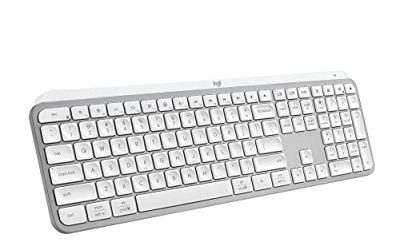
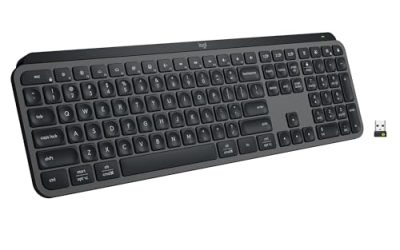
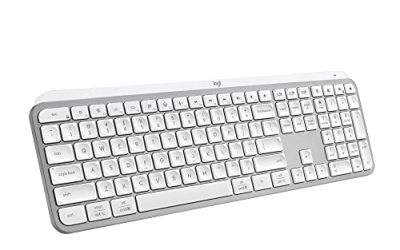
Logitech MX Keys S is the strongest typing keyboard in this guide, and the pick for anyone who writes for hours. Its low-profile design uses spherically dished keys shaped for fingertips, which reduces mistypes and keeps long sessions comfortable. Smart illumination lights the keys when your hands approach and dims them when you step away. The board pairs with up to three devices over Bluetooth Low Energy or the included Logi Bolt USB receiver, and it works across Windows, macOS, Linux, Chrome OS, iPadOS, and Android. The rechargeable battery lasts up to 10 days with backlighting on, or up to 5 months with it off, and charges over USB-C while you type. Confirm on the listing which color the link points to.
Pros:
- Quiet, precise, low-profile keys that suit long typing sessions
- Smart backlighting that reacts to your hands and the room
- Pairs with up to three devices and charges over USB-C
Cons:
- Heavier than the compact boards, so it is not a travel keyboard
- Backlighting drains the battery quickly when left on
Logitech G915 TKL Lightspeed — Best for Gaming
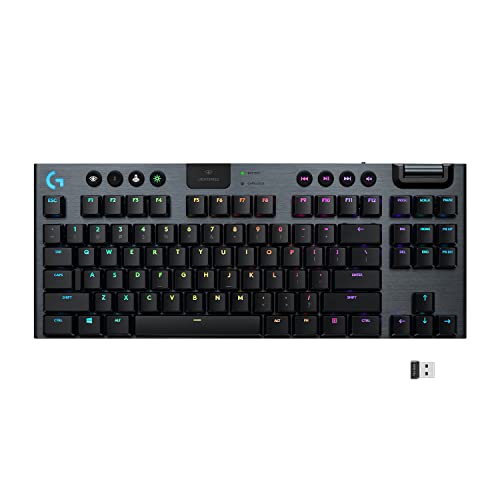
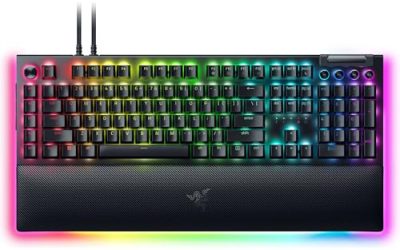
Logitech G915 TKL Lightspeed is the premium gaming pick in this guide. It pairs LIGHTSPEED wireless with Bluetooth and a wired Micro-USB mode, so you can play on the low-latency 2.4 GHz link, switch to a laptop over Bluetooth, and plug in to charge without stopping. The low-profile GL mechanical switches come in tactile, linear, and clicky options. LIGHTSYNC RGB lights each key, and G HUB software handles lighting, macros, and onboard profiles. An aluminum top plate keeps the frame rigid, and dedicated media controls with a volume roller sit along the top edge. Battery life reaches up to 40 hours with RGB lighting on. Confirm on the listing which GL switch option the link points to, since the variants are listed separately.
Pros:
- LIGHTSPEED wireless with a 1 ms report rate for responsive play
- Low-profile GL mechanical switches in three feels
- Aluminum top plate and dedicated media controls with a volume roller
Cons:
- Tenkeyless layout means no number pad for spreadsheets
- ABS keycaps can develop shine with heavy use over time
Logitech G515 Lightspeed TKL — Best Low-Profile Gaming Value
Logitech G515 Lightspeed TKL brings the low-profile gaming formula into a slimmer and simpler board. It stands just 22 mm tall, and its factory-lubed GL switches actuate at 1.3 mm, which gives fast, quiet keystrokes without the taller profile of a standard mechanical board. Tri-mode connectivity covers LIGHTSPEED wireless, Bluetooth, and a wired USB-C data mode, and the board can pair a compatible Logitech G mouse on the same LIGHTSPEED receiver with 2:1 pairing. Double-shot PBT keycaps resist wear better than the ABS caps on older boards, and the layered, sound-dampened construction keeps typing quieter than many mechanical keyboards. LIGHTSYNC RGB gives access to around 16.8 million colors through G HUB, and KEYCONTROL lets you map up to 15 functions per key. Battery life reaches up to 36 hours. Confirm on the listing whether the link points to the tactile or linear switch version, since the two feel different.
Pros:
- Slim 22 mm profile with fast, factory-lubed GL switches
- Tri-mode connectivity with LIGHTSPEED, Bluetooth, and wired modes
- Double-shot PBT keycaps and KEYCONTROL remapping through G HUB
Cons:
- Tenkeyless layout means no number pad
- Shorter battery life than the G915 TKL with lighting on
Logitech K380 Multi-Device — Best for Travel and Multi-Device Use

Logitech K380 Multi-Device is the smallest and simplest keyboard in this guide, and it is the one to pack in a bag. It connects over Bluetooth to a PC, a laptop, a tablet, or a phone, and its Easy-Switch keys pair with up to three devices at once, so switching from a laptop to a tablet takes one key press. The compact layout drops the number pad and the navigation cluster, which keeps the board light and easy to carry, and the round, scooped keys feel comfortable for short and medium typing sessions. Battery life is the K380’s quiet strength: it runs on two AAA batteries for up to 2 years, so charging is never part of your routine. Flow cross-computer control works with a Flow-enabled mouse, and the board works across Windows, Mac, Chrome OS, Android, iPadOS, and Apple TV. Confirm on the listing which color the link points to, since the Dark Grey version is the one tied to this ASIN.
Pros:
- Compact and light, easy to carry in a bag
- Pairs with up to three devices over Bluetooth with Easy-Switch keys
- Up to 2 years of battery life on two AAA batteries
Cons:
- No backlighting for typing in dim rooms
- No USB receiver included, so Bluetooth is the only link
Logitech K780 Multi-Device — Best Full-Size Multi-Device Keyboard
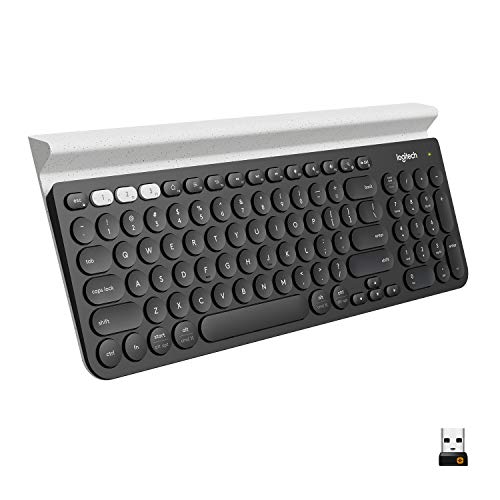
Logitech K780 Multi-Device is the full-size answer to the K380. It keeps the same multi-device idea, pairing with up to three devices over Bluetooth or the included Unifying USB receiver, and adds a number pad, a full navigation cluster, and a built-in cradle that holds a phone or a tablet upright on the desk. That cradle is the feature that sets the K780 apart: you can prop up a tablet beside your monitor and type on it with the same keyboard you use for your PC. The K780 is a quiet membrane board with large, comfortable keys, and it runs on two AAA batteries that come pre-installed. Flow support lets it follow a Flow-enabled mouse across computers. The full-size layout measures 14.9 by 6.2 by 0.9 inches and weighs 1.92 pounds, so it is a desk keyboard rather than a travel board. Confirm on the listing the battery life for the variant you choose.
Pros:
- Full-size layout with a number pad for spreadsheets and data entry
- Built-in cradle holds a phone or tablet upright on the desk
- Pairs with up to three devices over Bluetooth or the Unifying receiver
Cons:
- No backlighting for typing in dim rooms
- Large footprint needs a wide desk
Who Should Choose What
Choose the MX Keys S if you write, code, or answer messages for hours each day and want the most comfortable typing experience in this guide. Its quiet keys, smart backlighting, and three-device switching suit a home office. Choose the G915 TKL Lightspeed if you play games seriously and want the fastest wireless link, mechanical switches, and per-key RGB in a rigid aluminum frame. Choose the G515 Lightspeed TKL if you want low-profile mechanical gaming in a slimmer board with durable PBT keycaps. Choose the K380 if you travel, work from a tablet, or switch between a laptop and a phone all day. Choose the K780 if you share one desk between a PC, a laptop, and a tablet, and you want a full-size board with a number pad and a cradle.
Common Mistakes
Buying a gaming board for an office. Mechanical switches with a loud click can distract coworkers and family, and a tenkeyless gaming board without a number pad slows down spreadsheet work. Match the switch and the layout to the room and the job, not only to the look of the board.
Ignoring the connection type. A Bluetooth-only board such as the K380 needs a device with Bluetooth, and a LIGHTSPEED board needs its USB receiver for the fastest link. Check that your computer, tablet, or console supports the connection you plan to use.
Forgetting about backlighting. The K380 and K780 have no backlighting, which is fine on a bright desk but frustrating in a dim room. If you type at night, pick a backlit board such as the MX Keys S or one of the G series boards.
Assuming every variant is the same. Logitech lists the same model in several colors and switch options, and the ASIN changes with the variant. A G915 TKL with tactile switches feels different from the same board with linear switches. Confirm the switch, color, and layout on the listing before you buy.
Overlooking battery habits. Rechargeable boards need a charging cable nearby every few days when backlighting stays on, while AAA boards need fresh batteries once in a long while. Pick the habit you will actually keep.
FAQ
Are Logitech wireless keyboards good for gaming?
Yes, when you pick a gaming model. The G915 TKL Lightspeed and G515 Lightspeed TKL use LIGHTSPEED wireless with a 1 ms report rate, low-profile mechanical switches, and features built for fast play. Typing-focused boards such as the K380 and K780 connect over Bluetooth, which is fine for casual games but not built for competitive play.
What is the difference between LIGHTSPEED and Bluetooth?
LIGHTSPEED is Logitech G’s proprietary 2.4 GHz wireless link, designed for gaming with low latency and a 1 ms report rate. Bluetooth is a standard wireless link built into most laptops, tablets, and phones, and it needs no dongle. LIGHTSPEED suits fast games, while Bluetooth suits typing across phones, tablets, and laptops.
Can one Logitech wireless keyboard connect to three devices?
Yes, on the multi-device models. The MX Keys S, K380, and K780 each pair with up to three devices and switch between them with Easy-Switch keys.
Do Logitech wireless keyboards need batteries or charging?
It depends on the model. The MX Keys S and G515 TKL charge over USB-C; the G915 TKL charges over Micro-USB. The K380 and K780 run on two AAA batteries each, and the K380 is listed with up to 2 years of battery life.
Which Logitech wireless keyboard is best for typing all day?
The MX Keys S is the strongest choice for all-day typing in this guide. Its low-profile scissor switches, spherically dished keys, and quiet action suit long writing sessions, and the full-size layout includes a number pad. The K780 is a good alternative if you want a full-size board with a device cradle and replaceable batteries.
Do Logitech wireless keyboards work with Mac and Windows?
Yes. The keyboards in this guide work across Windows and macOS, and most of them also support Chrome OS, Linux, iPadOS, and Android. The MX Keys S and K380 list the widest compatibility.
Conclusion
The best logitech wireless keyboards all come from the same brand, but they serve very different desks. The MX Keys S is the typing pick, with quiet low-profile keys, smart backlighting, and three-device switching for long workdays. The G915 TKL Lightspeed is the premium gaming pick, with fast LIGHTSPEED wireless, mechanical switches, and RGB lighting in a rigid frame. The G515 Lightspeed TKL gives you low-profile gaming in a slimmer board with durable PBT keycaps. The K380 is the travel and multi-device pick, small enough to carry anywhere and light on battery worries. The K780 rounds out the set as a full-size multi-device board with a number pad and a cradle for a phone or tablet. Pick the board that matches your main job.
FAQ
Are Logitech wireless keyboards good for gaming?
What is the difference between LIGHTSPEED and Bluetooth?
Can one Logitech wireless keyboard connect to three devices?
Do Logitech wireless keyboards need batteries or charging?
Which Logitech wireless keyboard is best for typing all day?
Do Logitech wireless keyboards work with Mac and Windows?
More from Amazon
Programs that pair well with the guide above. Offers and eligibility are set by Amazon and may change.
Free shipping on eligible items, Prime Video and more. Eligible new members can start with a free trial.
Start a Prime free trialAd-free music streaming. Eligible new subscribers can start with a free trial.
Try Music Unlimited freeA Prime membership for ages 18-24 with a trial period. Eligibility is set by Amazon.
See Prime for Young AdultsAudiobooks and podcasts to listen to on the go. Eligible new members can start with a free trial.
Try Audible freeAs an Amazon Associate we earn from qualifying purchases.