Key takeaways
- The best gaming monitors for Xbox One pair sharp 1080p panels with low input lag and HDMI. Compare five screens for the One, One S, and One X.
The best gaming monitors for Xbox One turn a desk into a proper console setup. The Xbox One family — the original Xbox One, the Xbox One S, and the Xbox One X — plays best on a screen that matches what the console can actually output: a sharp 1080p image for most games, 4K and HDR for the One X, and a responsive picture that keeps controls feeling direct. A monitor built for that job beats a living room television for desk play, because it sits at the right distance, keeps input lag low, and leaves room on the desk for a controller and a headset.
Choosing the wrong screen is easy, because most gaming monitors are built for PC play. A PC monitor that shines through DisplayPort at very high refresh rates may give you far less over HDMI, which is the only cable an Xbox One uses. The console itself caps at 60 frames per second, so a 240Hz panel will not make your games run faster — but the right 1080p panel with low input lag, good color, and the right ports will make every game look and feel better. This guide explains what matters for Xbox One, then compares five monitors that fit the console, from a purpose-built console screen to a 4K HDR panel for Xbox One X owners.
How to Choose
Match the resolution to your Xbox One model
Resolution is the first decision, and it depends on which Xbox One you own. The original Xbox One and the Xbox One S render games at 1080p, so a 1080p monitor shows their picture at native resolution with no scaling softness. The Xbox One X is different: it renders many games at 4K, so a 4K monitor shows its sharpest picture and unlocks its HDR output. Check your console model first, then choose the resolution to match.
Remember that Xbox One caps at 60 frames per second
No Xbox One model outputs more than 60 frames per second, so refresh rate works differently here than on a PC. A 144Hz or 180Hz monitor will still work fine — it simply runs at 60Hz when connected to the console — and the extra headroom is useful if the same screen later serves a PC or a newer console. What matters for Xbox One is that the panel is smooth and responsive at 60Hz, with no smearing or ghosting in fast scenes.
Insist on low input lag over HDMI
Input lag is the delay between pressing a button and seeing the result on screen, and it matters more for console play than almost any other spec. Look for a monitor with a fast response time and a game mode that bypasses extra image processing. Every monitor here connects over HDMI, which is the only video output an Xbox One has, so check that the HDMI port — not just the DisplayPort — supports the refresh rate and features listed on the box. A monitor that only reaches its headline refresh rate through DisplayPort is giving you a PC spec, not a console one.
Pick the right panel type for your room
Panel type shapes color, contrast, and viewing angles. IPS panels give the most accurate color and the widest viewing angles, which suits bright rooms and anyone who watches from the side of the desk. VA panels give deeper blacks and stronger contrast, which suits dark rooms and cinematic games, though their viewing angles are narrower. TN panels respond fastest and cost the least, but their colors shift when viewed off-center.
Check HDR support if you own a One S or One X
The Xbox One S and Xbox One X both support HDR, which widens the range between the brightest and darkest parts of the picture in games that support it. A monitor with HDR support makes sunsets, explosions, and dark corridors look richer, but only if the panel is bright enough to show the difference. A screen that accepts an HDR signal without the brightness to back it up will look much like a standard screen. If HDR matters to you, choose a monitor with genuine HDR support and good brightness, such as the 4K pick below, rather than one that merely lists HDR on the box.
Count the HDMI ports and think about sound
An Xbox One connects over HDMI, and most players also want a second input for a PC, a streaming stick, or a second console. Two HDMI ports make switching painless, and a headphone jack on the monitor lets you plug in a headset without reaching behind the console. Built-in speakers are a bonus for a bedroom or dorm setup where a soundbar will not fit, though they rarely match a dedicated headset or speaker set for quality. Check the port list before you buy, because a monitor with a single HDMI port will force you to swap cables every time you change devices.
Choose a size that fits your desk and viewing distance
Size is about distance as much as screen space. At a desk, where you sit two to three feet from the screen, a 24-inch monitor is sharp and easy to take in at a glance, while a 27-inch screen is the largest that still looks crisp at 1080p from that distance. A 27-inch 4K screen, by contrast, stays sharp because its pixels are far smaller. Measure your desk depth, then pick the size that fills your view without forcing you to turn your head to see the corners.
Top Picks
BenQ ZOWIE RL2755

The BenQ ZOWIE RL2755 is the only monitor in this guide designed specifically for console play, and it shows in every decision BenQ made. The 27-inch screen runs at 1080p with a 75Hz refresh rate and a 1ms response time, which matches the Xbox One output exactly: a full HD picture at the console frame rate, with no wasted headroom. Two HDMI ports let you connect the console and a second device, and built-in speakers cover bedroom setups without extra hardware.
What sets the RL2755 apart is its console tuning. Black eQualizer brightens dark corners without washing out the rest of the picture, which helps in shooters where enemies hide in shadows. Color Vibrance adjusts color intensity through preset modes, and dedicated game modes tune the picture for different genres. The low input lag design keeps controls feeling direct, which matters more on a console than a headline refresh rate number.
This monitor suits Xbox One players who want a screen built for their console rather than adapted from a PC monitor, especially in a bedroom or dorm where the 27-inch size and built-in speakers replace a television. Its main caveats are the TN panel, whose colors shift when viewed from a sharp angle, and its age: it is a long-running model, so confirm the exact listing and its contents before ordering. If you want a console-first screen and a large picture for the desk, the RL2755 is the most purpose-built option here.
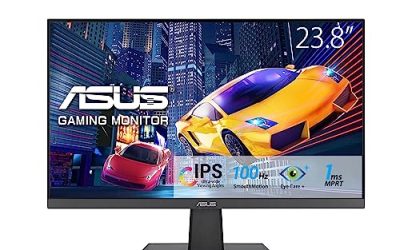
ASUS VP249QGR
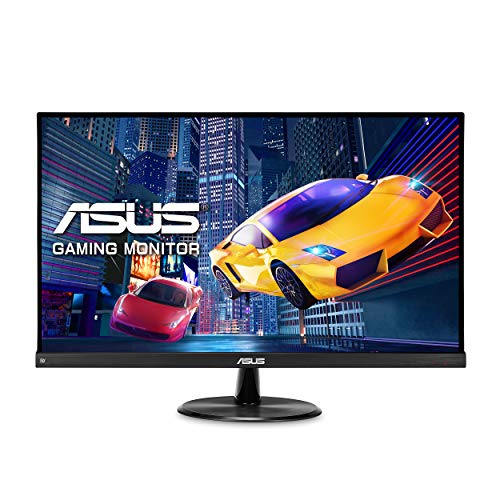
The ASUS VP249QGR is a 23.8-inch IPS monitor that pairs a sharp 1080p picture with a 144Hz refresh rate and a 1ms response time, and it is one of the best all-round screens for an Xbox One desk setup. The IPS panel delivers accurate color and wide viewing angles, so the picture stays true whether you sit straight on or off to the side. FreeSync support smooths out frame pacing, and ASUS Extreme Low Motion Blur sharpens fast movement when the console output allows it.
Connectivity covers the console well, with HDMI and DisplayPort inputs plus a VGA port, and the frameless design keeps the bezels slim for a clean desk look. Eye Care features, including a blue light filter and flicker-free backlighting, make long sessions easier on the eyes, and the stand tilts to find a comfortable viewing angle. The extra refresh rate headroom is a bonus rather than the point: on Xbox One the screen runs at 60Hz, and the headroom only matters if the monitor later serves a PC.
This monitor suits Xbox One players who want accurate color and a compact 24-inch screen for a smaller desk, and who may later use the same screen with a PC. Its main caveats are the lack of built-in speakers and the absence of HDR, so plan on a headset or separate speakers and skip this one if HDR is a priority. If you want a sharp, color-accurate 1080p screen that does everything well, the VP249QGR is a strong everyday pick.
Acer Nitro VG240Y Pbiip
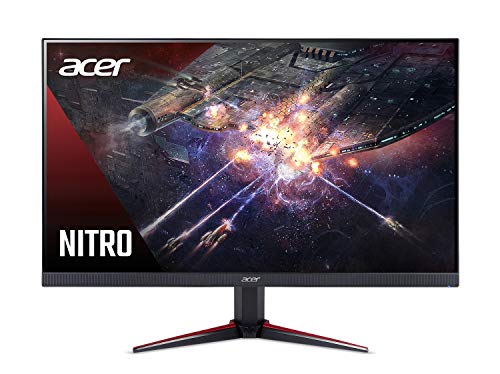
The Acer Nitro VG240Y Pbiip is a 23.8-inch IPS monitor with a 1080p resolution, a 144Hz refresh rate, and a 1ms visual response time, built around two HDMI 2.0 ports and a DisplayPort input. The zero-frame design keeps bezels thin on three sides, which makes the screen feel larger than its size suggests and suits a tidy desk. FreeSync support helps keep the picture smooth, and the IPS panel gives the wide viewing angles and steady color that suit shared viewing.
For Xbox One play, the VG240Y gets the essentials right. The dual HDMI ports mean the console and a second device can stay connected at once, and the 1080p resolution matches the console native output on the original One and One S. The panel is bright and vivid for colorful games, and the stand tilts to suit a low or high seating position. As with other high-refresh screens here, the console uses 60Hz of the available refresh rate, and the rest is headroom for other devices.
This monitor suits Xbox One players who want a bright, slim-bezel IPS screen with two HDMI ports and a compact footprint, especially in a shared room where viewers sit at angles. Its main caveats are the tilt-only stand, which does not adjust for height, and the lack of built-in speakers or HDR. If you want a clean-looking 1080p screen with room for a second HDMI device, the VG240Y is an easy fit.
Samsung Odyssey G3 G30D 24-Inch

Samsung Odyssey G3 G30D 24-Inch
The Samsung Odyssey G3 G30D is a current-generation 24-inch monitor with a 1080p resolution, a 180Hz refresh rate, and a 1ms response time, and it brings the newest feature set in this guide to an Xbox One desk. The panel runs through HDMI 2.0 as well as DisplayPort, so the console connection uses a modern port, and FreeSync Premium support keeps the picture smooth. Black Equalizer and Virtual Aim Point are gamer-focused extras that help in dark scenes and aiming-heavy games.
The adjustable stand is a genuine advantage: it adjusts for height, tilt, and swivel, and the screen can rotate to a vertical position, which helps when the same desk serves work or study as well as play. Eye Saver Mode and a flicker-free backlight reduce eye strain during long sessions, and the 24-inch size is the sweet spot for a desk where you sit close to the screen. The 180Hz refresh rate is headroom on Xbox One, where the console caps at 60 frames per second, but it means the screen is ready for a newer console or a PC later.
This monitor suits Xbox One players who want a modern, adjustable screen with a current port set and a compact 24-inch size, and who plan to keep the monitor through a future console upgrade. Its main caveats are the lack of built-in speakers and the small screen size, which may feel modest if you sit far from the desk; its HDR10 support is entry-level on a screen of this brightness, so do not expect the deep HDR impact of the 4K pick below. If you want the newest 1080p monitor in this guide with a stand that adjusts every way, the G3 G30D is the pick.
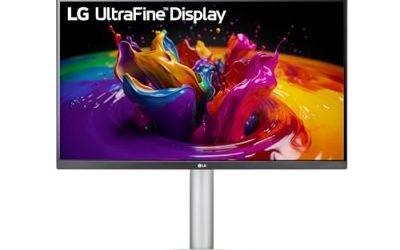
LG 27UK650-W

The LG 27UK650-W is the 4K pick in this guide, and it is the monitor to choose if you own an Xbox One X. The 27-inch IPS panel runs at 3840 x 2160 with HDR10 support, so One X games that render at 4K show their full detail and HDR games show a wider range of light and shadow. Wide sRGB coverage keeps colors rich and accurate, and the 60Hz refresh rate matches the console output exactly, with a 5ms response time that suits console play.
Two HDMI ports and a DisplayPort input cover the console and a second device, and the height-adjustable stand makes it easy to set the screen at eye level. The three-side borderless design keeps the focus on the picture, and the white finish stands out on a desk full of black hardware. FreeSync support helps with frame pacing on the One X, and the IPS panel keeps colors steady from wide viewing angles.
This monitor suits Xbox One X owners who want the sharpest possible picture and HDR, and anyone whose desk doubles as a workspace where 4K resolution helps with text and windows. Its main caveats are the 60Hz refresh rate, which gives no headroom for a future high-refresh console, and the 4K resolution, which is wasted on an original Xbox One or One S. If you own a One X and want its best picture, the 27UK650-W is the clear choice.
Comparison Table
| Monitor | Size | Resolution | Refresh Rate | Panel | HDMI Ports | HDR |
|---|---|---|---|---|---|---|
| BenQ ZOWIE RL2755 | 27 inch | 1080p | 75Hz | TN | 2 | No |
| ASUS VP249QGR | 23.8 inch | 1080p | 144Hz | IPS | 1 | No |
| Acer Nitro VG240Y Pbiip | 23.8 inch | 1080p | 144Hz | IPS | 2 | No |
| Samsung Odyssey G3 G30D | 24 inch | 1080p | 180Hz | VA | 1 | Yes, HDR10 |
| LG 27UK650-W | 27 inch | 4K UHD | 60Hz | IPS | 2 | Yes, HDR10 |
Which One Is Right for You?
Start with your console model, because it decides the resolution. If you own an Xbox One X and want its sharpest picture, the LG 27UK650-W is the only 4K HDR screen here, and it is the right call. If you own an original Xbox One or an Xbox One S, a 1080p screen is the right match, and the choice comes down to size and features.
For a bedroom or dorm where the monitor replaces a television, the BenQ ZOWIE RL2755 stands out: its 27-inch screen, built-in speakers, and console-tuned picture modes are made for that job. For a compact desk where color accuracy matters, the ASUS VP249QGR and the Acer Nitro VG240Y Pbiip are both strong IPS options — pick the ASUS for its eye care features and slim frame, or the Acer for its dual HDMI ports and zero-frame design. For the newest feature set and a stand that adjusts in every direction, the Samsung Odyssey G3 G30D is the most modern 1080p screen here, and its modern port set and high refresh headroom make it the best choice if you plan to upgrade to a newer console later. Whichever you choose, connect over HDMI, switch the console to its best output settings, and enable the monitor game mode for the lowest input lag.
Frequently Asked Questions
Do I need a 144Hz monitor for Xbox One?
No. Every Xbox One model caps at 60 frames per second, so a 144Hz monitor will run at 60Hz when connected to the console. The extra refresh rate is only useful if the same screen later serves a PC or a newer console that outputs higher frame rates. For Xbox One itself, low input lag and a good 1080p picture matter far more.
Can the Xbox One X use a 4K monitor?
Yes. The Xbox One X renders many games at 4K and supports HDR output, so a 4K HDR monitor such as the LG 27UK650-W shows its best picture. Connect the console with a high-speed HDMI cable, enable 4K and HDR in the console display settings, and choose a monitor with genuine HDR support rather than one that merely accepts an HDR signal.
Does Xbox One need HDMI 2.1?
No. The Xbox One outputs 1080p at up to 60 frames per second, or 4K at 60 frames per second on the One X, and an HDMI 1.4 or HDMI 2.0 connection handles both. HDMI 2.1 only matters for newer consoles that output 4K at 120 frames per second, so it is a bonus for future upgrades, not a requirement for Xbox One.
Should I use a monitor or a television for Xbox One?
It depends on where you play. A monitor suits a desk setup: it sits closer, keeps input lag low, and leaves room for a controller and headset. A television suits a living room, where you sit further back and want a large screen and built-in speakers. At a desk, in a bedroom, or in a dorm, a monitor is the better choice; from a couch, a television is more comfortable.
Disclosure: As an Amazon Associate, we may earn from qualifying purchases.
FAQ
Which One Is Right for You?
Do I need a 144Hz monitor for Xbox One?
Can the Xbox One X use a 4K monitor?
Does Xbox One need HDMI 2.1?
Should I use a monitor or a television for Xbox One?
More from Amazon
Programs that pair well with the guide above. Offers and eligibility are set by Amazon and may change.
Free shipping on eligible items, Prime Video and more. Eligible new members can start with a free trial.
Start a Prime free trialAd-free music streaming. Eligible new subscribers can start with a free trial.
Try Music Unlimited freeA Prime membership for ages 18-24 with a trial period. Eligibility is set by Amazon.
See Prime for Young AdultsAudiobooks and podcasts to listen to on the go. Eligible new members can start with a free trial.
Try Audible freeAs an Amazon Associate we earn from qualifying purchases.