Key takeaways
- Compare the best ARGB controllers for PC lighting, from software hubs with per-port control to simple remote kits that need no motherboard header.
A motherboard gives you one or two addressable RGB headers, and every device on a header follows a single shared signal. An ARGB controller changes that math. It sits between the power supply and your lit fans, strips and coolers, produces the lighting signal itself, and hands control to software, a handheld remote or a phone app instead of leaving it with the board. That matters most on boards with no 5V header at all, but it also helps when you want separate zones, music sync, or one control point for a mixed-brand build.

The five controllers below cover the main ways of taking charge of case lighting: a full software hub from Razer, a sync box for Thermaltake gear, a Bluetooth music controller for addressable strips and panels, and two compact remote kits that run from SATA power with no header and no software. None of them spins a fan motor. Fan speed stays with your motherboard or a separate fan hub, and that split is deliberate: lighting is the whole job here.
Disclosure: As an Amazon Associate, we earn from qualifying purchases made through links in this article, at no extra cost to you.
Quick Picks
Our Short List of 3
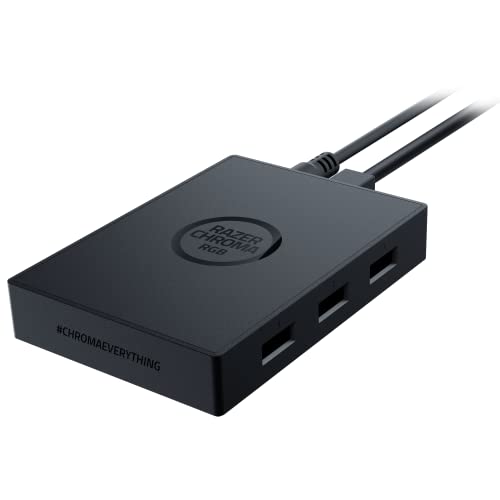
- Best for: Builders who want per-port software control over standard ARGB gear from many brands.
- 6 addressable RGB headers, standard 3-pin 5V format
- Up to 80 LEDs per port, 240 LEDs in total
- Internal USB 2.0 header link for Razer Synapse 3 control
- Molex power input, with Molex and USB header cables included
- Best for: Thermaltake-heavy builds that want motherboard sync across many devices at once.
- 9 device ports with Thermaltake 9-pin connectors
- Connects and controls up to nine Thermaltake addressable LED devices
- Sync cables included for ASUS Aura Sync, Gigabyte RGB Fusion and MSI Mystic Light
- SATA power input, with 12V and 5V device support

- Best for: Strip and panel lighting that should react to game audio, tuned from a phone.
- Bluetooth control through the LED Chord app on iOS and Android
- Built-in microphone plus a 3.5 mm AUX input for music sync
- 18 music effects for strips, 30 for matrix panels, 180 non-music effects
- Controls up to 960 IC chips, with segment and pixel counts you set in the app
All 4 Picks at a Glance
| Product | Specs | Action |
|---|---|---|
| Razer Chroma Addressable RGB Controller |
| Check price on Amazon |
| Thermaltake TT Sync Controller TT Premium Edition |
| Check price on Amazon |
| BTF-LIGHTING SP107E Bluetooth Music Controller |
| Check price on Amazon |
 DS Mini ARGB PC Fans Controller Kit |
| Check price on Amazon |
How to Choose
Decide who produces the signal. Software controllers link to an internal USB header and let an app address each port on its own, which is how you get zones and per-device effects. Remote kits produce their effects on the unit itself and need nothing from the board. A sync box is the third pattern: it takes the signal from a motherboard header and repeats it across many ports, so it only helps if your board already has a header to give.
Match the connector before anything else. Standard ARGB is a 3-pin 5V plug, and it is the format to build around. The older 12V 4-pin RGB format looks similar and fits nothing here; feeding one format from the other can kill LEDs. Razer and the two remote kits use the standard 3-pin plug. Thermaltake gear uses its own 9-pin device cables, and the SP107E uses the JST-style 3-pin connectors common on strips and panels.
Count LEDs, not just ports. Every controller lists a ceiling. The Razer handles up to 80 LEDs per port and 240 in total, while the SP107E can address up to 960 IC chips across segments you define in its app. A chain of fan lighting leads and two long strips adds up faster than most builders expect, so do the LED math before you wire anything.
Check the power source. The remote kits and the Thermaltake box draw from a SATA lead, the Razer uses a Molex input, and the SP107E takes a DC input anywhere from 5V to 24V that you must match to the voltage of your strips. Powered controllers are also what keep long chains evenly lit, because the board header is no longer feeding every LED on the run.
Think about where control lives day to day. If you like building lighting profiles per game, a PC app is the natural home. If the machine sits in a living room or you lend it to family, a remote on the coffee table beats opening software. Phone control sits between the two, and it is the only route here that adds music reaction.
The Best ARGB Controllers for PC Lighting
Razer Chroma Addressable RGB Controller
- Best for: Builders who want per-port software control over standard ARGB gear from many brands.
- 6 addressable RGB headers, standard 3-pin 5V format
- Up to 80 LEDs per port, 240 LEDs in total
- Internal USB 2.0 header link for Razer Synapse 3 control
- Molex power input, with Molex and USB header cables included
Builders who want per-port software control over standard ARGB gear from many brands.
The Razer is the full software option. Because its ports speak the standard 3-pin language, it accepts lighting leads from almost any brand of fan, strip or cooler block, then brings all of them into Synapse 3 alongside Razer peripherals. Each port is addressed on its own, so the front fans can run one effect while a strip along the floor of the case runs another, and profiles can change with the game you launch.
The trade-offs are ecosystem and power. Control lives in Synapse rather than your motherboard software, and the unit feeds from a Molex lead, which some modern supplies only offer on a shared cable. Neither point matters much if you already run Razer gear, and the universal ports make this the easiest controller to grow with.
Thermaltake TT Sync Controller TT Premium Edition
- Best for: Thermaltake-heavy builds that want motherboard sync across many devices at once.
- 9 device ports with Thermaltake 9-pin connectors
- Connects and controls up to nine Thermaltake addressable LED devices
- Sync cables included for ASUS Aura Sync, Gigabyte RGB Fusion and MSI Mystic Light
- SATA power input, with 12V and 5V device support
Thermaltake-heavy builds that want motherboard sync across many devices at once.
This box solves a specific problem: a build full of Thermaltake lit hardware and a motherboard with a single 5V header. The controller takes that one header signal and repeats it across nine Thermaltake devices, powered by SATA, so a set of Riing Plus fans, a Floe cooler and Lumi Plus strips all follow the board software as one coordinated system. The included cables cover the three big motherboard sync families.
Be clear about what it is not. The 9-pin plugs serve Thermaltake devices only, and every port mirrors the same signal, so there are no independent zones. It is a powered sync splitter for one ecosystem, and within that ecosystem it is exactly the right tool.
BTF-LIGHTING SP107E Bluetooth Music Controller
- Best for: Strip and panel lighting that should react to game audio, tuned from a phone.
- Bluetooth control through the LED Chord app on iOS and Android
- Built-in microphone plus a 3.5 mm AUX input for music sync
- 18 music effects for strips, 30 for matrix panels, 180 non-music effects
- Controls up to 960 IC chips, with segment and pixel counts you set in the app
Strip and panel lighting that should react to game audio, tuned from a phone.
The SP107E comes from the pixel lighting world rather than the fan world, and it shows in the best way. Its party trick is sound: feed it game audio through the AUX input for a clean signal, or let the built-in microphone listen to the room, and strips or matrix panels pulse and chase in time. The app lets you declare how many pixels sit in each segment, so effects land where you expect instead of wrapping at the wrong point.
In a PC setting it suits strip-lit cases, light panels behind a desk, and other addressable runs fed from a suitable DC supply. It will not plug into a motherboard header, and its JST connectors are strip hardware rather than fan hardware. Treat it as the lighting brain for strips and panels, not as a fan accessory.
MAYWILLA 5V 3-Pin Mini ARGB Controller Kit
Specs
- Single 5V 3-pin ARGB output for one daisy chain
- SATA power input, compatible with any supply that has a SATA lead
- 21-key wireless remote covering modes, colors, brightness and speed
- Dynamic modes such as rainbow and chase, plus 12 static colors
- On-unit M, S and C keys mirror the main remote controls
- 530 mm cable length for flexible placement in the case
This is the shortest path to lit fans on a board with no ARGB header. SATA power goes in, one 3-pin chain comes out, and everything else happens on the remote: pick a dynamic mode or a static color, set brightness and speed, and the whole chain follows. There is no software to install, no USB header to give up, and nothing to configure after the first button press.
The single channel is also the honest limit. Every device on the chain shows the same effect at the same time, and very long chains still answer to how much 5V current your wiring can carry, so keep runs modest. For one unified look with zero fuss, that trade is easy to accept.
Best for: A first ARGB setup, or an older board that needs one tidy remote-run lighting chain.
DS Mini ARGB PC Fans Controller Kit
- Best for: One synchronized chain that needs a deep library of built-in effects.
- Single 5V 3-pin ARGB channel with a one-to-one matching function
- 215 dynamic modes and 4 static colors in the built-in library
- 14-key remote control for mode, color, speed and brightness
- SATA power input
One synchronized chain that needs a deep library of built-in effects.
The DS kit shares the one-channel idea with the MAYWILLA but leans on depth instead of remote size. Its built-in library runs to 215 dynamic modes, and the one-to-one matching function pairs the devices on the chain so they behave as a single matched set rather than drifting apart. The 14-key remote covers the everyday adjustments, and the unit itself is small enough to disappear behind a motherboard tray.
As with any single-output controller, zones are off the menu: one signal, one look, everywhere at once. What you get in exchange is the deepest effect library in this roundup and a footprint that fits builds with no spare room at all.
FAQ
Can an ARGB controller damage my lighting gear?
The real risk is mixing formats. The 12V 4-pin RGB system and the 5V 3-pin ARGB system use similar-looking plugs with different pin layouts and voltages, and feeding one from the other can kill LEDs. Check the plug shape and the voltage printed on every device before it joins a chain.
Do these controllers also control fan speed?
No. Every pick here handles the lighting signal only. Fan motors keep their own 4-pin PWM leads running to the motherboard or to a fan hub, which is why a lighting controller and a fan hub often live side by side in the same build.
My motherboard has no ARGB header. Which type should I buy?
A self-contained one. A software controller that talks over USB, such as the Razer, and remote kits such as the MAYWILLA and DS all produce their own signal and need nothing from the board. A sync box such as the Thermaltake needs a header to sync from, so it only helps once the board has one to offer.
How many devices can I chain on one output?
Follow the LED ceiling for the controller: 240 LEDs in total on the Razer, up to 960 IC chips on the SP107E. Remember that a mirrored signal means every device on the chain shows the same effect, and long chains may need an extra power feed partway along the run to stay evenly lit.
Conclusion
Pick by control style and the rest falls into place. The Razer controller is the software hub for mixed-brand builds that want zones. The Thermaltake box exists for one job, syncing a fleet of Thermaltake devices from a single header, and does it well. The SP107E turns strips and panels into part of the soundtrack. The MAYWILLA and DS kits ask the least of you: SATA power, one chain, a remote, and light. Any of the five gives your lighting a proper home; match the controller to the gear you already own and the way you like to drive it.
More from Amazon
Programs that pair well with the guide above. Offers and eligibility are set by Amazon and may change.
Free shipping on eligible items, Prime Video and more. Eligible new members can start with a free trial.
Start a Prime free trialAd-free music streaming. Eligible new subscribers can start with a free trial.
Try Music Unlimited freeA Prime membership for ages 18-24 with a trial period. Eligibility is set by Amazon.
See Prime for Young AdultsAudiobooks and podcasts to listen to on the go. Eligible new members can start with a free trial.
Try Audible freeAs an Amazon Associate we earn from qualifying purchases.