Key takeaways
- Find the best 5k monitors for crisp text, colour work, and wide workspaces. Compare five true 5K displays, their panels, ports, and fit.
Introduction
A 5K monitor changes how a desk feels. Text stays crisp at small sizes, photographs show fine texture instead of soft edges, and a timeline, spreadsheet, or code editor gains room to breathe. The extra pixels sharpen menus, documents, and browser tabs as well as media work.


True 5K means a horizontal resolution of 5120 pixels. Most 27-inch 5K monitors pair that width with 2880 vertical pixels, giving a 16:9 image at 218 pixels per inch. Ultrawide 5K2K monitors keep the same 5120-pixel width and use 2160 vertical pixels across a 21:9 panel, trading some height for a much wider canvas. Both formats belong in a guide to the best 5K monitors, but they suit different desks.
This guide compares five true 5K monitors. Four are 27-inch 16:9 displays built for sharp text and colour-critical work, and one is a 40-inch curved ultrawide for people who want a single wide screen instead of two separate monitors. Nearly every 27-inch 5K monitor here runs at 60Hz, which is smooth for documents, design, and video editing, but is not aimed at fast competitive gaming. A 5K signal also needs a capable connection, so Thunderbolt, USB-C with DisplayPort support, or a full-bandwidth DisplayPort output is important.
At a Glance
| Monitor | Size and Format | Resolution | Panel and Colour | Refresh Rate | Key Connection |
|---|---|---|---|---|---|
| Apple Studio Display | 27-inch, 16:9 | 5120 x 2880 | IPS, P3 wide colour | 60Hz | Thunderbolt |
| Samsung ViewFinity S9 | 27-inch, 16:9 | 5120 x 2880 | Matte IPS, 99 percent DCI-P3 | 60Hz | Thunderbolt 4 |
| LG UltraFine 5K 27MD5KL-B | 27-inch, 16:9 | 5120 x 2880 | IPS, 99 percent DCI-P3 | 60Hz | Thunderbolt 3 |
| ASUS ProArt Display PA27JCV | 27-inch, 16:9 | 5120 x 2880 | IPS, 99 percent DCI-P3, 100 percent sRGB | 60Hz | USB-C, DisplayPort, HDMI |
| Dell UltraSharp U4025QW | 40-inch curved ultrawide, 21:9 | 5120 x 2160 | IPS Black, 99 percent DCI-P3, 100 percent sRGB | 120Hz | Thunderbolt hub |
1. Apple Studio Display
The Apple Studio Display is the most integrated 5K monitor for a Mac-centred desk. Its 27-inch panel delivers 5120 x 2880 resolution at 218 pixels per inch, with 600 nits of brightness, support for one billion colours, and P3 wide colour. Text looks printed rather than rendered, and photographs keep subtle gradients smooth. True Tone adjusts the white point to match ambient light.
The built-in hardware is a large part of the appeal. A 12MP Center Stage camera keeps a speaker framed during video calls, a three-microphone array picks up voice clearly, and a six-speaker sound system fills a desk area without external speakers. Connectivity centres on Thunderbolt, with USB-C ports for peripherals. A single cable can carry the display signal and charge a connected MacBook. The version linked here uses standard glass with a tilt- and height-adjustable stand.
Listing Features
- 27-inch 5K Retina display, 5120 x 2880, 218 pixels per inch
- 600 nits of brightness, P3 wide colour, True Tone
- 12MP Center Stage camera, six-speaker sound, three-microphone array
- Thunderbolt with USB-C ports and laptop charging over one cable
- Standard glass, tilt- and height-adjustable stand
Considerations
Windows users should confirm that the camera, speakers, and brightness controls behave as expected on that system.
2. Samsung ViewFinity S9
The Samsung ViewFinity S9 is the most direct alternative to the Studio Display for a buyer who wants a 27-inch 5K panel with a matte finish and broader device support. It uses the same 5120 x 2880 resolution on a 27-inch IPS panel, with 99 percent DCI-P3 colour coverage and a matte coating that softens reflections in bright rooms. Where the Studio Display uses glossy glass, the S9 spreads reflections across the surface, which suits desks facing windows.
Its feature set leans toward versatility. Thunderbolt 4 carries video and data, DisplayPort provides a direct connection for a desktop computer, and the monitor includes smart television apps, AirPlay support, and a Gaming Hub for streaming services. A detachable SlimFit camera supports 4K video calls and can be removed when not in use. The S9 also supports Smart Calibration through a phone app, allowing colour adjustment without a separate calibration device.
Listing Features
- 27-inch 5K display, 5120 x 2880, matte IPS panel
- 99 percent DCI-P3 colour coverage
- Thunderbolt 4, DisplayPort, and USB-C connectivity
- Detachable SlimFit camera for video calls
- Smart television apps, AirPlay, and Gaming Hub
- Slim metal design, height-adjustable stand
Considerations
A buyer who mainly uses a Mac should confirm that the monitor wakes reliably and holds its resolution and scaling settings with their particular Mac model and cable.
3. LG UltraFine 5K 27MD5KL-B
The LG UltraFine 5K 27MD5KL-B is the long-running Mac companion in the 5K category. Its 27-inch IPS display runs at 5120 x 2880, with 500 nits of brightness and 99 percent DCI-P3 colour coverage. Text is sharp, photographs hold fine detail, and the panel integrates closely with macOS brightness and volume controls.
Thunderbolt 3 is the main connection, with up to 94W of power delivery over the same cable, so a MacBook can charge while it drives the display. Three downstream USB-C ports provide room for a keyboard, a drive, or other peripherals. A built-in camera and speakers cover video calls without extra hardware, and the glossy panel gives images a vivid, high-contrast look in controlled lighting. The stand adjusts for height and tilt, and the monitor can also be used with a VESA mount.
Listing Features
- 27-inch IPS display, 5120 x 2880 resolution
- 99 percent DCI-P3 colour gamut, 500 nits of brightness
- Thunderbolt 3 with up to 94W power delivery
- Built-in camera and speakers, three downstream USB-C ports
- Height- and tilt-adjustable stand, VESA mounting support
Considerations
It is a 60Hz panel, which suits creative and office work rather than fast-paced gaming. Because this model has been on the market for several years, a buyer should confirm that the listing is for the new monitor rather than a renewed unit.
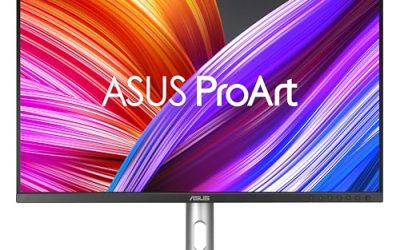
4. ASUS ProArt Display PA27JCV
The ASUS ProArt Display PA27JCV is the strongest choice in this guide for a Windows-based creative desk. It is a 27-inch 5K monitor with 5120 x 2880 resolution, an IPS panel, 99 percent DCI-P3 coverage, 100 percent sRGB coverage, and factory calibration to a colour difference of Delta E less than 2. Calman verification backs that calibration, so colour-critical work starts from a consistent baseline.
The panel uses LuxPixel anti-glare, low-reflection coating, which sits between a fully matte screen and glossy glass. Brightness reaches 400 nits, and the monitor carries VESA DisplayHDR 500 certification for high-dynamic-range content. Ambient light and backlight sensors adjust brightness and colour temperature automatically. USB-C with 96W power delivery handles a laptop over one cable, while DisplayPort and HDMI cover desktop computers. Built-in Auto KVM lets two computers share one keyboard and mouse through the monitor.
Listing Features
- 27-inch 5K HDR monitor, 5120 x 2880, 218 pixels per inch
- IPS panel, 99 percent DCI-P3, 100 percent sRGB, 95 percent Adobe RGB
- Factory calibrated to Delta E less than 2, Calman Verified
- LuxPixel anti-glare, low-reflection coating
- USB-C with 96W power delivery, DisplayPort, HDMI
- Built-in Auto KVM, VESA DisplayHDR 500, three-year warranty
Considerations
A buyer who works mainly on a Mac can use this monitor, but its strengths show most clearly on a mixed Windows and laptop desk.
5. Dell UltraSharp U4025QW

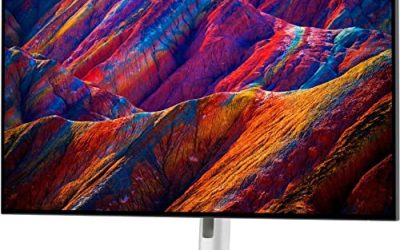
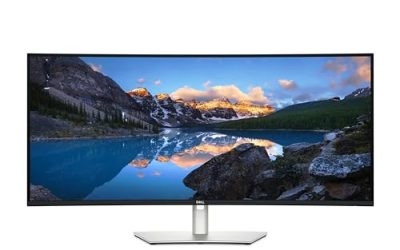
The Dell UltraSharp U4025QW takes a different approach from the other monitors in this guide. Instead of a 27-inch 16:9 panel, it is a 40-inch curved ultrawide with 5120 x 2160 resolution, known as 5K2K. The 21:9 aspect ratio spreads those pixels across a much wider screen, so a single display can hold a video timeline, a spreadsheet, and a reference document side by side without a bezel in the middle.
It is the only monitor here with a 120Hz refresh rate, which makes scrolling and window movement feel smoother than on a 60Hz panel. The IPS Black panel improves contrast over a standard IPS display, with 99 percent DCI-P3 and 100 percent sRGB colour coverage and DisplayHDR 600 certification. The 2500R curve wraps the edges of the screen toward the viewer, which helps a wide panel feel comfortable at a normal desk distance. The Thunderbolt hub connects a laptop over one cable, provides downstream USB ports, and includes an RJ45 Ethernet port.
Listing Features
- 40-inch curved ultrawide display, 5120 x 2160 resolution
- IPS Black panel, 99 percent DCI-P3, 100 percent sRGB, DisplayHDR 600
- 120Hz refresh rate, 2500R curve
- Thunderbolt hub with USB ports and RJ45 Ethernet
- Height-, tilt-, and swivel-adjustable stand
Considerations
Colour-critical work should still be checked from a centred seating position. A buyer should measure the desk depth and confirm that the stand fits, because this monitor dominates a small workspace.
How to Choose
Start with the computer that will drive the monitor. A Mac user who wants the simplest setup should look first at the Apple Studio Display or the LG UltraFine 5K, because both integrate closely with macOS scaling, brightness, and camera features. A Samsung ViewFinity S9 also pairs well with a Mac while adding a matte screen and smart features. A Windows user should look first at the ASUS ProArt PA27JCV for its input selection and KVM switching, or at the Dell UltraSharp U4025QW for its Thunderbolt hub and ultrawide workspace.
Next, decide between a 27-inch 16:9 panel and a 40-inch ultrawide. The 27-inch format gives the highest pixel density and the sharpest text, which matters for reading, writing, coding, and detailed image work. The ultrawide gives more horizontal room for timelines, spreadsheets, and multiple windows, but with lower pixel density and a much larger footprint. A buyer who already uses two monitors and wants to replace them with one screen is the natural audience for the Dell.
Colour needs come next. All five monitors cover 99 percent of DCI-P3, and the ASUS and Dell also list full sRGB coverage, so any of them can handle photo and video work at a serious level. The ASUS adds factory calibration to Delta E less than 2 with Calman verification, which is the most explicit colour guarantee here.
Refresh rate is a smaller factor for most buyers here. Four of the five monitors run at 60Hz, which is fine for creative work, office tasks, and media viewing. Only the Dell runs at 120Hz, and that smoother motion is a real advantage for scrolling through long documents and timelines. A buyer who plays fast-paced games should treat a 5K monitor as a second screen for work and keep a separate high-refresh display for gaming.
Connectivity should be checked against the actual computer, not assumed. Driving a 5120-pixel-wide image needs a Thunderbolt port, a USB-C port with DisplayPort support, or a DisplayPort output with enough bandwidth. Older HDMI ports on some laptops cannot drive full 5K at 60Hz, so the cable and the port version matter as much as the monitor.
Fit and Installation Considerations
Measure the desk before ordering, especially for the Dell ultrawide. A 27-inch monitor fits a standard desk with room for a keyboard beside it, while a 40-inch ultrawide needs a wider surface and enough depth that the curve does not push the screen too close to the viewer. Leave space behind the monitor for cables, and check that a window behind the desk will not throw reflections across a glossy panel. The Samsung and ASUS panels handle bright rooms better than the glossy Apple and LG screens.
Height matters as much as width. The top of the screen should sit near eye level when seated, with the centre of the panel slightly below the line of sight. All five monitors include height adjustment on their stands, so most desks can be set up without an arm. A monitor arm is still worth considering for a deep desk, but the arm must be rated for the monitor weight, and the Dell in particular needs a heavy-duty arm.
Cables deserve attention on a 5K setup. Use the cable supplied with the monitor first, because it is matched to the display bandwidth. A short Thunderbolt or USB-C cable keeps the signal stable, and a cable that is too long or of uncertain specification can drop the resolution or the refresh rate.
Software setup is the last step. Set the display scaling so text is comfortable, enable the full resolution in the display settings, and check that the refresh rate is set correctly. On Windows, scaling can be set per display, which helps when a 5K monitor sits beside a lower-resolution screen.
Frequently Asked Questions
Is a 5K monitor worth it over a 4K monitor?
A 5K monitor shows noticeably sharper text and finer detail than a 4K panel of the same size, because a 27-inch 5K display packs more pixels into each inch. The difference is clearest in small text, fine lines in design work, and high-resolution photographs.
Can a laptop drive a 5K monitor?
Many modern laptops can drive a 5K monitor over Thunderbolt or USB-C with DisplayPort support, and several of the monitors in this guide charge the laptop over the same cable. Older laptops, and laptops with only a basic HDMI port, may be limited to a lower resolution or a lower refresh rate. The graphics hardware, the port version, and the cable all matter, so the laptop specifications should be checked before ordering.
Do 5K monitors work with Windows as well as Mac?
Yes, 5K monitors work with Windows, and the ASUS and Dell models in this guide are designed with Windows desks in mind. Scaling on Windows can be set per display, which keeps text readable on a high-density panel. The Apple and LG monitors are tuned most closely for macOS, including camera and brightness integration, so Windows users should confirm which of those features carry across before choosing one of them.
Is 60Hz enough for a 5K monitor?
For creative work, office tasks, reading, and media viewing, 60Hz is enough, and four of the five monitors in this guide use it. The Dell ultrawide runs at 120Hz and feels smoother still. A buyer who plays fast-paced games should not expect a 60Hz 5K monitor to match a dedicated high-refresh gaming display.
Conclusion
The best 5K monitor depends on the computer on the desk and the work that fills the day. The Apple Studio Display is the most complete Mac-centred option, with a sharp panel, a strong camera and speaker system, and a single-cable Thunderbolt connection. The Samsung ViewFinity S9 gives a similar 27-inch 5K image with a matte finish, smart features, and broader device support. The LG UltraFine 5K remains a straightforward Mac companion with wide colour and Thunderbolt charging. The ASUS ProArt PA27JCV is the pick for a Windows creative desk, with factory calibration, wide input selection, and KVM switching. The Dell UltraSharp U4025QW stands apart as a curved ultrawide for a buyer who wants one wide screen, a 120Hz refresh rate, and a Thunderbolt hub instead of two separate monitors.
Any of these five delivers true 5K resolution, and any of them will make text, photographs, and interface elements visibly sharper than a lower-resolution display. The right choice is the one whose size, connections, colour strengths, and built-in features match the computer and the workspace it will live in. Measure the desk, confirm the port and cable, and choose the panel that fits the work.
As an Amazon Associate, we earn from qualifying purchases.
FAQ
Is a 5K monitor worth it over a 4K monitor?
Can a laptop drive a 5K monitor?
Do 5K monitors work with Windows as well as Mac?
Is 60Hz enough for a 5K monitor?
More from Amazon
Programs that pair well with the guide above. Offers and eligibility are set by Amazon and may change.
Free shipping on eligible items, Prime Video and more. Eligible new members can start with a free trial.
Start a Prime free trialAd-free music streaming. Eligible new subscribers can start with a free trial.
Try Music Unlimited freeA Prime membership for ages 18-24 with a trial period. Eligibility is set by Amazon.
See Prime for Young AdultsAudiobooks and podcasts to listen to on the go. Eligible new members can start with a free trial.
Try Audible freeAs an Amazon Associate we earn from qualifying purchases.