Key takeaways
- Find the best laptop keyboards for writers: quiet, comfortable external keyboards for long sessions, from budget wired picks to premium backlit boards.
As an Amazon Associate, we earn from qualifying purchases.

A laptop keyboard gets the job done, but it is rarely the best tool for writing all day. Laptop keys are usually flat, cramped, and unforgiving: short travel, tight spacing, and a layout that forces your wrists into the same position for hours. Writers notice it first in the shoulders and forearms, then in the typos that creep in during a long draft.
That is why so many writers pair their laptop with an external keyboard. This guide focuses on exactly that: standalone external keyboards you plug into or pair with a laptop to make writing more comfortable. Every pick below is a full-size or compact standalone keyboard, not a bundle, not a keypad add-on, and not a replacement part. They are all quiet, low-profile boards with the kind of soft, laptop-like key feel writers tend to prefer over loud, clicky switches, and each one is sold as a standalone listing on Amazon.
Prices mentioned in this guide are approximate Amazon US prices at the time of writing and may change, so check the listing for the current price before you buy.
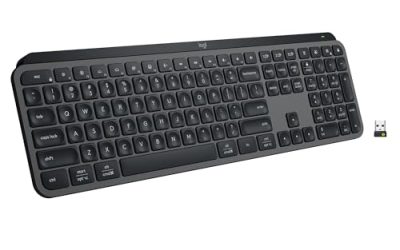
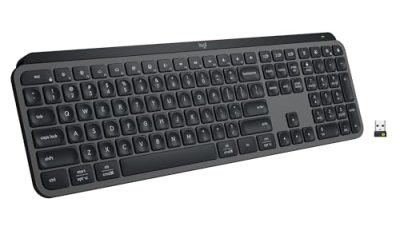
1. Logitech MX Keys — Best Overall Laptop Keyboard for Writers
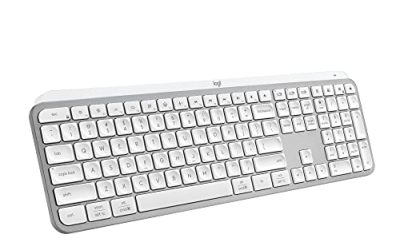
The Logitech MX Keys is the closest thing to a default recommendation for writers who want a better typing experience next to their laptop. It is a full-size wireless keyboard with low-profile keys, a layout that will feel familiar the moment you sit down, and a build quality that makes cheaper boards feel hollow by comparison.
The keys use Logitech’s Perfect Stroke design: dished, low-profile keycaps with a short, stable press and a soft landing. The travel is deeper than a laptop keyboard, which gives each keystroke a more definite feel, but the action stays quiet.
Smart backlighting is one of the MX Keys’ best features for writers. The keys light up when your hands approach and dim when you step away, and the brightness adjusts to the room. If you write late at night or in a dim room, the backlight keeps you from hunting for keys, and the automatic dimming saves battery. The battery is rechargeable over USB-C and lasts up to ten days with the backlight on, or up to five months with it off.
Connectivity is flexible: Bluetooth Low Energy or the included USB receiver, with pairing for up to three devices and a one-touch switch between them. The keyboard works with Windows, macOS, Linux, ChromeOS, iPadOS, and Android, and Logitech’s Options software lets you remap keys and set up app-specific shortcuts.
At around $119.99, the MX Keys is the most expensive board in this guide, and writers who only need a basic keyboard will not need everything it offers. But if you write for hours every day, the combination of quiet keys, backlighting, and multi-device switching is hard to beat.
Key specifications: Full-size layout with number pad; low-profile Perfect Stroke scissor keys; smart backlit keys with proximity sensor; USB-C rechargeable battery (up to 10 days with backlight, up to 5 months without); Bluetooth and USB receiver connectivity for up to 3 devices; Windows, macOS, Linux, ChromeOS, iPadOS, and Android compatible; 5.1 x 16.9 x 0.8 inches; 1.79 pounds.
View the Logitech MX Keys on Amazon
2. Logitech ERGO K860 — Best Ergonomic Keyboard for Writers
If your wrists ache after a long writing session, the Logitech ERGO K860 is the pick that addresses the problem most directly. It is a split, curved ergonomic keyboard designed to put your hands, wrists, and forearms in a more natural position, and it is one of the most comfortable boards in this guide for all-day typing.
The keyboard is split down the middle and curved so your hands rest at a slight angle instead of flat. The front edge slopes down, which reduces wrist bending, and a wide cushioned palm rest supports your wrists without the hard edge you get on a standard keyboard. Writers who struggle with wrist strain often find that a split layout like this one changes how long they can comfortably write.
The keys themselves are quiet and low-profile, with a soft, laptop-like feel and a slightly scooped shape that helps your fingers find the home row. The board is full-size, with a number pad and a full row of function keys, so you do not give up any keys for the ergonomic shape. It runs on two AAA batteries for up to 24 months, connects over Bluetooth or the included USB receiver, and pairs with up to three devices.
The trade-off is size. At around 17.9 inches wide and with a deep palm rest, the K860 takes up considerably more desk space than a compact board, and it is not something you will toss in a laptop bag. The split layout also takes a few days to get used to if you have only ever typed on a straight keyboard.
Key specifications: Split curved ergonomic layout with cushioned palm rest; full-size layout with number pad; quiet low-profile keys; two AAA batteries, up to 24 months of battery life; Bluetooth and USB receiver connectivity for up to 3 devices; Windows and macOS compatible; 9.0 x 17.9 x 1.9 inches; 2.55 pounds.
View the Logitech ERGO K860 on Amazon
3. Logitech K780 Multi-Device Wireless Keyboard — Best Multi-Device Keyboard for Writers
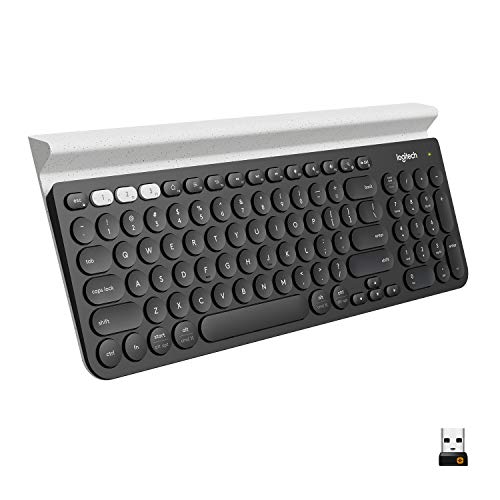
The Logitech K780 is a full-size wireless keyboard built around a simple idea: one keyboard for every device you write on. It pairs with up to three devices over Bluetooth or the included USB receiver, and a row of white Easy-Switch keys lets you hop between a laptop, a tablet, and a phone with a single press.
What sets the K780 apart for writers is the built-in device cradle. A rubber slot along the top of the keyboard holds a phone or tablet upright at a comfortable reading angle, so you can keep your notes, research, or a second draft visible while you type on your laptop. If you write with reference material open on a tablet, that cradle is genuinely useful, and it removes the need for a separate tablet stand.
The typing feel is quiet and rounded: large, circular, concave keys with a soft, low-profile press that is easy on the fingers during long sessions. It is a full-size board with a number pad, and the key spacing is generous, so writers with larger hands will find it more comfortable than the compact keyboards that dominate the portable market.
At around $79.99, the K780 sits in the middle of this guide on price. It is heavier and wider than the compact picks here, so it suits a fixed desk setup better than a bag. But if your writing life spans a laptop and a tablet, the K780 is the most convenient way to type on both.
Key specifications: Full-size layout with number pad; built-in cradle holds phones and tablets up to 12 mm thick; quiet round concave keys; two AAA batteries, up to 24 months of battery life; Bluetooth and USB receiver connectivity for up to 3 devices; Windows, macOS, ChromeOS, Android, and iOS compatible; 5.8 x 14.9 x 0.9 inches; 1.93 pounds.
View the Logitech K780 on Amazon
4. Logitech K400 Plus Wireless Touch Keyboard — Best Keyboard for Writing Away From the Desk
Not all writing happens at a desk. If you draft from the couch, an armchair, or a laptop balanced on your knees, the Logitech K400 Plus is built for exactly that. It is a compact wireless keyboard with a built-in touchpad, so you get typing and cursor control in one device, with no mouse required.
The keyboard itself is quiet and low-profile, with soft keys that are comfortable for long typing stretches. The built-in touchpad supports multi-touch gestures, so you can scroll through a document, move the cursor, and click without reaching for a separate mouse. That matters when you are writing away from a desk, where there is often no flat surface for a mouse at all.
It connects over a 2.4 GHz USB receiver with a range of up to 33 feet, runs on two AA batteries for up to 18 months, and includes media hotkeys and a volume control. The layout is compact, with no number pad, which keeps the board small enough to rest on your lap or carry around the house. It works with Windows, Android, and ChromeOS.
At around $29.99, the K400 Plus is also one of the cheapest boards in this guide. The trade-offs are the compact layout, which some touch typists find cramped, and the touchpad, which is good for document navigation but no replacement for a real mouse during heavy editing.
Key specifications: Compact layout with built-in multi-touch touchpad; quiet low-profile keys; 2.4 GHz USB receiver, up to 33 feet of range; two AA batteries, up to 18 months of battery life; media hotkeys and volume control; Windows, Android, and ChromeOS compatible; 5.5 x 14.0 x 0.9 inches; 0.86 pounds.
View the Logitech K400 Plus on Amazon
5. Logitech K120 Wired Keyboard — Best Budget Keyboard for Writers
Sometimes the right keyboard for writing is the simplest one. The Logitech K120 is a full-size wired USB keyboard that costs around $14.99, and it is the pick for writers who want a comfortable, reliable board without spending much or thinking about batteries, Bluetooth pairing, or charging cables.
The K120 uses quiet, low-profile membrane keys with a soft press and a standard full-size layout, including a number pad and a full function row. The key feel is closer to a laptop keyboard than to a mechanical board: short travel, gentle bottoming out, and very little noise. It is also spill-resistant, with a design that drains minor splashes away from the electronics, which is a small but real comfort for writers who keep coffee next to their keyboard.
Because it is wired, there is nothing to charge and nothing to pair. Plug it into a USB port and it works, on Windows or Linux, with no software needed. The cable is a standard USB-A connection, so laptop users with only USB-C ports will need a small adapter. There is no backlighting, no multi-device switching, and no wireless freedom.
None of that matters much for the job it is meant to do. If you want a quiet, full-size keyboard for drafting at your desk and you want to spend as little as possible, the K120 is a proven, long-running model that does the basics well.
Key specifications: Full-size wired layout with number pad; quiet low-profile membrane keys; spill-resistant design; USB-A wired connection, plug and play with no software; Windows and Linux compatible; 6.0 x 17.7 x 0.9 inches; 1.21 pounds.
View the Logitech K120 on Amazon
Comparison Table
| Keyboard | Best For | Connection | Backlit | Battery | Approx. Price |
|---|---|---|---|---|---|
| Logitech MX Keys | Best overall | Bluetooth / USB receiver | Yes, smart | USB-C rechargeable | ~$119.99 |
| Logitech ERGO K860 | Ergonomic comfort | Bluetooth / USB receiver | No | 2 AAA, up to 24 months | ~$129.99 |
| Logitech K780 | Multi-device writing | Bluetooth / USB receiver | No | 2 AAA, up to 24 months | ~$79.99 |
| Logitech K400 Plus | Writing away from the desk | 2.4 GHz USB receiver | No | 2 AA, up to 18 months | ~$29.99 |
| Logitech K120 | Budget wired typing | Wired USB-A | No | None (wired) | ~$14.99 |
Prices are approximate Amazon US prices at the time of writing and may change.
Buying Guide: How to Choose a Laptop Keyboard for Writing
Key feel matters more than anything else. Writers type more than almost anyone, so the feel of the keys is the first thing to get right. Quiet, low-profile keys with a soft landing, like the scissor or membrane switches on the boards in this guide, are usually the best choice for long sessions. Loud, clicky mechanical switches can be satisfying, but they tire the fingers faster and disturb everyone nearby.
Pick the right size for your space. A full-size keyboard with a number pad suits a fixed desk and writers who work with numbers, outlines, or spreadsheets alongside their drafts. A compact board suits small desks, laps, and travel. If you write on the couch, a keyboard with a built-in touchpad, like the K400 Plus, removes the need for a mouse entirely.
Think about ergonomics before your wrists complain. A flat keyboard is fine for short sessions, but if you write for hours a day, a split or curved layout like the ERGO K860 can make a real difference. A keyboard with a slight negative tilt, a palm rest, or a split design keeps your wrists straighter and reduces strain over time.
Multi-device support is worth having if you write on more than one screen. Many writers draft on a laptop, check research on a tablet, and jot notes on a phone. A keyboard that pairs with three devices and switches between them with one key, like the MX Keys or the K780, saves constant re-pairing.
Backlighting helps night writers. If you write in the evening or in dim rooms, backlit keys are worth paying for. The MX Keys is the only backlit board in this guide, and its automatic brightness adjustment is genuinely useful. If you only write in daylight, you can skip backlighting and save money.
Wired versus wireless is a lifestyle choice, not a quality choice. Wireless boards keep your desk tidy and let you type from the couch, but they need batteries or charging. A wired board like the K120 never needs charging and never drops a connection, and it costs far less. Neither is better in absolute terms; pick the one that fits how and where you write.
Check the connection your laptop actually has. Most wireless keyboards here use Bluetooth or a USB-A receiver. If your laptop only has USB-C ports, budget for a small USB-C adapter for the receiver, or choose a Bluetooth board and pair it directly.
Frequently Asked Questions
Do writers need a mechanical keyboard?
No. Many writers prefer quiet membrane or scissor-switch keyboards, like the ones in this guide, because they are softer, quieter, and less tiring over long sessions. Mechanical keyboards can be excellent for typing, but the loud, clicky switches most gamers prefer are usually a poor fit for writing, especially in shared spaces.
Is an external keyboard better than a laptop keyboard for writing?
For long sessions, usually yes. An external keyboard lets you position the keys at a comfortable height and angle, choose a layout and key feel that suits your hands, and keep your laptop screen at eye level with a stand. Laptop keyboards are built for thinness first, and that compromise shows up after a few hours of typing.
What is the quietest keyboard for writers?
Quiet, low-profile membrane and scissor-switch keyboards are the quietest options. Every keyboard in this guide is designed to be quiet, and the MX Keys and K120 are among the softest. If silence matters, avoid clicky mechanical switches and boards marketed for gaming.
Can I use these keyboards with a MacBook?
Yes, with a caveat. The MX Keys, ERGO K860, K780, and K120 all work with macOS, though the key labels follow a Windows layout, so a few keys, like Command and Option, sit where Control and Alt would be on a Windows board. Most writers adjust within a day, and Logitech’s software can remap keys on macOS.
How much should I spend on a keyboard for writing?
It depends on how much you write. Occasional writers will be happy with a budget board like the K120 at around $14.99. Daily writers who type for hours should consider the MX Keys or the ERGO K860, where the better key feel, backlighting, and ergonomics pay off over time. Spending more mostly buys comfort and features, not typing speed.
Do I need a number pad on a writing keyboard?
Not necessarily. A number pad is useful if your writing involves figures, dates, or data, but it makes the keyboard wider and pushes your mouse further to the right. If you rarely type numbers, a compact board without a number pad is more comfortable and takes up less desk space.
Conclusion
The best laptop keyboard for writers is the one that lets you forget about your hands and focus on the words. For most writers, that is the Logitech MX Keys: quiet, low-profile keys, smart backlighting, and easy switching between three devices make it the strongest all-round choice for daily writing. If your wrists hurt after long sessions, the Logitech ERGO K860 is worth its larger footprint for the split, curved layout alone. Writers who split their time between a laptop and a tablet will get the most from the Logitech K780 and its built-in device cradle, while the Logitech K400 Plus is the practical pick for drafting away from a desk. And if you simply want a reliable, quiet keyboard for as little money as possible, the Logitech K120 covers the basics for around $14.99.
Whichever you choose, pair it with a laptop stand so your screen sits at eye level, and give yourself a few days to adjust to the new key feel before judging it. A good writing keyboard is a small investment that pays off every time you sit down to write, and the right one is the one you stop noticing.
More from Amazon
Programs that pair well with the guide above. Offers and eligibility are set by Amazon and may change.
Free shipping on eligible items, Prime Video and more. Eligible new members can start with a free trial.
Start a Prime free trialAd-free music streaming. Eligible new subscribers can start with a free trial.
Try Music Unlimited freeA Prime membership for ages 18-24 with a trial period. Eligibility is set by Amazon.
See Prime for Young AdultsAudiobooks and podcasts to listen to on the go. Eligible new members can start with a free trial.
Try Audible freeAs an Amazon Associate we earn from qualifying purchases.