Our Short List of 3

- Best for: Wireless gaming and typing with a softer, dampened key feel
- Layout: 81-key 75 percent layout
- Switches: Linear red, hot-swap socket
- Connectivity: 2.4 GHz wireless, Bluetooth, USB-C wired (3 modes)
- Mount: Gasket design with sound-absorbing pads and 5-layer noise dampening
- Best for: FPS players who want the smallest possible footprint
- Layout: 61-key 60 percent layout
- Switches: Linear red
- Sockets: Hot-swap
- Connectivity: Wired

- Best for: Full-size typing and gaming with a numpad, at low noise
- Layout: 104-key full-size layout
- Switches: Linear red, quiet, pluggable (hot-swappable)
- Connectivity: Wired USB
- Backlighting: RGB, 16.8 million colors
All 4 Picks at a Glance
| Product | Specs | Action |
|---|---|---|
| Redragon K673 PRO Wireless Gasket Gaming Keyboard |
| Check price on Amazon |
| Redragon K617 Fizz 60 percent Wired Gaming Keyboard |
| Check price on Amazon |
| Redragon K582 Surara Wired RGB Mechanical Keyboard |
| Check price on Amazon |
 Redragon K580 Vata Wired RGB Mechanical Keyboard |
| Check price on Amazon |
Our Top Picks

Choosing a Redragon keyboard is less about whether the brand can build a decent mechanical board and more about which of its many similar-looking models matches your desk. The catalog repeats names across wired and wireless versions, sells the same layout with three different switches, and mixes entry boards with genuinely modern gasket designs. Pick on layout and switch first, and the rest of the range falls into place quickly.
This roundup is for first-time mechanical buyers, FPS players short on mouse room, and anyone who wants a full-size board with a numpad for weekday work. Every pick below is a Redragon keyboard sold on Amazon US, and each one was chosen from the details printed on its own product page: layout, switch type, connection, and the extras in the title, so you can compare the five on facts rather than marketing.
Quick Picks
As an Amazon Associate we earn from qualifying purchases
| Product | Best for | Key spec from title |
|---|---|---|
| Redragon K552 Kumara | A first mechanical keyboard that frees desk space | 87-key TKL layout with a metal frame |
| Redragon K673 PRO | Wireless gaming with a softer, quieter key feel | 81-key gasket board with a control knob |
| Redragon K617 Fizz | Shooter players who need maximum mouse room | 61-key 60 percent layout with hot-swap sockets |
| Redragon K582 Surara | Full-size typing with a numpad, minus the noise | 104 keys with quiet linear red switches |
| Redragon K580 Vata | MMO and macro-heavy games with media controls | Dedicated macro keys and a media wheel |
How to Choose
Start with the layout, because it decides your whole desk
Redragon sells the same switch technology in 60 percent, 75 percent, tenkeyless and full-size shells, and the layout is the one choice you cannot change later. A 60 percent board like the K617 Fizz deletes the arrow cluster, the F-row and the numpad, which is wonderful for wide mouse swings and miserable for spreadsheet work. Full-size models such as the K582 and K580 keep the numpad and add macro or media hardware, but they claim far more desk width. Measure your tray, count the keys you actually use in a normal week, and let that decide before switch talk begins.
Match the switch to the room, not just your fingers
Most of this lineup ships with linear red switches, which travel straight down with no bump and stay comparatively quiet, or clicky blue switches, which announce every press to the whole room. The K580’s blue switches feel deliberate and sound sharp; the K582’s reds are the polite option for shared spaces. Hot-swap sockets, fitted to the K552, K673 PRO, K617 and K582 here, are your insurance policy: if the stock feel disappoints, you can pull the switches and fit a different set with the included tool instead of replacing the entire keyboard.
Decide whether a cable is a feature or a nuisance
Four of these five boards are wired only, and for a fixed gaming desk that is honestly fine: no charging, no pairing, no battery anxiety mid-match. The K673 PRO is the exception, with 2.4 GHz wireless, Bluetooth and a USB-C wired fallback in one board, which suits anyone who moves between a gaming PC and a laptop or tablet. Wireless freedom costs you a battery to manage and one more thing to charge before a long session. If your keyboard never leaves one desk, spend the difference on layout and switches instead of radios you will never switch on.
Weigh the extras against what budget boards quietly drop
Redragon’s value comes from hardware extras rivals charge more for: the K580’s dedicated macro keys and media wheel, the K673 PRO’s control knob, the K552’s metal frame. The corners get cut elsewhere. Keycaps on these boards are typically ABS rather than PBT, software support varies by model, and some listings rely on onboard controls instead of a polished app. Read the listing for the exact extras you care about, because two boards with near-identical names can differ in exactly the feature you were counting on, and the cheaper variant is usually the one missing it.
The 5 Best Options
Redragon K552 Kumara Mechanical Gaming Keyboard
The K552 Kumara is the board most people picture when they hear the Redragon name: an 87-key tenkeyless deck in a metal frame, wired, with linear red switches and RGB backlighting. It suits a first mechanical purchase because nothing about it is exotic, yet the frame feels a class above the plastic shells around it, and the hot-swap sockets mean the switches can change as your taste develops. For a small desk that still needs a proper F-row and arrow keys, this remains the sensible default in the range.
Specs
- Layout: 87-key tenkeyless (TKL)
- Switches: Linear red, hot-swappable
- Connectivity: Wired USB
- Backlighting: RGB
- Frame: Metal and ABS enclosure
- Dimensions: 13.94 x 4.86 x 1.46 inches
- Weight: 875 grams
- Model: K552-KR
- Splash-resistant design
Best for: A first mechanical keyboard on a compact desk
Watch out for: Several K552 variants with different backlighting and switch colors sit on separate listings, so confirm the exact version on the page before ordering; the cable is wired-only.
ASIN: B016MAK38U
Redragon K673 PRO Wireless Gasket Gaming Keyboard
- Best for: Wireless gaming and typing with a softer, dampened key feel
- Layout: 81-key 75 percent layout
- Switches: Linear red, hot-swap socket
- Connectivity: 2.4 GHz wireless, Bluetooth, USB-C wired (3 modes)
- Mount: Gasket design with sound-absorbing pads and 5-layer noise dampening
Wireless gaming and typing with a softer, dampened key feel
This listing is one colorway (Vintage Blue); other K673 PRO colors are sold under different ASINs, so check the color on the page matches the board you think you are buying.
The K673 PRO is where Redragon’s range grows up. It is a 75 percent board with 81 keys, a gasket-mounted structure with sound-absorbing pads, and a dedicated knob for volume and lighting, and it connects over 2.4 GHz wireless, Bluetooth or a USB-C cable. The linear red switches are hot-swappable, and the dampened build gives it a softer, quieter character than the tray-mount boards elsewhere in this list. Pick it if your keyboard splits time between gaming and everyday typing, or between two machines, and you want the desk to stay free of cables.
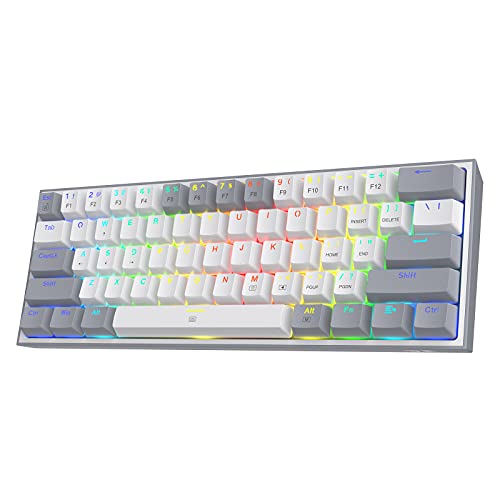
Redragon K617 Fizz 60 percent Wired Gaming Keyboard
- Best for: FPS players who want the smallest possible footprint
- Layout: 61-key 60 percent layout
- Switches: Linear red
- Sockets: Hot-swap
- Connectivity: Wired
FPS players who want the smallest possible footprint
Everything beyond the base layer, arrows included, needs an Fn combination, which frustrates anyone who edits text or works in spreadsheets all day; confirm the keycap color variant on the listing.
The Fizz takes the opposite approach to the full-size boards: 61 keys, no F-row, no arrows, no numpad, and a footprint small enough to leave half your desk to the mouse. That trade is exactly what shooter players want, because wide, low-sensitivity mouse movement stops colliding with the keyboard. The linear red switches sit in hot-swap sockets, the white and grey keycaps keep it looking clean, and Redragon’s software support covers remapping, which matters more on a board where half the functions live on a second layer.
Redragon K582 Surara Wired RGB Mechanical Keyboard
- Best for: Full-size typing and gaming with a numpad, at low noise
- Layout: 104-key full-size layout
- Switches: Linear red, quiet, pluggable (hot-swappable)
- Connectivity: Wired USB
- Backlighting: RGB, 16.8 million colors
Full-size typing and gaming with a numpad, at low noise
Redragon sells the K582 in more than one switch flavor, so verify the linear red version is the one selected on the listing before checkout.
The Surara is the full-size traditionalist of the group: 104 keys, a proper numpad, wired USB, and quiet linear red switches you can pull and replace thanks to the pluggable sockets. N-key rollover keeps fast combo inputs registering, the double-shot ABS keycaps should hold their legends, and software support is there when you want to record macros or tune the RGB. It makes the most sense for someone whose keyboard earns its keep in documents and data entry all week, then stays put for gaming in the evening without waking the household.
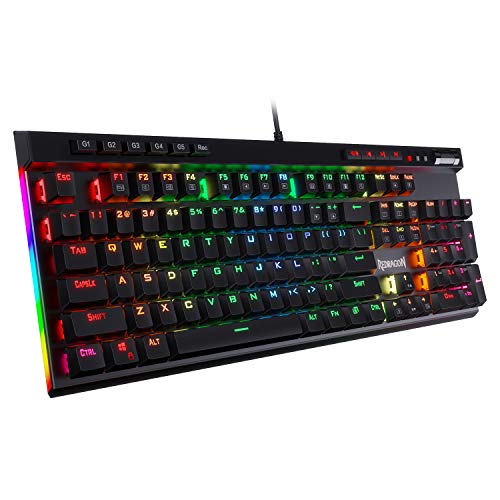
Redragon K580 Vata Wired RGB Mechanical Keyboard
- Best for: MMO and MOBA players who use macros and media keys constantly
- Layout: Full-size layout with numpad
- Switches: Blue switches, hot-swappable socket
- Macro keys: 5 dedicated macro keys with onboard macro recording
- Media: Dedicated media controls and media wheel
MMO and MOBA players who use macros and media keys constantly
Blue switches are genuinely loud, so this is the wrong pick for a shared bedroom or open office; the K580 also exists in other switch and wireless versions, so match the listing to the wired blue-switch variant.
The Vata is built for players who bind everything. Alongside the full-size layout you get five dedicated macro keys down the side, onboard macro recording that needs no software session, and dedicated media controls with a wheel, so volume and playback never require leaving the game. This variant carries clicky blue switches in hot-swappable sockets, which gives each press a firm tactile snap and an audible report. If your evenings run on MMO rotations, MOBA combos or streaming hotkeys, the extra hardware earns its desk space in a way a plain board cannot.
Which One Fits Your Situation
You are buying your first mechanical keyboard
Start with the K552 Kumara. The tenkeyless layout keeps every key you are used to except the numpad, the metal frame makes it feel like a real upgrade from a membrane board, and hot-swap sockets let you experiment with switches later instead of buying a second keyboard. It is the lowest-risk way into the Redragon range and into mechanical boards generally.
You play shooters and swing your mouse in wide arcs
Take the K617 Fizz. A 60 percent board hands the right half of your desk back to the mouse, which matters more to aim than any switch specification. You will live on the Fn layer for arrows and F-keys, so this pick assumes gaming comes first and document work happens somewhere else, or rarely.
You game at night while other people sleep
Choose between the K673 PRO and the K582 Surara. The K673 PRO’s gasket mount and sound-absorbing pads take the edge off bottom-out noise, and wireless keeps the desk clear; the K582’s quiet linear reds and full-size layout suit a home office better. Either way, avoid the K580’s blue switches for this job.
Your week mixes spreadsheets, data entry and long game sessions
The K580 Vata covers both lives: numpad for the numbers, five macro keys and a media wheel for the games and calls in between. If the click of blue switches would bother coworkers or family, the K582 Surara gives you the same full-size footprint with quiet linear reds and software-based macros instead.
Common Mistakes
- Buying a 60 percent keyboard for the look, then discovering your daily work needs arrow keys, an F-row or a numpad on their own switches rather than an Fn layer.
- Assuming two listings with the same model name are the same keyboard, when Redragon sells wired and wireless, RGB and rainbow, and red- and blue-switch versions under near-identical names.
- Choosing clicky blue switches for a shared room because the sound seemed fun in a video, then living with the noise every night.
- Expecting every Redragon board to be hot-swappable, when only some listings state a socket; check the product page for the exact model instead of assuming.
- Ignoring the variant selector at the top of the listing and ordering whichever color or switch version happens to be preselected.
Frequently Asked Questions
Are Redragon keyboards good for both gaming and typing?
They can be, provided you match the board to the work. Linear red switches and full or tenkeyless layouts, as on the K582 and K552, type comfortably all day, while the compact boards trade typing convenience for gaming space. The listings are aimed at Windows PCs, so check the compatibility line on the page if your setup is unusual.
What is the difference between the K552 and the K582?
Size and intent. The K552 is an 87-key tenkeyless board in a metal frame, built to save desk space while keeping the F-row and arrows. The K582 is a 104-key full-size board with a numpad, quiet linear red switches and software support, aimed at people whose keyboard splits time between data-heavy work and gaming.
Which Redragon keyboard is the quietest in this list?
The K673 PRO, on paper: its gasket mount and sound-absorbing pads are designed to soften each keystroke, and its linear red switches have no click mechanism. The K582 is the quieter full-size alternative, since its red switches are positioned as the quiet option in the range. The K580’s blue switches sit at the opposite, loud end.
Do these keyboards need software to work?
No. Every board here works when plugged in or paired, including the K580’s onboard macro recording, which is handled on the keyboard itself. Software, where a listing offers it, adds remapping, macro profiles and deeper RGB control. If you dislike companion apps, the onboard controls on the K580 and the knob on the K673 PRO cover the everyday adjustments.
FAQ
Are Redragon keyboards good for both gaming and typing?
What is the difference between the K552 and the K582?
Which Redragon keyboard is the quietest in this list?
Do these keyboards need software to work?
More from Amazon
Programs that pair well with the guide above. Offers and eligibility are set by Amazon and may change.
Free shipping on eligible items, Prime Video and more. Eligible new members can start with a free trial.
Start a Prime free trialAd-free music streaming. Eligible new subscribers can start with a free trial.
Try Music Unlimited freeA Prime membership for ages 18-24 with a trial period. Eligibility is set by Amazon.
See Prime for Young AdultsAudiobooks and podcasts to listen to on the go. Eligible new members can start with a free trial.
Try Audible freeAs an Amazon Associate we earn from qualifying purchases.