Key takeaways
- Shopping for best adsl2 routers? This November 2026 guide explains ADSL2+ limits, ISP compatibility, and what to verify before buying legacy modem-router stock.
As an Amazon Associate we earn from qualifying purchases.
If your home still runs on a copper telephone line, the modem-router is the one box standing between you and the internet, and picking the wrong one means days of blinking lights and calls to your provider. ADSL2+ tops out far below modern fibre, so the decision is less about chasing speed and more about matching a box to your line, your provider’s settings and the number of devices in your home. With most of these models now out of production, the choice also involves sorting genuine remaining stock from renewed units and listings that overpromise.
This guide is written for three groups: households in areas where fibre has not arrived yet, renters who want to stop paying a monthly rental fee for an ISP-supplied gateway, and anyone keeping a DSL line as a backup. Rather than ranking boxes that may no longer be on sale, it explains what to check on the product page before you order, so the model you pick actually connects on your line.
ADSL2+ in 2026: The Honest Picture
ADSL2+ is the ITU-T G.992.5 standard that carried home broadband through the 2000s and early 2010s, with a headline downstream rate of up to 24 Mbps and upstream of around 1 Mbps. In practice, the speed you get depends on how far your home sits from the exchange or street cabinet: a short line can come close to the headline figure, while a long rural line may deliver a fraction of it. Fibre and cable have replaced copper across most towns and cities, and several providers are now retiring their copper networks altogether, which is why ADSL2+ hardware has become a legacy category.
Most ADSL2+ modem-routers stopped rolling off production lines years ago. What you will find on sale today is usually remaining new stock, renewed units, or third-party sellers clearing old inventory, and the listing does not always make that clear. Firmware updates have also stopped for many of these models, so a box bought today is unlikely to receive new security fixes. That does not make every old model a bad buy, but it does mean the listing’s condition, the seller, the returns policy and the manufacturing date deserve as much attention as the headline speed.
On a healthy line, an ADSL2+ connection still handles everyday use without fuss: browsing, email, SD video, music streaming and one video call at a time. It starts to struggle with 4K streaming, large game downloads, cloud backups and a house full of connected devices all at once. Before spending money on new hardware, it is worth checking whether fibre, fixed wireless or a faster DSL tier is available at your address, because a better line often helps more than a better box.
How to Choose
Match the modem to your line type
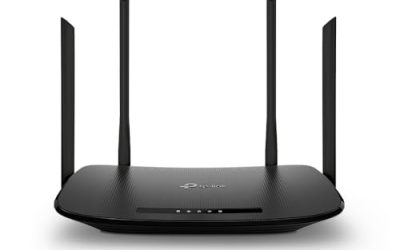
Start with your line, not the box. An ADSL2+ modem-router only works on an ADSL or ADSL2+ service; it will not connect to a VDSL2, fibre or cable line on its own, so confirm your line standard with your provider first. Most ADSL lines use Annex A, while ISDN-based lines in parts of Europe need Annex B, and a unit built for the wrong annex will never sync. Ask your provider for the connection details too: whether it uses PPPoE or PPPoA, the username and password, and whether any VLAN tag is required. A dual-standard model such as the TP-Link TD-W9970 also handles VDSL2, which helps if your line is upgraded later.
Check the Wi-Fi and wired ports against your household
Most ADSL2+ modem-routers are Wireless-N units with a single 2.4 GHz radio and a headline Wi-Fi speed of 300 Mbps, which is ample for a line that tops out at 24 Mbps but can feel crowded in a flat full of neighbours on the same band. If several people stream and game at once, a dual-band model such as the Netgear D6400, with its 5 GHz radio, keeps short-range traffic off the busy 2.4 GHz band. Wired ports matter too: four 10/100 LAN ports are the norm in this class, and that is enough for a television and a console, but gigabit ports are rare, so check the specification if you move large files between computers at home.
Look at the extras that still matter
A USB port is the most useful extra on an ADSL2+ unit: on models such as the TP-Link TD-W9970 it accepts a 3G or 4G dongle as a backup connection, or a storage stick for basic file sharing across the home network. Parental controls and a guest network are worth having if children or visitors use your Wi-Fi, since they let you set access times and keep guests off your main network. Quality of service settings help when one device hogs the line, letting you give video calls priority over background downloads. None of these extras fixes a slow line, but on a 24 Mbps connection the right ones decide whether the connection feels fair to everyone using it.
Verify condition, seller and returns before ordering
Because most ADSL2+ stock is old, the listing matters as much as the model. Read whether the unit is new, renewed or used, and check who the seller is, what the warranty covers and the returns window if it will not sync on your line. A renewed unit can be good value, but only if the power adapter and the DSL cable are included, since replacements for older models can be awkward to source. Look for the hardware version as well: the same model name sometimes covers several revisions with different firmware, and the wrong revision can behave differently on your provider’s network. If the listing is vague about any of this, ask the seller before you buy.
Which One Fits Your Situation
A basic replacement for a small flat
For a one- or two-person flat with a handful of devices, a simple N300 unit in the mould of the TP-Link TD-W8961N covers the basics: a built-in ADSL2+ modem, 300 Mbps Wi-Fi and four wired ports in a single box. It suits light browsing, email and evening streaming, and its straightforward setup keeps the job short. Just confirm Annex A compatibility first if your line uses a standard telephone socket.
A household that wants dual-band Wi-Fi
When several people share one DSL line, a dual-band model in the mould of the Netgear D6400 earns its keep: the 5 GHz radio carries nearby laptops and phones while the 2.4 GHz band serves devices further away. Its AC1600 wireless and VDSL2 support also leave room for a line upgrade. Check the listing carefully, though, since this is an older model and condition varies between sellers.
A line that may move to faster DSL later
If your provider has hinted at a VDSL upgrade, a dual-standard unit in the mould of the TP-Link TD-W9970 makes sense: it handles ADSL2+ today and VDSL2 up to 100 Mbps if your line moves over, plus a USB port for a mobile dongle as backup. That flexibility avoids buying twice. Before ordering, confirm your provider supports the model and that the listing is for the Annex version your line needs.
A wired-heavy setup with more demanding devices
For a home where the television, console and desktop all connect by cable, a gigabit-equipped model in the mould of the Motorola MD1600 fits best: four gigabit LAN ports move files between local devices far faster than the 10/100 ports on basic units, and its AC1600 dual-band Wi-Fi covers the wireless side. It is built for providers such as Frontier and Windstream, so confirm yours is supported, and note it does not work with bonded DSL lines.
Setting Up an ADSL2+ Router Without Headaches
Fit a microfilter on every telephone socket in use, then connect the modem-router to the line with the DSL cable supplied and wait for the DSL light to go solid, which can take a couple of minutes on the first sync. If the light keeps flashing, try the main socket without an extension cable, since long internal wiring is a common cause of a line that will not sync.
Log in to the router’s setup page and enter the connection details your provider gave you: the protocol, usually PPPoE or PPPoA, plus the username and password. Save, reboot, and check that the status page shows a connected state and an IP address. Change the admin password and the Wi-Fi name and password at this point, and switch the wireless security to WPA2 if it is not already set.
Place the box in the open, away from thick walls and large metal objects, roughly in the middle of the area you use most. If speeds fall short of what your provider quoted, test with a wired connection first to separate line problems from Wi-Fi problems, and run the test at a quiet time of day. Keep the firmware as it is unless the maker still publishes updates for your exact hardware version.
Common Mistakes
- Buying a router-only unit with no DSL modem built in, then finding it cannot connect to a telephone line at all.
- Ordering the wrong Annex version for your line, which leaves the modem unable to sync no matter how the settings are changed.
- Expecting ADSL2+ to carry 4K streaming or large downloads, when the line itself tops out near 24 Mbps on a short run.
- Skipping the microfilter on a shared socket, which causes crackling calls, dropped sync and slow speeds.
- Choosing a renewed unit without checking that the power adapter, DSL cable and return window are included.
Frequently Asked Questions
Can I still buy a new ADSL2+ router in 2026?
Yes, but new stock is limited because most makers stopped producing ADSL2+ models years ago. Listings today are often remaining stock or renewed units, so read the condition, the seller and the returns policy before ordering, and check that the hardware version matches your line type. If your provider is retiring copper in your area, a short-term unit may still be the sensible buy.
Will an ADSL2+ router work with a fibre connection?
No. An ADSL2+ modem-router is built to sync with a copper telephone line, and it cannot connect to fibre on its own. Some dual-standard models accept an Ethernet WAN connection from a fibre modem, which lets the same box act as your router, but you still need the fibre modem or ONT in front of it. Check the specification for an EWAN or WAN port before assuming it will work.
What speed will I actually get from ADSL2+?
ADSL2+ is rated at up to 24 Mbps downstream and around 1 Mbps upstream, but your real speed depends on the distance and quality of the copper between your home and the exchange. Short lines can come close to the headline figure, while long lines may deliver far less. Ask your provider for the expected speed at your address rather than trusting the number on the box.
Do I need a separate modem if I buy an ADSL2+ router?
No. If the box is a modem-router combo with a DSL port, the modem is built in and it connects straight to the telephone socket through a microfilter. A router without a built-in modem will not work on a DSL line by itself. If your own DSL modem already works, a standard router can sit behind it, but for most homes a single combo unit is simpler.
FAQ
Can I still buy a new ADSL2+ router in 2026?
Will an ADSL2+ router work with a fibre connection?
What speed will I actually get from ADSL2+?
Do I need a separate modem if I buy an ADSL2+ router?
More from Amazon
Programs that pair well with the guide above. Offers and eligibility are set by Amazon and may change.
Free shipping on eligible items, Prime Video and more. Eligible new members can start with a free trial.
Start a Prime free trialAd-free music streaming. Eligible new subscribers can start with a free trial.
Try Music Unlimited freeA Prime membership for ages 18-24 with a trial period. Eligibility is set by Amazon.
See Prime for Young AdultsAudiobooks and podcasts to listen to on the go. Eligible new members can start with a free trial.
Try Audible freeAs an Amazon Associate we earn from qualifying purchases.