Our Short List of 3
All 5 Picks at a Glance
| Product | Specs | Action |
|---|---|---|
 1. ASUS VY229HF | Check price on Amazon | |
 2. HP V22 FHD | Check price on Amazon | |
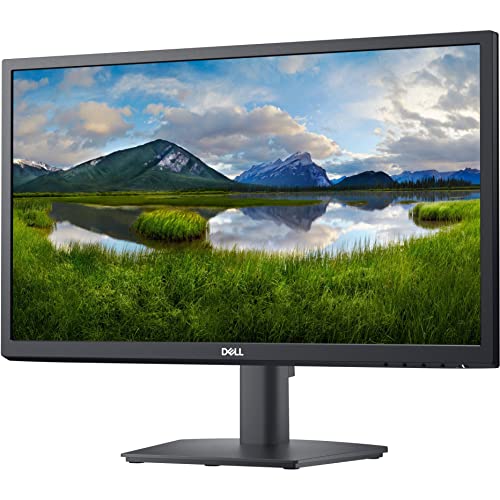 3. Dell E2222H | Check price on Amazon | |
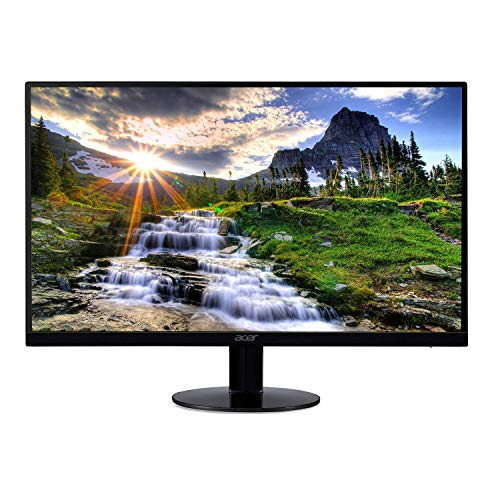 4. Acer SB220Q bi | Check price on Amazon | |
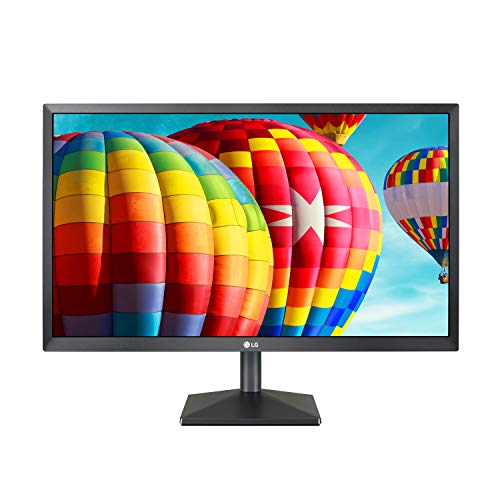 5. LG 22MK430H-B | Check price on Amazon |
Key takeaways
- Find the best 22 monitors with sharp 1080p IPS panels, fast refresh rates, and slim designs that fit small desks and tight workspaces.
The best 22 monitors prove that a smaller screen can still be sharp, fast, and comfortable for a full workday. A 22-inch monitor, usually with a 21.5-inch viewable panel, fits on a small desk, leaves room for a keyboard and notebook, and costs less than larger displays while still showing a full 1080p desktop. This guide covers only 22-inch class monitors, meaning models with a 21.5-inch viewable screen that manufacturers market as 22-inch displays. Every pick below is a 1080p monitor with that screen size, so you can compare them directly without worrying about a larger or smaller panel sneaking into the list.
This guide explains what to look for in a 22-inch monitor, then compares five models that cover office work, casual gaming, and tight budgets. Each pick links to its Amazon listing so you can confirm the exact model and current availability before ordering.
How to Choose
1. Panel type and viewing angles
Panel type decides how the image looks from different angles and how accurate the colors are. IPS panels give wide viewing angles and consistent color, which makes them the best choice for shared desks, photo work, and anyone who moves around while working. VA panels give deeper blacks and higher contrast, which suits movie watching and dark games, but their viewing angles are narrower. TN panels are the fastest for competitive gaming but have the weakest color and viewing angles. For most 22-inch buyers, IPS is the safest choice, since it looks good from any seat and handles both work and entertainment well.
2. Resolution and text sharpness
All five picks in this guide are 1080p, at 1920 x 1080, which is the standard resolution for 22-inch monitors. At this size, 1080p gives sharp text and a comfortable desktop without scaling, and it is easy for any laptop or desktop to drive. A higher resolution would be wasted on a 22-inch screen for most users, and it would demand more from the graphics hardware. If you plan to use the monitor as a second screen for documents and spreadsheets, 1080p at 22 inches is a good balance of sharpness and readability. Check that the listing states 1920 x 1080 native resolution, not a lower panel that accepts a 1080p signal.
3. Refresh rate and response time
Refresh rate decides how smooth motion looks. A 60 Hz monitor refreshes the image 60 times per second, which is fine for office work, browsing, and video. A 75 Hz monitor is slightly smoother and is a nice step up for everyday use, while a 100 Hz monitor gives visibly smoother scrolling and casual gaming. Response time, usually 5 ms on these models, decides how quickly pixels change color; a lower number means less ghosting in fast motion. For competitive gaming, a higher refresh rate and lower response time matter, but for work and casual play, 75 Hz with a 5 ms response is a comfortable standard.
4. Connectivity and ports
Check the ports before you buy, since a monitor with the wrong inputs will need an adapter. HDMI is the standard connection for laptops, consoles, and desktops, and it is present on every pick here. VGA is an older analog connection that still appears on office models and is useful for legacy desktops. DisplayPort appears on some business models and supports higher refresh rates on compatible hardware. A 3.5 mm audio output lets you connect headphones or speakers when the monitor has no built-in audio. Make sure your computer has a matching output, and remember that a monitor with only VGA will not work well with a modern laptop that has only HDMI or USB-C.
5. Ergonomics and mounting
A monitor that cannot adjust to your eye level will cause neck strain over a long workday. Tilt adjustment is standard on these models and lets you angle the screen up or down. Height adjustment, swivel, and pivot are less common at this size and price, so check the listing if you need them. VESA mounting, usually 100 x 100 mm, lets you attach the monitor to a desk arm or wall mount, which frees desk space and gives far more adjustment than the included stand. If desk space is tight, a VESA-compatible model on a monitor arm is often the best setup.
6. Eye care and comfort features
Long sessions demand eye comfort features. Low blue light modes reduce the blue light that can cause eye fatigue in the evening, and flicker-free backlights reduce the invisible flickering that can cause headaches on some displays. An anti-glare coating reduces reflections from windows and overhead lights, which matters in a bright room. Some models carry independent low blue light certification, which is a useful sign that the feature was checked by a third party. These features do not change image quality much, but they make a real difference over an eight-hour workday.
7. Design, bezels, and footprint
A 22-inch monitor should be slim and light enough to fit a small desk without dominating it. Thin bezels, especially on three sides, make the screen feel larger and look better in a dual-monitor setup, since the gap between two screens is smaller. Check the width and depth in the listing and measure your desk, including space for the stand. A monitor with a small, stable stand leaves room for a keyboard, a notebook, and a coffee mug, which is the whole point of choosing a compact display.
Top Picks
1. ASUS VY229HF
The ASUS VY229HF is a 22-inch Eye Care monitor with a 21.45-inch viewable IPS panel, Full HD resolution, and a 100 Hz refresh rate, which makes it the smoothest pick in this guide. Its 1 ms response time and Adaptive Sync support keep casual gaming and fast scrolling smooth, while Eye Care Plus technology, a blue light filter, and a flicker-free backlight make long sessions more comfortable. The slim, frameless design looks modern on a small desk, and the tilt-adjustable stand keeps setup simple.
Specifications include a 22-inch class IPS panel with a 21.45-inch viewable area, 1920 x 1080 resolution, 100 Hz refresh rate, 1 ms response time, Adaptive Sync, HDMI and VGA inputs, and a three-year warranty. The panel covers a wide color range for its class, and the low blue light and flicker-free features are designed for extended daily use.
This monitor is for home offices and casual gaming setups where smooth motion and eye comfort matter. It suits a primary desk monitor for work, study, and light gaming, and its 100 Hz refresh rate is a real step up from standard 60 Hz models. The main caveat is that it has no height adjustment, so you may need a monitor riser or arm to reach the ideal eye level. It also has no built-in speakers, so plan for headphones or external speakers if you need audio.
2. HP V22 FHD
The HP V22 FHD is a 21.5-inch Full HD monitor with a TN panel, a tiltable screen, and HDMI and VGA ports. It is a straightforward office monitor from a major brand, with a slim design, a low blue light mode, and a three-sided micro-edge bezel that looks clean on a desk. The TN panel gives a fast response for its class, and the monitor is light enough to move between rooms or desks without effort.
Specifications include a 21.5-inch TN panel, 1920 x 1080 resolution, 60 Hz refresh rate, 5 ms response time, HDMI and VGA inputs, tilt adjustment, and a low blue light setting. The micro-edge bezel keeps the footprint small, and the monitor is compatible with standard VESA mounts for desk arms.
This monitor is for office work, study, and everyday browsing where a reliable, no-fuss display is the priority. It suits a home office, a school desk, or a second screen for a laptop, and its low blue light mode helps during long sessions. The main caveat is the TN panel, which has narrower viewing angles and less accurate color than the IPS picks in this guide, so it is not the best choice for photo work or for sharing the screen with someone sitting to the side. Confirm the exact model number on the listing before ordering, since HP sells several V22 variants and the listing should match the 9SV78AA model family.
3. Dell E2222H
The Dell E2222H is a 21.5-inch Full HD business monitor with a VA panel, DisplayPort, and VGA inputs. It is built for office desks, with a sturdy stand, tilt adjustment, VESA mounting, and a three-year warranty that reflects its business focus. The VA panel gives a 3000:1 contrast ratio, which means deeper blacks than IPS models, and the anti-glare coating keeps reflections low in bright offices. Cable management through the stand keeps the desk tidy.
Specifications include a 21.5-inch VA panel, 1920 x 1080 resolution, 60 Hz refresh rate, 5 ms response time, DisplayPort 1.2 and VGA inputs, tilt adjustment, VESA 100 x 100 mm mounting, and a three-year warranty. The monitor is designed for all-day office use, with a comfortable viewing angle range and a stable, compact stand.
This monitor is for office work, document editing, and video calls where contrast and a sturdy build matter. It suits a business desk, a reception area, or a home office that needs a reliable display with DisplayPort input. The main caveat is the lack of HDMI, so check that your computer has DisplayPort or VGA output, or budget for an adapter. It is also a 60 Hz model, so it will not feel as smooth as the 100 Hz ASUS pick for fast scrolling or casual gaming. Confirm availability on the listing before ordering, since this business model can move between direct and third-party sellers.
4. Acer SB220Q bi
The Acer SB220Q bi is a 21.5-inch Full HD IPS monitor with an ultra-thin zero-frame design and a 75 Hz refresh rate, and it is the most popular 22-inch class model in this guide. Its IPS panel gives wide viewing angles and accurate color for work and movies, and AMD FreeSync support smooths casual gaming when paired with a compatible graphics card. The zero-frame design looks modern and works well in a dual-monitor setup, since the gap between two screens is minimal.
Specifications include a 21.5-inch IPS panel, 1920 x 1080 resolution, 75 Hz refresh rate, 4 ms response time, AMD FreeSync, HDMI and VGA inputs, Acer VisionCare with dimming and low blue light, and a tilt-adjustable stand. The ultra-thin profile and light weight make it easy to place on a small desk or mount on a VESA arm.
This monitor is for home offices, study desks, and casual gaming setups where a good IPS image and a slim design matter. It suits a primary monitor for everyday computing and a second screen for a laptop, and its 75 Hz refresh rate is smoother than standard office models. The main caveat is the lack of height adjustment and built-in speakers, so plan for a riser or arm and external audio if you need them. It also has only one HDMI port, so a second HDMI device will need a switch or a cable swap.
5. LG 22MK430H-B
The LG 22MK430H-B is a 21.5-inch Full HD IPS monitor with AMD FreeSync, Dynamic Action Sync, and Black Stabilizer, and it is the best gaming-oriented pick in this guide. Its IPS panel gives wide viewing angles and consistent color, while FreeSync reduces tearing in games when paired with a compatible graphics card. Dynamic Action Sync lowers input lag, and Black Stabilizer brightens dark areas in games so details are easier to see. On-Screen Control software lets you adjust settings from the desktop instead of reaching for the buttons.
Specifications include a 21.5-inch IPS panel, 1920 x 1080 resolution, 75 Hz refresh rate, 5 ms response time, AMD FreeSync, Dynamic Action Sync, Black Stabilizer, HDMI and VGA inputs, and a tilt-adjustable stand. The slim bezel and compact stand keep the footprint small, and the monitor supports VESA mounting.
This monitor is for casual gaming and everyday computing where a responsive IPS panel and gaming features add value without a gaming-monitor outlay. It suits a bedroom gaming setup, a student desk, or a home office that doubles as a play space. The main caveat is that it is a 75 Hz model, so it will not match a high-refresh gaming monitor for competitive play, and it has no built-in speakers. It also has a single HDMI port, so plan your connections accordingly.
Comparison Table
| Monitor | Panel Type | Viewable Size | Refresh Rate | Response Time | Best For |
|---|---|---|---|---|---|
| ASUS VY229HF | IPS | 21.45 inches | 100 Hz | 1 ms | Smoothest motion and eye care |
| HP V22 FHD | TN | 21.5 inches | 60 Hz | 5 ms | Simple office work |
| Dell E2222H | VA | 21.5 inches | 60 Hz | 5 ms | Business desks with DisplayPort |
| Acer SB220Q bi | IPS | 21.5 inches | 75 Hz | 4 ms | Slim design and everyday use |
| LG 22MK430H-B | IPS | 21.5 inches | 75 Hz | 5 ms | Casual gaming features |
Which One Is Right for You?
If you want the smoothest image and the best eye comfort in this guide, the ASUS VY229HF is the pick. Its 100 Hz refresh rate, 1 ms response, and Eye Care Plus features suit long workdays and casual gaming, and its IPS panel looks good from any angle.
If you need a simple, reliable office monitor from a major brand and you work mostly with documents and browsing, the HP V22 FHD is the pick. Its slim design and low blue light mode suit a home office or study desk, as long as you do not need wide viewing angles for shared viewing.
If your desk is a business setup with DisplayPort output and you value contrast and a sturdy build, the Dell E2222H is the pick. Its VA panel gives deeper blacks, and its three-year warranty and VESA mounting suit an office that needs a dependable display.
If you want a slim, modern IPS monitor that works well as a primary screen or in a dual-monitor setup, the Acer SB220Q bi is the pick. Its zero-frame design, 75 Hz refresh rate, and FreeSync support cover work, study, and casual gaming in one compact package.
If casual gaming matters and you want features that help in dark scenes and fast action, the LG 22MK430H-B is the pick. Its FreeSync, Dynamic Action Sync, and Black Stabilizer give it an edge for play, while its IPS panel keeps everyday work looking sharp.
Before ordering, measure your desk, check your computer’s video outputs, and decide whether you need height adjustment or a VESA arm. A 22-inch monitor is a compact choice, and the right one is the model whose ports and stand match the desk it will live on.
Frequently Asked Questions
Is a 22-inch monitor big enough for work?
For most office work, yes. A 22-inch 1080p monitor shows a full desktop with sharp text and fits a small desk with room to spare. It is less suited to work that needs many windows side by side, such as large spreadsheets, where a 27-inch or ultrawide display gives more room. As a primary monitor for documents, email, and video calls, it is comfortable, and as a second screen it is an excellent size.
What is the difference between a 22-inch monitor and a 21.5-inch monitor?
They are usually the same thing. Manufacturers market many 21.5-inch viewable panels as 22-inch class monitors, and the diagonal measurement can include or exclude the bezel depending on the brand. All five picks in this guide are 22-inch class monitors with a 21.5-inch or 21.45-inch viewable panel, so they are directly comparable.
Do 22-inch monitors work well for gaming?
They work well for casual gaming and for competitive games where a smaller screen keeps the whole action in view. A 22-inch 1080p monitor is easy for a modest graphics card to drive at high frame rates, and the higher pixel density makes the image look sharp. The ASUS VY229HF at 100 Hz and the LG 22MK430H-B with FreeSync are the strongest gaming picks in this guide.
Should I choose IPS, VA, or TN for a 22-inch monitor?
IPS is the best all-round choice, with wide viewing angles and accurate color for work, movies, and shared viewing. VA gives deeper blacks and higher contrast, which suits movies and dark games, but its viewing angles are narrower. TN is the fastest and often the least expensive, but its color and viewing angles are the weakest. In this guide, the ASUS, Acer, and LG picks use IPS, the Dell uses VA, and the HP uses TN.
Disclosure: As an Amazon Associate, we may earn from qualifying purchases.
FAQ
Which One Is Right for You?
Is a 22-inch monitor big enough for work?
What is the difference between a 22-inch monitor and a 21.5-inch monitor?
Do 22-inch monitors work well for gaming?
Should I choose IPS, VA, or TN for a 22-inch monitor?
More from Amazon
Programs that pair well with the guide above. Offers and eligibility are set by Amazon and may change.
Free shipping on eligible items, Prime Video and more. Eligible new members can start with a free trial.
Start a Prime free trialAd-free music streaming. Eligible new subscribers can start with a free trial.
Try Music Unlimited freeA Prime membership for ages 18-24 with a trial period. Eligibility is set by Amazon.
See Prime for Young AdultsAudiobooks and podcasts to listen to on the go. Eligible new members can start with a free trial.
Try Audible freeAs an Amazon Associate we earn from qualifying purchases.