Our Short List of 3

- Best for: Long writing sessions at a desk.
- Low-profile scissor keys with Perfect Stroke
- Smart backlighting that adapts to ambient light
- Bluetooth and Logi Bolt receiver, pairs with 3 devices
- Rechargeable Li-Po battery, 1500 mAh, USB-C charging
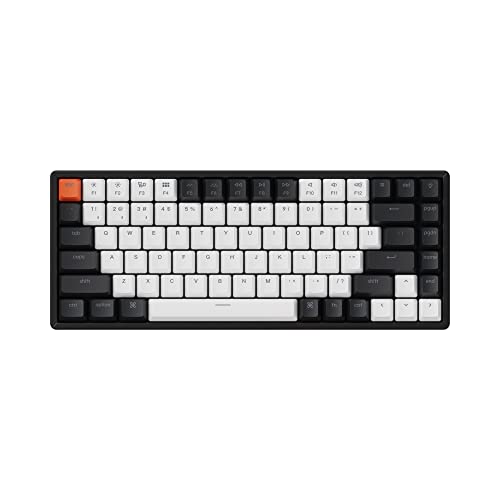
- Best for: A tactile mechanical feel for typing on a smaller desk.
- 75 percent layout with hot-swappable Gateron switches
- Aluminium frame with ABS keycaps
- Bluetooth for 3 devices and USB-C wired mode
- RGB backlight with 15 lighting modes

- Best for: Firm Cherry MX typing with a full layout.
- Cherry MX Blue switches with tactile bump and click
- Full-size layout with number pad
- Aluminium top panel, laser-etched keycaps
- Dedicated media controls and volume knob
All 3 Picks at a Glance
| Product | Specs | Action |
|---|---|---|
| Logitech MX Keys S |
| Check price on Amazon |
| Keychron K2 V2 |
| Check price on Amazon |
| Das Keyboard 4 Professional |
| Check price on Amazon |
Our Top Picks
A keyboard you type on for hours is a different purchase from a keyboard you tap for a few minutes a day. Key travel, spacing, noise and wrist angle decide whether your hands feel fine at five in the afternoon or ache before lunch. The real decision is which key feel suits your hands: a soft scissor key, a quiet membrane key, a tactile mechanical switch, or a firm Cherry MX switch with a clear bump.
This guide is for writers, coders, students and office workers who type for long stretches, and for anyone whose current keyboard makes their fingers tired. Each keyboard below was picked from the names and specifications shown on its Amazon page, with attention to key feel, layout, connection and the comfort features that matter over a full working day.
Quick Picks
As an Amazon Associate we earn from qualifying purchases
| Product | Best for | Key spec from title |
|---|---|---|
| Logitech MX Keys S | Long writing sessions at a desk | Low-profile scissor keys, backlit |
| Logitech K780 | Typing across a PC, phone and tablet | Multi-device keys, 3-device switch |
| Keychron K2 V2 | A tactile mechanical feel for typing | Hot-swappable Gateron switches |
| Das Keyboard 4 Professional | Firm Cherry MX typing with a full layout | Cherry MX Blue switches, full size |
How to Choose
Pick a key feel you can live with all day
Key feel is the first decision and the most personal one. Scissor keys are low, quiet and fast, which suits people who type quickly and want little finger travel. Membrane keys are soft and cheap, but they can feel mushy after a few hours. Tactile mechanical switches give a small bump as the key registers, which helps touch typists know each press landed without bottoming out hard. Cherry MX Blue switches add a click to that bump, which some typists love and some coworkers hate. If you share a room, choose a quieter switch.
Check the layout before you fall for the keys
A full-size layout with a number pad suits data entry, spreadsheets and anyone who types numbers often, but it pushes the mouse further right and can strain the shoulder. A tenkeyless board saves desk space and keeps the mouse closer, which suits smaller desks. A compact 75 percent board goes further, but it moves keys around and takes a week to learn. Check where the function keys, media keys and arrow keys sit, because a layout that hides them behind a function layer slows down everyday work.
Weigh wireless freedom against a wired connection
Wireless keyboards keep a desk tidy and let you type from the couch, but they need charging or batteries and can lag for a fraction of a second on a crowded Bluetooth channel. A wired board never runs flat and never drops a keystroke, which matters for long documents and code. Some wireless boards connect to three devices at once, so one keyboard can serve a PC, a tablet and a phone with a keypress. If you choose wireless, check the battery life and whether it charges over USB-C while you keep typing.
Mind wrist angle, noise and build quality
Comfort over a long day depends on more than the switches. A keyboard that sits too high forces the wrists up, so look for adjustable feet or a low profile that keeps hands level. Noise matters in shared rooms: clicky switches carry across an office, while scissor and quiet membrane keys stay discreet. Build quality shows in the frame, which should not flex when you press hard, and in the keycaps, which should resist shine and fading after months of use. A wrist rest helps, whether it comes in the box or not.
The 4 Best Options
Logitech MX Keys S
- Best for: Long writing sessions at a desk.
- Low-profile scissor keys with Perfect Stroke
- Smart backlighting that adapts to ambient light
- Bluetooth and Logi Bolt receiver, pairs with 3 devices
- Rechargeable Li-Po battery, 1500 mAh, USB-C charging
Long writing sessions at a desk.
The keys are low and quiet, so typists who want deep mechanical travel may find them too shallow.
The MX Keys S is the most comfortable scissor-switch keyboard for long writing sessions, and it is the easiest recommendation in this guide for anyone who types all day. Its low-profile keys have a dished shape that guides the fingers home, and the backlighting adjusts to the room so the legends stay readable in dim light. It pairs with up to three devices over Bluetooth or the included Logi Bolt receiver, and it charges over USB-C while you keep working. The full-size layout includes a number pad, and the Smart Actions in Logi Options+ can automate repetitive keystrokes for writers and coders.
Logitech K780
The K780 is the pick for a desk where one keyboard serves a PC, a phone and a tablet. It has dedicated Easy-Switch keys that jump between three paired devices, and a built-in cradle holds a phone or tablet upright at a readable angle. Its round, low-profile keys are quiet and comfortable for long typing sessions, and the full-size layout includes a number pad. It runs on two AAA batteries that last for many months, and it connects over Bluetooth or the included Unifying receiver. For a shared desk or a small home office, it replaces three keyboards with one.
Specs
- Full-size layout with number pad and device cradle
- Easy-Switch keys for 3 paired devices
- Bluetooth and Unifying receiver connectivity
- Quiet low-profile round keys
- 2 AAA batteries included, up to 24 months of use
Best for: Typing across a PC, phone and tablet from one desk.
Watch out for: The round keys feel different from standard square keys, so give yourself a few days to adjust.
ASIN: B01LZAK8MM
Keychron K2 V2
- Best for: A tactile mechanical feel for typing on a smaller desk.
- 75 percent layout with hot-swappable Gateron switches
- Aluminium frame with ABS keycaps
- Bluetooth for 3 devices and USB-C wired mode
- RGB backlight with 15 lighting modes
A tactile mechanical feel for typing on a smaller desk.
The 75 percent layout moves some keys, so check the layout before you buy if you rely on a number pad.
The K2 V2 brings a tactile mechanical feel to everyday typing without demanding a gamer setup. It is a 75 percent board with hot-swappable Gateron switches, so a worn switch can be pulled out and replaced without soldering, and the aluminium frame gives it a solid weight that keeps it still while you type. It connects over Bluetooth to three devices or over USB-C cable, and its battery lasts for weeks of typing with the backlight off. The layout keeps the function row and arrow keys while saving desk space, which suits smaller desks and writers who want a mechanical feel.
Das Keyboard 4 Professional
- Best for: Firm Cherry MX typing with a full layout.
- Cherry MX Blue switches with tactile bump and click
- Full-size layout with number pad
- Aluminium top panel, laser-etched keycaps
- Dedicated media controls and volume knob
Firm Cherry MX typing with a full layout.
Cherry MX Blue switches are loud, so they suit a private room better than a shared office.
The Das Keyboard 4 Professional is the firm, no-nonsense choice for typists who want Cherry MX switches and a full layout. Its Cherry MX Blue switches give a clear tactile bump and an audible click on every press, which helps touch typists keep a steady rhythm. The board has a full-size layout with a number pad, dedicated media controls, a two-port USB 3.0 hub and a long braided cable. Its aluminium top panel and heavy build keep it planted on the desk, and the laser-etched keycaps resist fading after months of heavy use.
Which One Fits Your Situation
A writer typing for hours every day
Pick the Logitech MX Keys S. Its dished scissor keys guide the fingers and stay quiet through a long session, the backlighting keeps legends readable in any light, and the full-size layout with a number pad suits long documents. It pairs with three devices, so the same board can serve a desktop and a laptop without replugging.
One keyboard for a PC, phone and tablet
Pick the Logitech K780. Its Easy-Switch keys jump between three paired devices, and the built-in cradle holds a phone or tablet upright while you type. The quiet round keys are comfortable for long sessions, and the two AAA batteries last for months, so the board is always ready when you sit down.
A mechanical feel without a gamer look
Pick the Keychron K2 V2. Its hot-swappable Gateron switches give a tactile bump for touch typing, the aluminium frame keeps it solid, and the 75 percent layout saves desk space while keeping the function row. Bluetooth pairs with three devices, and the battery lasts for weeks with the backlight off.
A firm Cherry MX board for a private room
Pick the Das Keyboard 4 Professional. Its Cherry MX Blue switches give a clear bump and click that keeps a steady typing rhythm, the full-size layout has a number pad and media controls, and the aluminium top panel keeps the board planted. It is loud, so it suits a private room where the click will not bother anyone else.
Common Mistakes
- Choosing a clicky switch for a shared office, then annoying everyone within earshot.
- Buying a compact board and discovering too late that you need a number pad every day.
- Picking a wireless keyboard without checking battery life or whether it charges while you type.
- Ignoring wrist angle and buying a tall board that forces the wrists up for hours.
- Judging a keyboard by its looks instead of typing on its key feel for a full session first.
Frequently Asked Questions
What is the best switch type for typing all day?
There is no single best switch, because hands differ. Scissor keys suit fast, quiet typing with little travel. Tactile mechanical switches suit touch typists who want a bump to confirm each press. Cherry MX Blue switches suit typists who like a firm click and a clear rhythm. Try the key feel first, since the wrong switch makes long sessions tiring.
Are mechanical keyboards better for typing than membrane ones?
Mechanical keyboards usually feel more precise because each key has its own switch with a defined actuation point, which helps touch typists keep a steady rhythm. Membrane keyboards are quieter and cheaper, and good scissor-key boards can match a mechanical board for comfort. The best choice depends on whether you value feel, noise or cost most.
Should I get a full-size or tenkeyless keyboard for typing?
A full-size keyboard suits data entry, spreadsheets and anyone who types numbers often, because the number pad saves time. A tenkeyless board suits smaller desks and keeps the mouse closer to the body, which can ease shoulder strain. If you rarely type numbers, the smaller board is usually the more comfortable choice for long sessions.
Do wireless keyboards lag when typing?
Most modern wireless keyboards do not lag in normal typing, because Bluetooth and 2.4 GHz receivers respond fast enough for text. A crowded Bluetooth channel can cause a rare missed keystroke, and a flat battery stops the board entirely. A wired board avoids both problems, so writers who type for a living often keep a cable handy even with a wireless board.
FAQ
What is the best switch type for typing all day?
Are mechanical keyboards better for typing than membrane ones?
Should I get a full-size or tenkeyless keyboard for typing?
Do wireless keyboards lag when typing?
More from Amazon
Programs that pair well with the guide above. Offers and eligibility are set by Amazon and may change.
Free shipping on eligible items, Prime Video and more. Eligible new members can start with a free trial.
Start a Prime free trialAd-free music streaming. Eligible new subscribers can start with a free trial.
Try Music Unlimited freeA Prime membership for ages 18-24 with a trial period. Eligibility is set by Amazon.
See Prime for Young AdultsAudiobooks and podcasts to listen to on the go. Eligible new members can start with a free trial.
Try Audible freeAs an Amazon Associate we earn from qualifying purchases.