Our Short List of 3
- Resolution: 4K Ultra HD (4096 x 2160) at 30 fps; 1080p at 60 fps; 720p at 90 fps
- Field of view: adjustable 65°, 78° or 90°
- Focus: autofocus
- Microphone: dual noise-cancelling microphones

- Resolution: Full HD 1080p at 30 fps; 720p at 30 fps
- Field of view: 78° (diagonal, fixed)
- Focus: autofocus, glass lens
- Microphone: dual stereo microphones

- Resolution: Full HD 1080p at 30 fps; 720p at 60 fps
- Field of view: 78° (diagonal, fixed)
- Focus: autofocus
- Microphone: dual stereo microphones
All 5 Picks at a Glance
| Product | Specs | Action |
|---|---|---|
| Logitech Brio 4K Webcam |
| Check price on Amazon |
| Logitech C920s HD Pro Webcam |
| Check price on Amazon |
| Logitech C922x Pro Stream Webcam |
| Check price on Amazon |
 NexiGo N60 1080P Webcam |
| Check price on Amazon |
 Anker PowerConf C200 2K Webcam |
| Check price on Amazon |
Our Top Picks
Lenovo sells more laptops than almost anyone, and the camera built into most of them is the weakest part of the package. IdeaPad and ThinkPad models have shipped with 720p cameras for years, and even the newer 1080p units sit behind small lenses with basic microphones. The fix is simple, because every webcam in this roundup follows the USB Video Class (UVC) standard: plug it into a ThinkPad, IdeaPad, Legion, Yoga or ThinkCentre, and Windows recognises it as a camera with no driver installation and no Lenovo software involved. The same camera then works in Teams, Zoom, Meet, OBS and the Windows Camera app.
That plug-and-play framing is what “for Lenovo” means here. Lenovo’s own webcam range is thin, so this guide covers the external USB webcams that pair cleanly with Lenovo hardware, from a 4K flagship down to a wide-angle 1080p model for group calls. The two checks that matter before ordering are the port — older ThinkPads offer USB-A only, while slim Yoga and Legion models may give you USB-C — and the bezel, since every camera below uses a folding monitor clip that also stands on a desk or mounts on a tripod. Each pick lists its published resolution, field of view, microphone arrangement and connection, matched to the exact listing linked under it.
Disclosure: As an Amazon Associate, we earn from qualifying purchases made through links on this page, at no extra cost to you.
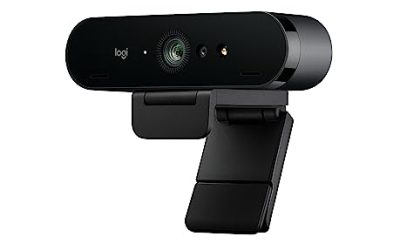
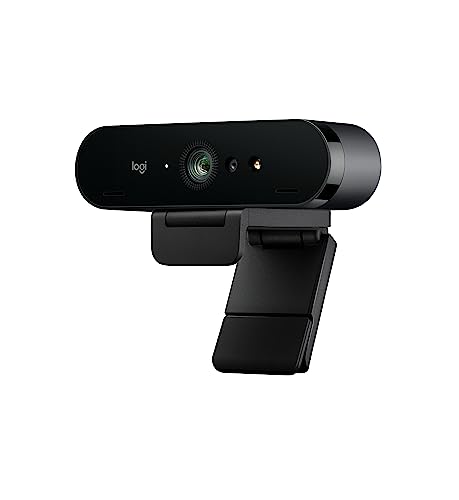
Logitech Brio 4K Webcam
- Resolution: 4K Ultra HD (4096 x 2160) at 30 fps; 1080p at 60 fps; 720p at 90 fps
- Field of view: adjustable 65°, 78° or 90°
- Focus: autofocus
- Microphone: dual noise-cancelling microphones
The Brio 4K is the flagship of Logitech’s webcam line and the sharpest camera in this roundup. It records 4K Ultra HD at 30 frames per second, steps down to 1080p at 60 frames per second for smoother motion, and offers a 720p mode at 90 frames per second. For a Lenovo owner who presents, records or streams from the same desk, that resolution ladder means one camera covers polished video calls today and higher-resolution recording when an app supports it.
The field of view adjusts between 65, 78 and 90 degrees, so the same camera frames a tight head-and-shoulders shot for a one-to-one call or widens to take in a whiteboard. Autofocus and RightLight 3 light correction with HDR handle the exposure work, and a 5x digital zoom lets you crop in without moving the camera. Dual noise-cancelling microphones pick up speech from the desk position where laptop microphones usually sound thin.
The Brio also carries an infrared sensor for Windows Hello face sign-in, which pairs naturally with the fingerprint readers fitted to many ThinkPad and Yoga models — two biometric options on one machine. It connects over USB as a UVC device, so a Lenovo laptop treats it like any other camera, and Logitech’s software is optional rather than required. If your Lenovo machine is your main work computer and the camera gets hours of daily use, this is the step-up pick.
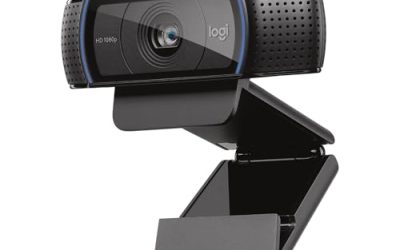
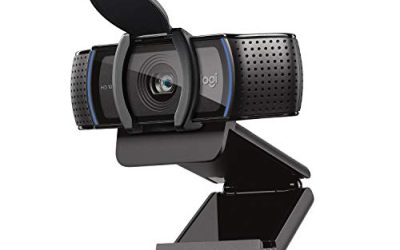
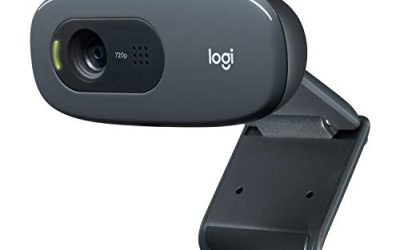
Logitech C920s HD Pro Webcam
- Resolution: Full HD 1080p at 30 fps; 720p at 30 fps
- Field of view: 78° (diagonal, fixed)
- Focus: autofocus, glass lens
- Microphone: dual stereo microphones
The C920s is the long-running default recommendation in this category, and its appeal for Lenovo owners is predictability. It records Full HD 1080p at 30 frames per second through a glass lens with autofocus, at a fixed 78-degree field of view that frames one person and a modest amount of background. Every conferencing app on Windows already knows how to handle it, and the UVC connection means a ThinkPad or IdeaPad sees it the moment the cable goes in.
Two details separate the C920s from the older C920 it replaced. The first is the attachable privacy shutter, a physical cover that closes over the lens when the camera is idle — a simple answer for anyone whose laptop lives in a shared room. The second is the dual stereo microphone pair, which captures a more natural voice than the single microphones on entry-level cameras. RightLight 2 light correction adjusts exposure automatically in the dim or backlit rooms where built-in Lenovo cameras struggle most.
This is the camera to choose when the goal is a dependable everyday upgrade rather than the highest specification. It asks nothing of the machine it attaches to: no software, no settings migration, and a USB-A plug that suits the port selection on most Lenovo laptops and docks. For a work-issued ThinkPad that cannot run extra utilities, that restraint is the point.
Logitech C922x Pro Stream Webcam
- Resolution: Full HD 1080p at 30 fps; 720p at 60 fps
- Field of view: 78° (diagonal, fixed)
- Focus: autofocus
- Microphone: dual stereo microphones
The C922x takes the C920 platform and retunes it for people who appear on camera in front of an audience. It keeps the Full HD 1080p mode at 30 frames per second and adds a 720p mode at 60 frames per second, which renders movement — gestures, head turns, gameplay behind the presenter — with noticeably smoother motion. Streamers broadcasting from a Legion laptop, tutors recording lessons, and anyone whose calls double as content will feel that difference more than a resolution bump.
The rest of the package supports that use. Autofocus and HD light correction carry over, the field of view stays at the head-and-shoulders 78 degrees streamers expect, and dual stereo microphones cover voice when a separate microphone is not part of the setup. Logitech publishes compatibility with broadcasting software such as OBS and XSplit, and because the camera is a standard UVC device, it feeds those apps on a Lenovo machine with no capture hardware in between.
A small tripod is included in the box, which matters more than it sounds: it lets the camera sit beside the monitor at a lower, more natural angle instead of perched on the lid of a thin Lenovo display, and it gives the camera a home on the desk when the laptop is away. Choose the C922x over the C920s when the faster frame-rate mode and the tripod match how the camera will actually be used.
NexiGo N60 1080P Webcam
- Resolution: Full HD 1080p (1920 x 1080) at 30 fps
- Field of view: 110°, adjustable in software
- Focus: fixed focus, 3.6mm glass lens
- Microphone: built-in noise-cancelling microphone
The NexiGo N60 is the wide-angle option in this group, and that single specification changes who it suits. Its 110-degree field of view captures a small group around a table, a whiteboard behind a presenter, or a room-scale view for lessons and demonstrations — situations where the narrower Logitech models would crop people out. It records in 1080p, includes a built-in microphone, and ships with a privacy cover, a simple physical answer to the always-on-camera worry that the two Logitech models above do not provide.
NexiGo also leans on software control. The companion app adjusts field of view and zoom digitally, along with brightness and contrast, which gives a fixed-focus camera more flexibility than its hardware suggests. The lens is fixed focus, set for the typical desk distance range, so it rewards a camera that stays in one place — exactly how most Lenovo desktop and docked-laptop setups are used.
Compatibility is as broad as the class gets: USB 2.0 plug-and-play with no drivers, published support for Windows, macOS, Linux and Chrome OS, and a universal clip that fits laptop lids, monitors and tripods. On a Lenovo all-in-one or a ThinkCentre with a separate monitor, the N60 is the straightforward way to add a group-capable camera. Pick it when the room matters as much as the face.
Anker PowerConf C200 2K Webcam
- Resolution: 2K (2560 x 1440) at 30 fps; 1080p and 720p modes
- Field of view: adjustable 65°, 78° or 95°
- Focus: autofocus
- Microphone: dual stereo microphones with AI noise cancelling
Anker’s PowerConf C200 sits between the 1080p cameras and the 4K flagship in both resolution and intent. Its headline mode is 2K at 30 frames per second, with 1080p and 720p modes below it, so a Lenovo owner gets visibly finer detail than a standard Full HD camera without asking the machine or the call software to handle a 4K stream. Autofocus keeps the image locked as you move, and low-light correction brightens the underexposed rooms that make built-in cameras look grainy.
The field of view adjusts between 65, 78 and 95 degrees, covering the same framing range as the Brio’s three steps: tight for solo calls, wide for two people at one desk. Dual stereo microphones with AI noise cancelling work on the voice from the other side of the call, suppressing keyboard clatter and room noise before it reaches the meeting. A built-in privacy cover slides over the lens — integrated, so it cannot be misplaced the way a detachable cap can.
The connection is USB-C, which suits the current ThinkPad, Yoga and Legion ranges directly; owners of older USB-A-only machines should plan on the appropriate cable or adapter. Like every camera here it is a UVC device, so Windows on a Lenovo machine recognises it without Anker software, and the AnkerWork app remains an optional layer for settings. Choose the C200 when 1080p feels soft on a large external monitor but 4K is more camera than your calls can use.
How to Choose a Webcam for a Lenovo Computer
Confirm the port before anything else. Webcams divide by connector: the C920s and C922x use USB-A plugs, the Anker C200 uses USB-C, and the Brio works with USB 2.0 and USB 3.0 ports. A slim Yoga or Legion with only USB-C ports takes the C200 natively and needs an adapter for USB-A cameras; a ThinkPad with both port types takes everything in this roundup. Adapters should carry video-class data, not just charging, so use the cable and adapter guidance from the camera maker.
Match resolution to the call, not the badge. Most conferencing apps transmit at 720p or 1080p regardless of the camera attached, so a 1080p camera already covers everyday meetings. The steps above that pay off in specific ways: the C200’s 2K sensor gives cleaner digital zoom and cropping, and the Brio’s 4K sensor serves recording, streaming and large-monitor calls where the extra detail stays visible. Buy the resolution your software actually sends.
Field of view decides the framing. A 78-degree camera frames one person at a desk. Adjustable models — the Brio at 65/78/90 degrees and the C200 at 65/78/95 degrees — let you tighten or widen that framing in software. The NexiGo N60’s 110 degrees is a different tool: it exists for groups, whiteboards and room views, and at a solo desk it will show a great deal of the room behind you.
Treat the microphone as a stopgap or a solution. Every camera here carries microphones, and the dual arrangements on the Logitech and Anker models are a clear step up from a laptop’s built-in array for voice. If calls are your job, a headset or desk microphone still wins; if calls are occasional, the camera microphones in this roundup remove the need for extra hardware.
Mind the mount and the shutter. Lenovo lids are thin, so check that the folding clip grips without pressing on the display, and consider the tripod option on the C922x for a steadier desk position. For privacy, the C920s and N60 include covers and the C200 builds one in; the Brio answers with a physical indicator and its Hello sensor design. Pick the arrangement you will actually use every day.
Frequently Asked Questions
Do these webcams need drivers or Lenovo software to work?
No. All five are USB Video Class devices, and Windows includes the UVC driver, so a Lenovo laptop or desktop recognises the camera as soon as it is plugged in. Maker software from Logitech, NexiGo or Anker adds settings such as field-of-view adjustment and firmware updates, but it is optional — the camera works in Teams, Zoom and the Windows Camera app without it.
Will an external webcam work with a Lenovo docking station?
Yes, in almost every setup. A webcam plugged into a USB port on a ThinkPad or USB-C dock passes through to the laptop as a normal camera. Two habits help: connect the camera to the dock once and let Windows register it, and if an app ever shows the built-in camera by default, select the external camera in that app’s video settings — the choice is per app, not a system fault.
Can I disable the built-in Lenovo camera and use only the external one?
You can select the external camera inside each app, which is the method most people need. If you want the built-in camera gone entirely, Device Manager in Windows can disable it, and some ThinkPad models also offer a camera toggle in the BIOS or UEFI settings. Leaving it enabled but unselected is simpler and keeps Windows Hello face sign-in available on models that support it through the built-in unit.
Does a 4K webcam make my video calls look 4K?
Usually not end to end. Teams, Zoom and Meet cap outgoing video well below 4K for most accounts and connection speeds, so callers will see a 720p or 1080p picture even from the Brio. The 4K sensor still earns its place for local recording, streaming software that accepts the full feed, and digital zoom, where cropping into a 4K frame keeps the result sharp. Buy it for those uses, not for sharper meeting tiles alone.
Conclusion
For most Lenovo owners, the Logitech C920s is the upgrade that simply removes the built-in camera problem: 1080p video, stereo microphones, a privacy shutter and a USB-A plug that suits nearly every ThinkPad, IdeaPad and dock already in service. Step up to the Anker PowerConf C200 for 2K detail and a USB-C connection that matches current Lenovo models, or to the Logitech Brio 4K if the camera also feeds recordings, streams or Windows Hello sign-in. The C922x serves presenters and streamers who want the 60 fps mode and the included tripod, and the NexiGo N60 covers the rooms the others cannot, with a 110-degree view for groups and whiteboards. Because all five speak the same UVC standard, whichever one you choose will still be working when the Lenovo machine under it is replaced.
More from Amazon
Programs that pair well with the guide above. Offers and eligibility are set by Amazon and may change.
Free shipping on eligible items, Prime Video and more. Eligible new members can start with a free trial.
Start a Prime free trialAd-free music streaming. Eligible new subscribers can start with a free trial.
Try Music Unlimited freeA Prime membership for ages 18-24 with a trial period. Eligibility is set by Amazon.
See Prime for Young AdultsAudiobooks and podcasts to listen to on the go. Eligible new members can start with a free trial.
Try Audible freeAs an Amazon Associate we earn from qualifying purchases.