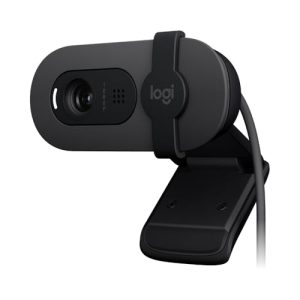
Our Short List of 3

- Best for: Creators who record seated talking-head vlogs and want smooth 1080p60 video with face tracking.
- Full HD 1080p video at 60 fps
- USB-C connection
- Smart autofocus with AI facial tracking
- 78-degree field of view

- Best for: Vloggers who record at a fixed desk in dim rooms and want deep control over the image.
- True Full HD 1080p video at 60 fps
- f/2.4 24 mm all-glass prime lens
- Sony CMOS sensor optimized for indoor use
- Uncompressed video output

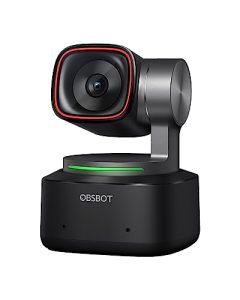
- Best for: Vloggers who move around while recording and want the camera to keep them framed automatically.
- 4K video with 60 fps
- 1/1.5-inch CMOS sensor
- AI-powered pan, tilt, and zoom tracking
- Voice control
All 3 Picks at a Glance
| Product | Specs | Action |
|---|---|---|
| Logitech StreamCam |
| Check price on Amazon |
| Elgato Facecam |
| Check price on Amazon |
| OBSBOT Tiny 2 |
| Check price on Amazon |
Key takeaways
- Three PC webcams for video blogging compared on autofocus, low-light image quality, framing, and audio, so your face-to-camera videos look clean and steady.
A video blog is a face-to-camera conversation, and the camera decides how much of that conversation reaches the viewer. A webcam built for calls can hunt for focus, blow out a bright window, or turn a dim room into grain, and every one of those flaws stays in the finished video. Vlogging asks for more: steady focus through long takes, natural skin tones under mixed light, and motion smooth enough that a lean toward the lens never turns into a blur.
The three webcams below were picked from their Amazon listings for exactly that job. The Logitech StreamCam records smooth 1080p60 video with autofocus that follows your face, the Elgato Facecam pairs a fast glass lens with deep image controls for tricky light, and the OBSBOT Tiny 2 adds a motorized head that keeps you framed while you move. The guide after the table explains which one matches the way you record.
Quick Picks
As an Amazon Associate we earn from qualifying purchases
| Product | Best for | Key spec from title |
|---|---|---|
| Logitech StreamCam | Smooth 1080p60 face-to-camera recording | Full HD 1080p at 60 fps, USB-C, smart autofocus |
| Elgato Facecam | A clean, controlled image in dim rooms | 1080p60 uncompressed video, f/2.4 24 mm glass lens |
| OBSBOT Tiny 2 | Hands-free framing that follows you | 4K PTZ, AI tracking, 1/1.5-inch sensor |
How to Choose
Resolution and Frame Rate
Resolution sets how much detail your face keeps on screen, and frame rate sets how natural your movement looks. A 1080p camera at 60 frames per second gives smooth motion for hand gestures and head turns, which matters in a vlog where you talk with your hands. A 4K camera adds room to crop closer in editing without softening the picture, which helps when you want a tighter shot from a wider recording. Match the camera to your editing habits: if you publish straight from the recording, 1080p60 is plenty, while a 4K sensor pays off when you reframe, zoom, or punch in during the edit.
Autofocus and Framing
Vlogging means leaning toward the lens, holding up an object, then sitting back again, so the camera has to keep your face sharp through all of it. Fast autofocus locks on quickly and stays there, while a fixed-focus lens only works when you sit inside its sharp zone. Framing matters just as much: a field of view near 78 degrees keeps your head and shoulders in frame without pulling in the clutter at the edges of the room. If you move around while you talk, look for a camera that tracks you or lets you set a preset framing, so you never drift out of shot mid-sentence.
Low-Light Performance
Most vlogs are recorded in a bedroom or a home office, where the light is one lamp and a window rather than a studio rig. A large sensor and a fast lens gather more of that light, so your face stays bright and clean instead of grainy and washed out. Software light correction can lift shadows, but it cannot recover detail that the sensor never captured, so the hardware matters more than the slider. Check the lens aperture and sensor size on the listing, and treat a camera that needs bright light to look good as a poor fit for evening recording sessions.
Audio and Mounting
Built-in microphones will never match a dedicated mic, but they decide whether a quick vlog is usable without extra gear. Dual microphones with noise reduction keep your voice clear when a fan or a keyboard is running nearby, and they save you from syncing separate audio for every clip. Mounting decides the angle: a clip that grips a monitor puts the lens at eye level, while a tripod thread lets you raise the camera and shoot from further back. Choose a camera whose mount fits your desk, because a camera that wobbles or sits too low will ruin takes before the recording even begins.
The 3 Best Options
Logitech StreamCam
- Best for: Creators who record seated talking-head vlogs and want smooth 1080p60 video with face tracking.
- Full HD 1080p video at 60 fps
- USB-C connection
- Smart autofocus with AI facial tracking
- 78-degree field of view
Creators who record seated talking-head vlogs and want smooth 1080p60 video with face tracking.
It tops out at 1080p, so there is no 4K headroom for cropping tighter in the edit.
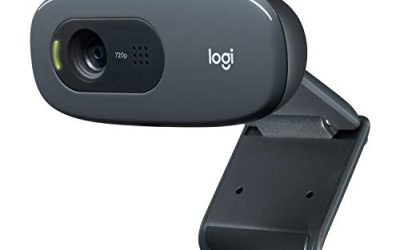
The StreamCam is the most vlog-ready camera in this lineup because it was built around creators who record themselves talking to a lens. It captures Full HD 1080p video at 60 frames per second, so gestures and head turns stay smooth, and its smart autofocus follows your face as you lean in or sit back. The 78-degree field of view frames head and shoulders without pulling in the edges of the room, and the mount rotates so you can record vertical video for short-form clips. Dual microphones handle quick takes when you do not want to set up separate audio.
Elgato Facecam
- Best for: Vloggers who record at a fixed desk in dim rooms and want deep control over the image.
- True Full HD 1080p video at 60 fps
- f/2.4 24 mm all-glass prime lens
- Sony CMOS sensor optimized for indoor use
- Uncompressed video output
Vloggers who record at a fixed desk in dim rooms and want deep control over the image.
It needs a USB 3.0 port and its fixed focus means you must stay in one spot to stay sharp.
The Facecam suits vloggers who record in imperfect light and want control over the final image. Its all-glass f/2.4 24 mm lens and Sony CMOS sensor are tuned for indoor use, and it outputs uncompressed 1080p video at 60 frames per second, so the picture stays clean through long takes. Fixed focus keeps you sharp once you sit inside its range, which suits a fixed desk setup, and the Camera Hub software lets you tune brightness, contrast, and color, then saves those settings in the camera itself. The result is a consistent look from one recording session to the next.
OBSBOT Tiny 2
- Best for: Vloggers who move around while recording and want the camera to keep them framed automatically.
- 4K video with 60 fps
- 1/1.5-inch CMOS sensor
- AI-powered pan, tilt, and zoom tracking
- Voice control
Vloggers who move around while recording and want the camera to keep them framed automatically.
The tracking head and software take some setup before your first recording, and it is the bulkiest camera here.
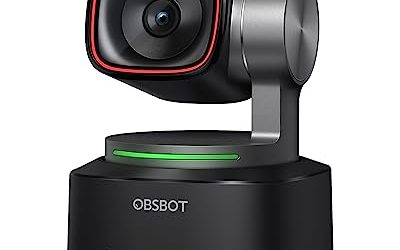
The Tiny 2 is the pick for vloggers who do not sit still. Its motorized pan-tilt-zoom head follows you around the room with AI tracking, so you can stand, pace, or demonstrate something on a desk while the camera keeps you centered. The 1/1.5-inch sensor records 4K video, which gives you room to crop in editing, and gesture control lets you zoom in or out with a hand signal instead of reaching for the mouse mid-take. Voice control adds another hands-free option, and HDR light correction helps when a window sits behind you.
Which One Fits Your Situation
You Record Seated Talking-Head Videos
Pick the Logitech StreamCam. Its autofocus follows your face through leans and gestures, the 1080p60 picture stays smooth, and the 78-degree framing keeps the shot tight on you. Vertical video mode is a bonus when the same take also needs to work as a short clip. It is the simplest of the three to set up and the easiest to live with day to day.
You Film in a Dim Room or at Night
Pick the Elgato Facecam. Its fast glass lens and indoor-tuned sensor hold detail when the only light is a lamp, and the Camera Hub controls let you dial in brightness and color once and have the camera remember it. Fixed focus is no problem at a desk, where your distance from the lens never changes.
You Move Around While You Record
Pick the OBSBOT Tiny 2. Its motorized head tracks you across the room, so walking, standing, or showing something on a desk never pushes you out of frame. Gesture control lets you zoom without touching the computer, and the 4K sensor leaves room to crop the framing tighter when you edit.
You Want One Camera for Vlogs and Short Clips
Pick the Logitech StreamCam. Its mount rotates for vertical recording, so the same session can produce a wide vlog and a tall clip for short-form platforms without a second camera or a separate setup. The autofocus and dual microphones keep both formats usable straight from the recording.
Common Mistakes
- Buying a call-focused webcam and expecting it to hold focus through long vlogging takes.
- Recording with a bright window behind you, which turns your face into a dark silhouette.
- Placing the camera below eye level, which gives every take an unflattering upward angle.
- Ignoring the microphone and discovering the audio is unusable only after a long recording.
- Choosing 4K for the label alone when your editing workflow never crops or reframes the picture.
Frequently Asked Questions
Is 1080p enough for video blogging?
Yes, 1080p is enough for most vlogs. It looks sharp on phones, laptops, and televisions, and it keeps file sizes small enough that editing and uploading stay quick. A 4K camera only earns its place when you crop, reframe, or zoom in during the edit, so choose resolution for your workflow rather than for the label on the box.
Do I need a separate microphone for vlogging?
Not for your first vlogs. The dual microphones in these cameras record clear voice in a quiet room, which covers most talking-head videos. A separate microphone becomes worth it when you record in a noisy room, move away from the desk, or want warmer, fuller voice quality that a small built-in mic cannot deliver.
Why does my webcam look grainy in a dim room?
Grain comes from a small sensor struggling to gather light. When the room is dark, the camera boosts its sensitivity, and that boost adds noise to the picture. A larger sensor and a faster lens capture more light before that boost is needed, which is why cameras built for indoor recording look cleaner in the same room.
Can one webcam work for vlogs and video calls?
Yes, all three cameras here work for both. They connect over USB, show up as a standard camera in calling apps, and need no extra hardware to switch between recording and calls. Keep your framing and light the same for both uses, and your calls will look as clean as your vlogs.
FAQ
Is 1080p enough for video blogging?
Do I need a separate microphone for vlogging?
Why does my webcam look grainy in a dim room?
Can one webcam work for vlogs and video calls?
More from Amazon
Programs that pair well with the guide above. Offers and eligibility are set by Amazon and may change.
Free shipping on eligible items, Prime Video and more. Eligible new members can start with a free trial.
Start a Prime free trialAd-free music streaming. Eligible new subscribers can start with a free trial.
Try Music Unlimited freeA Prime membership for ages 18-24 with a trial period. Eligibility is set by Amazon.
See Prime for Young AdultsAudiobooks and podcasts to listen to on the go. Eligible new members can start with a free trial.
Try Audible freeAs an Amazon Associate we earn from qualifying purchases.