Our Short List of 3
- Best for: everyday typing, travel, and anyone who wants a simple keyboard that just works.

- Best for: writers, professionals, and anyone who types in dim light.

- Best for: Mac owners who want Touch ID and perfect macOS integration.
All 4 Picks at a Glance
| Product | Specs | Action |
|---|---|---|
| 1. Logitech K380 for Mac — Best Overall |
| Check price on Amazon |
| 2. Logitech MX Keys Mini for Mac — Best Backlit Keyboard |
| Check price on Amazon |
| 3. Apple Magic Keyboard with Touch ID — Best for macOS Integration |
| Check price on Amazon |
 4. Keychron K2 Version 2 — Best Mechanical Keyboard |
| Check price on Amazon |
Key takeaways
- Find the best bluetooth keyboards for mackbook air in 2026. Compare compact, backlit and mechanical Bluetooth keyboards with a true Mac layout.
The best bluetooth keyboards for mackbook air turn a thin laptop into a comfortable desktop workstation. A MacBook Air is a wonderful machine to carry around, but its built-in keyboard is not always the best tool for long writing sessions, spreadsheets, or late-night work at a desk. An external Bluetooth keyboard lets you raise the laptop on a stand, place the screen at eye level, and type with your wrists in a natural position. It also frees you from cables, which matters on a laptop that has only a couple of ports.
This guide compares four Bluetooth keyboards that pair cleanly with a MacBook Air. Every pick uses a Mac-friendly layout with Command and Option keys, connects over Bluetooth without a dongle, and is sold on Amazon US. Whether you want the cheapest reliable option, the best typing feel, a perfect match for macOS, or a mechanical board with real key travel, one of these four will fit your desk.
How to Choose a Bluetooth Keyboard for Your MacBook Air
Mac layout matters more than you think
A keyboard made for Windows will work with a Mac, but the modifier keys will be in the wrong places and the legends will not match what macOS shows on screen. Look for a board that ships with a Mac layout, or at least one with a physical Mac and Windows switch, so Command sits next to the spacebar and Option is where your muscle memory expects it. All four picks in this guide have a proper Mac layout.
Bluetooth version and multi-device pairing
Most modern Bluetooth keyboards use Bluetooth 5.0 or newer, which gives a stable connection with very little lag. Just as important is how many devices the board can remember. If you switch between a MacBook Air, an iPad, and a phone, a keyboard with Easy-Switch or a similar multi-device feature saves you from re-pairing every time you change devices. Three-device memory is the sweet spot for most people.
Key feel: scissor, low-profile, or mechanical
The MacBook Air uses a scissor-switch keyboard with short, quiet key travel. If you want a familiar feel, choose a low-profile scissor board. Mechanical keyboards feel very different: the keys travel further, give a satisfying tactile bump or click, and are easier on the fingers during very long sessions. Mechanical boards are taller and louder, so think about where you will use one before you commit.
Backlighting and battery
Backlit keys are a genuine help if you type in dim rooms or at night, but they drain the battery faster. Boards with rechargeable batteries usually last weeks between charges with the backlight off and days with it on, while boards that run on disposable batteries can last for a year or more. Decide which trade-off suits you: a rechargeable board with a USB-C port is convenient, while a battery-powered board is one less thing to plug in.
Size and portability
A compact keyboard without a number pad fits neatly beside a MacBook Air on a small desk and slips into a bag for travel. Full-size boards with a numeric keypad are better for accounting and data entry, but they take up much more space. The MacBook Air is a portable machine, so a compact or 75 percent layout is the natural match for most owners.
Touch ID and extra features
Apple’s own Magic Keyboard is the only Bluetooth keyboard with Touch ID, which lets you unlock your MacBook Air and approve purchases with a fingerprint. Third-party boards cannot offer that, but they often add things Apple does not: multi-device switching, programmable keys, RGB lighting, and hot-swappable switches. Decide whether Touch ID or flexibility matters more to you.
Top Picks
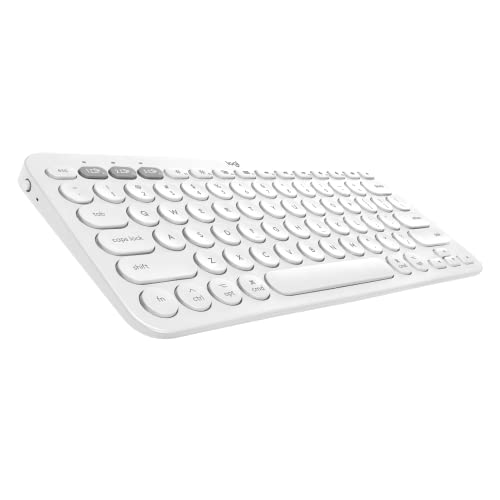
1. Logitech K380 for Mac — Best Overall
- Best for: everyday typing, travel, and anyone who wants a simple keyboard that just works.
everyday typing, travel, and anyone who wants a simple keyboard that just works.
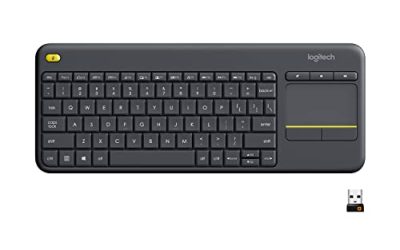
The Logitech K380 for Mac is the easiest recommendation on this list. It is small, light, quiet, and designed from the start for Apple devices. The compact layout drops the number pad but keeps every key you actually use, and the round, scooped keycaps feel comfortable even after hours of typing. Because it is so slim, it slides into a laptop bag next to a MacBook Air without adding noticeable bulk.
Pairing is simple. The K380 connects over Bluetooth and remembers up to three devices, switching between them with the yellow Easy-Switch keys on the top row. That means you can type on your MacBook Air, jump to your iPad to answer a message, and come back without touching any settings. The board ships with a Mac layout, so Command, Option, and Control are exactly where macOS users expect them.
Battery life is the K380’s quiet superpower. It runs on two AAA batteries and can go for up to two years before they need replacing, so you will almost forget it has batteries at all. There is no backlight, which is the main compromise, but for a desk near a window or a well-lit room, that will never bother you. For everyone else, this is the best balance of price, portability, and everyday reliability you can buy.
Check the Logitech K380 for Mac on Amazon
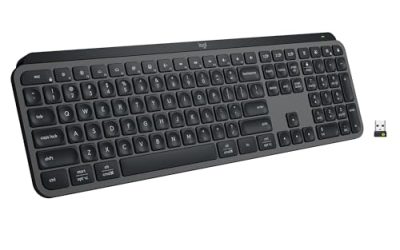
2. Logitech MX Keys Mini for Mac — Best Backlit Keyboard
- Best for: writers, professionals, and anyone who types in dim light.
writers, professionals, and anyone who types in dim light.
The Logitech MX Keys Mini for Mac is the premium pick for people who type a lot and want the best experience a low-profile board can offer. The keys are spherically dished to fit your fingertips, and the scissor mechanism under each key gives a stable, precise, laptop-like feel with a little more travel than the MacBook Air’s own keyboard. It feels expensive the moment you start typing, because it is built around an aluminum body that does not flex.
Backlighting is the headline feature. The keys light up automatically when your hands approach and adjust their brightness to the room, so you can keep working in a dark room without hunting for keys. The board charges over USB-C and the battery lasts for weeks with the backlight off, or several days with it on. A full charge takes only a short time, and a quick top-up gives you hours of use.
Like the K380, the MX Keys Mini for Mac pairs with up to three devices over Bluetooth and switches between them at the touch of a key. The Mac version adds Mac-specific function keys for dictation, emoji, and screen capture, plus a dedicated key for locking the screen. If you want a keyboard that feels like an upgrade in every direction from the one built into your MacBook Air, this is the one to get.
Check the Logitech MX Keys Mini for Mac on Amazon
3. Apple Magic Keyboard with Touch ID — Best for macOS Integration
- Best for: Mac owners who want Touch ID and perfect macOS integration.
Mac owners who want Touch ID and perfect macOS integration.
No third-party keyboard integrates with a MacBook Air as seamlessly as Apple’s own Magic Keyboard with Touch ID. It pairs instantly over Bluetooth, the function keys match macOS exactly, and the Touch ID sensor lets you unlock your Mac, authorize Apple Pay, and sign in to apps with a fingerprint. That single feature is something no other Bluetooth keyboard on this list can match, and for many Mac owners it is worth the premium on its own.
The typing experience is deliberately familiar. The low-profile scissor keys feel very close to the keyboard built into your MacBook Air, so there is no adjustment period at all. The aluminum enclosure matches the laptop’s design, the board is extremely thin, and the whole thing is rechargeable over USB-C, with a battery that lasts for a month or more between charges. The current USB-C model works with any Mac that has Apple silicon, which includes every modern MacBook Air.
There are two things to know before you buy. First, the Touch ID model does not include a numeric keypad, so if you do a lot of number entry you may want the larger keypad version instead. Second, the board only pairs with one Mac at a time, so it is not a multi-device keyboard. If you live entirely inside the Apple ecosystem and want the cleanest, most seamless option, this is it.
Check the Apple Magic Keyboard with Touch ID on Amazon
4. Keychron K2 Version 2 — Best Mechanical Keyboard
- Best for: mechanical keyboard fans, gamers, and heavy typists.
mechanical keyboard fans, gamers, and heavy typists.
The Keychron K2 Version 2 is the pick for anyone who finds laptop keyboards too flat and wants real key travel. This is a 75 percent mechanical keyboard with 84 keys, an aluminum frame, and hot-swappable switches, which means you can pull the switches out and replace them without soldering. It connects to up to three devices over Bluetooth 5.1, or to your MacBook Air over a wired USB-C connection when you want zero latency.
Keychron built the K2 with Mac users in mind. A physical switch on the side changes the board between Mac and Windows layouts, and the box includes extra keycaps for both systems. The RGB backlighting is bright and fully adjustable, the battery is large enough for days of heavy use, and the whole board has a solid, premium feel that is a world away from a membrane keyboard. The Gateron switches in the standard configuration give a smooth, responsive keystroke that makes long typing sessions genuinely enjoyable.
The trade-offs are size and sound. The K2 is taller and heavier than the other boards here, and mechanical switches are louder than scissor switches, so it is not the best choice for a quiet library or a shared office. But if you type for a living, play games on your MacBook Air, or simply enjoy the feel of a mechanical keyboard, the K2 is the most satisfying Bluetooth keyboard on this list.
Check the Keychron K2 Version 2 on Amazon
Comparison Table
| Keyboard | Layout | Backlit | Multi-device | Battery | Best For |
|---|---|---|---|---|---|
| Logitech K380 for Mac | Compact, Mac | No | Yes, 3 devices | Replaceable, up to 2 years | Everyday use and travel |
| Logitech MX Keys Mini for Mac | Compact, Mac | Yes, smart backlight | Yes, 3 devices | Rechargeable USB-C | Backlit premium typing |
| Apple Magic Keyboard with Touch ID | Compact, Mac | No | No, single Mac | Rechargeable USB-C | Touch ID and macOS integration |
| Keychron K2 Version 2 | 75 percent, Mac and Windows | Yes, RGB | Yes, 3 devices | Rechargeable USB-C | Mechanical feel and gaming |
How to Pair a Bluetooth Keyboard with a MacBook Air
Pairing any of these keyboards takes less than a minute. Turn the keyboard on and put it into pairing mode, then open System Settings on your MacBook Air, go to Bluetooth, and click Connect next to the keyboard’s name when it appears. macOS may ask you to press a few keys so it can identify the layout; follow the prompts and you are done. The keyboard will reconnect automatically whenever you turn it on near your Mac.
If the connection ever drops, first check that the keyboard is charged or has fresh batteries, then turn Bluetooth off and back on from the menu bar. If the keyboard still does not appear, remove it from the Bluetooth device list and pair it again from scratch. Interference from other wireless devices is the most common cause of lag, so keeping the keyboard within a few feet of the laptop and away from USB 3 hubs usually solves any stutter.
Frequently Asked Questions
Do Bluetooth keyboards work with the MacBook Air?
Yes. Every modern MacBook Air has Bluetooth built in, and any Bluetooth keyboard that supports macOS will pair with it. Keyboards with a Mac layout work best because the Command, Option, and Control keys are in the right places and the function keys match macOS shortcuts. Keyboards designed for Windows will still type, but the modifier keys will be swapped and some shortcuts will feel wrong.
Will a Bluetooth keyboard drain my MacBook Air battery?
The impact is tiny. Bluetooth Low Energy is designed to sip power, and a connected keyboard draws so little energy that you will not notice any change in battery life. The keyboard itself has its own battery, so it does not draw power from the laptop at all. Using the laptop in clamshell mode with an external keyboard and monitor is a perfectly normal setup.
Is a mechanical keyboard too loud for a MacBook Air setup?
It depends on the switches. Clicky switches are noticeably loud and can disturb people nearby, while linear and silent switches are much quieter. If you share an office or work in a library, choose a board with quiet switches or stick with a low-profile scissor keyboard like the K380 or the MX Keys Mini. The Keychron K2 is a great home-desk keyboard but can be loud in shared spaces.
Can I use one Bluetooth keyboard with my MacBook Air and iPad?
Yes, if the keyboard supports multi-device pairing. The Logitech K380, the MX Keys Mini, and the Keychron K2 all remember up to three devices and let you switch between them with a key press. Apple’s Magic Keyboard pairs with a single Mac at a time, so it is not a good choice if you want to share one keyboard between a laptop and a tablet.
Should I get a keyboard with Touch ID?
Touch ID is convenient if you unlock your MacBook Air often, use Apple Pay, or sign in to apps and websites with a fingerprint. It only works with the Apple Magic Keyboard, and only on Macs with Apple silicon. If you use your laptop mostly in clamshell mode on a desk, Touch ID saves you from opening the lid to authenticate. If you rarely lock your Mac, it is not worth paying extra for.
Conclusion
The best bluetooth keyboards for mackbook air depend on how you type and where you work. The Logitech K380 for Mac is the best all-rounder: affordable, portable, and reliable enough to disappear into your daily routine. The Logitech MX Keys Mini for Mac is the premium choice, with smart backlighting and the best low-profile typing feel on this list. The Apple Magic Keyboard with Touch ID is the most seamless option for anyone who lives in the Apple ecosystem and wants fingerprint authentication. And the Keychron K2 Version 2 is the board to pick if you want the deep, tactile feel of a mechanical keyboard.
Any of these four will make your MacBook Air more comfortable to use at a desk, and all of them pair in under a minute. Pick the one that matches your typing style, and your wrists will thank you.
Disclosure: As an Amazon Associate, we earn from qualifying purchases.
FAQ
Do Bluetooth keyboards work with the MacBook Air?
Will a Bluetooth keyboard drain my MacBook Air battery?
Is a mechanical keyboard too loud for a MacBook Air setup?
Can I use one Bluetooth keyboard with my MacBook Air and iPad?
Should I get a keyboard with Touch ID?
More from Amazon
Programs that pair well with the guide above. Offers and eligibility are set by Amazon and may change.
Free shipping on eligible items, Prime Video and more. Eligible new members can start with a free trial.
Start a Prime free trialAd-free music streaming. Eligible new subscribers can start with a free trial.
Try Music Unlimited freeA Prime membership for ages 18-24 with a trial period. Eligibility is set by Amazon.
See Prime for Young AdultsAudiobooks and podcasts to listen to on the go. Eligible new members can start with a free trial.
Try Audible freeAs an Amazon Associate we earn from qualifying purchases.