Our Short List of 3

- Best for: small rooms, desk setups, and engineers who want DSP room tuning in a compact monitor.
- Best for: medium rooms, engineers who want a proven flat reference, and masters that need honest low-end judgement without a subwoofer.

- Best for: engineers who want ribbon-tweeter detail, a balanced seven-inch size, and a clear middle ground between compact and large monitors.
All 3 Picks at a Glance
| Product | Specs | Action |
|---|---|---|
| 1. KRK RP5G5 ROKIT 5 Generation Five |
| Check price on Amazon |
| 2. Yamaha HS8 |
| Check price on Amazon |
| 3. ADAM Audio T7V |
| Check price on Amazon |
Key takeaways
- Find the best studio monitors for mastering: flat response, clear stereo imaging, and honest low end. Compare three proven nearfield picks for your setup.
Choosing the best studio monitors for mastering is a different job from choosing speakers for casual listening or tracking a loud band. Mastering is the final stage before a recording reaches listeners, so the monitors must reveal small problems rather than hide them. A flattering speaker can make a mix sound finished when it is not. A dull or boomy speaker can push an engineer to add brightness or cut bass that the music never needed. The right monitor stays neutral, stays detailed at low volume, and lets a careful listener hear compression, equalisation, stereo width, and low-end balance without guessing.
This guide explains what matters most for mastering, then compares three powered nearfield monitors that suit that work: the KRK RP5G5 ROKIT 5 Generation Five, the Yamaha HS8, and the ADAM Audio T7V. All three are two-way powered monitors with balanced inputs and rear-panel tuning controls. They differ in woofer size, tweeter design, and room fit, so the best choice depends on room size and listening distance.
How to Choose Studio Monitors for Mastering
Mastering monitors should be judged by accuracy first and by excitement second. A monitor that sounds impressive in a shop demonstration may not help you make reliable decisions over a long session.
Flat Frequency Response
A flat response means the monitor does not add a large boost or cut in any part of the spectrum. Bass should not sound thick by default, mids should not sound scooped, and highs should not sound sharp. When the response is close to flat, a change made with an equaliser is easier to hear, and a problem in the source material is easier to find. Look for monitors described by the maker as neutral or reference monitors, and pay attention to rear-panel high-frequency trim and low-frequency controls. Those controls are not meant to make the speaker sound pleasant. They are meant to correct for placement near a wall, on a desk, or in a corner.
No small nearfield monitor is perfectly flat in every room. Room reflections, desk reflections, and standing waves all change what reaches your ears. That is why placement and basic acoustic treatment matter as much as the speaker itself. A flat monitor in a treated room will usually give more reliable results than a more expensive monitor in a bare, reflective room.
Low-End Accuracy and Extension
Low end is one of the hardest parts of mastering. A monitor with a small woofer may roll off early, so deep bass notes sound quieter than they really are. That can lead to masters with too much sub-bass, because the engineer keeps turning the low end up to hear it. A monitor with a larger woofer usually reaches lower, but it also needs more space and more careful placement. An eight-inch woofer in a small untreated room can excite room modes and make bass sound uneven from one note to the next.
For mastering, the goal is not the deepest bass on paper. The goal is bass that stays even, tight, and easy to judge. A five-inch monitor can work well in a small room, especially when paired with good placement and, if needed, a matched subwoofer set up with care. An eight-inch monitor is often a better fit for a medium room where the listening position is farther from the speakers. In either case, check mixes at low volume as well as at normal volume. Low-end problems often become clearer when the level is reduced and the room is not being driven hard.
Stereo Imaging and Detail
Mastering decisions depend on stereo image as much as on tone. A good monitor should place instruments in a stable, believable space. The centre image should stay centred, the left and right edges should stay clear, and small changes in width, panning, or reverb should be easy to hear. A waveguide around the tweeter, a well-designed cabinet, and a matched pair all help here. Buy monitors as a matched pair when possible, and keep them at the same height, at the same angle, and at the same distance from your ears.
Detail matters for a different reason. Mastering often involves very small moves: a half-decibel change, a gentle high-frequency lift, or a slight change in compressor timing. A monitor with good transient response and low distortion will reveal those moves. A monitor that smears transients will make small moves hard to judge, and that can lead to over-processing. Listen for clean attacks on drums, clear consonants on vocals, and a sense of space around each sound rather than a flat wall of sound.
Tweeter Design, Room Size, and Inputs
Most monitors in this guide use a dome tweeter, while one uses a ribbon tweeter. A dome tweeter is a proven design that can sound smooth and detailed when well matched to the woofer and crossover. A ribbon tweeter, such as the folded ribbon design used by ADAM Audio, is known for fast transient response and extended high-frequency detail. Neither design is automatically better for mastering. The important question is whether the highs sound clean without sounding harsh, and whether long sessions cause fatigue. If a monitor makes your ears tired after an hour, it will be hard to trust your decisions late in a session.
Nearfield monitors are designed to be heard at close range, usually between one and two metres from the listener. At that distance, the direct sound from the speaker is stronger than the reflected sound from the room, which helps accuracy. If your desk is small, a five-inch monitor may be the practical choice. If your room is larger and your listening position is farther back, a seven-inch or eight-inch monitor will usually fill the space more easily and give a fuller low end without being pushed to its limits. Keep the left and right speakers symmetrical, and avoid placing one speaker in a corner and the other in open space.
For mastering, balanced inputs matter. XLR and TRS inputs help reject hum and interference over longer cable runs, which is common when monitors sit on stands away from an interface. RCA inputs can be useful for a second source, but balanced connections should be the main path for critical work. Rear-panel volume, high-frequency trim, and low-frequency trim are also useful, as long as they are set with a purpose and then left alone. Write down the settings you use so you can return to them after moving a speaker or changing a cable.
Top Picks
The three monitors below are all powered, two-way studio monitors. Each one is sold as a single unit or as a pair depending on the listing, so check the listing carefully and buy two matching units for a stereo setup. All three are suitable for nearfield mastering in a home studio or a small professional room.
1. KRK RP5G5 ROKIT 5 Generation Five
- Best for: small rooms, desk setups, and engineers who want DSP room tuning in a compact monitor.
small rooms, desk setups, and engineers who want DSP room tuning in a compact monitor.
KRK RP5G5 ROKIT 5 Generation Five 5-inch Powered Studio Monitor Pair
The KRK RP5G5 ROKIT 5 Generation Five is the smallest monitor in this guide, and it is the best fit for a small room or a desk-based mastering setup. It uses a five-inch woven Kevlar woofer and a one-inch silk dome tweeter, with bi-amplified Class D power. Amazon lists speaker maximum output power at 82 watts for this model. The compact cabinet fits easily on a desk or on short stands, and the front port helps when the speaker must sit closer to a wall than ideal.
What sets this generation apart is its onboard DSP. It offers three voicing modes, including a flat Mix mode for critical listening, plus 25 boundary and tuning EQ settings that can be adjusted through the KRK app. That tuning is useful in a small room, where desk reflections and wall proximity can change the sound more than the speaker itself. The Mix mode is the right starting point for mastering, because it aims for a neutral balance rather than a coloured one.
The five-inch woofer will not reach as low as the larger monitors in this guide, so very deep bass needs to be checked with care. That is a fair trade in a small room, where a larger woofer can cause more problems than it solves. The RP5G5 gives clear mids, clean highs, and a stereo image that stays stable at close range. It is a practical choice for an engineer who masters in a bedroom studio, a small treated room, or a shared space where size and volume must stay under control.
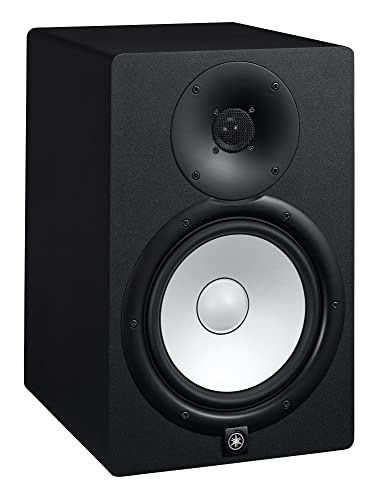
2. Yamaha HS8
- Best for: medium rooms, engineers who want a proven flat reference, and masters that need honest low-end judgement without a subwoofer.
medium rooms, engineers who want a proven flat reference, and masters that need honest low-end judgement without a subwoofer.
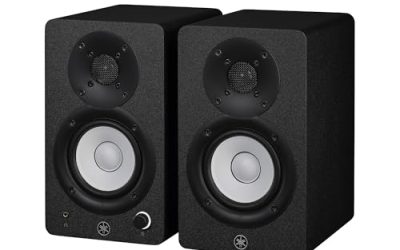
Yamaha HS8 Studio Monitor, Black, 8 Inch
The Yamaha HS8 is a long-standing reference monitor, and it remains a strong choice for mastering because of its honest, uncoloured sound. It uses an eight-inch cone woofer and a one-inch dome tweeter, with a frequency response of 38Hz to 30kHz. The bi-amplified system provides 75 watts for the low-frequency driver and 45 watts for the high-frequency driver, for 120 watts in total. The crossover is set at 2kHz, and the monitor offers XLR and TRS phone jack inputs.
The HS8 is known for a flat, precise presentation. It does not add warmth or sparkle to make music sound better than it is. That can feel plain at first, especially after listening to hi-fi speakers, but it is exactly what mastering needs. If a mix is harsh, the HS8 will show it. If the low end is loose, the HS8 will show that too. The low-resonance MDF cabinet and the port design help keep the sound clean, and the rear-panel room control and high trim switches let you adapt the monitor to your room. The room control switch offers cuts below 500Hz, while the high trim switch adjusts the high-frequency level.
Size is the main trade-off. The HS8 is a large nearfield monitor, and it needs space. It works best in a medium room with proper stands, enough distance from the front wall, and a listening position that is not too close. In a very small room, the eight-inch woofer can excite room modes and make bass sound uneven. In the right room, however, the HS8 gives a full, stable low end without a subwoofer, along with clear mids and a wide, believable stereo image.
3. ADAM Audio T7V
- Best for: engineers who want ribbon-tweeter detail, a balanced seven-inch size, and a clear middle ground between compact and large monitors.
engineers who want ribbon-tweeter detail, a balanced seven-inch size, and a clear middle ground between compact and large monitors.
ADAM Audio T7V Studio Monitor for Recording, Mixing and Mastering
The ADAM Audio T7V is a seven-inch nearfield monitor that sits between the compact KRK and the larger Yamaha in size, and it brings a different tweeter design to this comparison. It uses a seven-inch polypropylene woofer and a U-ART ribbon tweeter, a folded ribbon design that ADAM Audio is known for. The ribbon tweeter is designed for fast, detailed high-frequency reproduction, which can help when judging air, sibilance, and reverb tails during mastering. The monitor is described by the maker as a studio monitor for recording, mixing, and mastering, and it is sold as a single unit, so a stereo setup needs two matching units.
The T7V offers balanced XLR and unbalanced RCA inputs, a rear-panel level control, and high-frequency and low-frequency EQ switches. Those controls help adapt the monitor to desk placement and room acoustics without adding unnecessary complexity. The seven-inch woofer gives more low-end weight than a five-inch monitor, while staying easier to place in a small or medium room than an eight-inch monitor. The maximum sound pressure level per pair at one metre is listed at 110 dB, which gives enough headroom for normal mastering levels without pushing the amplifier hard.
In use, the T7V is valued for its clear highs and its stable stereo image. Vocals, cymbals, and acoustic instruments keep their detail without sounding sharp, and small changes in equalisation are easy to follow. The low end is tight rather than boomy, which helps when judging bass balance and kick drum weight. It is a good middle ground for an engineer who wants more low end than a five-inch monitor, more high-frequency detail than a standard dome tweeter, and a cabinet that still fits a normal studio desk or stand setup.
Comparison Table
| Monitor | Woofer | Tweeter | Inputs | Best Room Fit |
|---|---|---|---|---|
| KRK RP5G5 ROKIT 5 Generation Five | 5-inch Kevlar woofer | 1-inch silk dome tweeter | XLR, TRS | Small room or desk setup |
| Yamaha HS8 | 8-inch cone woofer | 1-inch dome tweeter | XLR, TRS | Medium room |
| ADAM Audio T7V | 7-inch polypropylene woofer | U-ART ribbon tweeter | XLR, RCA | Small to medium room |
Setting Up Monitors for Mastering
Good monitors still need good setup. Start by placing the monitors on solid stands or isolation pads at ear height, with the tweeters level with your ears. Form an equilateral triangle between the two speakers and your head, with the speakers angled slightly inward. Keep the distance from each speaker to your ears as equal as possible, and keep the speakers away from corners when you can.
Treat the room before you blame the monitors. A few well-placed absorption panels at first reflection points, bass trapping in corners, and a rug or soft furnishing to reduce flutter echo can make a bigger difference than a more expensive speaker. After treatment, use the rear-panel trim controls to fine-tune the response, and listen to familiar reference tracks to learn how the monitors sound in your room.
Set both monitors to the same volume, and use a consistent level for critical decisions. Listening too loud for too long causes fatigue and makes it harder to hear small problems. Take short breaks, and check your work on headphones, in a car, and on a small portable speaker. If the same issue appears everywhere, fix it on the mastering monitors.
FAQ
What size studio monitor is best for mastering?
There is no single best size for every room. A five-inch monitor suits a small room or desk setup, a seven-inch monitor suits a small to medium room, and an eight-inch monitor suits a medium room with enough space for proper placement. Choose the size that fits your room and listening distance, not the largest size you can afford.
Do I need a subwoofer for mastering?
Not always. A good eight-inch monitor can give enough low end for many masters, while a five-inch monitor may need a subwoofer for deep bass work. A subwoofer must be set up carefully, with correct crossover, level, and placement, or it can make bass judgement worse. If you add one, use reference tracks and check the result on other systems.
Are ribbon tweeters better than dome tweeters for mastering?
A ribbon tweeter can offer fast transient response and detailed highs, while a well-designed dome tweeter can sound smooth and accurate. Both designs can work well for mastering. Choose based on how the highs sound in your room over a long session, and whether the monitor causes fatigue or reveals small details clearly.
Can I master with the same monitors I use for mixing?
Yes, in many home and small professional studios the same monitors are used for both jobs. Mastering places a higher demand on neutrality and low-level detail, so a flat, well-set-up monitor is important. If your mixing monitors are heavily coloured, they may not be the best choice for final mastering decisions.
How important is room treatment for mastering monitors?
Room treatment is very important. Reflections, standing waves, and desk bounce can change the sound more than the difference between two good monitors. Basic treatment at reflection points and in corners, plus careful placement, will help any monitor in this guide perform more reliably.
Conclusion
The best studio monitors for mastering are the ones that tell the truth in your room, at your listening distance, and over a long session. The KRK RP5G5 ROKIT 5 Generation Five is the compact choice for small rooms, with DSP tuning and a flat Mix mode that helps in a desk setup. The Yamaha HS8 is the proven flat reference for medium rooms, with an eight-inch woofer, honest mids, and a full low end that needs no subwoofer for many masters. The ADAM Audio T7V is the balanced middle ground, with a seven-inch woofer and a ribbon tweeter that reveals high-frequency detail without sounding harsh.
Start with room size and placement, then choose the monitor that fits that space. Set it up carefully, treat the room, and learn how it translates to other systems. A neutral monitor will not make mastering easy, but it will make it honest.
Disclosure: As an Amazon Associate, we earn from qualifying purchases.
FAQ
What size studio monitor is best for mastering?
Do I need a subwoofer for mastering?
Are ribbon tweeters better than dome tweeters for mastering?
Can I master with the same monitors I use for mixing?
How important is room treatment for mastering monitors?
More from Amazon
Programs that pair well with the guide above. Offers and eligibility are set by Amazon and may change.
Free shipping on eligible items, Prime Video and more. Eligible new members can start with a free trial.
Start a Prime free trialAd-free music streaming. Eligible new subscribers can start with a free trial.
Try Music Unlimited freeA Prime membership for ages 18-24 with a trial period. Eligibility is set by Amazon.
See Prime for Young AdultsAudiobooks and podcasts to listen to on the go. Eligible new members can start with a free trial.
Try Audible freeAs an Amazon Associate we earn from qualifying purchases.