Our Short List of 3
All 4 Picks at a Glance
| Product | Specs | Action |
|---|---|---|
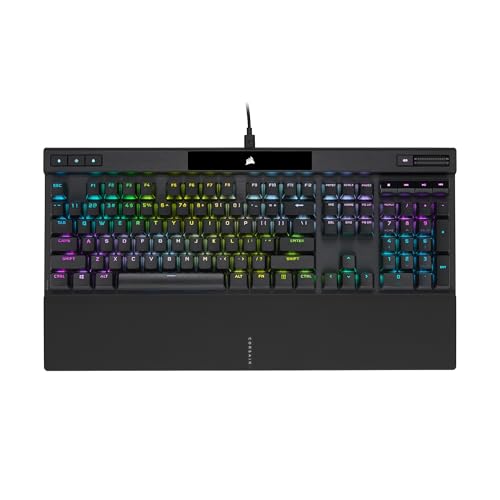 1. Corsair K70 RGB PRO with CHERRY MX RGB Red Switches | Check price on Amazon | |
 2. Corsair K70 RGB PRO with CHERRY MX RGB Speed Switches | Check price on Amazon | |
 3. Ducky One 3 Pure White Hotswap RGB with CHERRY MX Blue Switches | Check price on Amazon | |
 4. Ducky One 3 TKL Aura Clear Black Hotswap RGB with CHERRY MX Silver Switches | Check price on Amazon |
Key takeaways
- Compare the best Cherry RGB keyboards with genuine CHERRY MX RGB switches, per-key lighting, switch feel, and full-size and compact layouts for gaming.
The best Cherry RGB keyboards combine two things that are easy to get wrong separately: genuine CHERRY MX switches and per-key RGB lighting that actually looks good. CHERRY MX RGB switches use a clear switch housing that lets light pass through from an LED mounted under each key, so the legends glow evenly and the colour stays consistent across the board. That is different from keyboards that put a single light strip under the keys or use a coloured backlight with no per-key control. When the switch, the keycap, and the lighting are designed together, the result is a keyboard that feels precise and looks clean, whether the lighting is set to a single calm colour or a full rainbow wave.
This guide covers full-size and compact keyboards that use genuine CHERRY MX RGB switches, not lookalike switches from other brands. The picks below come from Corsair and Ducky, two brands with a long history of building boards around CHERRY switches. They cover linear switches for fast gaming, tactile switches for typing, clicky switches for buyers who like audible feedback, and a low-travel linear switch for players who want the shortest possible key travel. Each board is a mechanical keyboard sold on Amazon, with per-key RGB lighting, durable keycaps, and a layout suited to a different kind of desk.
What Makes a Cherry RGB Keyboard Different?
The name CHERRY refers to the German switch maker whose MX switches became the standard for mechanical keyboards. A CHERRY MX RGB switch is a variant with a transparent top housing, designed so the RGB LED sits inside the switch and shines through the keycap legend. Because the LED is part of the switch assembly, the light is centred under each key and the colour does not bleed unevenly into neighbouring keys. That matters more than it sounds: a keyboard with poorly placed lighting can look patchy in a dark room, while a well-built CHERRY RGB board looks even from edge to edge.
Switch feel is decided by the colour of the switch, not by the lighting. CHERRY MX Red is linear and smooth, with no bump and no click, and it is the most popular choice for gaming. CHERRY MX Speed is also linear, but it actuates sooner, so a keypress registers with less travel. CHERRY MX Brown is tactile, with a small bump that can be felt without a loud click, and it suits typing as well as gaming. CHERRY MX Blue is tactile and clicky, with a clear click sound on every press. CHERRY MX Silver is linear with very short travel, aimed at players who want the fastest possible response.
Keycaps also affect the result. Double-shot PBT keycaps, used on several boards in this guide, are made by moulding the legend into the keycap rather than printing it on the surface, so the legend does not wear off and the keycap resists shine from finger oils. ABS keycaps can feel smoother at first but tend to shine and wear sooner.
How to Choose the Best Cherry RGB Keyboard
Pick the Switch First, Then the Lighting
Start with switch feel, because lighting can be changed in software but the switch cannot be changed without replacing the board or the switches. Linear switches such as Red, Speed, and Silver suit fast-paced games where keys are pressed repeatedly and a smooth, quiet travel helps. Tactile Brown switches suit mixed use, where the same keyboard is used for work during the day and games in the evening. Clicky Blue switches suit buyers who type alone and enjoy audible feedback, but they are loud enough to disturb others in a shared room.
Choose a Layout That Fits the Desk
Full-size keyboards include a number pad, which is useful for spreadsheets, data entry, and games that use the number pad for extra bindings. Tenkeyless boards drop the number pad and leave more room for the mouse, which many players prefer, while keeping the function row and arrow keys in a familiar place. Compact 60 percent and 65 percent boards go further, removing the function row and sometimes the arrow keys to save desk space, but they rely on layered key combinations for functions that a full-size board has as dedicated keys.
Check Keycap Material and Build Quality
A keyboard that will be used for hours every day should have a solid frame and keycaps that hold up. An aluminium frame resists flex and gives the board a stable feel, while a plastic frame can feel lighter and may flex under hard typing. Double-shot PBT keycaps are the most durable common option, and they keep their texture longer than printed ABS keycaps. Check whether the board has a detachable cable, which makes it easier to move or replace, and whether it includes a palm rest, which helps during long sessions.
Look at Polling Rate and Software
Polling rate is how often the keyboard reports its state to the computer. A standard keyboard polls at 1,000 times per second, which is enough for most players. Some gaming boards, including the Corsair models below, support up to 8,000 times per second, which reduces input delay in theory, although the difference is small and depends on the game and the system.
Consider Noise, Stabilisers, and Extra Features
Mechanical keyboards vary in sound as much as in feel. Linear switches are quieter than clicky switches, and boards with sound-dampening foam or lubricated stabilisers sound softer under the space bar and larger keys. Dedicated media controls, a volume roller, and macro keys are useful extras, but they add size and cost, so they are worth paying for only when they will be used regularly.
Top Picks
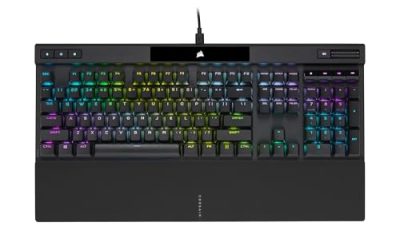
1. Corsair K70 RGB PRO with CHERRY MX RGB Red Switches
The Corsair K70 RGB PRO with CHERRY MX RGB Red switches is a full-size mechanical gaming keyboard built around linear switches that are smooth, quiet, and well suited to both gaming and typing. The Red switches have a linear travel with no tactile bump and no click, so keys glide straight down and return quickly, which helps in games where the same key is pressed repeatedly. They are rated for 100 million keystrokes, which is a useful sign of long-term durability for a board that will be used daily.
The board itself is built on a durable aluminium frame with PBT double-shot PRO keycaps, which resist wear and shine and keep the legends crisp. Per-key RGB lighting is controlled through Corsair iCUE software, with support for dynamic lighting effects and integration with compatible games. Polling reaches up to 8,000 times per second through Corsair AXON hyper-processing technology, and the board includes a detachable USB-C cable, a soft-touch magnetic palm rest, dedicated media controls, and a multifunction volume roller. A tournament switch on the back locks the lighting to a static profile and disables custom macros, which is handy for competitive play.
This is the pick for buyers who want a full-size CHERRY RGB keyboard with a proven linear switch, a solid frame, and strong software support, and who have desk space for a number pad. The Red switch is the safest all-round choice in the CHERRY range, and the K70 RGB PRO pairs it with a complete set of gaming features without moving to an unusual layout.
Check the Corsair K70 RGB PRO, CHERRY MX RGB Red, on Amazon
2. Corsair K70 RGB PRO with CHERRY MX RGB Speed Switches
The second Corsair pick is the same K70 RGB PRO board fitted with CHERRY MX RGB Speed switches instead of Red switches. Speed switches are also linear, but they actuate at a shorter travel distance, so a keypress registers sooner than on a standard Red switch. That shorter actuation is the whole point of the Speed variant: in fast-paced games, the time between pressing a key and the game registering the input is slightly reduced, and repeated presses feel quicker because less travel is needed before the switch resets.
Everything else about the board matches the Red version. It has the same aluminium frame, PBT double-shot PRO keycaps, per-key RGB lighting through iCUE, up to 8,000 times per second polling, a detachable USB-C cable, a magnetic palm rest, and dedicated media controls with a volume roller. The lighting, build, and software are identical, so the choice between this pick and the previous one comes down to switch feel alone.
Speed switches are best for competitive players who want the fastest linear response and are comfortable with a switch that can be easier to press by accident when resting fingers on the keys. Typists who press keys lightly or who make frequent typing errors may prefer the Red version, which needs a little more travel before it actuates. For pure gaming speed, the Speed version is the sharper tool of the two.
Check the Corsair K70 RGB PRO, CHERRY MX RGB Speed, on Amazon
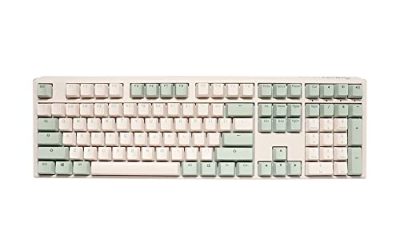
3. Ducky One 3 Pure White Hotswap RGB with CHERRY MX Blue Switches
The Ducky One 3 Pure White is a full-size hot-swappable mechanical keyboard with CHERRY MX Blue switches and RGB backlighting, and it takes a different approach from the Corsair boards. Instead of relying on software, Ducky builds most of the lighting and macro control into the board itself, with onboard shortcuts for changing effects, brightness, and profiles. The white case and keycaps give the board a clean look that stands out from the usual black gaming keyboard, and the RGB lighting shows clearly through the legends.
CHERRY MX Blue switches are tactile and clicky, with a distinct bump and an audible click on every press. That feedback suits typists who like to know exactly when a key has registered, and many writers prefer Blue switches for long typing sessions. The click is loud, so this board is best for a private room rather than a shared office or a late-night session next to a sleeping household. The hot-swappable sockets are a major advantage: the switches can be pulled out and replaced with another CHERRY MX variant without soldering, so the board can change from clicky to linear later if tastes change.
Ducky also adds its Quack Mechanics sound-dampening design, with foam and stabiliser tuning aimed at a cleaner sound, along with double-shot PBT keycaps and a detachable USB-C cable. The One 3 is a good pick for buyers who want a full-size CHERRY RGB keyboard with clicky feedback, onboard controls instead of heavy software, and the freedom to swap switches in the future.
Check the Ducky One 3 Pure White, CHERRY MX Blue, on Amazon
4. Ducky One 3 TKL Aura Clear Black Hotswap RGB with CHERRY MX Silver Switches
The Ducky One 3 TKL Aura Clear Black is a tenkeyless version of the One 3, fitted with CHERRY MX Silver switches and RGB lighting. Dropping the number pad leaves more room for the mouse, which suits players who use a low sensitivity and move the mouse across a wide area, while keeping the function row, arrow keys, and main typing area in their usual places. The Aura Clear Black design uses a translucent case that lets the RGB lighting glow through the body of the board as well as the keys, which gives it a distinctive look on a desk.
CHERRY MX Silver switches are linear with very short travel, actuating sooner than Red switches and resetting quickly, which makes them one of the fastest-feeling CHERRY switches for gaming. They are quieter than Blue switches and smoother than tactile switches, but the short travel means they can be easier to trigger accidentally, so they suit players with a deliberate touch rather than heavy-handed typists. Like the full-size One 3, this board is hot-swappable, so the Silver switches can be replaced with another CHERRY MX type without soldering if the feel does not suit.
The board includes double-shot PBT keycaps, a detachable USB-C cable, onboard RGB and macro controls, and the same Quack Mechanics dampening as the full-size model. It is the pick for buyers who want a compact CHERRY RGB keyboard with the fastest linear switch in the range, a tenkeyless layout for more mouse room, and the option to change switches later.
Check the Ducky One 3 TKL Aura Clear Black, CHERRY MX Silver, on Amazon
Comparison Table
| Keyboard | Switch | Layout | Hot-Swappable | Keycaps | Best For |
|---|---|---|---|---|---|
| Corsair K70 RGB PRO, Red | CHERRY MX RGB Red, linear | Full-size | No | PBT double-shot | All-round gaming and typing |
| Corsair K70 RGB PRO, Speed | CHERRY MX RGB Speed, linear | Full-size | No | PBT double-shot | Competitive gaming speed |
| Ducky One 3 Pure White | CHERRY MX Blue, clicky | Full-size | Yes | PBT double-shot | Typing with clicky feedback |
| Ducky One 3 TKL Aura | CHERRY MX Silver, linear | Tenkeyless | Yes | PBT double-shot | Compact desk, fast linear feel |
Frequently Asked Questions
What is the difference between CHERRY MX RGB and standard CHERRY MX switches?
CHERRY MX RGB switches use a clear housing that lets the LED shine through the switch and the keycap legend, giving even per-key RGB lighting. Standard CHERRY MX switches have an opaque housing, so the light is less visible through the key. The mechanical feel of the switch is the same for a given colour, whether it is an RGB variant or a standard one.
Which CHERRY MX switch is best for gaming?
Linear switches are usually the best choice for gaming, because they travel smoothly with no bump to overcome and reset quickly for repeated presses. CHERRY MX Red is the most versatile linear option, Speed actuates sooner for competitive play, and Silver has the shortest travel of all. Tactile Brown is a good compromise for mixed gaming and typing, while clicky Blue is better suited to typing than to fast gaming.
Are Cherry RGB keyboards good for typing as well as gaming?
Yes, when the switch matches the typing style. Brown switches suit typing with a light tactile bump, Blue switches suit typists who like clicky feedback, and Red switches suit typists who prefer a smooth, quiet press. A full-size layout with a number pad helps for data entry, while a tenkeyless layout suits writers who want more mouse room. Keycap quality and a stable frame matter as much for typing as they do for gaming.
Do I need software to use the RGB lighting?
It depends on the board. Corsair boards use iCUE software for the full range of per-key effects, macros, and game integration, although basic lighting can be changed on the board. Ducky boards rely more on onboard controls, so lighting, brightness, and profiles can be changed with key combinations and saved to the board without installing software. Check the software support for the operating system in use before buying.
Can I replace the switches on a Cherry RGB keyboard?
Only hot-swappable boards allow switch replacement without soldering. The two Ducky picks in this guide are hot-swappable, so their CHERRY MX switches can be pulled out and replaced with another CHERRY MX variant. The Corsair picks are not hot-swappable, so the switch choice should be made carefully before ordering, because changing switches later would need soldering work.
Conclusion
The best Cherry RGB keyboards in this guide cover the main switch choices without mixing in other switch brands. The Corsair K70 RGB PRO with CHERRY MX RGB Red switches is the safest all-round pick, with a full-size layout, a solid aluminium frame, and strong software support. The same board with CHERRY MX RGB Speed switches is the faster option for competitive players who want the shortest actuation. The Ducky One 3 Pure White with CHERRY MX Blue switches suits typists who like clicky feedback and want hot-swappable sockets, while the Ducky One 3 TKL Aura Clear Black with CHERRY MX Silver switches suits players who want a compact layout and the fastest linear feel.
Before ordering, decide on the switch first, then the layout, and check the listing for the exact switch variant, because the same model name is sold with several different CHERRY switches. A keyboard is used for hours every day, so the feel of the switch matters more than any single lighting effect. Choose the switch that matches the way the keyboard will actually be used, and the RGB lighting will be a bonus on top of a board that already feels right.
Disclosure: As an Amazon Associate, we earn from qualifying purchases.
FAQ
What Makes a Cherry RGB Keyboard Different?
What is the difference between CHERRY MX RGB and standard CHERRY MX switches?
Which CHERRY MX switch is best for gaming?
Are Cherry RGB keyboards good for typing as well as gaming?
Do I need software to use the RGB lighting?
Can I replace the switches on a Cherry RGB keyboard?
More from Amazon
Programs that pair well with the guide above. Offers and eligibility are set by Amazon and may change.
Free shipping on eligible items, Prime Video and more. Eligible new members can start with a free trial.
Start a Prime free trialAd-free music streaming. Eligible new subscribers can start with a free trial.
Try Music Unlimited freeA Prime membership for ages 18-24 with a trial period. Eligibility is set by Amazon.
See Prime for Young AdultsAudiobooks and podcasts to listen to on the go. Eligible new members can start with a free trial.
Try Audible freeAs an Amazon Associate we earn from qualifying purchases.