Our Short List of 3
All 4 Picks at a Glance
| Product | Specs | Action |
|---|---|---|
 1. Synology RT6600ax — Best Overall Security-First Router | Check price on Amazon | |
 2. ASUS RT-AX86U Pro — Best Subscription-Free Protection | Check price on Amazon | |
 3. GL.iNet Flint 2 (GL-MT6000) — Best for Privacy and VPN Control | Check price on Amazon | |
 4. TP-Link Archer AXE75 — Best Wi-Fi 6E Value with HomeShield | Check price on Amazon |
Our Top Picks
- TP-Link AXE5400 Tri-Band WiFi 6E RouterWiFi 6E, Tri-Band AXE540012.91 x 10.43 x 4.72 inches1.5 poundsCheck on Amazon
The best hacker proof routers do more than move data quickly. They guard the front door of a home network, blocking intrusions, encrypting traffic, and keeping every connected device behind a wall that updates itself. A standard router supplied by an internet provider usually covers the basics, but it rarely includes intrusion prevention, a built-in VPN, or network segmentation, and its firmware may sit unpatched for months. That gap is exactly what attackers look for, because a single weak router can expose laptops, phones, game consoles, smart TVs, and cameras all at once.
No router is literally impossible to hack, and any honest guide should say so up front. What the routers in this guide offer is a much harder target: current WPA3 encryption, automatic security updates, threat detection that watches traffic in real time, and tools that isolate risky devices from the rest of the network. The four picks below are standalone Wi-Fi routers, each with a built-in security suite and VPN support, chosen for homes and gaming setups where protection matters as much as speed.
How to Choose a Hacker Proof Router
Look for WPA3 and strong default encryption
WPA3 is the current Wi-Fi security standard, and it should be switched on for every network a router runs. It protects against offline password guessing far better than WPA2, and it encrypts traffic on open networks when supported. A good security router enables WPA3 by default and offers a transition mode for older devices that only speak WPA2, so nothing on the network is left using outdated encryption. Check the settings after setup and confirm that WPA3 is active on both the main network and the guest network.
Demand automatic firmware updates
Most router attacks succeed because of old firmware, not because of clever new exploits. Vulnerabilities in router software are discovered regularly, and manufacturers fix them through firmware updates. A router that updates itself closes that window automatically. Every pick in this guide supports automatic updates, but the feature is sometimes off by default, so turn it on during setup and check for an update on the first day. A router that has not received a firmware update in years is a liability, no matter how good its hardware is.
Check for intrusion prevention, not just a firewall
A basic firewall blocks unsolicited incoming traffic, which is useful but limited. Intrusion prevention goes further by inspecting traffic for known attack patterns, blocking malicious domains, and flagging devices that behave strangely. Synology calls its version Threat Prevention, ASUS calls its version AiProtection Pro, and TP-Link bundles its version into HomeShield. Whatever the brand name, the function matters: the router should be able to recognise and stop common attacks on its own, without extra software on every device. Some of these services are free for the life of the router, while others charge a subscription after a trial, so check the terms before buying.
Use network segmentation to isolate risky devices
Smart home gadgets, cheap cameras, and internet-connected appliances are the weakest devices on most home networks, because they rarely receive updates and often ship with weak default security. Network segmentation solves this by putting those devices on a separate network, such as a guest network or a VLAN, so a compromised gadget cannot reach a gaming PC or a work laptop. Routers with VLAN support or multiple SSIDs make this easy. The Synology pick below is the strongest here, but every router in this guide offers at least a guest network, and that alone is a meaningful upgrade.
Make sure VPN support is built in
A VPN server on the router lets household members connect back to the home network securely while travelling, which is safer than using public Wi-Fi directly. A VPN client on the router can route some or all household traffic through a commercial VPN service, protecting devices that cannot run VPN software themselves, such as consoles and smart TVs. WireGuard is the modern protocol to look for, because it is fast and simple, while OpenVPN remains a widely supported alternative. All four routers below support at least one of these protocols.
Do not ignore the security subscription question
Several security routers bundle their best protection into a service that is free for a year or two and then requires a paid subscription. That is not necessarily a bad deal, but it changes the real cost of ownership. Two of the picks below include their security suite for the life of the router with no subscription, which is a genuine advantage for buyers who want protection without a recurring bill. Before choosing, decide whether a subscription is acceptable, and read what happens when it lapses: some routers keep basic protection and lose the advanced features, while others lose the whole suite.
Top Picks
1. Synology RT6600ax — Best Overall Security-First Router
The Synology RT6600ax is the most security-focused router in this guide, and it is the natural first choice for a household that wants a router designed around protection. It is a tri-band Wi-Fi 6 router rated AX6600, with two 5 GHz radios and one 2.4 GHz radio, a 2.5 gigabit WAN and LAN port, and three additional gigabit LAN ports. It runs Synology Router Manager, a full operating system for the router that receives regular updates and supports a large catalogue of add-on packages.
Its headline security feature is Threat Prevention, a built-in intrusion prevention system that inspects incoming and outgoing traffic against a database of known attack signatures and blocks malicious connections before they reach a device. The router also supports VLAN segmentation and multiple SSIDs, so smart home gadgets can be isolated from computers and phones, and it includes Safe Access parental controls with per-device profiles and schedules. VPN server and client support covers common protocols, and the router can run a VPN server for secure remote access to the home network.
Setup uses a web interface or a mobile app, and the interface is closer to a small business system than a typical consumer router, which means more options and a slightly longer learning curve. That depth is the point: the RT6600ax gives its owner real control over traffic rules, device permissions, and threat logs, and its mesh support lets it extend coverage with additional Synology units later.
Check the Synology RT6600ax on Amazon
2. ASUS RT-AX86U Pro — Best Subscription-Free Protection
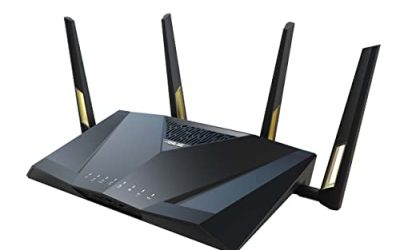
The ASUS RT-AX86U Pro is the best choice for buyers who want strong protection without paying for a security subscription. It is a dual-band Wi-Fi 6 router rated AX5700, with a 2.0 GHz quad-core processor, a 2.5 gigabit port, a dedicated gaming port, and AiMesh support for expanding coverage with other ASUS routers. Its security suite, AiProtection Pro, is powered by Trend Micro and included for the life of the router at no extra cost.
AiProtection Pro blocks access to known malicious websites, detects infected devices on the network, and inspects traffic for common attack patterns. The router also supports WPA3, a VPN server and client, and a guest network, and its mobile app includes a security scan that checks the network for weak passwords and open ports. Automatic firmware updates keep the protection current, and the router has a long track record of receiving updates from ASUS.
Gaming features are a bonus rather than the focus here: adaptive Quality of Service prioritises gaming traffic, the dedicated gaming port gives a connected PC or console priority, and a mobile game mode reduces latency on phones. For a gaming household that also wants a hardened network, the RT-AX86U Pro covers both needs in one box, and the lifetime security suite keeps the running cost at zero beyond the purchase.
Check the ASUS RT-AX86U Pro on Amazon
3. GL.iNet Flint 2 (GL-MT6000) — Best for Privacy and VPN Control
The GL.iNet Flint 2, model GL-MT6000, is the pick for buyers who want direct control over their privacy tools. It is a dual-band Wi-Fi 6 router with two 2.5 gigabit Ethernet ports, four gigabit LAN ports, a USB 3.0 port, and a quad-core processor. It runs an OpenWrt-based system, which means its firmware is open source and its VPN and filtering tools are first-class features rather than afterthoughts.
WireGuard performance is the standout specification: the Flint 2 handles WireGuard VPN traffic at speeds far above most consumer routers, making it practical to route the whole household through a VPN without slowing everyday browsing and gaming. OpenVPN is supported as well, and the router can act as both a VPN server for remote access and a VPN client for a commercial service. It also includes AdGuard Home for network-wide ad and tracker blocking, which removes a common tracking vector at the router level instead of relying on browser extensions.
The Flint 2 suits technically confident buyers. Its interface exposes more settings than a typical consumer router, and its open-source base means the owner can install additional packages and keep the firmware current through the community as well as the manufacturer. For a household that treats the router as a privacy device first and a Wi-Fi box second, this is the most capable option in the guide.
Check the GL.iNet Flint 2 on Amazon
4. TP-Link Archer AXE75 — Best Wi-Fi 6E Value with HomeShield
The TP-Link Archer AXE75 is the most affordable route into Wi-Fi 6E in this guide, and its security suite makes it a strong value pick rather than a stripped-down one. It is a tri-band Wi-Fi 6E router rated AXE5400, with a dedicated 6 GHz band, a 2.5 gigabit WAN port, four gigabit LAN ports, and a USB 3.0 port. The 6 GHz band gives nearby gaming PCs and consoles a clean channel with little interference from neighbours.
Security comes from TP-Link HomeShield, which provides network security scanning, IoT device identification, and parental controls through the Tether app, along with WPA3 encryption and VPN server and client support. HomeShield includes a free basic tier, with a paid Pro tier adding deeper intrusion protection and more detailed reports, so buyers should check which tier covers the features they want. The router also supports OneMesh, so a compatible TP-Link extender can widen coverage later without replacing the router.
The AXE75 fits a household that wants modern Wi-Fi 6E, solid protection, and a straightforward app, without paying flagship money. Its combined throughput is more than enough for gigabit internet and several simultaneous streams, and the 6 GHz band is where the real benefit lives for gaming devices close to the router.
Check the TP-Link Archer AXE75 on Amazon
Comparison Table
| Router | Wi-Fi Standard | Key Security Features | VPN Support | Subscription for Security |
|---|---|---|---|---|
| Synology RT6600ax | Wi-Fi 6, tri-band AX6600 | Threat Prevention, VLAN, Safe Access | Server and client | No subscription |
| ASUS RT-AX86U Pro | Wi-Fi 6, dual-band AX5700 | AiProtection Pro, WPA3, security scan | Server and client | No subscription, lifetime |
| GL.iNet Flint 2 | Wi-Fi 6, dual-band | OpenWrt, AdGuard Home, WPA3 | WireGuard and OpenVPN | No subscription |
| TP-Link Archer AXE75 | Wi-Fi 6E, tri-band AXE5400 | HomeShield, WPA3, IoT identification | Server and client | Basic free, Pro tier paid |
What a Router Cannot Protect
A secure router is the strongest single upgrade a home network can get, but it is not a complete security system on its own. It cannot stop a household member from clicking a phishing link, entering a password on a fake website, or installing a malicious app. It also cannot protect a device once it leaves the home network, which is why a VPN on the phone or laptop matters when travelling. Good habits still carry weight: use a password manager, turn on two-factor authentication for important accounts, and keep computers and phones updated. The router handles the network layer; the rest is up to the people using it.
It is also worth changing the defaults on day one. Give the router admin account a strong unique password, disable remote administration unless it is genuinely needed, and turn off any features that are not in use, such as WPS or an unused USB sharing service. Each disabled feature is one less door into the network. A router that ships with strong defaults still benefits from a ten-minute review of its settings.
FAQ
Can a router really be hacker proof?
No router is completely hacker proof, and any product that claims otherwise should be treated with suspicion. What a security-focused router does is raise the cost of an attack far above what most attackers are willing to pay for a home target. Current encryption, automatic updates, intrusion prevention, and network segmentation together close the common entry points, which is the practical meaning of hacker proof for a home network.
Is WPA3 enough on its own?
WPA3 is an important part of the picture, but it is not enough alone. It protects the wireless link between devices and the router, but it does nothing about malicious websites, infected gadgets, or unpatched firmware. A router that pairs WPA3 with intrusion prevention, automatic updates, and a guest network protects far more of the network than encryption alone ever could.
Do I need a subscription for router security?
It depends on the router. The Synology RT6600ax, the ASUS RT-AX86U Pro, and the GL.iNet Flint 2 include their security features without a subscription, while the TP-Link Archer AXE75 offers a free basic HomeShield tier with a paid Pro tier for deeper protection. Check what each tier includes before buying, and confirm what happens to protection if a subscription lapses.
Should smart home devices go on a separate network?
Yes, whenever the router supports it. Smart bulbs, cameras, and appliances rarely receive security updates and are common targets for botnets. Putting them on a guest network or a VLAN keeps a compromised gadget away from computers, phones, and storage. The Synology pick is the strongest option for this, because it supports full VLAN segmentation.
Is a VPN on the router better than a VPN app?
Each has its place. A VPN on the router protects every device on the network, including consoles and smart TVs that cannot run VPN apps. A VPN app on a laptop or phone protects that device when it leaves home. Many households use both: the router VPN for devices at home, and an app for devices on the road.
Conclusion
The best hacker proof routers share a clear set of traits: WPA3 encryption, automatic firmware updates, intrusion prevention, VPN support, and a way to isolate risky devices from the rest of the network. The Synology RT6600ax leads this guide with its Threat Prevention system and VLAN segmentation. The ASUS RT-AX86U Pro pairs strong protection with a lifetime security suite and no subscription. The GL.iNet Flint 2 gives privacy-focused buyers fast WireGuard performance and open-source control. The TP-Link Archer AXE75 brings Wi-Fi 6E and HomeShield to a lower budget.
Pick the router that matches the household: Synology for maximum control, ASUS for set-and-forget protection, GL.iNet for VPN and privacy, TP-Link for Wi-Fi 6E value. Whichever one is chosen, enable automatic updates, turn on WPA3, change the default passwords, and put smart home gadgets on their own network. Those four steps, plus a security-first router, make a home network a far harder target than the average one an attacker scans.
Disclosure: As an Amazon Associate, we earn from qualifying purchases.
FAQ
Can a router really be hacker proof?
Is WPA3 enough on its own?
Do I need a subscription for router security?
Should smart home devices go on a separate network?
Is a VPN on the router better than a VPN app?
More from Amazon
Programs that pair well with the guide above. Offers and eligibility are set by Amazon and may change.
Free shipping on eligible items, Prime Video and more. Eligible new members can start with a free trial.
Start a Prime free trialAd-free music streaming. Eligible new subscribers can start with a free trial.
Try Music Unlimited freeA Prime membership for ages 18-24 with a trial period. Eligibility is set by Amazon.
See Prime for Young AdultsAudiobooks and podcasts to listen to on the go. Eligible new members can start with a free trial.
Try Audible freeAs an Amazon Associate we earn from qualifying purchases.