Our Short List of 3

- Amazon ASIN: B08P58JXJ9
- View on Amazon: https://www.amazon.com/dp/B08P58JXJ9

- Amazon ASIN: B0749NTSCD
- View on Amazon: https://www.amazon.com/dp/B0749NTSCD

- Amazon ASIN: B08LFWJHB7
- View on Amazon: https://www.amazon.com/dp/B08LFWJHB7
All 5 Picks at a Glance
| Product | Specs | Action |
|---|---|---|
| 1. Epson EX3280 — Best Budget Meeting-Room Projector |
| Check price on Amazon |
| 2. ViewSonic PA503W — Best Value Widescreen Office Projector |
| Check price on Amazon |
| 3. BenQ MW560 — Best Mid-Range Business Projector |
| Check price on Amazon |
 4. Optoma EH412ST — Best Short-Throw Projector for Small Meeting Rooms |
| Check price on Amazon |
 5. Epson EpiqVision Flex CO-W01 — Best Portable Projector for Huddle Spaces |
| Check price on Amazon |
Key takeaways
- Find the best projectors for companies with bright, reliable picks for meeting rooms, wireless presenting, and everyday office use. Compare top models here.
A meeting room lives or dies by its display. When a projector is too dim, the team spends the first ten minutes closing blinds and squinting at washed-out slides. Choosing the best projectors for companies is therefore less about home theater flair and more about office realities: brightness that survives fluorescent lights and daylight, connections that work with whatever laptop walks into the room, and a light source that lasts through years of daily use.
This guide focuses on projectors built for business presentations, conference rooms, training sessions, and huddle spaces. The shortlist covers what matters in an office: high brightness, readable text, flexible placement, simple setup, and dependable operation day after day.
Disclosure: As an Amazon Associate, we earn from qualifying purchases.
How to Choose a Projector for Your Company
Brightness matters more than resolution
In a lit conference room, brightness is the single most important specification. A projector rated at 3,000 lumens or higher can produce a readable image with the lights on. For small huddle rooms, 3,000 lumens is a reasonable floor. For medium conference rooms with windows, aim for 3,500 to 4,000 lumens. For large rooms or spaces with a lot of glass, 4,000 lumens and above is the safer choice.
White brightness describes how bright white areas appear, while color brightness describes how bright colors appear. A projector with equal color and white brightness, as Epson advertises for its 3LCD models, keeps charts vivid instead of letting colors look dull next to bright whites. Compare lumen figures only between models measured the same way.
Resolution: XGA, WXGA, or Full HD
Resolution determines how sharp text and spreadsheets look. XGA, at 1024 by 768 pixels, is the classic business format and remains perfectly usable for slide decks and documents in smaller rooms. WXGA, at 1280 by 800 pixels, matches the widescreen shape of modern laptops and gives spreadsheets extra horizontal room, which makes it the sweet spot for most offices. Full HD, at 1920 by 1080 pixels, suits rooms showing detailed dashboards, design work, or small text to a large audience. Match resolution to room size and content, not to a specification race.
Lamp life and total cost of ownership
A projector is a long-term purchase, and the light source is the part that wears out. A lamp rated for 6,000 hours in normal mode and up to 15,000 hours in eco mode can last several years at a few hours a day, but heavy daily use burns through lamps faster. Check that replacement lamps are readily available before buying, because a bargain projector with a scarce lamp is no bargain at all.
Laser and LED projectors cost more up front but can run for 20,000 hours or longer with almost no maintenance, which is why many companies choose them for permanently installed rooms. For a portable unit or a lightly used room, a lamp projector still makes sense. For a room that runs eight hours a day, five days a week, a maintenance-free light source pays for itself quickly.
Wireless presenting, throw distance, and sound
The fastest way to kill a meeting is a missing cable. A company projector should offer at least one HDMI input, and two is better when a room PC and a guest laptop both need to connect. Some projectors have built-in wireless or Miracast; others rely on a dongle or a streaming stick in the HDMI port. Confirm that wireless casting works with your corporate network and security policies before committing.
Throw distance decides where the projector sits relative to the screen. Standard-throw models need several feet for a large image and suit ceiling mounts in medium and large rooms. Short-throw models sit close to the wall and still fill a big screen, which suits small rooms. Measure the room first and check the throw ratio. Automatic keystone correction is a real convenience in shared rooms, where different people set the projector up each week.
A built-in speaker matters too: 2 watts is enough for spoken slides in a small room, while 10 watts can carry a training video in a medium room. Rooms hosting regular video conferences still need a conference audio system. For portable use, a projector under six pounds can travel between rooms, branch offices, and client sites.
Top Picks: Best Projectors for Companies
The five projectors below cover the most common company scenarios, from a budget room to a portable huddle-space unit.
1. Epson EX3280 — Best Budget Meeting-Room Projector
- Amazon ASIN: B08P58JXJ9
- View on Amazon: https://www.amazon.com/dp/B08P58JXJ9
The Epson EX3280 is a straightforward 3LCD business projector that does the core job well: bright, readable slides in a lit room at a modest outlay. It produces 3,600 lumens of both color and white brightness, so charts, graphs, and text stay vivid with the lights on. Native XGA resolution at 1024 by 768 pixels is the classic presentation format, and the 15,000 to 1 dynamic contrast ratio keeps text crisp against white backgrounds.
Key specifications include 3-chip 3LCD technology, XGA resolution, 3,600 lumens of color and white brightness, a 15,000 to 1 dynamic contrast ratio, one HDMI port, a built-in 2-watt speaker, and a lamp rated for up to 12,000 hours in eco mode. It measures 11.9 by 9.3 by 3.2 inches, weighs 5.2 pounds, and connects to streaming devices through HDMI.
Three-chip 3LCD technology avoids the rainbow artifacts some viewers notice on single-chip DLP projectors, and equal color and white brightness keeps presentation graphics looking as designed. Setup is simple and the compact size makes it easy to share between rooms.
XGA is a 4 to 3 format, so widescreen laptop content gets pillarboxed or stretched, and fine spreadsheet text is less sharp than on WXGA or Full HD models. There is no built-in wireless, so guest laptops need a cable or a streaming stick, and the 2-watt speaker is thin for video.
This suits small companies and departments that need a reliable room projector without overinvesting, for small to medium meeting rooms where slides and documents are the main content. Note: Epson lists this model as discontinued on its own site, so confirm the condition of the Amazon listing, new or renewed, before ordering.
2. ViewSonic PA503W — Best Value Widescreen Office Projector
- Amazon ASIN: B0749NTSCD
- View on Amazon: https://www.amazon.com/dp/B0749NTSCD
The ViewSonic PA503W is a WXGA business projector built for modern offices: widescreen laptops, spreadsheet-heavy decks, and rooms where the lights stay on. Its Amazon listing rates it at 4,000 lumens, and its 1280 by 800 resolution matches the 16 to 10 shape of most business laptops, so slides fill the screen without black bars.
Key specifications include DLP technology, WXGA resolution at 1280 by 800 pixels, brightness rated at 4,000 lumens on the Amazon listing, a 22,000 to 1 contrast ratio, a 1.1x optical zoom, vertical keystone correction, HDMI and VGA inputs, a lamp rated for up to 15,000 hours in SuperEco mode, and ViewSonic SuperColor technology.
The widescreen format is a genuine everyday advantage for laptop-based presenting. The 1.1x optical zoom and vertical keystone correction make setup forgiving when the mount point is not perfectly centered, and the long lamp life in SuperEco mode keeps running costs down. DLP technology delivers sharp text and strong contrast for spreadsheets and documents.
Some viewers notice the rainbow effect single-chip DLP projectors can produce during fast motion, though it rarely matters for slides. The built-in speaker is basic, so larger rooms will want external audio for video, and brightness figures vary between sources, so treat the headline lumen rating as approximate.
This is a strong default choice for everyday meetings, classrooms, and training rooms showing a mix of slides, spreadsheets, and video from laptops, especially when the budget must cover more than one room.
3. BenQ MW560 — Best Mid-Range Business Projector
- Amazon ASIN: B08LFWJHB7
- View on Amazon: https://www.amazon.com/dp/B08LFWJHB7
The BenQ MW560 is a WXGA business projector aimed squarely at offices, with the features IT departments ask for: high brightness, dual HDMI inputs, a strong built-in speaker, automatic keystone correction, and a long-life lamp with power-saving modes.
Key specifications include DLP technology, WXGA resolution at 1280 by 800 pixels, 4,000 ANSI lumens, a 20,000 to 1 contrast ratio, dual HDMI inputs plus VGA, a 10-watt built-in speaker, a 1.1x zoom ratio, automatic keystone correction, and a lamp rated for 6,000 hours in normal mode and up to 15,000 hours in LampSave mode. It measures 296 by 120 by 221 millimeters, weighs 2.3 kilograms, runs at 34 decibels in normal mode and 29 in eco mode, and includes picture modes for spreadsheets, infographics, and presentations.
Dual HDMI inputs mean a room PC and a guest laptop can both stay connected, removing the daily cable shuffle. The 10-watt speaker is genuinely useful for training videos and conference calls in a medium room, and automatic keystone correction and SmartEco power saving reduce setup and maintenance work.
ProjectorCentral lists the MW560 as out of production, with the MW560C as its successor, so confirm stock and seller details on the Amazon listing before ordering. It is a lamp projector rather than a laser model, so a heavily used room will eventually need a replacement lamp, and wireless presenting needs an optional accessory or an external streaming device.
This suits companies fitting out a dedicated conference room or several meeting rooms with one consistent model, especially medium rooms where two HDMI sources, a louder speaker, and quick setup matter most.
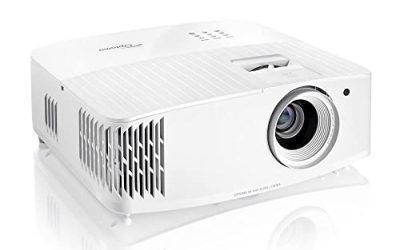
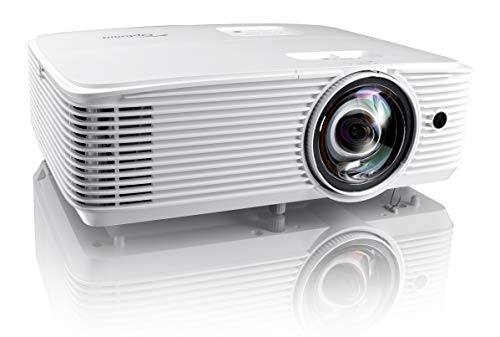
4. Optoma EH412ST — Best Short-Throw Projector for Small Meeting Rooms
- Amazon ASIN: B07TR7K33F
- View on Amazon: https://www.amazon.com/dp/B07TR7K33F
Small rooms create a specific problem: there is not enough distance between projector and wall for a standard-throw model to produce a large image. The Optoma EH412ST solves it with a short-throw lens, producing a large Full HD image from close range for huddle rooms, small conference rooms, and classrooms where space is tight.
Key specifications include DLP technology, Full HD resolution at 1920 by 1080 pixels, 4,000 lumens, a 50,000 to 1 contrast ratio, a short-throw lens, HDR and 4K input support, a 10-watt built-in speaker, HDMI and VGA inputs, and a lamp rated for up to 15,000 hours. The short-throw design keeps the projector out of the way of presenters and the audience.
Full HD resolution keeps small text and detailed dashboards readable, the high contrast ratio gives the image depth, and the short-throw lens gives a small room a large screen without ceiling-mount gymnastics. The 15,000-hour lamp life reduces maintenance, and the 10-watt speaker handles video audio without extra equipment.
A short-throw lens is less flexible about placement than a standard lens with zoom, so the projector must sit at roughly the right distance, and the image is less forgiving of an uneven wall. As a DLP model, it can show rainbow artifacts to sensitive viewers during fast motion, though this rarely affects presentations, and a heavily used room will eventually need a lamp replacement.
This is the model to shortlist first for small rooms, huddle spaces, and training corners where a standard projector cannot fit and the screen still needs to be big.
5. Epson EpiqVision Flex CO-W01 — Best Portable Projector for Huddle Spaces
- Amazon ASIN: B0BDQ84L6Z
- View on Amazon: https://www.amazon.com/dp/B0BDQ84L6Z
Not every meeting happens in a formal conference room. Huddle spaces, shared lounges, and off-site sessions need a projector that can be carried in, set up in a minute, and run without a tangle of equipment. The Epson EpiqVision Flex CO-W01 combines a portable 3LCD projector with built-in Android TV streaming for exactly that role.
Key specifications include 3-chip 3LCD technology, WXGA resolution at 1280 by 800 pixels, 3,000 lumens of color and white brightness, a 5-watt built-in speaker, HDMI and USB ports, built-in Android TV with access to streaming apps, and an image size of up to 300 inches, so it can display streaming content directly without a laptop.
Built-in streaming removes the need for a laptop in casual sessions and video playback, and the 3,000-lumen output is enough for a huddle room with moderate lighting. The 3LCD design gives good color brightness for charts, the 5-watt speaker beats the 2-watt speakers on many budget business projectors, and portability makes it easy to share one unit across several informal spaces.
At 3,000 lumens, it is the dimmest projector on this list, so it is not the right choice for a large, bright boardroom. As a streaming-first portable unit, it lacks the dual HDMI inputs and ceiling-mount design of a fixed conference room projector, and wireless casting can depend on the office network, so confirm compatibility with your IT setup.
This suits companies needing a flexible, portable display for huddle rooms and mobile teams, and it works well as a second projector for an office that already has a fixed conference room unit.
Comparison Table
| Projector | Resolution | Brightness | Lamp Life | Speaker | Best For |
|---|---|---|---|---|---|
| Epson EX3280 | XGA (1024 x 768) | 3,600 lumens | Up to 12,000 hrs eco | 2 W | Budget meeting rooms, portable use |
| ViewSonic PA503W | WXGA (1280 x 800) | 4,000 lumens (listing) | Up to 15,000 hrs SuperEco | Basic | Everyday widescreen presenting |
| BenQ MW560 | WXGA (1280 x 800) | 4,000 ANSI lumens | Up to 15,000 hrs LampSave | 10 W | Dedicated medium conference rooms |
| Optoma EH412ST | Full HD (1920 x 1080) | 4,000 lumens | Up to 15,000 hrs | 10 W | Small rooms needing a large image |
| Epson CO-W01 | WXGA (1280 x 800) | 3,000 lumens | Lamp | 5 W | Huddle spaces, portable use |
Frequently Asked Questions
How many lumens do I need for a meeting room projector?
For a small huddle room with controlled lighting, 3,000 lumens is a workable minimum. For a medium conference room with windows and overhead lighting, look for 3,500 to 4,000 lumens. For a large room or a space with a lot of glass, 4,000 lumens or more is the safer choice. A smaller screen also makes the same projector look brighter, so a modest model can serve a small room well.
Is XGA enough for business presentations, or should I buy WXGA or Full HD?
XGA is enough for standard slide decks and documents in a small room, and it remains common in budget business projectors. WXGA is the better default for most offices because it matches the widescreen shape of modern laptops and gives spreadsheets more horizontal space. Full HD is worth the step up when the room regularly shows detailed dashboards, design files, small text, or video to a larger audience.
Should a company buy a lamp projector or a laser projector?
A lamp projector costs less up front and is a sensible choice for rooms used a few hours a day, for portable units, and for smaller offices. Expect a lamp replacement after several thousand hours, and check availability before buying. A laser projector costs more initially but can run for 20,000 hours or longer with almost no maintenance, which suits rooms in daily, all-day use and permanent ceiling installations where servicing is disruptive.
Can these projectors handle wireless presenting?
It depends on the model. Some business projectors include built-in wireless or Miracast, while others need an optional dongle or a streaming stick plugged into HDMI. The Epson EpiqVision Flex CO-W01 in this guide has Android TV built in, so it can stream content without a laptop. For the other models, a streaming device on the HDMI port or a dedicated wireless presentation system usually does the job.
Do I need a screen, or can I project onto a wall?
A plain white wall works for casual use, and many small offices start that way. A proper screen gives a brighter, more even image with better contrast, and a fixed or pull-down screen defines the viewing area. For a dedicated conference room, a screen is worth the investment. For a portable projector that moves between spaces, a wall or a portable screen is the practical answer.
Conclusion
The best projectors for companies fit the room, the content, and the way people actually meet. Brightness comes first, because a dim image wastes every meeting it appears in. Resolution comes second, matched to room size and content detail, while lamp life, connectivity, and ease of setup decide ownership cost and hassle.
For most offices, the ViewSonic PA503W and BenQ MW560 cover the middle ground well: bright, widescreen, and built for daily presenting, with the BenQ adding a stronger speaker and dual HDMI. The Epson EX3280 is the sensible budget choice for smaller rooms, the Optoma EH412ST is the pick for small rooms needing a big Full HD image, and the Epson CO-W01 is the portable option for huddle spaces.
Measure the room, count the hours the projector will run, and check the inputs your laptops need. Get those three decisions right, and any projector on this list will serve the company well for years.
FAQ
How many lumens do I need for a meeting room projector?
Is XGA enough for business presentations, or should I buy WXGA or Full HD?
Should a company buy a lamp projector or a laser projector?
Can these projectors handle wireless presenting?
Do I need a screen, or can I project onto a wall?
More from Amazon
Programs that pair well with the guide above. Offers and eligibility are set by Amazon and may change.
Free shipping on eligible items, Prime Video and more. Eligible new members can start with a free trial.
Start a Prime free trialAd-free music streaming. Eligible new subscribers can start with a free trial.
Try Music Unlimited freeA Prime membership for ages 18-24 with a trial period. Eligibility is set by Amazon.
See Prime for Young AdultsAudiobooks and podcasts to listen to on the go. Eligible new members can start with a free trial.
Try Audible freeAs an Amazon Associate we earn from qualifying purchases.