Key takeaways
- Find the best hack proof routers for a safer home network, with built-in threat blocking, WPA3, automatic updates, guest networks, and VPN support.
The phrase hack proof sounds absolute, so let us be plain about what it means here. No router is literally unhackable. Every networked device can be attacked, and every maker can ship a flaw that is found later. What you can buy is a router with strong security features that make an attack far harder, far slower, and far less likely to succeed. That is the reading this guide uses throughout: best hack proof routers means routers built around serious, always-on protection, not boxes with a bold label and little behind it.
A home network now holds far more than a laptop and a phone. It holds work laptops, game consoles, smart TVs, cameras, doorbells, thermostats, speakers, and tablets. Many of those devices never get updates of their own, and some ship with weak default settings. The router sits in front of all of them. It can watch traffic, block known threats, keep guests away from private devices, and close the doors that attackers probe first.
A fast router with old firmware, an unchanged admin password, and no threat blocking is a fast way into a home network. This guide explains what to look for, then covers one router that brings the full set of protections together: the ASUS RT-AX88U Pro, with lifetime AiProtection Pro, WPA3, automatic updates, guest networking, and VPN support.
What to Look For
Automatic Updates and Long Support
The most valuable security feature in a router is not printed on the box. It is the update habit of the maker behind it. New flaws are found in router software every year, and the only fix is a firmware update that closes the hole. A router that updates itself stays protected against flaws that were unknown when it left the factory.
Look for a maker with a clear record of supporting routers for years, not months. Check whether the model still receives firmware updates and whether updates arrive automatically by default. If a model has reached the end of its support life, cross it off the list, even if it is still listed for purchase somewhere.
Built-In Threat Blocking
A modern secure router does more than move packets between your home and the internet. It inspects traffic for known threats and blocks them before they reach your devices. Look for a suite that blocks known malicious sites, blocks malware downloads, blocks infected devices from talking to command servers, and blocks intrusion attempts aimed at open ports and services.
ASUS calls its suite AiProtection Pro, and it is powered by Trend Micro. It is included for the life of the router, with no extra charge and no yearly renewal to remember. Two-way intrusion prevention watches traffic in both directions, so a device that is already infected cannot quietly phone home, and an outside attacker cannot quietly probe in.
Strong Wireless Encryption
Wireless encryption is the lock on the air between your devices and your router. The current standard is WPA3, and any router you buy now should support it. WPA3 makes it far harder for an attacker to guess a Wi-Fi password by trying many combinations, and it protects traffic even when the network password is shared with guests.
WPA3 alone is not enough. The password itself has to be strong and unique. Use a long passphrase made of unrelated words, with numbers and symbols mixed in, and never reuse the password from another account. Change the default network name, too, so it does not advertise the maker and model of your router to anyone in range. Turn off WPS, the push-button pairing feature, whose PIN version has a known flaw that lets an attacker guess the PIN in far fewer tries than the design intended.
Guest and IoT Networks
A guest network is a separate wireless network for visitors, with its own password, that cannot see the devices on your main network. When a friend visits and asks for Wi-Fi, you give them the guest password, and their phone can reach the internet without reaching your laptop, your file shares, your printers, or your smart home gear.
The same idea applies to smart home devices, and it matters even more there. Cameras, doorbells, thermostats, plugs, and bulbs often run old software, rarely get updates, and sometimes phone home to servers you have never heard of. Put them on their own network segment, away from laptops and phones, and a flaw in a cheap bulb cannot become a path to your work laptop.
VPN Support
A VPN server built into the router lets you reach your home network safely when you are away, without exposing the admin page or your file shares to the whole internet. Instead of opening ports for remote access, you connect through an encrypted tunnel, and the router treats you as if you were sitting at home. WireGuard is the modern protocol to look for: it is fast and simple.
A VPN client in the router is the other half of the picture. It can route some or all of your home traffic through a VPN service. Check which protocols the router supports, whether the VPN server can be turned on with a few taps, and whether you can choose which devices use the VPN client.
Login Hardening
The admin page is the control room of your router, and it is the first thing an attacker tries to reach. Change the default admin password the moment you install the router, and make it long, unique, and stored in a password manager. If the router supports two-factor authentication for admin login, turn it on.
Remote administration should be off unless you have a clear reason to turn it on. It lets you manage the router from anywhere, and it lets an attacker try to manage the router from anywhere, too. If you need remote access, use the built-in VPN server instead, and keep the admin page reachable only from inside the home. Set the session timeout short, and log out when you finish changing settings.
Visibility and Alerts
You cannot protect what you cannot see. A secure router shows you every device on the network, by name, with its connection type and recent activity. When a device you do not recognize appears, you should be able to block it with one tap.
Alerts are the other half of visibility. The router should tell you when it blocks an intrusion attempt, when a device tries to reach a known malicious site, when a new device joins, and when a firmware update is ready. A pattern of blocked attacks is a sign that something in the house needs attention.
Ports and Remote Access
Every open port on a router is a door, and every door needs a reason to exist. Port forwarding opens a path from the internet to one device inside the home, and it should only be used when a game, a server, or a camera truly needs it. If you do not know what a forwarded port is for, close it. Universal Plug and Play, known as UPnP, opens ports automatically when a device or app asks, and it should be turned off in a security-focused home.
The DMZ feature, which exposes one device fully to the internet, should be left off entirely in a home network. A good router lists every forwarded port, every UPnP rule, and every remote access setting in one place.
Performance Without Weakening Security
Security features are only useful if the router is fast enough that you leave them on. Look for a modern wireless standard, enough wired ports for the devices that need a cable, and a processor that can handle threat inspection at the speed of your internet connection.
Wi-Fi 6 is the baseline for a new router now, with support for many devices at once, better handling of crowded airwaves, and lower latency for games and calls. Dual-band coverage, with 2.4 GHz for range and 5 GHz for speed, fits most homes. Beamforming, MU-MIMO, and OFDMA are the quiet features that keep a busy house smooth: they let the router talk to several devices at once instead of one at a time, and they keep latency low when the house is full of streams, calls, and games.
ASUS RT-AX88U Pro
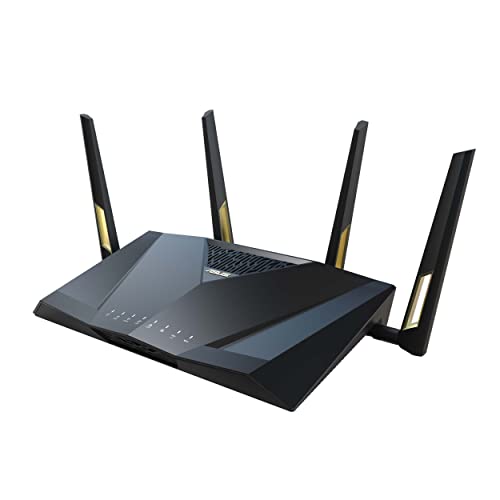
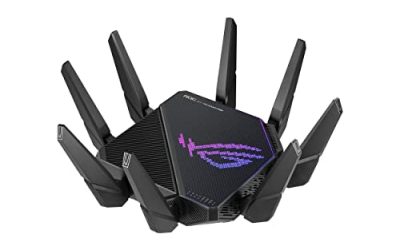
The ASUS RT-AX88U Pro is the router in this guide, and it earns the place by bringing the full set of protections together in one box. It is a dual-band Wi-Fi 6 router with a combined wireless class of AX6000, which breaks down as 1,148 Mbps on the 2.4 GHz band and 4,804 Mbps on the 5 GHz band, with 160 MHz channels and 1024-QAM. A 2.0 GHz quad-core processor drives the box, and it has the headroom to run threat inspection, VPN tunnels, and parental controls without choking the network. That headroom is what makes the security features usable in daily life rather than a burden you switch off.
AiProtection Pro is the heart of the security story here. It is built in, powered by Trend Micro, and included for the life of the router with no extra charge. It blocks known malicious sites, blocks malware downloads, blocks infected devices from reaching command servers, and runs two-way intrusion prevention that watches traffic in both directions.
The wired side is generous. Two 2.5G ports handle a fast internet connection and a fast wired device, with link aggregation and load balancing for homes that need both. Several gigabit LAN ports cover wired PCs, consoles, and storage, and a USB 3.0 port supports shared storage and printers.
VPN support is complete. The router works as a VPN server, so you can reach the home network through an encrypted tunnel when you travel, and as a VPN client, so chosen devices can route traffic through a VPN service. Guest networking is simple to turn on, with its own password and its own limits, and parental controls let you filter content by age group and set time limits per device.
The RT-AX88U Pro also has a path for advanced users who want even more control. It supports ASUS Merlin firmware, a community firmware build that adds deeper options for logging, scripting, and fine control over the network.
No router is without limits, and this one is no exception. It is a dual-band Wi-Fi 6 box, so it has no 6 GHz band, and a home that is already moving to Wi-Fi 7 devices may want a newer wireless standard in time. The box is large, and it runs warm under load, so it needs open air around it rather than a closed cabinet. For a large home with many wired devices, a family that needs parental controls, and a gamer who needs low latency with protection always on, the RT-AX88U Pro is a strong fit.
Key details:
- Dual-band Wi-Fi 6, AX6000, with 1,148 Mbps on 2.4 GHz and 4,804 Mbps on 5 GHz
- AiProtection Pro by Trend Micro, included for the life of the router
- WPA3 wireless security with two-way intrusion prevention and malware blocking
- Two 2.5G ports with link aggregation, plus gigabit LAN ports and USB 3.0
- AiMesh support, Adaptive QoS, Mobile Game Mode, and VPN server and client
- Guest networking and parental controls with per-device time limits
- ASUS Router app with device lists, alerts, and one-tap blocking
Comparison Table
| Router | Wi-Fi | Security Suite | Wired Ports | Best For |
|---|---|---|---|---|
| ASUS RT-AX88U Pro | Wi-Fi 6, AX6000 dual-band | AiProtection Pro, WPA3, two-way intrusion prevention | Two 2.5G ports, gigabit LAN, USB 3.0 | Large homes, wired gaming setups, and families that need always-on protection |
Frequently Asked Questions
Can a router ever be truly hack proof?
No, and any maker that claims otherwise is not being straight with you. What a good router can do is make an attack far harder and far less likely to succeed. Automatic updates close flaws quickly, built-in threat blocking stops known attacks before they reach your devices, WPA3 makes password guessing far harder, and network segmentation keeps a flaw in one device from becoming a path to the rest of the house.
What security feature matters most in a router?
Automatic firmware updates matter most, because they are what keep every other feature working against new threats. A router with the best threat blocking in the world becomes weak the moment its software falls behind, since new flaws are found constantly and the fix only arrives in an update. After updates, look for built-in threat blocking that stays active for the life of the router, WPA3 wireless encryption, and an easy guest network.
Do I need to change settings after installing a new router?
Yes, and the changes take only a few minutes. Change the admin password to something long and unique, and store it in a password manager. Turn on WPA3 and set a long unique Wi-Fi passphrase. Turn off WPS, turn off remote administration, and turn off UPnP unless a specific device truly needs it. Turn on automatic firmware updates, turn on the built-in threat blocking, and set up a guest network with its own password for visitors. Those habits, plus a router that keeps itself updated, are what turn a good box into a genuinely safer home network.
How to Choose
Begin with the size of the home and the number of devices on the network. A large home with many wired devices needs more LAN ports and stronger coverage than a small apartment with a handful of wireless devices. Count the wired PCs, consoles, TVs, and storage boxes, and make sure the router has a port for each one that needs a cable, with room to grow.
Next, weigh the security features as a set rather than as a single headline. Automatic updates and a long support window come first, because they decide whether the router stays safe in year three as well as in month one. Built-in threat blocking that stays active for the life of the router comes second, followed by WPA3, an easy guest network, and VPN support. A router that is strong on all five is worth more than a router that is loud about one and silent about the rest.
Then think about how the router will be managed day to day. A clear app with device lists, alerts, and one-tap blocking is worth a lot in a family home, because the security features only help when they are actually used.
Finally, plan the setup before the box arrives. Choose a long unique admin password and a long unique Wi-Fi passphrase, and put both in a password manager. Install the router, turn on automatic updates and threat blocking, set up the guest network, move smart home devices to their own segment, and turn off WPS, remote administration, and UPnP. A secure router, set up with care and kept current, is the strongest single step a home can take toward a safer network.
Disclosure: As an Amazon Associate, we may earn a commission from qualifying purchases made through links in this article, at no additional cost to you.
FAQ
Can a router ever be truly hack proof?
What security feature matters most in a router?
Do I need to change settings after installing a new router?
More from Amazon
Programs that pair well with the guide above. Offers and eligibility are set by Amazon and may change.
Free shipping on eligible items, Prime Video and more. Eligible new members can start with a free trial.
Start a Prime free trialAd-free music streaming. Eligible new subscribers can start with a free trial.
Try Music Unlimited freeA Prime membership for ages 18-24 with a trial period. Eligibility is set by Amazon.
See Prime for Young AdultsAudiobooks and podcasts to listen to on the go. Eligible new members can start with a free trial.
Try Audible freeAs an Amazon Associate we earn from qualifying purchases.