Our Short List of 3
All 5 Picks at a Glance
| Product | Specs | Action |
|---|---|---|
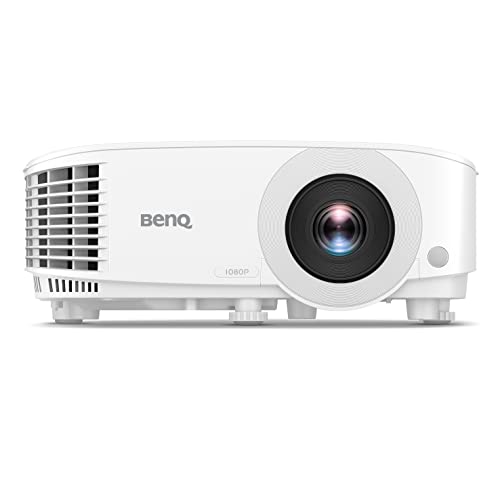 BenQ TH575 | Check price on Amazon | |
 BenQ TK700STi | Check price on Amazon | |
 Optoma HD146X | Check price on Amazon | |
 Epson Home Cinema 1080 | Check price on Amazon | |
 XGIMI Elfin Flip | Check price on Amazon |
Key takeaways
- Find the best projectors for pc gamiing, from bright low-lag 1080p models to sharp 4K screens for big-screen PC play at home.
The best projectors for pc gamiing — the brief spells it gamiing, and the meaning is gaming — turn a PC into a big-screen experience that no monitor can match. A projector gives you a screen measured in feet, a shared view for couch co-op, and an image that fills your field of view. But PC gaming asks specific things from a projector: low input lag, a fast refresh path, a bright image for daytime play, and a resolution that keeps text and HUD elements readable. This guide compares projectors for PC gaming on exactly those points.
A gaming projector is not a home theater projector with a different label. Input lag decides whether the game feels responsive, and a projector that adds noticeable delay will frustrate you in any fast game. Brightness matters because many PC setups live in rooms that are not fully dark. And the connection matters: HDMI 2.0 or better, a direct link from the GPU, and a mode that keeps lag low without wrecking color. The picks below cover the main shapes of PC gaming projector: a bright value model, a 4K model for large screens, a short-throw-friendly model, and two compact models for flexible setups.
How to Choose
1. Input lag
Input lag is the delay between your input and the image changing, and it decides whether a game feels responsive. Look for a projector with a published low-lag game mode, and check the lag figure at the resolution and refresh rate you will actually use. A projector that is fast at 1080p but slow at 4K may not suit your setup.
2. Resolution and refresh rate
A 1080p projector is enough for a fast, bright image at a sensible tier, while a 4K projector shows finer detail on very large screens. Check the refresh rate the projector accepts over HDMI: a 120 Hz or 144 Hz input smooths motion, but only when the projector and the GPU both support it. Text and HUD elements need a sharp image, so check edge sharpness as well as center sharpness.
3. Brightness and room light
PC gaming often happens in a room with some light, so brightness matters more than in a dedicated theater. A bright projector holds contrast and color when a lamp is on, while a dim projector needs a dark room to look its best. Check the brightness figure in the mode you will use, because game modes sometimes run brighter than cinema modes.
4. Contrast and color
Contrast decides how deep dark scenes look, which matters in games with night levels or horror settings. Color accuracy matters for games with rich art direction. A projector with a dedicated game mode should keep colors natural rather than oversaturating them for effect.
5. Throw distance and placement
A short-throw projector can sit close to the screen, which suits a desk or a small room where the PC is near the wall. A long-throw projector needs a shelf or mount behind the seating. Lens shift and zoom give placement flexibility, and a projector that sits behind you keeps its fan noise away from your ears.
6. Noise, lamp life, and connections
A quiet fan matters when the projector sits near you, so check the noise figure in game mode. Laser and LED models run longer between replacements than lamp models. Confirm the HDMI ports match your GPU: one port for the PC, and support for the audio path your speakers or headset need.
Top Picks
BenQ TH575
Check the BenQ TH575 on Amazon
The BenQ TH575 is a 1080p DLP projector built for gaming, with low input lag, high brightness, and a dedicated game mode. Its bright image holds up in a room with some light, and its low lag keeps fast games responsive on a large screen. It supports 3D content and offers picture modes tuned for games, films, and sport, so one projector covers the whole living room. Its lamp is easy to replace and its setup is quick.
This projector fits a PC gaming setup where responsiveness and brightness matter most. It suits a living room or a gaming room where the screen serves games, films, and sport, and where the lights are not always off. It also fits a first big-screen gaming setup, because its setup is simple and its game mode is easy to find.
Its 1080p resolution trails 4K models on very large screens, so close seating shows the difference. It is a lamp model, so plan on a replacement lamp after extended use. Its color needs the game or cinema mode to look its most natural, and its fan is audible in its brightest mode.
BenQ TK700STi
Check the BenQ TK700STi on Amazon
The BenQ TK700STi is a 4K projector with a bright image, low input lag, and a smart platform, so it covers PC games and films from one box. Its 4K resolution shows fine detail and keeps HUD text sharp on large screens, and its brightness holds up better than many theater models when some room light remains. It supports HDR sources and offers picture modes tuned for films, sport, and games, including a low-lag mode for fast play.
This projector fits a household that wants one large screen for both PC games and films. It suits a living room or a multipurpose gaming room where the projector runs most evenings and the screen serves more than one purpose. It also fits viewers who sit close to a large screen and will notice the extra 4K detail.
Its black levels are good for its class but not as deep as a dedicated dark-room theater projector, which shows in very dark game scenes. Its fan is audible in its brightest mode, so a quiet mode is the better choice for late sessions. Its smart platform covers the common apps, but most PC gamers will feed it from the GPU anyway.
Optoma HD146X
Check the Optoma HD146X on Amazon
The Optoma HD146X is a bright 1080p DLP projector that keeps its image punchy even when the room is not fully dark, and its low input lag keeps games responsive. Its high light output and strong contrast make it a practical choice for a gaming room, and its simple controls mean setup is quick. It is a straightforward projector: a single HDMI path, simple menus, and a lamp that is easy to replace.
This projector fits a gaming room where the lights are not always off and the screen serves games, films, and sport. It suits buyers who want brightness and simplicity over smart features, and who would rather feed the projector from a PC or console. It also works well for a first projector because setup is quick and the controls are plain.
Its 1080p resolution trails 4K models on very large screens, and its color needs a cinema or game mode to look its most natural. It is a lamp model, so running costs include a replacement lamp over time. It also has no built-in smart platform, so a PC or streaming box is required for app viewing.
Epson Home Cinema 1080
Check the Epson Home Cinema 1080 on Amazon
The Epson Home Cinema 1080 is a 1080p 3LCD projector with bright, even color and a clean Full HD image. Its 3LCD technology keeps color brightness high, which suits games with rich art direction, and its lens and placement options suit a shelf or a ceiling mount. It handles a screen in the 80 to 120 inch range comfortably in a dim room, and its HDMI input covers a PC, a console, and a streaming box.
This projector fits a PC gaming setup in a dim room where color and image quality matter more than the lowest possible lag. It suits players who enjoy story-driven and visually rich games on a big screen, and who want a projector that also serves films well. It also fits a first home theater where games share the screen with movies.
Its input lag is higher than a dedicated gaming projector, so fast competitive games feel less responsive. Its 1080p resolution trails 4K models on very large screens. It is a lamp model, so plan on a replacement lamp after extended use.
XGIMI Elfin Flip
Check the XGIMI Elfin Flip on Amazon
The XGIMI Elfin Flip is a compact 1080p projector with autofocus, a smart platform, and a flip design that lets it project from a table or a shelf at an angle. Its small size makes it easy to move between rooms or take to a friend’s place, and its built-in sound means it needs little more than a wall and a power socket to start a game. Its LED light source runs quietly and lasts a long time.
This projector fits a flexible PC gaming setup where the screen moves around the house. It suits small rooms, bedrooms, and casual gaming nights where a fixed installation is not practical. It also fits anyone who wants a second screen for a bedroom or a garden wall on a warm evening.
Its brightness is modest next to full-size gaming projectors, so a dark room gives the best result. Its input lag is higher than a dedicated gaming model, so fast competitive games are not its strength. Its built-in sound is handy but modest for a cinematic game night, and its small lens offers less placement flexibility than a larger projector.
Comparison Table
| Product | Best for | Key specs |
|---|---|---|
| BenQ TH575 | Responsive, bright gaming | 1080p DLP, low lag, bright, 3D |
| BenQ TK700STi | 4K films and games | 4K, bright, low lag, HDR, smart |
| Optoma HD146X | Bright gaming room | 1080p DLP, high brightness, low lag |
| Epson Home Cinema 1080 | Colorful, story games | 1080p 3LCD, bright color, HDMI |
| XGIMI Elfin Flip | Flexible, portable play | 1080p LED, autofocus, smart, sound |
Which One Is Right for You?
Start with the games you play. For fast, competitive play, the BenQ TH575 and the Optoma HD146X lead on low lag and brightness, with the BenQ adding 3D support. For a large screen where detail matters, the BenQ TK700STi is the 4K pick, and its low-lag mode keeps it responsive. For story-driven games in a dim room, the Epson Home Cinema 1080 gives the richest color. For a flexible setup that moves around the house, the XGIMI Elfin Flip is the practical choice, provided you play in a dark room and accept its higher lag. In every case, measure the throw distance, connect the PC directly over HDMI, and switch the projector to its game mode before you judge its lag.
Frequently Asked Questions
What input lag is good for a PC gaming projector?
For casual play, a lag figure in the tens of milliseconds feels fine. For fast competitive games, look for a projector with a published low-lag mode and a figure as low as you can find at your resolution. Check the lag at the resolution and refresh rate you will actually use, because the figure changes with the input.
Can I use a home theater projector for PC gaming?
Yes, when its input lag is low enough for the games you play. A home theater projector gives a great image for story-driven games, but a dedicated gaming projector is the better choice for fast competitive play. Check the game mode and the lag figure before you commit.
Do I need 4K for a PC gaming projector?
4K helps on very large screens and for games with fine detail, and it keeps HUD text sharp. On a screen under 100 inches viewed from a normal distance, a good 1080p projector still looks sharp and costs less. If your GPU already drives 4K, a 4K projector makes the most of it.
How do I connect a PC to a gaming projector?
Connect the GPU directly to the projector over HDMI, using a cable rated for the resolution and refresh rate you want. Avoid passing the signal through extra devices that add delay. Set the projector to its game mode, match the resolution in your system settings, and check that the audio path reaches your speakers or headset.
Disclosure: As an Amazon Associate, we may earn from qualifying purchases.
FAQ
Which One Is Right for You?
What input lag is good for a PC gaming projector?
Can I use a home theater projector for PC gaming?
Do I need 4K for a PC gaming projector?
How do I connect a PC to a gaming projector?
More from Amazon
Programs that pair well with the guide above. Offers and eligibility are set by Amazon and may change.
Free shipping on eligible items, Prime Video and more. Eligible new members can start with a free trial.
Start a Prime free trialAd-free music streaming. Eligible new subscribers can start with a free trial.
Try Music Unlimited freeA Prime membership for ages 18-24 with a trial period. Eligibility is set by Amazon.
See Prime for Young AdultsAudiobooks and podcasts to listen to on the go. Eligible new members can start with a free trial.
Try Audible freeAs an Amazon Associate we earn from qualifying purchases.