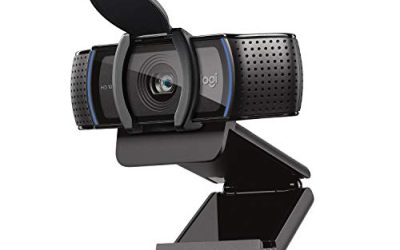
Our Short List of 3

- Resolution: 4K at 30 fps; 1080p at 60 fps
- Sensor: 1/2-inch stacked CMOS (Exmor RS), 48 megapixels
- Focus: PDAF autofocus with AI auto framing
- Field of view: 72 degrees (16:9)

- Resolution: 4K at 30 fps; 1080p at 60 fps
- Sensor: 1/1.8-inch CMOS, 8.4 megapixels
- Gimbal: 2-axis motorised PTZ with AI tracking for people, animals and objects
- Microphone: two built-in MEMS microphones; 3.5 mm TRS input for external microphones

- Resolution: 4K at 60 fps; 4K at 120 fps in slow-motion mode
- Sensor: 1-inch CMOS
- Lens: 20 mm equivalent, f/2.0
- Stabilisation: 3-axis mechanical gimbal
All 4 Picks at a Glance
| Product | Specs | Action |
|---|---|---|
| OBSBOT Meet Flip |
| Check price on Amazon |
| OBSBOT Tail Air |
| Check price on Amazon |
| DJI Osmo Pocket 3 |
| Check price on Amazon |
 Insta360 Link 2 |
| Check price on Amazon |
Our Top Picks
A phone is already the computer most people carry, and it is natural to ask it to do one more job: host a better camera than the one built into a laptop lid. The honest starting point is that dedicated phone webcams are a thin class. The big webcam makers still design for Windows and macOS first, and most desktop models never publish any phone support at all. So this roundup is built on a clear rule, stated up front: every camera here is one whose maker publishes smartphone connection support in its own material. That support takes three forms in this group. One webcam plugs straight into a phone over USB-C. Two are streaming cameras that run under the control of a phone app and can send a stream out through the phone. One is a pocket camera that pairs with a phone app for monitoring, control and transfer, and doubles as a USB webcam. One is a desktop webcam whose maker publishes a remote-control feature that runs from a smartphone.
That spread matters more than any single specification. If the goal is a video call from a phone on a tripod, the direct plug-in design is the clean answer. If the goal is a live stream where the phone is the production hub, the app-controlled cameras are built for exactly that. The sections below stick to published figures throughout: resolution and frame rate, connection type, what the phone actually does in the setup, and the microphone arrangement each maker publishes.
Disclosure: As an Amazon Associate, we earn from qualifying purchases made through links on this page, at no extra cost to you.
The Five Picks at a Glance
The OBSBOT Meet Flip is the only true plug-in phone webcam in the group, a foldable 4K camera that connects to smartphones and tablets over USB-C. The OBSBOT Tail Air is a battery-powered PTZ streaming camera that a phone app can direct, aim and send live. The Logitech Mevo Start is the phone-run streaming camera, capped at 1080p but rated for six hours from its internal battery. The DJI Osmo Pocket 3 brings the largest sensor and a mechanical gimbal, pairing with the DJI Mimo app. The Insta360 Link 2 is the desk-first design, a 4K gimbal webcam for a computer that a phone can control remotely over Wi-Fi.
OBSBOT Meet Flip
- Resolution: 4K at 30 fps; 1080p at 60 fps
- Sensor: 1/2-inch stacked CMOS (Exmor RS), 48 megapixels
- Focus: PDAF autofocus with AI auto framing
- Field of view: 72 degrees (16:9)
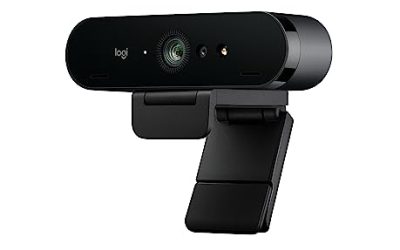
The Meet Flip is the closest thing on the market to a webcam designed for a phone first. OBSBOT publishes the feature plainly in its launch material: the OBSBOT Live app extends the camera to mobile devices, and the Meet Flip connects directly to smartphones and tablets via USB-C for streaming and content creation. Here the phone is a named, supported host, and the camera folds flat enough, at 37.7 grams, to live in the same bag pocket as the phone itself.
The imaging side is a 1/2-inch stacked CMOS sensor with phase-detection autofocus, publishing 4K at 30 frames per second and 1080p at 60 frames per second. AI auto framing keeps a single subject centred, gesture control handles basic commands without touching the phone, and the folding body is the privacy system: fold it shut and the lens is physically covered while the camera sleeps. Audio comes from a dual-microphone system that pairs an omnidirectional capsule with a directional one, with four audio modes for solo calls, two-person conversations, small groups and unprocessed stereo. For a caller who wants one cable between phone and camera and nothing else in the chain, this is the design that asks the least.
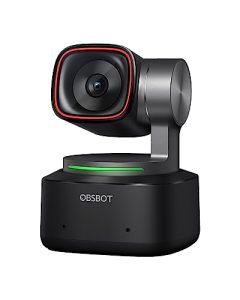
OBSBOT Tail Air
- Resolution: 4K at 30 fps; 1080p at 60 fps
- Sensor: 1/1.8-inch CMOS, 8.4 megapixels
- Gimbal: 2-axis motorised PTZ with AI tracking for people, animals and objects
- Microphone: two built-in MEMS microphones; 3.5 mm TRS input for external microphones
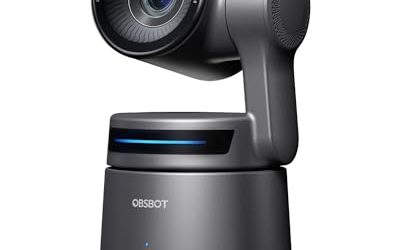
The Tail Air takes the opposite approach to the same problem. It is a self-contained streaming camera with its own battery, its own gimbal and its own network connection, and the phone steps in as the control surface. OBSBOT publishes control through PC and mobile software, and the camera’s wireless connection lets the app on a phone handle framing, presets and streaming settings while the camera sits on a tripod across the room. Turn on UVC mode and the same unit becomes a plug-and-play webcam for a computer, which makes it the most flexible device in this group.
The camera head is a two-axis motorised PTZ unit with AI tracking that follows people, animals and objects, built around a 1/1.8-inch CMOS sensor. Published video runs to 4K at 30 frames per second and 1080p at 60. Connection options are unusually complete: USB-C, micro HDMI, wireless, and Ethernet through an adapter, with RTMP among the streaming protocols for sending a feed to the usual platforms. Audio is handled by two built-in MEMS microphones with noise reduction and stereo modes, plus a 3.5 mm TRS input for an external microphone. The internal battery is rated at 154 minutes, and this listing is the version sold with NDI support in the title.
Logitech Mevo Start
The Mevo Start is the veteran of this group, and its whole design assumes a phone is in charge. Logitech publishes it as a wireless live streaming camera with app control: the Mevo Multicam app on iOS and Android is where framing, live editing and streaming destinations are managed, and the camera can stream via Wi-Fi or through a phone’s LTE connection. There is no screen on the camera, because the phone in the operator’s hand is the monitor and the switcher in one. A USB-C connection also gives it a conventional webcam mode for a computer.
The trade for that simplicity is resolution. The Start tops out at 1080p at 30 frames per second from its Sony IMX307 sensor, behind an f/2.8 lens with an 83.7-degree diagonal field of view and fixed focus. What it returns in exchange is endurance and audio. The internal battery is rated for up to six hours of streaming or recording, the longest figure in this group, and the onboard sound comes from a three-MEMS microphone array with spatial processing, with 3.5 mm TRS and USB-C inputs for external sources. For long events where the phone is the broadcast desk and the camera just has to keep going, the Start remains the purpose-built answer.
Specs
- Resolution: 1080p at 30 fps for streaming and recording
- Sensor: Sony IMX307, 2.07 megapixels
- Lens: f/2.8, 83.7-degree diagonal field of view, fixed focus
- Microphone: three-MEMS array with spatial processing; 3.5 mm TRS and USB-C audio inputs
- Connection: Wi-Fi, controlled from the Mevo Multicam app on iOS and Android; USB-C webcam mode
- Battery: up to 6 hours of streaming or recording
- Weight: 232 g
DJI Osmo Pocket 3
- Resolution: 4K at 60 fps; 4K at 120 fps in slow-motion mode
- Sensor: 1-inch CMOS
- Lens: 20 mm equivalent, f/2.0
- Stabilisation: 3-axis mechanical gimbal
The Pocket 3 is a camera first and a webcam second, and the phone connection DJI publishes is the DJI Mimo app. The camera links to an iPhone or Android phone over Wi-Fi and Bluetooth, and Mimo turns the phone into a larger monitor, a remote control and the route for moving footage off the device. Wired the other way, a USB-C cable puts the Pocket 3 into webcam mode for a computer. Either path makes it a legitimate entry in a phone-centred kit, and its imaging hardware is the strongest in this group by a wide margin.
A 1-inch CMOS sensor sits behind a 20 mm equivalent f/2.0 lens on a three-axis mechanical gimbal, publishing 4K at 60 frames per second for normal shooting and 4K at 120 in slow-motion mode. The two-inch touchscreen rotates for vertical framing, face and object tracking are built in, and three built-in microphones handle onboard sound, with support for DJI’s wireless microphone transmitters when the camera works as the hub of a larger kit. At 179 grams it is a camera that lives in a jacket pocket rather than on a desk, and for creators whose phone work is mostly filming rather than calling, it is the pick that behaves like a smaller mirrorless camera with a gimbal attached.
Insta360 Link 2
- Resolution: 4K at 30 fps
- Sensor: 1/2-inch CMOS
- Gimbal: 2-axis motorised gimbal with AI tracking
- Focus: phase-detection autofocus
The Link 2 is the desk webcam of the group, and its phone support is the narrowest of the five, so it pays to be precise about what Insta360 publishes. The webcam itself connects to a computer over USB-C. The phone enters the picture through Remote Smartphone Control: Insta360’s own support material explains that scanning a code in the Link Controller software lets a smartphone adjust settings, switch modes and move the gimbal over Wi-Fi, with phone and computer on the same network. The phone is a remote control here, not the host, and buyers who need the phone to be the host should look at the picks above.
Within that role, the hardware is strong. A 1/2-inch sensor publishes 4K at 30 frames per second, the two-axis gimbal carries the camera through its AI tracking moves, and phase-detection autofocus keeps the subject locked while the gimbal works. The built-in microphone carries AI noise cancelling, and the mode set includes whiteboard and overhead desk views alongside the standard framing modes. For a presenter who teaches or demonstrates from a desk and wants to drive the camera from the phone in their pocket rather than walking back to the keyboard, it is a tidy arrangement, and the only one here built around a computer that a phone can nonetheless command.
Buying Guide: Reading the Phone Connection First
The first question in this class is not resolution. It is what job the phone does. Three of the five designs give the phone a central role: the Meet Flip treats it as the host computer, the Tail Air and Mevo Start treat it as the control desk and streaming hub. The Pocket 3 treats it as monitor, remote and transfer route for a camera that also works alone. The Link 2 treats it as a remote control for a computer’s webcam. None of these is the wrong answer, but they are answers to different questions, and choosing by connection type first prevents the common disappointment of buying a camera whose phone support turns out to be thinner than the headline suggested.
Connection hardware comes next. A direct USB-C link, as on the Meet Flip, is the simplest chain for calls: one cable, no network in the middle, and the phone’s own apps see the camera. Wireless designs trade that simplicity for placement freedom. A Tail Air or Mevo Start can stand across a room while the operator works the phone from a seat, but they depend on a healthy network or phone connection, and their batteries set a clock on the session. Published operating-time figures matter here: six hours for the Mevo Start against 154 minutes for the Tail Air is a practical gap for long events.
Resolution and sensor size decide what the picture can survive. The 1080p ceiling of the Mevo Start is fine for a single-person stream at normal viewing sizes. The 4K designs earn their place when the frame will be cropped, reframed by AI tracking, or shown on a large screen. Sensor size matters most in ordinary rooms: the Pocket 3’s 1-inch sensor and the Tail Air’s 1/1.8-inch sensor gather more light than the 1/2-inch class, which shows up as cleaner images under ceiling lights.
Audio is the last check. A dual-capsule system with a directional mode, as on the Meet Flip, suits calls in shared spaces. A three-microphone array with spatial processing, as on the Mevo Start, suits events where the camera sits some distance from the subject. Where a maker publishes an external input, a 3.5 mm jack or USB-C audio, that is the upgrade path for anyone whose voice work matters more than their picture. Match the connection type first, the endurance second, and the imaging figures third.
Frequently Asked Questions
Can any webcam plug straight into a phone?
Very few. Most desktop webcams publish support for Windows and macOS only, and a USB-C plug alone does not make a camera phone-compatible. In this group, the OBSBOT Meet Flip is the design whose maker publishes direct connection to smartphones and tablets via USB-C, through its OBSBOT Live app. The other picks connect to a phone in different ways: app control and streaming for the Tail Air and Mevo Start, app pairing for the Pocket 3, and remote control for the Link 2.
What does the phone actually do with an app-controlled streaming camera?
On designs like the OBSBOT Tail Air and Logitech Mevo Start, the phone is the production desk. The maker’s app handles framing and camera settings, live editing where offered, and the streaming destination, and the Mevo Start can send its stream out through the phone’s LTE or Wi-Fi connection. The camera supplies the lens, sensor and microphone; the phone supplies the interface and, in the Mevo’s case, the uplink.
Is 1080p enough, or is 4K worth choosing for phone-based video?
It depends on the frame’s destination. A 1080p stream or call viewed on phones and laptops looks clean, and the Mevo Start’s long battery life is built around that sensible ceiling. Choose a 4K model when the picture will be cropped by AI framing, recorded for later editing, or displayed on a large screen. The Pocket 3 and Tail Air also pair their 4K modes with larger sensors, which helps in dim rooms regardless of output size.
Do these cameras work with both iPhone and Android phones?
The published app support in this group covers both platforms: OBSBOT Live, the Mevo Multicam app and DJI Mimo are all published for iOS and Android, and Insta360’s Remote Smartphone Control works from a phone browser-style connection over Wi-Fi. The detail worth checking on any listing is the phone’s port and operating system version, since direct cable connections depend on the phone offering a USB-C port with the right host support.
Conclusion
The phone webcam market is really three small markets sharing a name. For calls and streams where the phone is the computer, the OBSBOT Meet Flip is the direct answer: a 4K camera that plugs into a smartphone over USB-C and folds away at 37.7 grams. For phone-run production, the OBSBOT Tail Air adds a gimbal, a battery and every connection type a small stream might need, while the Logitech Mevo Start trades resolution for six hours of app-controlled streaming endurance. The DJI Osmo Pocket 3 serves creators whose phone is a companion screen for a serious pocket camera, and the Insta360 Link 2 serves desk presenters who want a phone in hand as the remote for a 4K computer webcam.
FAQ
Can any webcam plug straight into a phone?
What does the phone actually do with an app-controlled streaming camera?
Is 1080p enough, or is 4K worth choosing for phone-based video?
Do these cameras work with both iPhone and Android phones?
More from Amazon
Programs that pair well with the guide above. Offers and eligibility are set by Amazon and may change.
Free shipping on eligible items, Prime Video and more. Eligible new members can start with a free trial.
Start a Prime free trialAd-free music streaming. Eligible new subscribers can start with a free trial.
Try Music Unlimited freeA Prime membership for ages 18-24 with a trial period. Eligibility is set by Amazon.
See Prime for Young AdultsAudiobooks and podcasts to listen to on the go. Eligible new members can start with a free trial.
Try Audible freeAs an Amazon Associate we earn from qualifying purchases.