Our Short List of 3

- Best for: Small desks and first mixes.
- 50W total power, 25W per side
- 3.5-inch woven composite woofer
- 1-inch silk-dome tweeter
- 80 Hz to 20 kHz frequency response

- Best for: Wireless listening from a phone or tablet.
- 50W total power, 25W per side
- Bluetooth 5.0 wireless input
- 3.5-inch woven composite woofer
- 1-inch silk-dome tweeter
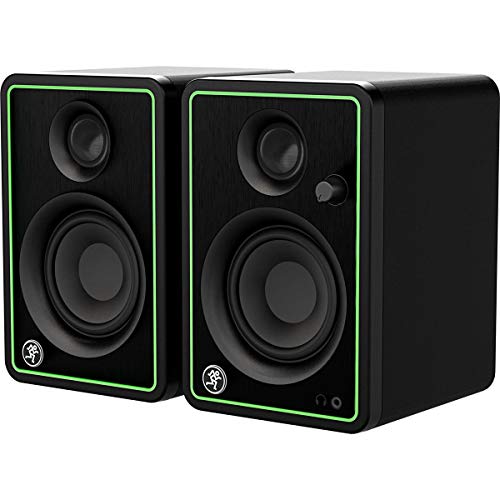
- Best for: Flexible desk layout and first-time creators.
- 50 watts maximum output power
- 3-inch polypropylene-coated woofer
- 0.75-inch silk-dome tweeter
- 60 dB signal-to-noise ratio
All 5 Picks at a Glance
| Product | Specs | Action |
|---|---|---|
| PreSonus Eris 3.5 Studio Monitors, Pair — Powered, Active Monitor Speakers for Near Field Music Production, Desktop Computer, Hi-Fi Audio |
| Check price on Amazon |
| PreSonus Eris 3.5BT Studio Monitors, Pair — 3.5″ Inch Powered Bookshelf Speakers, Stereo, Desktop Computer, Near Field Music Production, Audio Mixing Recording |
| Check price on Amazon |
| Mackie CR-X Series, 3.5-Inch Multimedia Monitors with Professional Studio-Quality Sound – Pair (CR3-X) |
| Check price on Amazon |
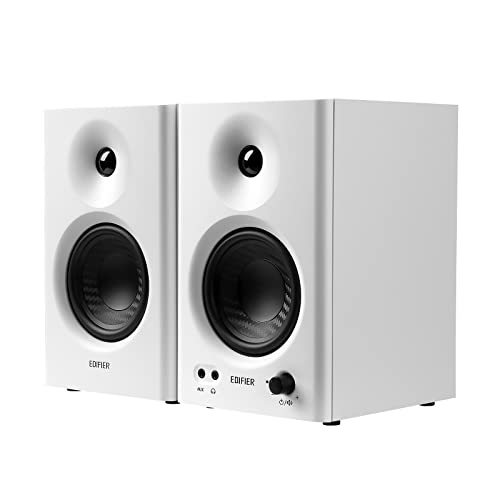 Edifier MR4 Powered Studio Monitor Speakers, 4″ Active Near-Field Monitor Speaker – White (Pair) |
| Check price on Amazon |
 M-AUDIO BX3 Pair 3.5″ Studio Monitors, HD PC Speakers for Recording and Multimedia with Music Production Software |
| Check price on Amazon |
Key takeaways
- Compare five studio monitors under two hundred, from compact nearfield speakers to accurate desktop pairs for mixing and listening in small rooms.
A good pair of studio monitors turns a small desk into a place where mixes make sense. The five pairs in this guide all sit under two hundred, and each one brings powered near-field sound to a home studio, a gaming desk, or a quiet corner for focused listening. They differ in woofer size, inputs, and tone, so the right pick depends on how much room you have and what you plug in. This guide compares them side by side, then walks through placement, connections, and the habits that keep a small pair sounding honest.
Every pair here is a powered set, so no separate amplifier is needed. Plug a pair into an audio interface, a laptop, or a phone, set the level with care, and let the speakers do the work. The notes below flag where each pair shines and where a different pick fits better, so you can match a pair to your room before you commit.
Quick Picks
As an Amazon Associate we earn from qualifying purchases
| Product | Best for | Key spec from title |
|---|---|---|
| PreSonus Eris 3.5 Studio Monitors, Pair — Powered, Active Monitor Speakers for Near Field Music Production, Desktop Computer, Hi-Fi Audio | Small desks and first mixes | 50W, 3.5-inch woofer |
| PreSonus Eris 3.5BT Studio Monitors, Pair — 3.5″ Inch Powered Bookshelf Speakers, Stereo, Desktop Computer, Near Field Music Production, Audio Mixing Recording | Wireless listening from a phone or tablet | 50W, Bluetooth 5.0 |
| Mackie CR-X Series, 3.5-Inch Multimedia Monitors with Professional Studio-Quality Sound – Pair (CR3-X) | Flexible desk layout and first-time creators | 50W, 3-inch woofer |
| Edifier MR4 Powered Studio Monitor Speakers, 4″ Active Near-Field Monitor Speaker – White (Pair) | Mixing with a flat, honest tone | 42W, 4-inch woofer |
| M-AUDIO BX3 Pair 3.5″ Studio Monitors, HD PC Speakers for Recording and Multimedia with Music Production Software | Loud multimedia, gaming, and lively music | 120W, 3.5-inch woofer |
How to Choose
Match the Woofer to the Room
A three-inch woofer suits a desk that sits close to a wall, while a four-inch woofer moves more air and fills a small room with a fuller low end. Bigger is not always better in a tight space, since a large woofer can excite room modes and blur the bass. Measure the gap between the speakers and the wall behind them, then leave breathing room on each side. If the desk is narrow, a compact pair keeps the stereo image tight. If the room is larger, a four-inch or five-inch woofer gives mixes more weight without a separate low-frequency unit.
Check the Inputs Before You Buy
Every pair in this guide takes analog audio, yet the input mix varies. Balanced TRS inputs suit an audio interface and reject hum on long cable runs, while RCA inputs suit a laptop, a turntable preamp, or a game console. A front aux jack is handy for a phone, and Bluetooth is handy when a cable run is awkward. List the devices you plan to connect, then match them to the rear panel. A pair with only one input type can still work with a small mixer, yet a pair with several inputs saves cable swaps and keeps the desk tidy.
Weigh Tone Against Features
A flat, honest tone helps mixes translate to other speakers, while a warm tone can flatter casual listening and hide mix flaws. Decide which job matters more. If mixing is the main job, pick a pair with tuning knobs for high and low frequencies, since a small room often needs a cut at the low end. If the pair will serve games, video, and music, Bluetooth and a front headphone jack add daily convenience. Extra features never fix a muddy tone, so put sound first and treat wireless links and extra inputs as a bonus.
Plan Placement and Listening Distance
Near-field monitors sound their best at arm’s length, with the tweeters aimed at ear level and the pair forming a triangle with the listening chair. A desk against a wall boosts the low end, so pull the pair forward a few inches when the bass sounds thick. Angle each cabinet inward a little and keep the path between speaker and ear free of clutter. A foam pad or a small stand can tame desk buzz and lift the tweeter to the right height. Small moves like these change the sound more than any knob on the rear panel.
The 5 Best Options
PreSonus Eris 3.5 Studio Monitors, Pair — Powered, Active Monitor Speakers for Near Field Music Production, Desktop Computer, Hi-Fi Audio
- Best for: Small desks and first mixes.
- 50W total power, 25W per side
- 3.5-inch woven composite woofer
- 1-inch silk-dome tweeter
- 80 Hz to 20 kHz frequency response
Small desks and first mixes.
Deep bass stays light, so add a low-frequency unit for bass-heavy work.
The second-generation Eris 3.5 is a compact powered pair that fits a crowded desk and still delivers a clear, honest tone for mixing. Its woven composite woofers and silk-dome tweeters give vocals and acoustic instruments a natural presence, while high and low tuning knobs let the sound adapt to a wall or a corner. Front headphone output and a front aux input keep late sessions simple. At this size the low end rolls off early, so deep bass stays light, yet the midrange stays open and easy to judge.
PreSonus Eris 3.5BT Studio Monitors, Pair — 3.5″ Inch Powered Bookshelf Speakers, Stereo, Desktop Computer, Near Field Music Production, Audio Mixing Recording
- Best for: Wireless listening from a phone or tablet.
- 50W total power, 25W per side
- Bluetooth 5.0 wireless input
- 3.5-inch woven composite woofer
- 1-inch silk-dome tweeter
Wireless listening from a phone or tablet.
Use a wired input for mixing, since wireless links can add delay.
The 3.5BT adds Bluetooth 5.0 to the same compact Eris formula, so a phone or tablet can send music to the pair without a cable. The woven composite woofers and silk-dome tweeters keep the tone clear and balanced, and the high and low tuning knobs help the pair sit well in a small room. A front aux input and a front headphone jack cover wired sources and quiet nights. The wireless link is a daily convenience for casual listening, while wired inputs stay the right call for mixing work.
Mackie CR-X Series, 3.5-Inch Multimedia Monitors with Professional Studio-Quality Sound – Pair (CR3-X)
- Best for: Flexible desk layout and first-time creators.
- 50 watts maximum output power
- 3-inch polypropylene-coated woofer
- 0.75-inch silk-dome tweeter
- 60 dB signal-to-noise ratio
Flexible desk layout and first-time creators.
Unbalanced RCA runs near a computer can pick up hum, so use TRS cables when possible.
The Mackie CR3-X is a friendly first pair for a creator who wants flexible placement and a warm, easy tone. A left-right placement switch lets the powered cabinet sit on either side of the desk, and the front volume knob and headphone jack keep daily control within reach. The pair ships with speaker wire and input cables in the box, so setup needs no extra parts. The midrange sits a little behind the Eris pair, yet the overall sound stays smooth for video, games, and light mixing.
Edifier MR4 Powered Studio Monitor Speakers, 4″ Active Near-Field Monitor Speaker – White (Pair)
- Best for: Mixing with a flat, honest tone.
- 42 watts total power, 21W per side
- 4-inch composite woofer
- 1-inch silk-dome tweeter
- 60 Hz to 20 kHz frequency response
Mixing with a flat, honest tone.
The cabinets are larger than the compact pairs, so check desk space first.
The Edifier MR4 is the most mix-focused pair in this guide, with a near-flat tone that suits careful listening and honest mix decisions. Its four-inch woofers reach lower than the three-inch pairs here, and the wooden cabinets give the sound a solid, settled character. A front knob switches between monitor mode and music mode, and balanced TRS inputs suit an audio interface. The pair is larger than the compact picks, so measure the desk first, yet the extra size pays off in low-end weight.
M-AUDIO BX3 Pair 3.5″ Studio Monitors, HD PC Speakers for Recording and Multimedia with Music Production Software
- Best for: Loud multimedia, gaming, and lively music.
- 120 watts maximum output power
- 3.5-inch Kevlar woofer
- High and low EQ controls
- TRS and RCA inputs, aux input
Loud multimedia, gaming, and lively music.
The warm tone can flatter a mix, so check mixes on other speakers too.
The M-Audio BX3 brings a bold, lively tone to a desk, with Kevlar woofers and a 120-watt peak output that fill a small room with ease. High and low EQ controls on the rear panel let the sound adapt to a bright room or a dull corner, and the front aux input and headphone jack cover phones and late sessions. The pair includes MPC Beats software for new producers. The tone leans warm rather than flat, so it suits multimedia and gaming as much as mixing, and it rewards a little care with placement.
Which One Fits Your Situation
A Tiny Desk in a Shared Room
Pick the Eris 3.5 Gen 2 or the Mackie CR3-X. Both sit close to a wall without crowding the desk, and both keep the volume easy to reach. The Eris pair gives a clearer midrange for mixing, while the Mackie pair gives a warmer tone for video and games. Add foam pads under each cabinet to tame desk buzz, and keep the pair at arm’s length for a tight stereo image.
A First Home Studio for Mixing
Pick the Edifier MR4. Its near-flat tone and four-inch woofers give mixes a fuller low end than the compact pairs, and the monitor mode keeps decisions honest. Pair it with an audio interface over balanced TRS, place the cabinets at ear level, and leave space behind each one. The larger cabinets need a wider desk, yet the extra low-end weight is worth the room.
Music and Video From a Phone
Pick the Eris 3.5BT Gen 2. Bluetooth 5.0 sends music from a phone or tablet without a cable, and the front aux input covers a laptop when a wire is handy. The tone stays clear at modest levels, and the tuning knobs help the pair sit well in a small room. Keep the phone near the desk for a steady link, and use a wired input when a mix needs full focus.
Games, Streams, and Late Sessions
Pick the M-Audio BX3. Its lively tone and strong output fill a small room during games and streams, and the front headphone jack keeps late sessions quiet for others in the house. The rear EQ controls let the sound adapt to a bright room, and the aux input takes a phone or a handheld console. Keep the volume moderate at night, since a lively pair can carry through thin walls.
Common Mistakes
- Placing the pair flat on the desk without angling the tweeters toward ear level, which dulls the high end and blurs the stereo image.
- Pushing one cabinet against a wall and the other into open space, which makes the bass uneven from left to right.
- Running long unbalanced RCA cables past a computer, which can invite hum into a quiet mix.
- Judging a mix at high volume only, which hides balance flaws that show up at modest levels.
- Skipping the high and low tuning knobs, which exist to adapt a pair to a small room.
Frequently Asked Questions
Do I need a separate amplifier for these monitors?
No. Every pair in this guide is powered, so each cabinet has its own amplifier built in. Plug the pair into an audio interface, a laptop, or a phone, then use the volume knob on the active cabinet. A separate amplifier would add clutter and gain nothing, since the built-in amplifier is matched to the drivers inside each cabinet.
Can a pair this small handle bass-heavy music?
It can handle the shape of the bass, yet deep low end stays light on a three-inch woofer. A four-inch woofer reaches lower and gives kick drums more weight, while a compact pair still shows the pitch and rhythm of a bass line. For bass-heavy work, add a low-frequency unit later, or check the mix on headphones with a fuller low end.
What cables do I need to connect a pair to a laptop?
Most laptops need only a short aux cable from the headphone jack to the aux input, or an RCA cable from a small USB interface. Balanced TRS cables suit an audio interface and reject hum on longer runs. Check the rear panel of your pick before ordering cables, since each pair ships with a different set in the box.
Where should I place monitors on a small desk?
Set the pair at arm’s length, with the tweeters at ear level and each cabinet angled inward a little. Keep the pair away from corners when possible, and leave a few inches behind each cabinet so the rear port can breathe. A foam pad under each cabinet tames desk buzz, and a clear path between speaker and ear keeps the stereo image tight.
FAQ
Do I need a separate amplifier for these monitors?
Can a pair this small handle bass-heavy music?
What cables do I need to connect a pair to a laptop?
Where should I place monitors on a small desk?
More from Amazon
Programs that pair well with the guide above. Offers and eligibility are set by Amazon and may change.
Free shipping on eligible items, Prime Video and more. Eligible new members can start with a free trial.
Start a Prime free trialAd-free music streaming. Eligible new subscribers can start with a free trial.
Try Music Unlimited freeA Prime membership for ages 18-24 with a trial period. Eligibility is set by Amazon.
See Prime for Young AdultsAudiobooks and podcasts to listen to on the go. Eligible new members can start with a free trial.
Try Audible freeAs an Amazon Associate we earn from qualifying purchases.