Our Short List of 3
- Best for: A busy household where a gamer, a streamer, and a home worker share the network at the same time, especially on a plan faster than one gigabit.

- Best for: A household with several Wi-Fi 6E devices and many connected gadgets, in an area where the 6 GHz band offers a quieter wireless lane.

- Best for: A household that wants strong control, clear traffic information, and subscription-free security, without paying for a third band it may not yet use.
All 5 Picks at a Glance
| Product | Specs | Action |
|---|---|---|
| 1. ASUS ROG Rapture GT-AX6000 — Best Overall for Heavy Gaming and Streaming Together |
| Check price on Amazon |
| 2. NETGEAR Nighthawk RAXE300 — Best Wi-Fi 6E Pick for a Crowded Home |
| Check price on Amazon |
| 3. ASUS RT-AX86U Pro — Best Balanced Pick for Control and Everyday Heavy Use |
| Check price on Amazon |
 4. TP-Link Archer AXE75 — Best Value Wi-Fi 6E Pick for a Busy Household |
| Check price on Amazon |
 5. NETGEAR Nighthawk RAX50 — Best Budget Heavy Use Pick for Smaller Heavy Loads |
| Check price on Amazon |
Our Top Picks
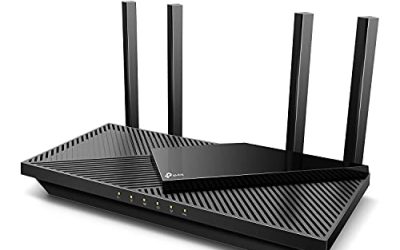
- TP-Link AXE5400 Tri-Band WiFi 6E RouterWiFi 6E, Tri-Band AXE540012.91 x 10.43 x 4.72 inches1.5 poundsCheck on Amazon
Disclosure: As an Amazon Associate, we earn from qualifying purchases.
Introduction
A heavy user home is a busy network. Someone is playing an online game in one room, someone else is streaming a film in 4K in another, a video call is running on a laptop, and a dozen small devices are quietly checking in with the cloud. When the router cannot keep up, the symptoms arrive together: the game stutters, the film drops to a blurry picture, the call freezes, and pages load slowly even though the internet plan itself is fast.
The best heavy user wi fi routers are built for that load. They combine a strong processor, enough memory to track many connections, modern Wi-Fi that serves several devices at the same time, and wired ports that keep the most demanding machines off wireless altogether. They also offer traffic priority, a guest network, and security features.
This guide is for households with many connected devices, for families where gaming and streaming happen at the same time, and for people who work from home. The five picks below are standalone Wi-Fi routers sold on Amazon US, each listed with its Amazon Standard Identification Number, or ASIN, so the exact model can be matched before ordering. Specifications are drawn from the manufacturers’ product pages and the Amazon listings for each model.
How to Choose a Router for Heavy Use
Wireless standard and speed class
Wi-Fi 6 is the sensible baseline for a heavy user home. It handles many devices more efficiently than Wi-Fi 5, thanks to OFDMA, which lets the router serve several devices in one transmission window, and MU-MIMO, which lets it communicate with several devices at once. Wi-Fi 6E adds a 6 GHz band that is less congested than the 2.4 GHz and 5 GHz bands, and it suits fast, nearby devices. It is most useful when some devices in the home support Wi-Fi 6E.
Router boxes print a combined speed class, such as AX5400, AX5700, AX6000, or AXE7800. That number adds together the maximum speed of every band, so it is not the speed any single device will reach. A single device connects to one band at a time, and its real speed depends on its hardware, distance, walls, and the internet plan.
Processor, memory, ports, and coverage
Processor and memory matter at least as much as the speed class. Every connected device creates sessions, and every stream, game, and call adds work. A quad-core processor is a good sign, and 512 MB or 1 GB of memory gives the router room to track many connections.
Wireless is convenient, but a cable is still the most stable connection for a gaming PC, a console, or a work computer. A heavy user router should have at least four gigabit LAN ports, and a 2.5 gigabit port is a genuine advantage for households on a plan faster than one gigabit. Dual 2.5 gigabit ports are better still, because one can serve the incoming connection and the other can serve a wired PC.
Manufacturers publish coverage figures, often up to 2,500 square feet for the models here, and device capacity figures that range from around 25 to 40 devices. Treat those figures as guidance for open layouts rather than guarantees. Place the router centrally, at about chest height, in the open, not inside a cabinet or behind a television. For a large or multi-storey home, consider whether the chosen router can grow into a mesh system later; several models in this guide support that.
Traffic priority and security
Quality of Service, often shortened to QoS, lets the router favour gaming or video calls over background downloads. Gaming routers take this further with dedicated gaming ports and game acceleration modes. Those features do not create bandwidth, but they can protect a game or a call when someone else starts a large download. Look for WPA3 support, firmware updates, a guest network, and built-in network protection. Some security features are free for the life of the router, while others require a subscription after a trial, so check which parts are free before deciding.
Top Picks
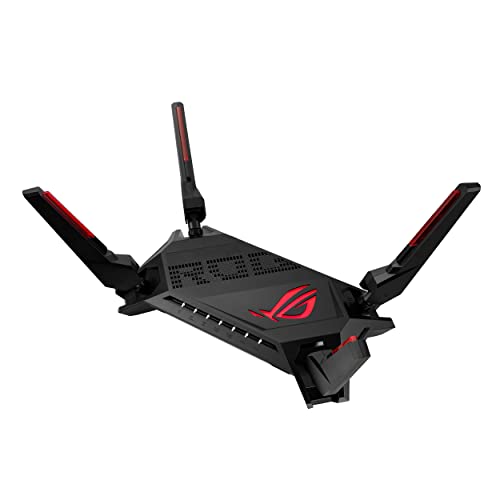
1. ASUS ROG Rapture GT-AX6000 — Best Overall for Heavy Gaming and Streaming Together
- Best for: A busy household where a gamer, a streamer, and a home worker share the network at the same time, especially on a plan faster than one gigabit.
A busy household where a gamer, a streamer, and a home worker share the network at the same time, especially on a plan faster than one gigabit.
The ASUS ROG Rapture GT-AX6000 is the strongest all-round pick here for a household where gaming and streaming compete for the same connection. It is a dual-band Wi-Fi 6 gaming router with a combined wireless speed of up to 6,000 Mbps, using 160 MHz channels, a 2.0 GHz quad-core 64-bit processor, and 1 GB of memory.
Key specifications: Wi-Fi 6 dual-band, up to 6,000 Mbps combined, 2.0 GHz quad-core CPU, 1 GB RAM, dual 2.5 Gbps ports, four gigabit LAN ports, one USB 3.2 port, four antennas, AiMesh support, lifetime internet security, Triple-Level Game Acceleration, dedicated gaming port.
The dual 2.5 Gbps ports are a real advantage. Traffic through them receives top priority, and the flexible WAN and LAN configuration means one port can serve a fast internet plan while the other serves a wired gaming PC or console. Triple-Level Game Acceleration prioritises game traffic, and the dedicated gaming port automatically prioritises whatever is plugged into it. AiMesh support means a second compatible ASUS router can extend coverage later, and lifetime internet security avoids a subscription for the core protection features.
Pros: Strong quad-core processor with 1 GB of memory, dual 2.5 Gbps ports, dedicated gaming port and game acceleration, AiMesh expansion, lifetime security included.
Cons: No 6 GHz band. The design is large and gamer-styled.
2. NETGEAR Nighthawk RAXE300 — Best Wi-Fi 6E Pick for a Crowded Home
- Best for: A household with several Wi-Fi 6E devices and many connected gadgets, in an area where the 6 GHz band offers a quieter wireless lane.
A household with several Wi-Fi 6E devices and many connected gadgets, in an area where the 6 GHz band offers a quieter wireless lane.
The NETGEAR Nighthawk RAXE300 brings Wi-Fi 6E to a heavy user home at a mid-range tier. It is a tri-band router with an AXE7800 speed class, or up to 7.8 Gbps of combined wireless speed across the 2.4 GHz, 5 GHz, and 6 GHz bands. The 6 GHz band gives newer devices a less congested lane, which helps when neighbours’ networks crowd the older bands.
Key specifications: Wi-Fi 6E tri-band, AXE7800 up to 7.8 Gbps combined, eight streams, 1.7 GHz quad-core processor, coverage up to 2,500 square feet, support for up to 40 devices, one 2.5 Gbps multi-gig port, four gigabit LAN ports, one USB 3.0 Type-C port, six antennas, NETGEAR Armor security offered as a subscription.
The band layout suits heavy use: 574 Mbps on 2.4 GHz, 4,804 Mbps on 5 GHz, and 2,402 Mbps on 6 GHz, spread across eight streams. A Wi-Fi 6E phone or laptop near the router can use the 6 GHz band, while older devices stay on the 5 GHz and 2.4 GHz bands. That separation reduces contention, which is the real benefit of a tri-band design in a busy home. Wired connectivity is good but not as generous as the GT-AX6000, with one 2.5 Gbps port that can serve either the incoming connection or a wired device, but not both at 2.5 Gbps. A renewed listing circulates under a separate code, so confirm the new RAXE300-100NAS listing and the ASIN above before ordering.
Pros: Tri-band Wi-Fi 6E with a clean 6 GHz lane, eight streams, support for up to 40 devices, 2.5 Gbps multi-gig port, strong coverage guidance for a typical family home.
Cons: Only one 2.5 Gbps port. Advanced security requires a subscription. No dedicated gaming port.
3. ASUS RT-AX86U Pro — Best Balanced Pick for Control and Everyday Heavy Use
- Best for: A household that wants strong control, clear traffic information, and subscription-free security, without paying for a third band it may not yet use.
A household that wants strong control, clear traffic information, and subscription-free security, without paying for a third band it may not yet use.
The ASUS RT-AX86U Pro is the balanced pick in this guide. It is a dual-band Wi-Fi 6 gaming router rated AX5700, with a combined wireless speed of up to 5,700 Mbps. It does not have the third band of the RAXE300 or the dual 2.5 Gbps ports of the GT-AX6000, but it combines a strong processor, a 2.5 Gbps port, a dedicated gaming port, and subscription-free network security in a compact design.
Key specifications: Wi-Fi 6 dual-band, AX5700 up to 5,700 Mbps combined, 2.0 GHz quad-core processor, 1 GB RAM, 2.5 Gbps port, dedicated gaming port, Adaptive QoS, AiProtection Pro subscription-free security, VPN support, AiMesh compatible, three antennas.
The 2.5 Gbps port can serve a fast internet plan or a wired gaming PC, and the dedicated gaming port automatically prioritises the device plugged into it. Adaptive QoS lets the owner favour gaming, streaming, or work traffic, and the traffic analyser shows which devices and applications use the most bandwidth. AiProtection Pro is included without a subscription. The AX5700 class splits into 861 Mbps on 2.4 GHz and 4,804 Mbps on 5 GHz, which is ample for a gigabit plan and several simultaneous 4K streams plus online gaming, provided the router is placed well.
Pros: Strong quad-core processor with 1 GB of memory, 2.5 Gbps port, dedicated gaming port, Adaptive QoS and traffic analyser, subscription-free AiProtection Pro, AiMesh expansion.
Cons: No 6 GHz band. Only one 2.5 Gbps port.
4. TP-Link Archer AXE75 — Best Value Wi-Fi 6E Pick for a Busy Household
- Best for: A busy family home on a gigabit plan that wants Wi-Fi 6E and a third band for many simultaneous streams, without paying for multi-gigabit wired ports it cannot yet use.
A busy family home on a gigabit plan that wants Wi-Fi 6E and a third band for many simultaneous streams, without paying for multi-gigabit wired ports it cannot yet use.
The TP-Link Archer AXE75 is the value Wi-Fi 6E pick in this guide. It is a tri-band Wi-Fi 6E router rated AXE5400, with combined wireless speeds of up to 5,400 Mbps across the 6 GHz, 5 GHz, and 2.4 GHz bands. It brings the 6 GHz band to a heavy user home at a lower tier than the RAXE300.
Key specifications: Wi-Fi 6E tri-band, AXE5400 up to 5,400 Mbps combined, 1.7 GHz quad-core CPU, six antennas, gigabit WAN and LAN ports, USB 3.0 port, OneMesh support, HomeShield security, VPN support, WPA3 security.
The band split is the story here. The 6 GHz and 5 GHz bands each reach 2,402 Mbps, so a Wi-Fi 6E device can move to the cleaner 6 GHz lane while the 5 GHz band serves phones, tablets, and televisions. OFDMA and MU-MIMO help the router serve several devices at once, and beamforming focuses the signal towards connected devices. OneMesh support lets the AXE75 work with a compatible TP-Link extender to extend coverage. HomeShield provides security and parental controls, with some advanced features as a paid tier. The wired ports are gigabit only, with no 2.5 Gbps port, so households on a faster plan should look at the GT-AX6000 or the RT-AX86U Pro instead.
Pros: Tri-band Wi-Fi 6E at a value tier, clean 6 GHz lane for newer devices, six antennas, quad-core CPU, OneMesh expansion, HomeShield parental controls, USB 3.0 port.
Cons: Gigabit wired ports only. Some advanced HomeShield features require a paid tier.
5. NETGEAR Nighthawk RAX50 — Best Budget Heavy Use Pick for Smaller Heavy Loads
- Best for: A smaller heavy user household, such as two or three people with a console, a gaming PC, and a couple of simultaneous streams, where budget matters and the device count stays within the stated capacity.
A smaller heavy user household, such as two or three people with a console, a gaming PC, and a couple of simultaneous streams, where budget matters and the device count stays within the stated capacity.
The NETGEAR Nighthawk RAX50 is the budget pick in this guide, and it suits a heavy user home with a smaller device count or a tighter budget. It is a dual-band Wi-Fi 6 router rated AX5400, with combined wireless speeds of up to 5.4 Gbps, a 6-stream design, and stated coverage of up to 2,500 square feet. It is an older model, first available in early 2020, but it remains capable for households whose heaviest simultaneous load is a game plus one or two streams.
Key specifications: Wi-Fi 6 dual-band, AX5400 up to 5.4 Gbps combined, 6-stream design, 1.5 GHz triple-core processor, 512 MB RAM, five gigabit Ethernet ports, one USB 3.0 port, four antennas, Dynamic QoS, Smart Connect, NETGEAR Armor security offered as a subscription, coverage up to 2,500 square feet, support for up to 25 devices.
The 5 GHz band reaches 4,800 Mbps, the same figure as the more expensive picks, and the 6-stream design helps it serve several devices at once. Dynamic QoS automatically prioritises gaming, streaming, and video calls over background traffic, and Smart Connect lets the household use a single Wi-Fi name while the router steers each device to the best band. The limits are worth stating plainly. The wired ports are gigabit only, so a plan faster than one gigabit cannot be fully used on a wired connection. The stated capacity is up to 25 devices, lower than the RAXE300’s figure of up to 40. A renewed version and a separate RAX54S bundle circulate under other codes, so confirm the new RAX50-100NAS listing tied to the ASIN above.
Pros: Strong 5 GHz speed for its tier, 6-stream design, Dynamic QoS, Smart Connect single network name, five gigabit ports, USB 3.0 port, stated 2,500 square feet coverage.
Cons: Gigabit wired ports only, capacity of up to 25 devices, older triple-core processor, advanced security requires a subscription.
Comparison Table
| Router | Wireless standard | Combined speed class | Wired ports | Processor and memory | Coverage and device guidance | Standout feature |
|---|---|---|---|---|---|---|
| ASUS ROG Rapture GT-AX6000 | Wi-Fi 6 dual-band | Up to 6,000 Mbps | Dual 2.5 Gbps plus gigabit LAN | 2.0 GHz quad-core, 1 GB RAM | AiMesh expansion | Dual 2.5 Gbps ports |
| NETGEAR Nighthawk RAXE300 | Wi-Fi 6E tri-band | AXE7800 up to 7.8 Gbps | One 2.5 Gbps plus gigabit LAN | 1.7 GHz quad-core | Up to 2,500 sq. ft., up to 40 devices | Clean 6 GHz band |
| ASUS RT-AX86U Pro | Wi-Fi 6 dual-band | AX5700 up to 5,700 Mbps | One 2.5 Gbps plus gigabit LAN | 2.0 GHz quad-core, 1 GB RAM | AiMesh expansion | Subscription-free security |
| TP-Link Archer AXE75 | Wi-Fi 6E tri-band | AXE5400 up to 5,400 Mbps | Gigabit WAN and LAN | 1.7 GHz quad-core | Six antennas, OneMesh expansion | Value tri-band Wi-Fi 6E |
| NETGEAR Nighthawk RAX50 | Wi-Fi 6 dual-band | AX5400 up to 5.4 Gbps | Five gigabit ports | 1.5 GHz triple-core, 512 MB RAM | Up to 2,500 sq. ft., up to 25 devices | Strong 5 GHz speed |
Frequently Asked Questions
What makes a router good for heavy users?
A good heavy user router combines a strong processor, enough memory, modern Wi-Fi with OFDMA and MU-MIMO, and wired ports that suit the internet plan. The processor and memory handle many simultaneous connections, the Wi-Fi features serve several devices efficiently, and the wired ports keep gaming PCs and consoles stable. Raw wireless speed alone is not enough, because a weak processor can still struggle when many devices are active at once.
Do I need Wi-Fi 6E for heavy use?
Wi-Fi 6E is useful but not essential. Its 6 GHz band gives newer devices a less congested lane, which helps in flats and neighbourhoods with many nearby networks. A household with Wi-Fi 6E phones or laptops will benefit, especially for devices near the router. A household with no Wi-Fi 6E devices gains little today, although the band becomes useful as devices are replaced. A strong Wi-Fi 6 router remains a good choice for many heavy user homes.
How many devices can these routers handle?
The NETGEAR Nighthawk RAXE300 is rated for up to 40 devices, and the NETGEAR Nighthawk RAX50 is rated for up to 25 devices, both with stated coverage of up to 2,500 square feet. The ASUS and TP-Link models do not publish a single device figure in the same way, but their quad-core processors are designed for many simultaneous connections. The real limit depends on how many devices are active at the same time, not only on how many are connected.
Should I choose a single router or a mesh system?
A single strong router suits a flat or a modest house where the router can sit centrally. A mesh system suits a large or multi-storey home where one box cannot reach every room. Several routers here support mesh expansion with a second compatible unit, including the ASUS models with AiMesh and the Archer AXE75 with OneMesh.
Conclusion
Heavy use tests the whole router, not just its headline speed. Choose the GT-AX6000 if gaming and streaming collide every evening and the plan is faster than one gigabit. Choose the RAXE300 if the home has Wi-Fi 6E devices and many gadgets. Choose the RT-AX86U Pro if control and subscription-free security matter most. Choose the Archer AXE75 if the home is on a gigabit plan and wants Wi-Fi 6E value. Choose the RAX50 if the household is smaller and the budget is tighter. Match the exact ASIN before ordering, place the router centrally, and use cables for the most demanding machines.
FAQ
What makes a router good for heavy users?
Do I need Wi-Fi 6E for heavy use?
How many devices can these routers handle?
Should I choose a single router or a mesh system?
More from Amazon
Programs that pair well with the guide above. Offers and eligibility are set by Amazon and may change.
Free shipping on eligible items, Prime Video and more. Eligible new members can start with a free trial.
Start a Prime free trialAd-free music streaming. Eligible new subscribers can start with a free trial.
Try Music Unlimited freeA Prime membership for ages 18-24 with a trial period. Eligibility is set by Amazon.
See Prime for Young AdultsAudiobooks and podcasts to listen to on the go. Eligible new members can start with a free trial.
Try Audible freeAs an Amazon Associate we earn from qualifying purchases.