Our Short List of 3
All 3 Picks at a Glance
| Product | Specs | Action |
|---|---|---|
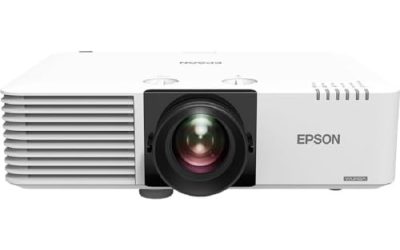
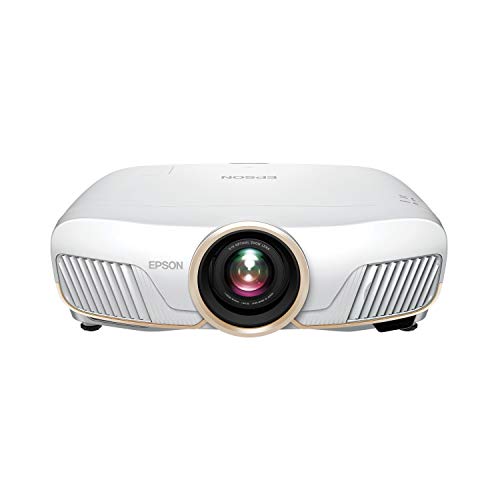
| 1. Epson Home Cinema 5050UB — Best Overall for Photo Color and Contrast | Check price on Amazon | |
 2. Epson Home Cinema 3800 — Best Value for Accurate Color | Check price on Amazon | |
 3. Optoma UHD38 — Best for Bright Rooms and Sharp Detail | Check price on Amazon |
Key takeaways
- Find the best projectors for photos with accurate color, high resolution, and strong contrast, so family pictures and photography look vivid on a big screen.
The best projectors for photos turn a slideshow into something worth gathering around. A television can show pictures well, but a projector can show them at a size that fills a wall, with skin tones that look natural, skies that keep their gradation, and fine detail that survives being enlarged. The difference between a good photo projector and an ordinary one is not brightness alone. It is color accuracy, contrast, resolution, and the way the projector handles the subtle tones in a photograph.
This guide is for people who want to share family photos, review photography work, or enjoy travel pictures on a big screen. The picks below are home cinema projectors with strong color performance, high resolution, and HDR support, so still images look rich rather than washed out. The buying guide explains what to look for, how to set a projector up for photos, and which trade-offs matter most.
Why Photos Need a Different Kind of Projector
A photograph is unforgiving. A movie can hide a small color error in motion and darkness, but a still portrait or landscape sits on screen long enough for everyone to notice if skin looks orange, grass looks neon, or shadows turn into flat black blocks. That is why color gamut and color accuracy matter more for photos than raw brightness.
Color gamut describes the range of colors a projector can reproduce. A projector that covers close to 100 percent of the Rec.709 standard will handle most family photos well, because that is the standard used for high-definition video and for most shared images. A wider gamut, such as 95 percent of DCI-P3, gives richer reds and greens and is useful for photos taken in wide-gamut color spaces, but only if the projector is calibrated well. A wide gamut with poor calibration can look worse than a narrower gamut done right.
Contrast matters for a similar reason. Photos often contain both bright highlights and deep shadows in the same frame: a white wedding dress against a dark church interior, or a sunset with a silhouetted foreground. A projector with good contrast keeps detail in both areas instead of crushing shadows or blowing out highlights. Resolution matters too, because a low-resolution projector softens fine detail such as hair, fabric, and distant foliage. A true 4K projector, or a 4K PRO-UHD model that shifts pixels to create a 4K image, preserves that detail at large screen sizes.
Brightness is still important, but it is not the whole story. A very bright projector can look impressive in a lit room, yet wash out subtle tones if its color is not accurate. For photos, a moderately bright projector in a dimmed room usually beats a very bright projector in a bright room. Control the light first, then choose brightness to match the room.
How to Choose a Projector for Photos
Resolution and Detail
Choose a 4K projector if your budget allows. True 4K models use 8.3 million pixels, while 4K PRO-UHD models from Epson use pixel-shifting to create a 4K image from a lower-resolution chip. Both can look excellent for photos, and the Epson models in this guide are a good example of the second approach done well. A 1080p projector can still show photos nicely at a smaller screen size, but at 100 inches or more the extra detail of 4K becomes easy to see, especially in landscapes and group portraits where fine detail matters.
Color Accuracy and Gamut
Look for a projector that lists its color gamut and that offers a calibrated picture mode for movies or photos. Modes labelled Cinema, Natural, or Rec.709 are usually closer to accurate color than bright Vivid or Dynamic modes, which boost saturation at the cost of realism. If the projector covers 95 percent of DCI-P3 or 100 percent of Rec.709, that is a good sign. Also check whether it supports HDR10 and HLG, because many modern cameras and phones record HDR photos and video, and a projector that handles HDR tone mapping well will show those images with better highlight detail.
A 3LCD design, such as the Epson models below, gives similar color and white brightness. DLP projectors, such as the Optoma model below, offer sharp detail and strong contrast. Calibration and picture mode matter more than the technology label alone.
Brightness and Room Light
Brightness is measured in lumens. For a dimmed room, 2,000 to 3,000 lumens is usually enough for photos at a large size. For a room with some ambient light, 3,000 to 4,000 lumens helps the image stay vivid without washing out. The Optoma pick in this guide, at 4,000 lumens, is the best choice if you cannot fully darken the room. The Epson picks are bright enough for a dimmed living room or a dedicated viewing room, and they trade a little brightness for better color and contrast.
A larger image spreads the same light over a bigger area, so it looks dimmer. For 120 inches or more, choose a brighter model.
Contrast, Black Level, and HDR
Contrast ratio numbers are hard to compare between brands, because each manufacturer measures them differently. Instead, look for features that help contrast in practice: a dynamic iris, good HDR tone mapping, and a picture mode designed for dark-room viewing. The Epson 5050UB is known for strong contrast and black levels, which helps photos with dark backgrounds. The Optoma UHD38 uses Dynamic Black technology to deepen blacks in dark scenes. Both approaches help still images, where a muddy black level is easy to spot.
Throw Distance, Lens Shift, and Placement
Throw distance is the distance from the projector to the screen for a given image size. A standard-throw projector needs a fair amount of room, often around 10 to 14 feet for a 120-inch image. Check the throw ratio before you buy, and measure your room. Lens shift is also valuable, because it lets you move the image up, down, or sideways without tilting the projector, which can distort the image. The Epson models below have generous lens shift, which makes installation much easier. The Optoma model has a more limited zoom and keystone correction, so placement needs more care.
Connections and Photo Sources
Most people will show photos from a laptop, a phone, a streaming stick, or a USB drive. Make sure the projector has enough HDMI inputs for your sources, and check whether it supports the wireless casting or screen mirroring you plan to use. A USB port that can power a streaming stick is a useful bonus. If you plan to show photos from a camera directly, an HDMI connection from the camera or a laptop is the most reliable route, because it preserves image quality better than casting over a weak wireless link.
Top Picks
1. Epson Home Cinema 5050UB — Best Overall for Photo Color and Contrast
The Epson Home Cinema 5050UB is the best overall pick for photos because it combines accurate color, strong contrast, and flexible placement in one well-balanced projector. It uses 4K PRO-UHD 3-chip 3LCD technology, with HDR support, to produce a sharp, color-rich image at up to 150 inches. Its 3LCD design gives equal color and white brightness, which helps photos look natural rather than washed out, especially in skin tones and skies.
Color is the strength here. The 5050UB is designed for home cinema use, with picture modes that prioritise accuracy over exaggerated saturation. That matters for portraits, where a small shift in skin tone is obvious, and for landscapes, where subtle gradations in sky and water need to stay smooth. Contrast and black level are also strong for this class, so photos with dark backgrounds keep detail instead of turning into flat black areas. A dynamic iris helps deepen blacks without crushing shadow detail.
Placement is flexible, with a 2.1x optical zoom and generous lens shift, so you can mount it on a ceiling or place it on a shelf without a perfect centre position. That flexibility is valuable in a living room, where the ideal projector spot is rarely the convenient one. The projector is a large, premium home cinema model, and it is best suited to a dimmed room rather than a bright living room in daylight. In a controlled-light room, though, it is the pick that most photographers will be happiest with for still images.
2. Epson Home Cinema 3800 — Best Value for Accurate Color
The Epson Home Cinema 3800 offers much of the color quality of the 5050UB in a more affordable and slightly brighter package. It is also a 4K PRO-UHD 3-chip 3LCD projector with HDR, rated at 3,000 lumens, so it handles a living room with some ambient light a little better than its larger sibling. It is a good fit for family slideshows, where the room may not be fully dark and where ease of use matters as much as absolute black level.
Color accuracy is again the main appeal. The 3LCD design and the calibrated Cinema modes produce natural skin tones and smooth gradations, and the HDR support helps with photos that have bright highlights. Contrast is good, though not quite at the level of the 5050UB, and black levels are solid for a projector in this class. For most family photos, the difference between the two Epson models will be subtle, and the 3800 is the better value if you do not need the top-level contrast of the flagship.
Placement is flexible, with lens shift and a good zoom range, so installation is straightforward. The 3800 is also a full-size home cinema projector, not a portable model, so it suits a permanent setup in a living room or a dedicated viewing space. Choose it if you want accurate Epson color for photos, a brighter image for a room that is not fully dark, and a lower outlay than the 5050UB.
3. Optoma UHD38 — Best for Bright Rooms and Sharp Detail
The Optoma UHD38 is the best pick if you need brightness and sharp detail, and if your room cannot be fully darkened. It is a true 4K UHD DLP projector with 8.3 million pixels, 4,000 lumens of brightness, HDR10 and HLG support, and a contrast ratio of 1,000,000 to 1. It can project images up to 300 inches, though 100 to 150 inches is a more realistic size for photos in a home.
Sharpness is the standout feature. True 4K resolution preserves fine detail in landscapes, architecture, and group photos, and the DLP design produces a crisp image with vivid color. The 8-segment color wheel helps with color richness, and HDR tone mapping with Dynamic Black technology improves highlight and shadow detail. At 4,000 lumens, it is the brightest pick here, so it holds up better than the Epson models in a room with lamps on or curtains open.
Placement needs more care than with the Epson models. The UHD38 has a 1.1x zoom and vertical keystone correction, but less lens shift, so you need to position it more precisely. It also has a gaming mode with low input lag, which is a bonus if the projector will double as a gaming display, though it is not needed for photos. Choose this model if brightness is your priority, if you want true 4K sharpness, or if your viewing room has ambient light that you cannot fully control.
Comparison Table
| Projector | Resolution | Brightness | Color Strength | Best For |
|---|---|---|---|---|
| Epson Home Cinema 5050UB | 4K PRO-UHD, 3LCD | High, best in dimmed rooms | Accurate color, strong contrast | Best overall photo quality |
| Epson Home Cinema 3800 | 4K PRO-UHD, 3LCD | 3,000 lumens | Natural color, good HDR | Value, rooms with some light |
| Optoma UHD38 | True 4K UHD, DLP | 4,000 lumens | Sharp detail, vivid color | Bright rooms, large images |
How to Show Photos at Their Best
Start with the picture mode. Choose Cinema, Natural, or Rec.709 rather than Vivid or Dynamic. Bright modes may look impressive at first, but they distort skin tones and oversaturate landscapes. If your projector has a calibrated mode, use it for photos and save the bright mode for sports in a lit room.
Next, control the light. Close curtains, dim lamps, and avoid light falling directly on the screen. Even a small amount of light on the screen washes out blacks and softens contrast. A dedicated screen helps too: a matte white screen is a good all-round choice for photos, while a grey screen can improve black levels in a room with some ambient light.
Use a good source file. Show the highest-resolution version of each photo, not a compressed preview from a messaging app. Export or copy originals to a laptop or a USB drive, and use a wired HDMI connection where possible. Wireless casting is convenient, but it can compress the image and soften fine detail.
Set the screen size to suit the room. A 100-inch image is a good starting point for most living rooms, and it keeps the image bright and sharp. A larger image is more immersive, but it needs more brightness and a longer throw distance. Leave a little space around the screen so the image does not feel cramped against a wall or ceiling.
Finally, give photos time on screen. A slideshow that changes every few seconds does not let anyone appreciate detail. A slower pace, with a simple fade or no transition at all, works better for photography, and it lets the projector’s color and contrast do the work.
Frequently Asked Questions
What resolution is best for showing photos on a projector?
A 4K projector is best if your budget allows, because it preserves fine detail at large screen sizes. True 4K models and 4K PRO-UHD models both work well for photos. A 1080p projector can still show photos nicely at a smaller size, but at 100 inches or more the extra detail of 4K becomes easy to see in hair, fabric, foliage, and distant landscape detail.
Is a brighter projector always better for photos?
No. Brightness helps in a room with ambient light, but a very bright projector with poor color accuracy can wash out subtle tones. For photos, color accuracy and contrast matter more than maximum brightness. A moderately bright projector in a dimmed room usually beats a very bright projector in a bright room. Control the light first, then choose brightness to match the room.
Do I need a special screen for photos?
A dedicated screen helps, but it does not need to be expensive. A matte white screen is a good all-round choice, because it shows color accurately and works well in a dimmed room. A grey screen can improve black levels if the room has some ambient light. A smooth, light-colored wall can work in a pinch, but a screen gives a flatter, more even surface and better color.
Can I show photos from my phone on a projector?
Yes. The most reliable way is a wired HDMI connection from a laptop or from a phone with an HDMI adapter, because it preserves image quality. Wireless casting and screen mirroring are convenient, and they work well for casual slideshows, but they can compress the image. For a photography review or a family event, use original files and a wired connection where possible.
Should I calibrate my projector for photos?
A basic calibration helps a lot, and it does not need professional equipment. Start by choosing a Cinema or Natural picture mode, then adjust brightness and contrast using a test image or a familiar photo. If you want more accuracy, a calibration disc or a simple colorimeter can help, but for most family slideshows the right picture mode and a dimmed room are enough.
Conclusion
The best projectors for photos are the ones that respect the image: accurate color, good contrast, enough resolution to hold fine detail, and brightness matched to the room. The Epson Home Cinema 5050UB is the best overall pick, with strong color and contrast for still images in a dimmed room. The Epson Home Cinema 3800 offers similar color quality at better value, with a little more brightness for a living room. The Optoma UHD38 is the best choice for a bright room, with true 4K sharpness and 4,000 lumens to keep photos vivid when the lights are on.
Before you buy, measure your room, check the throw distance for your planned screen size, and think about how much light you can control. Choose the picture mode for accuracy rather than brightness, use original photo files, and give each image time on screen. With those steps, any of the three picks above will turn a photo collection into a big-screen experience worth sharing.
Disclosure: As an Amazon Associate, we earn from qualifying purchases.
FAQ
What resolution is best for showing photos on a projector?
Is a brighter projector always better for photos?
Do I need a special screen for photos?
Can I show photos from my phone on a projector?
Should I calibrate my projector for photos?
More from Amazon
Programs that pair well with the guide above. Offers and eligibility are set by Amazon and may change.
Free shipping on eligible items, Prime Video and more. Eligible new members can start with a free trial.
Start a Prime free trialAd-free music streaming. Eligible new subscribers can start with a free trial.
Try Music Unlimited freeA Prime membership for ages 18-24 with a trial period. Eligibility is set by Amazon.
See Prime for Young AdultsAudiobooks and podcasts to listen to on the go. Eligible new members can start with a free trial.
Try Audible freeAs an Amazon Associate we earn from qualifying purchases.