Our Short List of 3

- Best for: most PS4 Pro owners who want one reliable 4K HDR monitor for games, films and everyday use at a desk.

- Best for: competitive players and anyone who wants the fastest, most affordable route to 4K HDR on the PS4 Pro.
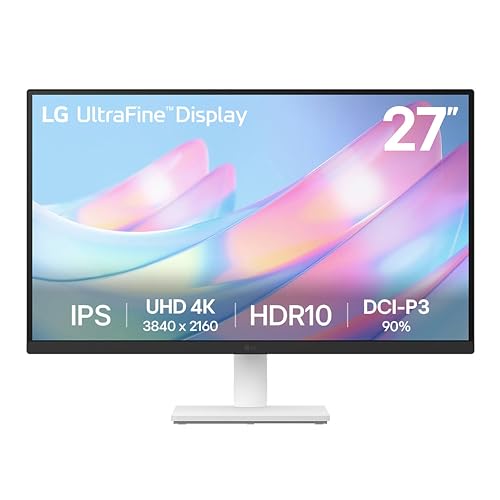
- Best for: players who want a newer, colour-rich 4K HDR monitor that also works well for everyday computing and media.
All 5 Picks at a Glance
| Product | Specs | Action |
|---|---|---|
| 1. LG 27UK650-W — Best Overall |
| Check price on Amazon |
| 2. BenQ EL2870U — Best Value and Fastest Response |
| Check price on Amazon |
| 3. LG 27US500-W — Best Modern Pick |
| Check price on Amazon |
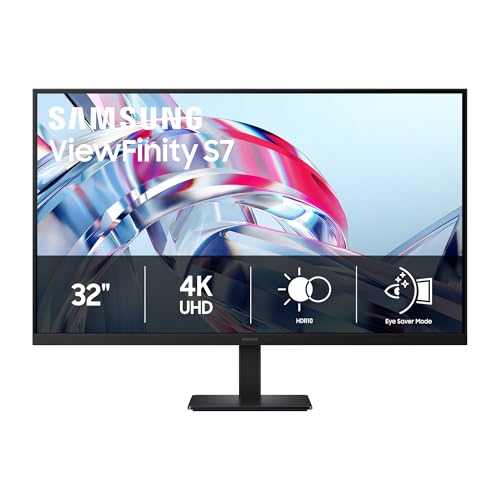 4. Samsung ViewFinity S7 32-Inch (S70H) — Best Large Screen |
| Check price on Amazon |
 5. LG 27UP650K-W — Best DisplayHDR 400 Pick |
| Check price on Amazon |
Our Top Picks
- LG 27UP650K-W 27-inch Ultrafine 4K UHD27-inch and HDMI9.42 x 24.15 x 22.41 inches12.3 poundsCheck on Amazon
Disclosure: As an Amazon Associate, we earn from qualifying purchases.
Introduction
The PlayStation 4 Pro was built for a 4K HDR display. When a game supports the console’s enhanced mode, it can render at up to 3840 x 2160 with High Dynamic Range colour: brighter highlights, deeper shadows and a wider colour range than 1080p gaming. Pair it with an ordinary Full HD screen, however, and much of that extra work goes to waste.
A dedicated 4K HDR monitor solves that problem. It sits comfortably on a desk, is easy to place at the right viewing distance, and can double as a PC display when the console is off. The catch is that not every 4K monitor is a good PS4 Pro monitor: it needs an HDMI 2.0 port with HDCP 2.2 support for a full 4K HDR signal at 60 Hz, a panel that shows the wider colour range HDR games use, and low input lag.
This guide rounds up five monitors that meet those requirements. Every pick is a genuine 4K HDR monitor with an HDMI input suitable for the PS4 Pro, listed on Amazon US with a verifiable ASIN. The list mixes 27-inch and larger screens and IPS and TN panels, so you can match the screen to the way you play.
How to Choose a 4K HDR Monitor for PS4 Pro
Resolution and HDMI bandwidth
The PS4 Pro outputs 4K at up to 60 frames per second over HDMI, so a monitor needs at least one HDMI 2.0 port. HDMI 1.4 can carry 4K only at 30 Hz, which makes motion look choppy. Every monitor in this guide has HDMI 2.0, and several have two HDMI ports, useful if you also connect a second console or a streaming stick. HDCP 2.2 matters too: it is the copy-protection standard used by 4K streaming apps, and a monitor without it may show games in 4K while protected 4K video falls back to a lower resolution.
HDR: what to look for
HDR on the PS4 Pro means HDR10; the console does not use Dolby Vision for games. Not all HDR10 monitors are equal, though. A monitor with a peak brightness of around 300 to 400 nits will show a visible HDR effect, but it will not match the punchy highlights of a high-end HDR television with local dimming. Look for DisplayHDR 400 certification where available, as it guarantees a minimum peak brightness of 400 nits. Colour gamut matters as well: 99 percent sRGB coverage is a good baseline, while wider DCI-P3 coverage helps HDR games show richer reds and greens.
Panel type: IPS, TN and VA
IPS panels are the most balanced choice for most PS4 Pro owners, with wide 178-degree viewing angles and accurate colours, though blacks can look slightly grey in a dark room. TN panels are the fastest, with response times as low as 1 ms, and often the most affordable way into 4K, but colours and contrast shift when viewed from an angle. VA panels sit between the two, with the deepest blacks and the highest native contrast, often around 3000:1, which makes dark scenes look richer, though some show more motion smearing in fast panning shots.
Refresh rate, response time and input lag
The PS4 Pro caps its output at 60 Hz, so a 60 Hz monitor is all the console needs. A higher refresh rate will not make PS4 Pro games run above 60 frames per second. Focus instead on response time and input lag: 5 ms or lower is a sensible target, and 1 ms is ideal for fast competitive games. Favour models with a dedicated game mode, which disables heavy image processing that can add delay.
Screen size, speakers and stand
For a desk setup, 27 inches is the sweet spot for 4K: pixel density is high enough that individual pixels disappear at normal viewing distance. A 28-inch screen is very similar, while a 32-inch screen is better if you sit further back or share the screen. Built-in speakers are convenient but rarely a substitute for a headset, and all the monitors here have a headphone jack. A height-adjustable stand is worth having if you share the desk, and VESA support lets you mount the monitor on an arm.
Top Picks: Best 4K HDR Monitors for PS4 Pro
1. LG 27UK650-W — Best Overall
- Best for: most PS4 Pro owners who want one reliable 4K HDR monitor for games, films and everyday use at a desk.
most PS4 Pro owners who want one reliable 4K HDR monitor for games, films and everyday use at a desk.
The LG 27UK650-W is the most balanced monitor in this guide, and the one to choose if you want a single screen that does everything well. It pairs a 27-inch IPS panel with a native 3840 x 2160 resolution, HDR10 support and 99 percent sRGB colour coverage, exactly the combination the PS4 Pro needs to show its best picture.
Key specifications: 27-inch IPS panel; 3840 x 2160 resolution; HDR10; 60 Hz refresh rate; 5 ms response time; 99 percent sRGB; peak brightness up to 450 nits in HDR mode; 2 x HDMI 2.0, 1 x DisplayPort 1.2 and a headphone jack; AMD FreeSync over HDMI; tilt and height adjustable stand with VESA support.
The IPS panel is the star: colours look natural and accurate, viewing angles stay consistent, and the borderless design makes the screen feel larger than 27 inches. HDR10 content is a clear step up from standard dynamic range, with brighter highlights and shadow detail that stays visible. The 5 ms response time is fast enough for most console games, FreeSync over HDMI smooths out frame-rate dips, and dual HDMI 2.0 ports let you keep a second device connected.
Pros: excellent IPS colour accuracy and wide viewing angles; strong HDR10 peak brightness for its class; two HDMI 2.0 ports; height-adjustable stand; FreeSync over HDMI.
Cons: 5 ms response time is slower than 1 ms TN rivals; HDR effect is good rather than dramatic at this brightness.
2. BenQ EL2870U — Best Value and Fastest Response
- Best for: competitive players and anyone who wants the fastest, most affordable route to 4K HDR on the PS4 Pro.
competitive players and anyone who wants the fastest, most affordable route to 4K HDR on the PS4 Pro.
The BenQ EL2870U is the value pick in this roundup, and the fastest monitor here. Its 28-inch TN panel delivers a 1 ms response time, making it a strong choice for competitive games where every frame of motion clarity counts. It also supports HDR, FreeSync and BenQ’s Brightness Intelligence Plus technology, which adjusts brightness and contrast based on ambient light.
Key specifications: 28-inch TN panel (27.9 inches viewable); 3840 x 2160 resolution; HDR10; 60 Hz refresh rate; 1 ms response time; 1.07 billion colours (10-bit with dithering); 300 nits brightness, higher in HDR mode; 1000:1 contrast ratio; 2 x HDMI 2.0, 1 x DisplayPort 1.4 and a headphone jack; AMD FreeSync; built-in 2W speakers; low blue light and flicker-free technology.
The EL2870U suits players who prioritise speed and sharpness over colour finesse. Fast-paced shooters and racing games benefit from the 1 ms response time, the 28-inch screen gives a slightly larger image without demanding a bigger desk, and the dedicated HDR button and Cinema HDR mode make it easy to switch HDR on for films and story-driven games. The trade-off is the TN panel: colours and contrast shift when viewed from an angle, so this monitor is at its best when you sit directly in front of it.
Pros: fastest response time in this guide at 1 ms; two HDMI 2.0 ports and DisplayPort 1.4; Brightness Intelligence Plus adapts the picture to room lighting; built-in speakers and a dedicated HDR button.
Cons: TN panel has narrower viewing angles and less rich colour than IPS rivals; modest HDR brightness; tilt-only stand.
3. LG 27US500-W — Best Modern Pick
- Best for: players who want a newer, colour-rich 4K HDR monitor that also works well for everyday computing and media.
players who want a newer, colour-rich 4K HDR monitor that also works well for everyday computing and media.
The LG 27US500-W is the most current model in this guide, and the best choice if you want a newer design with up-to-date colour performance. This 27-inch UltraFine monitor combines a 4K UHD IPS panel with HDR10 and up to 90 percent DCI-P3 colour gamut coverage, giving HDR games a wider and more vivid colour range than older sRGB-focused screens.
Key specifications: 27-inch IPS panel; 3840 x 2160 resolution; HDR10; 60 Hz refresh rate; 5 ms response time; up to 90 percent DCI-P3; 1000:1 contrast ratio; 300 nits brightness; HDMI, DisplayPort and headphone jack; Reader Mode and Flicker Safe; borderless design.
The borderless design looks clean, the IPS panel delivers consistent colour from wide angles, and 90 percent DCI-P3 coverage helps HDR games show deeper reds and richer greens than a standard sRGB monitor. Text stays crisp at 4K, so it also works well for browsing and streaming between sessions. Response time is 5 ms, standard for an IPS panel and fast enough for most PS4 Pro games, while the 60 Hz refresh rate matches the console’s maximum output exactly.
Pros: wide DCI-P3 colour coverage; sharp IPS picture with wide viewing angles; clean borderless look; vivid HDR10 colour; useful eye-comfort modes.
Cons: 300-nit brightness means gentler HDR highlights; tilt-only stand; no USB-C input.
4. Samsung ViewFinity S7 32-Inch (S70H) — Best Large Screen
- Best for: players who want the biggest picture in this guide, sit a little further from the screen, or share the monitor for multiplayer and films.
players who want the biggest picture in this guide, sit a little further from the screen, or share the monitor for multiplayer and films.
The Samsung ViewFinity S7 in its 32-inch S70H form is the large-screen pick in this guide. If you play from a little further back, share the screen, or simply want a more cinematic image than a 27-inch monitor can offer, the extra screen area makes a noticeable difference. It still delivers the essentials the PS4 Pro needs: a native 4K resolution, HDR10 support and a 60 Hz IPS panel.
Key specifications: 32-inch IPS panel; 3840 x 2160 resolution; HDR10; 60 Hz refresh rate; 99 percent sRGB; 1.07 billion colours; 300 nits brightness; HDMI 2.0, DisplayPort 1.4 and headphone jack; Eye Saver Mode and Flicker Free; tilt-only stand with VESA support.
At 32 inches, the S7 turns a desk into a small home cinema. Open-world games gain a sense of scale a smaller screen cannot match, split-screen multiplayer is far more comfortable, and the IPS panel keeps colours consistent across the wide screen. The trade-off is pixel density: 4K is still sharp at normal viewing distance, but not quite as pin-sharp as on a 27-inch screen. Sit a little further back and the difference disappears.
Pros: large 32-inch screen for a more immersive picture; HDR10 with 1.07 billion colours and 99 percent sRGB; wide IPS viewing angles; good for shared viewing and split-screen play.
Cons: lower pixel density than 27-inch 4K models at close range; tilt-only stand; gentler HDR effect at 300 nits.
5. LG 27UP650K-W — Best DisplayHDR 400 Pick
- Best for: players who want the strongest HDR in this guide on a 27-inch screen, plus a fully adjustable stand for a shared or multi-purpose desk.
players who want the strongest HDR in this guide on a 27-inch screen, plus a fully adjustable stand for a shared or multi-purpose desk.
The LG 27UP650K-W closes the list with a feature none of the other picks can match at this level: VESA DisplayHDR 400 certification. That certification guarantees a peak brightness of at least 400 nits and a defined standard for HDR performance, making the HDR effect in PS4 Pro games visibly stronger than on monitors that only list HDR10 support without a brightness standard.
Key specifications: 27-inch IPS panel; 3840 x 2160 resolution; VESA DisplayHDR 400 and HDR10; 60 Hz refresh rate; 5 ms response time; HDMI, DisplayPort and headphone jack; tilt, height and pivot adjustable stand; Reader Mode and Flicker Safe; VESA mount compatible.
In practice, DisplayHDR 400 means brighter highlights in sunlit scenes and glowing effects, with better contrast than a standard 300-nit HDR monitor. The 27-inch IPS panel keeps colours accurate, and the fully adjustable stand is the most flexible in this guide, with tilt, height and pivot adjustment. It is also the most versatile monitor here for mixed use, handling PS4 Pro gaming, PC work and media playback with equal ease.
Pros: DisplayHDR 400 certification for stronger HDR; fully adjustable stand with tilt, height and pivot; sharp 27-inch IPS panel; well suited to mixed gaming, work and media use.
Cons: 5 ms response time is slower than 1 ms TN alternatives; HDR still falls short of high-end HDR televisions with local dimming.
Comparison Table
| Monitor | Size | Panel | Resolution | HDR | Refresh Rate | Response Time | HDMI | Best For |
|---|---|---|---|---|---|---|---|---|
| LG 27UK650-W | 27 in | IPS | 3840 x 2160 | HDR10 | 60 Hz | 5 ms | 2 x HDMI 2.0 | Best overall |
| BenQ EL2870U | 28 in | TN | 3840 x 2160 | HDR10 | 60 Hz | 1 ms | 2 x HDMI 2.0 | Fastest response, best value |
| LG 27US500-W | 27 in | IPS | 3840 x 2160 | HDR10 | 60 Hz | 5 ms | HDMI | Modern colour-rich pick |
| Samsung ViewFinity S7 (S70H) | 32 in | IPS | 3840 x 2160 | HDR10 | 60 Hz | 5 ms | HDMI 2.0 | Largest screen |
| LG 27UP650K-W | 27 in | IPS | 3840 x 2160 | DisplayHDR 400 | 60 Hz | 5 ms | HDMI | Strongest HDR, adjustable stand |
Setting Up Your PS4 Pro for 4K HDR
Connect the console to the monitor’s HDMI 2.0 port with a high-speed HDMI cable; the cable supplied with the PS4 Pro is suitable, but an older cable may not carry the full 4K HDR signal reliably. Open the console’s video output settings, set the resolution to 2160p, and set HDR to Automatic, then check the video output information screen to confirm the console reports 4K and HDR as supported. If HDR shows as unsupported, check that the monitor’s HDR setting is enabled and that you are using the correct HDMI port. Enable game mode on the monitor to reduce input lag, and enable HDR in each game that supports it, since some games have a separate HDR toggle in their own display settings.
Frequently Asked Questions
Does the PS4 Pro need a 4K HDR monitor, or will any 4K monitor work?
Any 4K monitor will show the PS4 Pro’s 4K output, but only an HDR10 monitor will show HDR games in High Dynamic Range. Without HDR, you still get the sharper image, but you miss the wider colour range and brighter highlights.
Is 60 Hz enough for the PS4 Pro?
Yes. The PS4 Pro outputs a maximum of 60 frames per second, so a 60 Hz monitor matches the console exactly. A higher refresh rate monitor will still work, but it will not make PS4 Pro games run above 60 frames per second.
What is the best screen size for a PS4 Pro monitor?
For a desk setup, 27 inches is the most popular choice, offering high pixel density and a comfortable field of view at arm’s length. A 32-inch screen is better if you sit further back or share the screen for multiplayer.
Do I need two HDMI ports on a 4K HDR monitor?
You do not need two. One HDMI 2.0 port is enough for the PS4 Pro alone, while a second port lets you keep another device connected without swapping cables.
Why does HDR look washed out on some monitors?
Washed-out HDR usually means the monitor’s HDR mode is not enabled, the HDMI port is not set to full bandwidth, or the monitor’s peak brightness is too low for a strong HDR effect in a bright room. Check the HDR setting, use the correct HDMI port, and try a dimmer room.
Can I use these monitors with a PS5 or a PC as well?
Yes. All five have standard HDMI and DisplayPort inputs, so they work with a PS5, a PC, a laptop and most streaming devices, making any of them a useful long-term purchase even if you upgrade your console later.
Conclusion
The best 4K HDR monitor for PS4 Pro is the one that matches the way you play. For most people, the LG 27UK650-W is the safest choice: a 27-inch IPS panel with HDR10, accurate colour, two HDMI 2.0 ports and a height-adjustable stand. Players who want the fastest response time should look at the BenQ EL2870U, whose 1 ms TN panel makes it the quickest and most affordable route to 4K HDR here.
If you want a newer design with wider colour, the LG 27US500-W offers up to 90 percent DCI-P3 coverage. If you want the biggest picture, the 32-inch Samsung ViewFinity S7 makes split-screen play far more comfortable. And if HDR strength is your priority, the LG 27UP650K-W with DisplayHDR 400 delivers the brightest HDR effect of the five.
Whichever model you choose, confirm the model number and ASIN on the listing before you buy, connect the console to an HDMI 2.0 port with a high-speed cable, and enable game mode and HDR in the console settings. With those steps done, the PS4 Pro can show the 4K HDR picture it was designed for.
FAQ
Does the PS4 Pro need a 4K HDR monitor, or will any 4K monitor work?
Is 60 Hz enough for the PS4 Pro?
What is the best screen size for a PS4 Pro monitor?
Do I need two HDMI ports on a 4K HDR monitor?
Why does HDR look washed out on some monitors?
Can I use these monitors with a PS5 or a PC as well?
More from Amazon
Programs that pair well with the guide above. Offers and eligibility are set by Amazon and may change.
Free shipping on eligible items, Prime Video and more. Eligible new members can start with a free trial.
Start a Prime free trialAd-free music streaming. Eligible new subscribers can start with a free trial.
Try Music Unlimited freeA Prime membership for ages 18-24 with a trial period. Eligibility is set by Amazon.
See Prime for Young AdultsAudiobooks and podcasts to listen to on the go. Eligible new members can start with a free trial.
Try Audible freeAs an Amazon Associate we earn from qualifying purchases.