Our Short List of 3

- Best for: i7-10700K owners who plan to overclock and want WiFi 6 plus 2.5G wired networking on one board.
- Socket LGA1200, Intel Z490 chipset, ATX form factor
- 14+2 power stages
- 4 x DDR4 DIMM slots, up to 128GB, DDR4 4600 (OC)
- 2 x M.2 slots, SATA 6Gb/s ports

- Best for: Builders who want the fastest memory ceiling and wired networking here, with WiFi 6 included.
- Socket LGA1200, Intel Z490 chipset, ATX form factor
- 4 x DDR4 DIMM slots, up to 128GB, DDR4 4800 (OC)
- 2 x M.2 slots with M.2 Shield Frozr heatsinks
- 6 x SATA 6Gb/s ports

- Best for: A set-and-forget i7-10700 or 10700K build that needs WiFi and values durability over extras.
- Socket LGA1200, Intel Z490 chipset, ATX form factor
- 12+2 DrMOS power stages
- 4 x DDR4 DIMM slots, up to 128GB, DDR4 4600 (OC)
- 2 x M.2 slots, SATA 6Gb/s ports
All 4 Picks at a Glance
| Product | Specs | Action |
|---|---|---|
| ASUS ROG Strix Z490-E Gaming |
| Check price on Amazon |
| MSI MPG Z490 Gaming Edge WiFi |
| Check price on Amazon |
| ASUS TUF Gaming Z490-Plus (Wi-Fi) |
| Check price on Amazon |
 ASUS TUF Gaming Z490-Plus |
| Check price on Amazon |
Key takeaways
- Four LGA1200 Z490 boards that suit a Core i7 10th Gen build, compared on VRM design, DDR4 support, M.2 slots and networking from their Amazon listings.
The real decision with a 10th Gen Core i7 is not which board carries the longest feature list. It is whether the board can feed an eight-core chip at full boost for hours and still leave room for fast memory. An i7-10700K sitting on a weak power design backs off when a game or a render leans on it, and a locked i7-10700 on the wrong chipset gives up memory speed it should have kept. Chipset choice, VRM quality and memory support decide how the finished PC feels, far more than lighting or shrouds do.
This roundup is for two kinds of builders: anyone assembling an LGA1200 system around an i7-10700 or i7-10700K, and anyone replacing a failed board without changing the CPU or the DDR4 kit already on the shelf. Every pick below is a Z490 board still listed on Amazon US, chosen from the names and specifications printed on its product page, so the details trace back to the listing, not a generic spec roundup.
Quick Picks
As an Amazon Associate we earn from qualifying purchases
| Product | Best for | Key spec from title |
|---|---|---|
| ASUS ROG Strix Z490-E Gaming | Overclocked i7-10700K gaming builds | 14+2 power stages, WiFi 6 |
| MSI MPG Z490 Gaming Edge WiFi | Fast networking with dual M.2 storage | Wi-Fi 6 with 2.5G LAN |
| ASUS TUF Gaming Z490-Plus (Wi-Fi) | Durability-first builds that need WiFi | 12+2 power stages, WiFi 6 |
| ASUS TUF Gaming Z490-Plus | Wired builds that skip wireless entirely | 12+2 power stages, dual M.2 |
How to Choose
Start with the chipset, because it locks or unlocks the CPU
Only Z490 lets a Core i7-10700K run past its stock multiplier, and only Z490 lets DDR4 run above the platform’s base speeds with an XMP profile loaded. Step down to B460 or H470 and both doors close at once: the K chip behaves like a locked one, and memory is capped no matter what the kit promises. For a locked i7-10700 the gap is smaller, yet the memory limit still bites in games that scale with RAM speed. That is why every board in this roundup is a Z490 model. Pairing a 10700K with a locked chipset wastes the exact headroom the chip was bought for.
Judge the power design by sustained boost, not peak clocks
Eight cores holding an all-core boost draw serious current, and the voltage regulator is what decides whether that boost survives a two-hour session or fades after ten minutes. Look for a double-digit count of DrMOS power stages, an 8-pin plus 4-pin CPU power arrangement, and heatsinks with real fin area over the VRM instead of flat decorative covers. Boards that skimp here rarely fail outright; they quietly throttle, and the owner blames the CPU or the cooler instead. Each board below pairs its stage count with substantial VRM cooling, which is the combination that keeps a 10700K honest under load.
Count the memory slots and check the speed ceiling
A board with four DIMM slots and a 128GB ceiling leaves the upgrade path open: start with two sticks today, add a matching pair later. Two-slot boards force a full replacement when 32GB stops being enough. Just as important is the rated memory ceiling on the listing. The boards here support DDR4 up to 4600 MHz with overclocking profiles, which gives a 3200 or 3600 MHz kit room to run at its rated XMP settings instead of a fallback speed. Before ordering, match the exact kit model against the board maker’s memory support list, because high-speed four-stick combinations are the first place stability problems appear.
Match storage and networking to the parts already on hand
Nearly every Z490 board offers two M.2 slots, so the differences hide in the details: whether the second slot shares bandwidth with SATA ports, whether a heatsink covers the main drive, and what the rear panel carries. Decide the networking question before buying, not after. Two of the boards below build in WiFi 6 and Bluetooth, one adds a 2.5 gigabit wired controller, and one drops wireless completely for builders whose desk sits next to the router. Also confirm the case has a front USB Type-C port if the board’s internal header matters to you, because that header is one of the first things cheaper boards leave off.
The 4 Best Options
ASUS ROG Strix Z490-E Gaming
- Best for: i7-10700K owners who plan to overclock and want WiFi 6 plus 2.5G wired networking on one board.
- Socket LGA1200, Intel Z490 chipset, ATX form factor
- 14+2 power stages
- 4 x DDR4 DIMM slots, up to 128GB, DDR4 4600 (OC)
- 2 x M.2 slots, SATA 6Gb/s ports
i7-10700K owners who plan to overclock and want WiFi 6 plus 2.5G wired networking on one board.
It is a discontinued platform part sold by marketplace sellers, so confirm the listing includes the I/O shield and WiFi antenna before ordering.
The Strix Z490-E is the board for a 10700K that will actually be overclocked rather than left at stock. Its 14+2 power stages are the strongest delivery setup in this roundup, and the listing pairs them with WiFi 6, Bluetooth 5.1 and an Intel 2.5 gigabit Ethernet controller, so neither the power side nor the networking side asks for compromise. Dual M.2 slots cover a fast boot drive plus game storage, and the DDR4 ceiling of 4600 MHz leaves fast kits room to stretch. Builders who want one board that does everything for this platform start here.
MSI MPG Z490 Gaming Edge WiFi
- Best for: Builders who want the fastest memory ceiling and wired networking here, with WiFi 6 included.
- Socket LGA1200, Intel Z490 chipset, ATX form factor
- 4 x DDR4 DIMM slots, up to 128GB, DDR4 4800 (OC)
- 2 x M.2 slots with M.2 Shield Frozr heatsinks
- 6 x SATA 6Gb/s ports
Builders who want the fastest memory ceiling and wired networking here, with WiFi 6 included.
There is no front-panel USB Type-C header speed advantage to chase, and stock is third-party only, so check the seller and the return terms on the listing.
MSI’s Gaming Edge answers the same brief as the Strix with a slightly different balance. The listing highlights dual M.2 slots with heatsink coverage, Wi-Fi 6, and a Realtek 2.5G LAN controller next to a second gigabit port, which suits a desk that moves large files around a home network. Memory support runs to DDR4 4800 with overclocking profiles, the highest ceiling in this group, and a USB 3.2 Gen 2×2 Type-C port on the rear panel gives fast external drives a proper home. The pre-installed I/O shield removes one small but annoying build step.
ASUS TUF Gaming Z490-Plus (Wi-Fi)
- Best for: A set-and-forget i7-10700 or 10700K build that needs WiFi and values durability over extras.
- Socket LGA1200, Intel Z490 chipset, ATX form factor
- 12+2 DrMOS power stages
- 4 x DDR4 DIMM slots, up to 128GB, DDR4 4600 (OC)
- 2 x M.2 slots, SATA 6Gb/s ports
A set-and-forget i7-10700 or 10700K build that needs WiFi and values durability over extras.
The wired controller is 1 gigabit rather than 2.5, so heavy network storage users should look at the two boards above.
The TUF line trades the Strix family’s extras for reinforced components and a simpler brief, and this Wi-Fi version keeps the parts that matter for an i7 build. Its 12+2 power stages are a step down from the Strix on paper, yet still comfortably sized for a 10700K at stock or with a mild overclock. Dual M.2 slots, a DDR4 ceiling of 4600 MHz, Intel WiFi 6 and a front-panel USB 3.2 Type-C header round out a specification that gives up nothing a gaming PC actually uses. It is the sensible middle of this roundup.
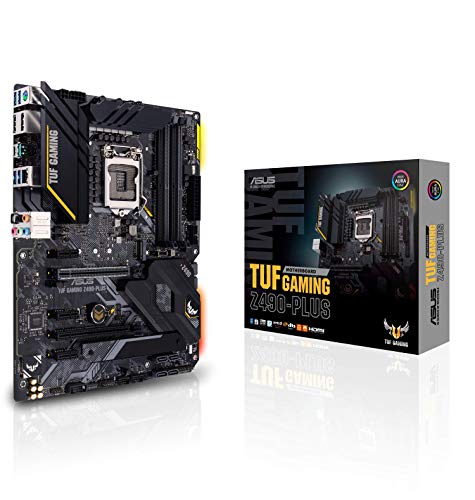
ASUS TUF Gaming Z490-Plus
- Best for: Wired-only i7 builds where the router is within cable reach and Bluetooth is not needed.
- Socket LGA1200, Intel Z490 chipset, ATX form factor
- 12+2 DrMOS power stages
- 4 x DDR4 DIMM slots, up to 128GB, DDR4 4600 (OC)
- 2 x M.2 slots, SATA 6Gb/s ports
Wired-only i7 builds where the router is within cable reach and Bluetooth is not needed.
Adding WiFi later means a PCIe card or USB adapter, so be certain about the wired-only decision before choosing it over the Wi-Fi version.
This is the same TUF board with the wireless hardware removed, and that single change defines who should buy it. The 12+2 power stages, dual M.2 slots and DDR4 support up to 4600 MHz carry over unchanged, so a wired 10700K build loses nothing in CPU or storage performance. What disappears is WiFi and Bluetooth, which matters only if the PC will ever sit away from a network cable or pair with wireless peripherals. For a desk that lives next to the router and a builder reusing an existing DDR4 kit, it is the leanest route onto this list.
Which One Fits Your Situation
You are overclocking a 10700K for a gaming rig
Take the ASUS ROG Strix Z490-E Gaming. Its 14+2 stage power design is the one here built to hold an overclocked eight-core chip through long sessions, and the 2.5 gigabit Intel networking plus WiFi 6 mean the rest of the board never becomes the bottleneck. The MSI Gaming Edge is the alternative if its memory ceiling matters more.
Your old LGA1200 board died and everything else still works
The ASUS TUF Gaming Z490-Plus (Wi-Fi) is the calm replacement. It accepts the same CPU and DDR4 already in the case, its 12+2 stage design runs a stock i7 without drama, and built-in WiFi covers the chance that the rebuilt PC lands in a different room than before, away from the router.
The PC lives far from the router
Choose between the MSI MPG Z490 Gaming Edge WiFi and the Strix Z490-E, the two boards here with WiFi 6 and a 2.5 gigabit wired fallback. The MSI adds a second gigabit port and the faster USB Type-C rear connection, while the ASUS counters with the stronger power design for overclocking.
You are rebuilding on the tightest sensible budget
The wired ASUS TUF Gaming Z490-Plus keeps the full Z490 feature set that affects speed: unlocked multipliers, fast memory support and dual M.2 slots. The money it saves against the WiFi boards comes entirely out of wireless hardware a cable-connected desk never uses, not out of the power delivery.
Common Mistakes
- Buying a B460 or H470 board for a 10700K, which locks the multiplier and caps memory speed, wasting the chip’s main advantage.
- Assuming any LGA1200 board fits any 10th Gen CPU without a BIOS check, when early boards may need an update for later-stepping processors.
- Filling all four DIMM slots with a high-speed kit that only appears on the support list as a two-stick configuration, then chasing instability for weeks.
- Forgetting that the second M.2 slot often shares bandwidth with SATA ports, so a drive can vanish from the boot list after an SSD upgrade.
- Ordering a discontinued board from a marketplace seller without confirming the I/O shield, WiFi antennas and SATA cables are in the box.
Frequently Asked Questions
Will these boards work with a locked i7-10700 as well as the 10700K?
Yes. Every board in this roundup accepts the full 10th Gen Core i7 range, locked and unlocked. The Z490 chipset simply leaves the 10700’s settings at stock while still allowing faster memory through XMP, which a B460 board would refuse. Owners of the locked chip give up nothing by choosing from this list.
Can a Z490 board take an 11th Gen processor later?
Most Z490 boards accept 11th Gen Core processors after a BIOS update from the board maker, and many unlock PCIe 4.0 support for the graphics slot and one M.2 slot in the process. Check the exact model’s CPU support page before counting on it, because the update must be installed while a supported CPU is still fitted.
How much memory should a 10th Gen i7 build carry?
Thirty-two gigabytes across two sticks is the comfortable point for gaming and general work on this platform, and every board here supports up to 128GB when a workstation workload demands it. Two sticks are also easier to run at high XMP speeds than four, so start with a matched pair in the primary slots.
Does the i7-10700K include a cooler or integrated graphics?
The 10700K ships without a cooler, so budget for a tower air cooler or liquid cooler sized for an eight-core chip. It does carry integrated Intel UHD Graphics 630, which drives the boards’ HDMI and DisplayPort outputs for setup and troubleshooting. The 10700KF variant removes the graphics and needs a graphics card from the first boot.
FAQ
Will these boards work with a locked i7-10700 as well as the 10700K?
Can a Z490 board take an 11th Gen processor later?
How much memory should a 10th Gen i7 build carry?
Does the i7-10700K include a cooler or integrated graphics?
More from Amazon
Programs that pair well with the guide above. Offers and eligibility are set by Amazon and may change.
Free shipping on eligible items, Prime Video and more. Eligible new members can start with a free trial.
Start a Prime free trialAd-free music streaming. Eligible new subscribers can start with a free trial.
Try Music Unlimited freeA Prime membership for ages 18-24 with a trial period. Eligibility is set by Amazon.
See Prime for Young AdultsAudiobooks and podcasts to listen to on the go. Eligible new members can start with a free trial.
Try Audible freeAs an Amazon Associate we earn from qualifying purchases.