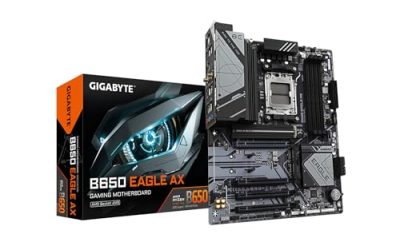
Our Short List of 3

- Chipset: AMD B650
- Socket: AM5, for Ryzen 9000/8000/7000 series processors
- Form factor: ATX
- Memory: DDR5

- Chipset: AMD B650E
- Socket: AM5
- Form factor: ATX
- Memory: DDR5

- Chipset: AMD B650
- Socket: AM5, supporting Ryzen 9000/8000/7000 series
- Form factor: ATX
- Memory: DDR5
All 4 Picks at a Glance
| Product | Specs | Action |
|---|---|---|
| MSI MAG B650 Tomahawk WiFi |
| Check price on Amazon |
| ASUS ROG Strix B650E-F Gaming WiFi |
| Check price on Amazon |
| Gigabyte B650 AORUS Elite AX |
| Check price on Amazon |
 ASUS TUF Gaming B650-PLUS WiFi |
| Check price on Amazon |
Our Top Picks
Building around a GeForce card sounds simple until the platform decision lands: the graphics card works in almost any modern board, so the real choice is which CPU socket, memory generation, and slot layout you commit to for the next several years. Pick the wrong chipset tier and you either overspend on features a single GPU never touches or box yourself out of a faster processor later.
This roundup serves three kinds of builders: Ryzen owners who want a current AM5 foundation, Intel loyalists staying on LGA 1700, and upgraders who care about fast storage and networking alongside the card. Every board below was chosen from the names and specifications printed on its own Amazon listing, so the comparison stays grounded in what each seller actually states.
Quick Picks
As an Amazon Associate we earn from qualifying purchases.
| Product | Best for | Key spec from title |
|---|---|---|
| MSI MAG B650 Tomahawk WiFi | Balanced Ryzen builds | AM5, DDR5, PCIe 4.0, Wi-Fi 6E |
| ASUS ROG Strix B650E-F Gaming WiFi | Buyers wanting PCIe 5.0 headroom | B650E, 12+2 power stages, PCIe 5.0 |
| Gigabyte B650 AORUS Elite AX | Storage-focused AM5 systems | PCIe 5.0 M.2, 14+2+1 power phase |
| MSI MAG Z790 Tomahawk WiFi | Intel builds on LGA 1700 | Z790, DDR5, PCIe 5.0, Wi-Fi 6E |
| ASUS TUF Gaming B650-PLUS WiFi | Durability-first Ryzen rigs | 14 power stages, PCIe 5.0 M.2, USB4 support |
How to Choose
Start With the CPU Socket, Not the Card
A GeForce card drops into any board with a full-length PCIe slot, which means the processor decides the motherboard, never the other way round. Choosing Ryzen 7000, 8000, or 9000 series silicon locks you into AM5 boards such as the B650 and B650E models here, while 12th, 13th, or 14th generation Intel chips point to LGA 1700 and the Z790 entry. Decide the CPU first, confirm the listing names that exact socket and processor family, and only then compare the boards that remain on your shortlist.
Read the PCIe Generation Carefully
Listings in this group split between PCIe 4.0 and PCIe 5.0, and the distinction matters differently for graphics and storage. A current GeForce card runs happily on a PCIe 4.0 x16 slot, so a 4.0 board like the MSI B650 Tomahawk gives up nothing today. PCIe 5.0 boards, including the ROG Strix B650E-F and both boards with PCIe 5.0 M.2 slots, buy headroom for future cards and faster NVMe drives. Match the slot generation to how long you realistically keep a platform before replacing it.
Count the M.2 Slots and Networking Together
A single-GPU build still lives or dies on its supporting hardware. Several boards here pair their graphics slot with a PCIe 5.0 M.2 connector for a fast boot drive, and every model in the roundup carries 2.5-gigabit Ethernet for quick game downloads and local file transfers. Wireless splits the field: most picks list Wi-Fi 6E, while the TUF Gaming B650-PLUS WiFi lists Wi-Fi 6. If your router sits in another room, that wireless generation belongs on your checklist beside the slot layout, not as an afterthought.
Treat These as Single-GPU Platforms
None of the five listings mentions SLI or any form of multi-GPU support, and that silence is the honest position for modern hardware. Current GeForce cards are designed to run alone, so shop for one strong primary slot with a sensible layout rather than a second slot you will never populate. Spend your attention instead on power-stage counts, which the ASUS and Gigabyte listings state openly, and on rear-panel USB, where the ROG Strix board’s USB 3.2 Gen 2×2 Type-C port stands out in this group.
The 5 Best Options
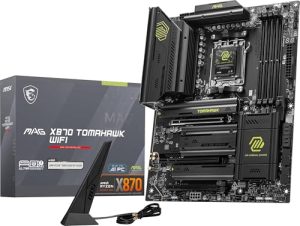
MSI MAG B650 Tomahawk WiFi
- Chipset: AMD B650
- Socket: AM5, for Ryzen 9000/8000/7000 series processors
- Form factor: ATX
- Memory: DDR5
Builders who want a no-drama Ryzen foundation keep landing on this board, and the listing explains why: it covers the AM5 essentials without pushing into flagship territory. The PCIe 4.0 slot is the honest match for today’s GeForce cards, the DDR5 support suits current Ryzen generations, and Wi-Fi 6E plus 2.5Gbps LAN means networking never becomes the bottleneck. It fits the person assembling a balanced single-card system who would rather put remaining budget toward the graphics card and processor than toward board features they will not open up.
ASUS ROG Strix B650E-F Gaming WiFi
- Chipset: AMD B650E
- Socket: AM5
- Form factor: ATX
- Memory: DDR5
The B650E chipset is the reason this board exists: it is the pick for a Ryzen builder who wants the graphics slot itself running at PCIe 5.0 rather than reserving that speed for storage alone. ASUS lists 12+2 power stages behind the AM5 socket, a USB 3.2 Gen 2×2 Type-C port for fast external drives, and the same Wi-Fi 6E and 2.5G LAN pairing found across this roundup. It suits someone planning to keep the platform through a future card swap and who would rather buy the headroom once than replace the board midway.
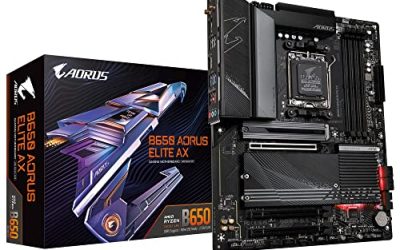
Gigabyte B650 AORUS Elite AX
- Chipset: AMD B650
- Socket: AM5, supporting Ryzen 9000/8000/7000 series
- Form factor: ATX
- Memory: DDR5
Storage speed is the headline here. Gigabyte’s listing leads with a PCIe 5.0 M.2 connector and a 14+2+1 power phase design, a combination aimed at builders loading large game libraries onto fast NVMe drives while a single GeForce card handles the display work. The ATX layout leaves room around the primary slot, Wi-Fi 6E and 2.5GbE networking match the rest of the group, and the USB-C 3.2 Gen 2 port covers modern peripherals. It is the natural shortlist entry for an AM5 builder whose bottleneck worries are about load times, not frame rates.
MSI MAG Z790 Tomahawk WiFi
Intel builders get exactly one seat in this roundup, and this board fills it properly. The Z790 chipset supports 12th, 13th, and 14th generation Intel processors on LGA 1700, giving a GeForce card a current platform with a PCIe 5.0 slot and DDR5 memory. Networking mirrors the strongest AMD picks here, with Wi-Fi 6E, Bluetooth 5.3, and 2.5Gbps LAN all named in the listing, and HDMI plus DisplayPort outputs cover integrated-graphics troubleshooting. Choose it when the processor decision is already made in Intel’s favour and the board simply needs to keep up.
Specs
- Chipset: Intel Z790
- Socket: LGA 1700, supports 12th/13th/14th Gen Intel processors
- Form factor: ATX
- Memory: DDR5
- Expansion: PCIe 5.0, M.2
- Networking: Wi-Fi 6E, Bluetooth 5.3, 2.5Gbps LAN
- Ports and display: USB 3.2 Gen 2, HDMI, DisplayPort
- Best for: An LGA 1700 build pairing a recent Intel processor with one GeForce card.
- Watch out for: Check that the buy option is live on the current US listing before ordering, since the captured listing data behind this pick is months old.
ASUS TUF Gaming B650-PLUS WiFi
- Chipset: AMD B650
- Socket: AM5, for Ryzen 9000/8000/7000 series processors
- Form factor: ATX
- Memory: DDR5
The TUF entry trades a little wireless speed for a durability-first pitch that many builders prefer. Its listing states 14 power stages, a PCIe 5.0 M.2 slot for fast storage, and USB4 support, which is unusual at this level and useful for high-speed external devices. Wi-Fi 6 rather than 6E is the visible compromise, though wired players get the same 2.5 Gb Ethernet as the rest of the group. It fits the Ryzen builder who keeps a machine for years, values a board built around longevity, and runs a cable to the router anyway.
Which One Fits Your Situation
You Are Building a Fresh Ryzen System
Start with the MSI MAG B650 Tomahawk WiFi if the budget has to stretch across a processor, card, and memory all at once, because its PCIe 4.0 slot costs a current GeForce card nothing. Step up to the ROG Strix B650E-F only when you know the platform will outlive the first graphics card you install in it.
Your Library Lives on Fast Storage
Pick the Gigabyte B650 AORUS Elite AX. Its PCIe 5.0 M.2 slot is the clearest storage statement in this group, the 14+2+1 power phase design supports sustained loads, and the rest of the specification, from Wi-Fi 6E to USB-C, matches the boards around it. Large installs and quick level loads are its home ground.
You Already Own an Intel Processor
The MSI MAG Z790 Tomahawk WiFi is the only board here that fits your chip, and fortunately it gives up little: PCIe 5.0 for the card, DDR5 support, and the full Wi-Fi 6E and 2.5Gbps LAN package. Confirm your processor generation against the 12th, 13th, and 14th Gen support named in its listing.
The PC Sits Far From the Router
Four of these boards list Wi-Fi 6E, so any of them beats a wired-only layout in a rented room or upstairs office. The Tomahawk pairing from either camp works well; just remember the TUF Gaming B650-PLUS WiFi drops to Wi-Fi 6, which matters only if your router and internet plan can actually feed the faster standard.
Common Mistakes
- Buying a board before choosing the processor, then discovering the socket and chipset point at a different CPU family entirely.
- Assuming a second graphics card can be added later, when none of these listings states any multi-GPU support.
- Mixing up near-identical model names, such as the ATX B650 AORUS Elite AX and its micro-ATX B650M sibling, or the WiFi and non-WiFi TUF boards.
- Paying for PCIe 5.0 everywhere when the installed card and drives only ever use PCIe 4.0 speeds.
- Ignoring the rear panel until build day, then finding the USB and display outputs do not match the peripherals already on the desk.
Frequently Asked Questions
Do these boards support running two NVIDIA cards together?
No listing in this roundup states SLI or multi-GPU support, so treat every board here as a single-card platform. That matches how current GeForce cards are designed to be used. If a build plan depends on two cards, it belongs on older, explicitly multi-GPU hardware rather than on any of these five boards.
Is PCIe 4.0 enough for a modern GeForce card?
Yes, for the cards these boards are realistically paired with. A PCIe 4.0 x16 slot feeds a current GeForce card without holding it back in ordinary play. PCIe 5.0 boards such as the ROG Strix B650E-F are about future headroom and faster storage, not about unlocking performance a card already has today.
Which of these boards fits an Intel processor?
Only the MSI MAG Z790 Tomahawk WiFi. Its listing names the LGA 1700 socket and support for 12th, 13th, and 14th generation Intel processors. The other four boards are AMD AM5 models for Ryzen 7000, 8000, and 9000 series chips, and none of them will accept an Intel processor.
Does the graphics card brand limit which chipset I can pick?
No. A GeForce card works in both the AMD-chipset and Intel-chipset boards listed here, because the card only needs a full-length PCIe slot. Choose the platform around the processor you prefer, then let the board’s storage, networking, and power design break the tie between the models that fit that socket.
FAQ
Do these boards support running two NVIDIA cards together?
Is PCIe 4.0 enough for a modern GeForce card?
Which of these boards fits an Intel processor?
Does the graphics card brand limit which chipset I can pick?
More from Amazon
Programs that pair well with the guide above. Offers and eligibility are set by Amazon and may change.
Free shipping on eligible items, Prime Video and more. Eligible new members can start with a free trial.
Start a Prime free trialAd-free music streaming. Eligible new subscribers can start with a free trial.
Try Music Unlimited freeA Prime membership for ages 18-24 with a trial period. Eligibility is set by Amazon.
See Prime for Young AdultsAudiobooks and podcasts to listen to on the go. Eligible new members can start with a free trial.
Try Audible freeAs an Amazon Associate we earn from qualifying purchases.