Our Short List of 3

- Best for: viewers who want a complete home theater in one box, with streaming built in.
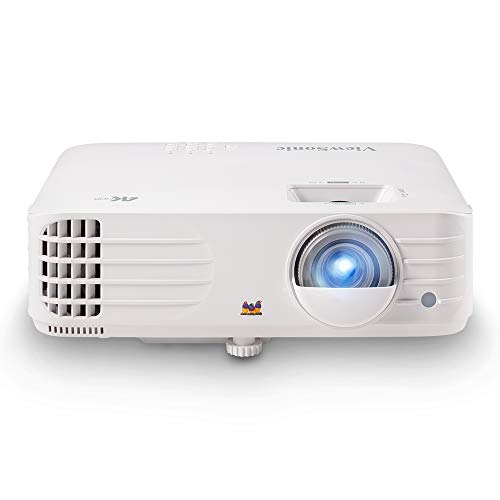
- Best for: gamers who want the fastest response and a bright image for daytime play.

- Best for: console players who want a projector tuned for games, with genre-specific image modes.
All 4 Picks at a Glance
| Product | Specs | Action |
|---|---|---|
| Epson Home Cinema 2350 — ASIN B0BDR8THMJ |
| Check price on Amazon |
| ViewSonic PX701-4K — ASIN B08L9SM2DK |
| Check price on Amazon |
| BenQ TK700 — ASIN B09CJGQ9MJ |
| Check price on Amazon |
 Epson Home Cinema 3800 — ASIN B07XF2G9WT |
| Check price on Amazon |
Key takeaways
- Best affordable 4K projectors for movies and gaming: compare true 4K resolution, brightness, input lag and smart features to pick the right one at home.
The best affordable 4K projectors pair a true 3840 by 2160 image with enough brightness for a living room, and the Epson Home Cinema 2350 leads this group because it combines 4K PRO-UHD projection, 2,800 lumens of brightness and built-in Android TV streaming in one compact unit. If gaming matters most, the ViewSonic PX701-4K is the stronger alternative, with a 240Hz refresh rate and 4.2 millisecond input lag. Every projector below delivers a real 4K image at a budget-friendly level, with no 1080p-only model in the group.
Our top pick: Epson Home Cinema 2350. Runner-up: ViewSonic PX701-4K. This guide compares published specifications only: brightness, resolution, input lag, throw distance, sound and smart features, so you can match a projector to your room and your viewing habits.
At a Glance
| Product | Best for | Key specification |
|---|---|---|
| Epson Home Cinema 2350 | All-around home theater | 4K PRO-UHD, 2,800 lumens, Android TV |
| ViewSonic PX701-4K | Gaming | True 4K, 240Hz, 4.2 millisecond input lag |
| BenQ TK700 | Console gaming | True 4K, 16 millisecond lag at 4K, game modes |
| Epson Home Cinema 3800 | Bright living rooms | 4K PRO-UHD, 3,000 lumens, wide lens shift |
How to Choose
1. Confirm the resolution is really 4K
Many low-cost projectors accept a 4K signal but display a 1080p image. Look for a native panel or a pixel-shifting engine that produces 8.3 million pixels on screen, described as 3840 by 2160. Epson calls its approach 4K PRO-UHD, while ViewSonic and BenQ list true 4K DLP resolution. Either route gives a sharp image at 100 inches and beyond, while a 1080p panel will look soft at the same size.
2. Match brightness to your room
Brightness is measured in lumens, and the number you need depends on ambient light. A dedicated dark room works well with around 2,000 lumens, while a living room with lamps and windows needs 2,800 lumens or more. All four projectors in this guide sit at 2,800 lumens or higher, so each one holds up with some light in the room, though a dark room still gives the deepest blacks and the strongest contrast.
3. Check input lag if you play games
Input lag is the delay between a controller action and the image changing on screen. For casual play, anything under 40 milliseconds feels fine, but competitive play benefits from a lower number. The ViewSonic PX701-4K leads here at 4.2 milliseconds, followed by the BenQ TK700 at 16 milliseconds in 4K. The Epson models include low-latency modes as well, so check the gaming setting in the menu before you play.
4. Think about throw distance and placement
Throw distance is how far the projector sits from the screen for a given image size. A standard-throw projector needs roughly 10 to 12 feet for a 100-inch image, while a short-throw model can sit much closer. Lens shift and zoom give you flexibility when the ceiling mount or shelf is not perfectly centered. The Epson Home Cinema 3800 has the widest lens shift in this group, which helps when the mount point is off-center.
5. Decide how much smart TV you need
Some projectors include a full smart TV system, while others expect you to plug in a streaming stick or a console. The Epson Home Cinema 2350 includes Android TV, so streaming apps run directly on the projector. The other three models rely on an external source, which suits a setup that already has a console or a media player connected.
6. Listen to the built-in sound, then plan for more
A built-in speaker is handy for a quick movie night, but it cannot match a soundbar or a set of external speakers for a big room. The Epson Home Cinema 2350 and the BenQ TK700 each include a built-in speaker, while the ViewSonic and the Epson 3800 are best paired with external audio from the start. All four models include audio output for a soundbar or a receiver.
7. Weigh lamp life and running costs
Lamp-based projectors need a replacement lamp after thousands of hours, and the rated life varies by mode. Eco modes extend lamp life and reduce fan noise, while bright modes give the strongest image. The ViewSonic PX701-4K lists a lamp life of up to 20,000 hours in its SuperEco mode, and the Epson models list up to 7,500 hours in Eco mode. If you watch several hours every day, lamp life is a real part of the long-term cost.
Our Picks
Epson Home Cinema 2350 — ASIN B0BDR8THMJ
- Best for: viewers who want a complete home theater in one box, with streaming built in.
viewers who want a complete home theater in one box, with streaming built in.
The Epson Home Cinema 2350 uses 4K PRO-UHD projection with a 3-chip 3LCD engine, producing 2,800 lumens of color brightness and 2,800 lumens of white brightness. It supports HDR10 and HLG, includes Android TV for streaming, and carries a 10 watt built-in speaker with Bluetooth audio output. A vertical lens shift and a 1.6x zoom make placement forgiving, and the low-latency mode keeps casual gaming responsive. The image can reach up to 500 inches in a large room, though most living rooms will use 100 to 120 inches.
Consideration: the lens shift is vertical only, so side-to-side placement needs more care than the Home Cinema 3800.
ViewSonic PX701-4K — ASIN B08L9SM2DK
- Best for: gamers who want the fastest response and a bright image for daytime play.
gamers who want the fastest response and a bright image for daytime play.
The ViewSonic PX701-4K is a true 4K DLP projector with a 3840 by 2160 image, 3,200 ANSI lumens of brightness, and a 240Hz refresh rate. Input lag is rated at 4.2 milliseconds, the lowest in this group, and the projector supports HDR and HLG. Auto keystone correction, a 1.1x optical zoom, and dual HDMI inputs cover the basics, and the image scales up to 300 inches. The lamp is rated for up to 20,000 hours in SuperEco mode, which is the longest lamp life among the four picks.
Consideration: there is no built-in smart TV system, so you will need a streaming stick, a console, or another source device.
BenQ TK700 — ASIN B09CJGQ9MJ
- Best for: console players who want a projector tuned for games, with genre-specific image modes.
console players who want a projector tuned for games, with genre-specific image modes.
The BenQ TK700 is a true 4K gaming projector with 3,200 ANSI lumens, HDR10 and HLG support, and 96 percent Rec.709 color coverage. Input lag is rated at 16 milliseconds in 4K and 4 milliseconds at 1080p with a 240Hz refresh rate. Dedicated game modes for first-person shooters, role-playing games and sports adjust the image for each genre, and a 5 watt chamber speaker handles sound for casual sessions. Two HDMI 2.0b ports connect a console and a streaming device at the same time, and the 1.3x zoom helps with placement.
Consideration: the smart features are limited, so streaming comes from an external device rather than the projector itself.
Epson Home Cinema 3800 — ASIN B07XF2G9WT
- Best for: living rooms where the projector cannot sit dead center, and for viewers who want the brightest Epson image here.
living rooms where the projector cannot sit dead center, and for viewers who want the brightest Epson image here.
The Epson Home Cinema 3800 uses the same 4K PRO-UHD and 3-chip 3LCD engine as the 2350, with 3,000 lumens of brightness and HDR10 and HLG support. Its advantage is placement: wide vertical and horizontal lens shift plus a 1.6x zoom let you mount it off-center without tilting the image, and the 100,000 to 1 dynamic contrast ratio keeps dark scenes detailed. The image scales up to 300 inches, and the projector includes a 10 watt speaker for casual viewing. It is the brightest Epson in this group, which suits living rooms that are never fully dark.
Consideration: there is no built-in streaming system, so plan on a streaming stick or a media player.
Which One Is Right for You?
If you want the simplest setup, choose the Epson Home Cinema 2350, because Android TV, a built-in speaker and 4K PRO-UHD projection cover movies, shows and casual games with no extra boxes. If gaming is the priority, choose the ViewSonic PX701-4K for its 4.2 millisecond input lag and 240Hz refresh rate, or the BenQ TK700 if you prefer dedicated game modes and a 16 millisecond lag in 4K. If your room is bright or the mount point is off-center, choose the Epson Home Cinema 3800 for its 3,000 lumens and wide lens shift. All four deliver a true 4K image, so the deciding factors are brightness, lag, placement flexibility and whether you want streaming built in.
Frequently Asked Questions
What makes a 4K projector affordable?
An affordable 4K projector uses a lamp light source and a pixel-shifting or single-chip DLP engine instead of a laser engine, which keeps the build simpler. The image is still 3840 by 2160 on screen, but brightness, contrast and color range sit a step below premium laser models. For a living room or a dedicated media room, that trade is usually worth it.
Is pixel-shift 4K the same as true 4K?
Pixel-shift 4K, which Epson calls 4K PRO-UHD, displays 8.3 million pixels by shifting a lower-resolution panel rapidly, while a true 4K DLP panel has 8.3 million physical pixels. In normal viewing at 100 inches or more, the two look very close, and both are a clear step up from 1080p. The difference is most visible in fine text and test patterns rather than in movies and games.
How bright should a 4K projector be for a living room?
For a living room with lamps and windows, look for 2,800 lumens or more, which is where all four projectors in this guide sit. A dark room works well with less brightness, but extra lumens give you the option to watch with the lights on. Remember that brightness and contrast work together, so a dark room still produces the richest image.
Do I need a screen, or can I project on a wall?
A smooth white or light gray wall works for casual viewing, and many people start that way. A dedicated screen improves brightness uniformity and contrast, and a fixed-frame screen gives the sharpest edges. If you project on a wall, fill any texture and keep the surface flat and matte.
Can these projectors handle gaming?
Yes, with the right settings. The ViewSonic PX701-4K and the BenQ TK700 are the strongest gaming picks here, with input lag of 4.2 milliseconds and 16 milliseconds in 4K respectively. The Epson models include low-latency modes as well. For the best results, enable the game or low-latency mode and connect the console directly to the projector rather than through a receiver.
Bottom Line
The Epson Home Cinema 2350 is the best affordable 4K projector for most people, because it pairs a sharp 4K PRO-UHD image with 2,800 lumens, Android TV and a built-in speaker in one unit. Gamers should look at the ViewSonic PX701-4K or the BenQ TK700 for faster response times, and viewers with a bright room or an awkward mount point should consider the Epson Home Cinema 3800. Whichever you choose, confirm the 4K resolution in the specifications, match the brightness to your room, and plan your audio before movie night.
Disclosure: As an Amazon Associate, this site earns from qualifying purchases.
FAQ
Which One Is Right for You?
What makes a 4K projector affordable?
Is pixel-shift 4K the same as true 4K?
How bright should a 4K projector be for a living room?
Do I need a screen, or can I project on a wall?
Can these projectors handle gaming?
More from Amazon
Programs that pair well with the guide above. Offers and eligibility are set by Amazon and may change.
Free shipping on eligible items, Prime Video and more. Eligible new members can start with a free trial.
Start a Prime free trialAd-free music streaming. Eligible new subscribers can start with a free trial.
Try Music Unlimited freeA Prime membership for ages 18-24 with a trial period. Eligibility is set by Amazon.
See Prime for Young AdultsAudiobooks and podcasts to listen to on the go. Eligible new members can start with a free trial.
Try Audible freeAs an Amazon Associate we earn from qualifying purchases.