Our Short List of 3

- Best for: editors who want the most complete package in one drive, with encryption, backup software, and 5TB of capacity for a full project library.

- Best for: editors who want a recovery service bundled with the drive, so a failed drive does not automatically mean lost footage.
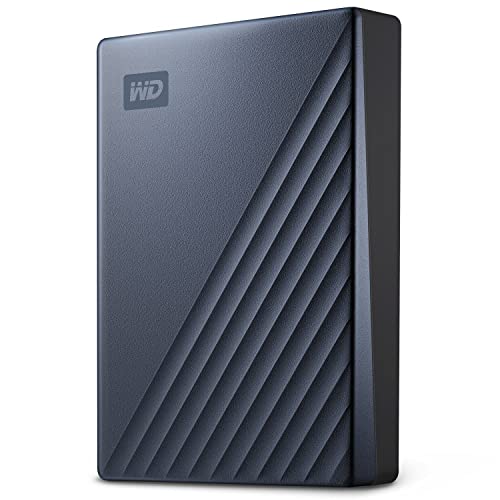
- Best for: editors working on a USB-C laptop who want the lightest drive in this guide with a metal body and hardware encryption.
All 4 Picks at a Glance
| Product | Specs | Action |
|---|---|---|
| WD My Passport 5TB — ASIN B07VP5X239 |
| Check price on Amazon |
| Seagate Portable 5TB — ASIN B07VS8QCXC |
| Check price on Amazon |
| WD My Passport Ultra 5TB — ASIN B07X46C64N |
| Check price on Amazon |
 WD Elements Portable 5TB — ASIN B07X41PWTY |
| Check price on Amazon |
Our Top Picks
- Western Digital WD 5TB Elements Portable External Hard5TB4.35 x 3.23 x 0.82 inches0.52 poundsCheck on Amazon
The best portable hard drive for video editing is the WD My Passport 5TB, because it packs 5TB of pocket-size storage, hardware encryption, and backup software into a 7.4-ounce drive that runs on USB power alone. Editors who need a lighter metal body with a USB-C connection should look at the WD My Passport Ultra 5TB instead. Every drive in this guide is a 2.5-inch portable hard drive with at least 5TB of capacity, so a full project library fits in a jacket pocket.
Video editing eats storage fast. A single afternoon of 4K footage can fill a laptop drive, and moving that footage between a desktop, a laptop, and a client machine means the storage has to travel too. A portable hard drive solves that problem by holding the whole project library in a device that needs no wall outlet and no separate power brick. The drives below were chosen for video work specifically: high capacity for raw footage, a USB interface fast enough for large file transfers, bus power so the drive works anywhere, and a compact 2.5-inch form factor that fits in a camera bag.
Our top pick: WD My Passport 5TB. Runner-up: Seagate Portable 5TB. This guide compares published specifications only: capacity, interface, dimensions, weight, encryption, bundled software, and warranty as listed by the manufacturer and the Amazon listing.
At a Glance
| Product | Best for | Key specification |
|---|---|---|
| WD My Passport 5TB — ASIN B07VP5X239 | All-around video editing storage | 5TB, USB 3.1, 7.4 ounces, hardware encryption |
| Seagate Portable 5TB — ASIN B07VS8QCXC | Data recovery coverage included | 5TB, USB 3.0, 0.57 pounds, 1-Year Rescue Service |
| WD My Passport Ultra 5TB — ASIN B07X46C64N | USB-C laptops and a metal body | 5TB, USB-C and USB 3.1, 4.64 ounces, metal design |
| WD Elements Portable 5TB — ASIN B07X41PWTY | Simple plug-and-play storage | 5TB, USB 3.2 Gen 1, 0.52 pounds, 2-year warranty |
How to Choose
1. Capacity: start at 5TB for video work
Video files are large, and a project folder grows with every shoot day, proxy render, and export. A 1TB or 2TB drive fills up after a few projects, which forces constant file shuffling. A 5TB drive holds several complete projects at once, including raw footage, audio, and exported masters. All four drives in this guide carry 5TB, which is the practical starting point for an editor who works with 4K footage. Editors who shoot in higher resolutions or keep every take should plan on one drive per active project and archive finished work to a second drive.
2. Interface: USB 3.0 or faster for large transfers
Moving a 100GB project folder is where the interface matters. Every drive here uses a USB interface rated at 5Gbps: USB 3.0, USB 3.1, or USB 3.2 Gen 1. That is the ceiling for the connection, and it is the same across all four picks, so the practical difference between them is small. What matters more is the cable in the box. The My Passport Ultra ships with USB-C, which matches modern laptops without an adapter. The other three use a USB-A cable, which fits older laptops and desktops directly. Check the ports on the machine you edit on before choosing, because an adapter is one more thing to lose on a shoot.
3. Bus power: no wall outlet needed
A portable hard drive for video editing should run on power from the USB port alone. All four drives in this guide are bus-powered, which means they spin up the moment they are plugged in and need no power brick. That matters on location, on a plane, or at a client desk where spare outlets are scarce. Desktop external drives, which need their own power supply, are a different category and are not included here, because they stay on a desk instead of traveling with the editor.
4. Form factor and weight: 2.5-inch drives travel best
Every pick here is a 2.5-inch drive, the pocket-size format that fits in a camera bag side pocket. Weights run from 0.52 pounds for the WD Elements to 0.57 pounds for the Seagate Portable, with the My Passport at 7.4 ounces and the My Passport Ultra at 4.64 ounces. The differences are small in practice, but the lightest drives disappear into a bag next to a camera body and a lens. A metal enclosure, like the one on the My Passport Ultra, adds a sturdier feel for a drive that gets handled every day, while the plastic bodies on the other three keep weight down.
5. Encryption and password protection for client footage
Client footage is sensitive, and a lost drive should not mean exposed files. The WD My Passport and the WD My Passport Ultra both include hardware encryption with password protection in their published specifications, so the contents stay locked without the password. The Seagate Portable and the WD Elements do not list hardware encryption, so an editor carrying unreleased client work should weigh that difference. Encryption is set up through the bundled software, and the password should be stored somewhere safe, because a forgotten password means the data cannot be recovered from the drive.
6. Bundled software: backup and recovery services
The software in the box changes what the drive can do beyond storing files. The WD My Passport includes backup software with defense against ransomware, plus device management software with password protection. The Seagate Portable includes a 1-Year Rescue Service, which is a data recovery service from the manufacturer, a useful safety net when a drive holds the only copy of a project. The WD Elements keeps things simple with plug-and-play operation and no bundled backup suite, which suits editors who already run their own backup workflow. Decide whether you want the drive to manage backups for you or just hold files.
7. Formatting and cross-platform use
A drive formatted for Windows works on a Windows machine out of the box, and all four drives here list Windows compatibility. Editors who move between Windows and Mac need to plan the format: the WD Elements listing states it comes formatted for Windows and is compatible with Mac after reformatting, and the My Passport listing notes Mac use with reformatting. Reformatting erases the drive, so it should be done before any footage is copied onto it. Editors who share drives with Mac-based collaborators should settle the format before the first shoot day, not after the footage is already on the disk.
8. Warranty and long-term reliability
A portable drive for video editing gets plugged in, unplugged, and carried around far more than a desktop drive, so the warranty is worth reading. The WD Elements carries a 2-year limited warranty in its published specifications. The other three drives list their warranties through the manufacturer as well, and the Seagate Portable adds the 1-Year Rescue Service on top. No drive lasts forever, and a portable hard drive should never be the only copy of a project. The standard practice is two copies on two separate drives, with the second copy stored somewhere else, so a single failure never costs a project.
Our Picks
WD My Passport 5TB — ASIN B07VP5X239
- Best for: editors who want the most complete package in one drive, with encryption, backup software, and 5TB of capacity for a full project library.
editors who want the most complete package in one drive, with encryption, backup software, and 5TB of capacity for a full project library.
The WD My Passport 5TB is a portable external hard drive with 5TB of capacity in a 2.5-inch body that weighs 7.4 ounces and measures 4.22 by 2.95 by 0.75 inches. It connects over USB 3.1 and USB 3.0 with the included SuperSpeed USB-A cable rated at 5Gbps, and it runs on bus power with no separate adapter. The listing states hardware encryption with password protection, and it includes backup software with defense against ransomware, plus software for device management. The manufacturer listing states it is not discontinued, and the drive works with Windows PC, Mac with reformatting, Chromebook, gaming consoles, and mobile devices.
Consideration: the included cable is USB-A, so a laptop with USB-C ports only will need an adapter or a separate USB-C cable.
Seagate Portable 5TB — ASIN B07VS8QCXC
- Best for: editors who want a recovery service bundled with the drive, so a failed drive does not automatically mean lost footage.
editors who want a recovery service bundled with the drive, so a failed drive does not automatically mean lost footage.
The Seagate Portable 5TB is a portable external hard drive with 5TB of capacity, model STGX5000400, in a 2.5-inch body that weighs 0.57 pounds. It connects over USB 3.0 for PC, Mac, PS4, and Xbox, and it runs on bus power. The listing includes a 1-Year Rescue Service, which is a data recovery service from Seagate, and the drive is sold as an Amazon Exclusive variant with that service bundled in. Its published specifications list a mechanical hard disk in a compact enclosure, and recent listing activity shows it available on Amazon US in late November 2026.
Consideration: the listing does not state hardware encryption, so editors carrying sensitive client footage should add their own encryption step before copying files onto it.
WD My Passport Ultra 5TB — ASIN B07X46C64N
- Best for: editors working on a USB-C laptop who want the lightest drive in this guide with a metal body and hardware encryption.
editors working on a USB-C laptop who want the lightest drive in this guide with a metal body and hardware encryption.
The WD My Passport Ultra 5TB is a portable external hard drive with 5TB of capacity, model WDBFTM0050BBL-WESN, in a metal design that weighs 4.64 ounces. It connects over USB-C and USB 3.1, which matches modern laptops without an adapter, and it includes backup software with defense against ransomware and password protection. The listing states hardware encryption and a portable 2.5-inch form factor, with a USB-C connection and USB 3.0 compatibility. Recent listing activity shows it in stock on Amazon US in late November 2026.
Consideration: the metal enclosure is the lightest here, but the drive still holds a mechanical hard disk, so it should be handled with the same care as any spinning drive when it is in use.
WD Elements Portable 5TB — ASIN B07X41PWTY
- Best for: editors who want the simplest drive in this guide, with no extra software to manage and the lightest published weight of the four.
editors who want the simplest drive in this guide, with no extra software to manage and the lightest published weight of the four.
The WD Elements Portable 5TB is a portable external hard drive with 5TB of capacity, model WDBU6Y0050BBK-WESN, in a 2.5-inch body that weighs 0.52 pounds and measures 4.35 by 3.20 inches. It connects over SuperSpeed USB 3.2 Gen 1 at 5Gbps with the included USB-A cable, and it is a mechanical hard disk that runs on bus power. The listing states plug-and-play operation, a 2-year limited warranty, and capacities up to 6TB in the product line. It comes formatted for Windows and is compatible with Mac and other operating systems after reformatting. Recent listing activity shows it in stock and fulfilled by Amazon in November 2026.
Consideration: there is no bundled backup software and no hardware encryption listed, so the editor supplies their own backup workflow and any encryption the footage needs.
Which One Is Right for You?
Choose the WD My Passport 5TB if you want the most complete single drive: 5TB, hardware encryption, and backup software in a proven package. Choose the Seagate Portable 5TB if the bundled 1-Year Rescue Service matters more to you than encryption, because a recovery service is the one thing that can rescue a project after a drive failure. Choose the WD My Passport Ultra 5TB if your laptop has USB-C ports and you want the lightest drive with a metal body. Choose the WD Elements Portable 5TB if you already have a backup workflow and want the simplest, lightest plug-and-play drive with no extra software in the way. Whichever you pick, keep two copies of every project on two separate drives, because a portable hard drive should never be the only copy of footage that cannot be shot again.
Frequently Asked Questions
Is a portable hard drive fast enough for video editing?
A portable hard drive with a USB 3.0 or faster interface is fast enough for storing footage, moving project libraries, and editing compressed 4K footage from the drive. For heavier work, such as multi-camera timelines or uncompressed footage, many editors keep active media on a faster drive and use the portable hard drive for the project library, backups, and transport between machines.
How much capacity do I need for video editing?
A 5TB drive is a practical starting point for 4K editing, because it holds several complete projects including raw footage, audio, and exports. Editors who shoot long-form work or keep every take should plan on one 5TB drive per active project and archive finished projects to a second drive.
Do portable hard drives need a power outlet?
No. All four drives in this guide run on bus power, which means they draw power from the USB port and need no wall outlet or power brick. That is what makes them portable, and it is the main difference from desktop external drives, which need their own power supply.
Can I use a portable hard drive with both Windows and Mac?
Yes, with a format decision made first. The drives here list Windows compatibility out of the box, and the WD Elements and WD My Passport listings state Mac compatibility after reformatting. Reformatting erases the drive, so choose the format before copying any footage onto it.
Should I buy a portable hard drive or a portable SSD for video editing?
A portable hard drive gives more capacity for the money and is a good fit for footage libraries, backups, and transport. A portable SSD is faster and has no moving parts, which suits active timeline work and rough handling. Many editors use both: an SSD for the active project and a portable hard drive for the full library and the backup copy.
Bottom Line
The best portable hard drive for video editing is the WD My Passport 5TB, because it combines 5TB of capacity, hardware encryption, and backup software in a pocket-size drive that runs on USB power alone. The Seagate Portable 5TB is the runner-up for its bundled 1-Year Rescue Service, the WD My Passport Ultra 5TB is the pick for USB-C laptops and the lightest carry, and the WD Elements Portable 5TB is the simplest plug-and-play option. Pick the one that matches your ports and your backup habits, then keep two copies of every project.
Disclosure: As an Amazon Associate, this site earns from qualifying purchases.
FAQ
Which One Is Right for You?
Is a portable hard drive fast enough for video editing?
How much capacity do I need for video editing?
Do portable hard drives need a power outlet?
Can I use a portable hard drive with both Windows and Mac?
Should I buy a portable hard drive or a portable SSD for video editing?
More from Amazon
Programs that pair well with the guide above. Offers and eligibility are set by Amazon and may change.
Free shipping on eligible items, Prime Video and more. Eligible new members can start with a free trial.
Start a Prime free trialAd-free music streaming. Eligible new subscribers can start with a free trial.
Try Music Unlimited freeA Prime membership for ages 18-24 with a trial period. Eligibility is set by Amazon.
See Prime for Young AdultsAudiobooks and podcasts to listen to on the go. Eligible new members can start with a free trial.
Try Audible freeAs an Amazon Associate we earn from qualifying purchases.