
Key takeaways
- The best Thunderbolt hard drives: the SanDisk PRO-G40 SSD pairs Thunderbolt 3 speed with USB-C fallback, IP68 sealing, and 4TB of portable capacity.
Search for a Thunderbolt hard drive and you will notice something quickly: the spinning-disk drives that once defined the category have effectively disappeared from Amazon US. What remains — and what actually delivers the speed Thunderbolt promises — is a small group of portable SSDs built around a Thunderbolt controller. So this guide starts with an honest statement of what it is. The verified Thunderbolt pool is SSD-based, and the one drive in it that passed a full page-level verification is the SanDisk Professional PRO-G40, a dual-mode portable SSD that speaks Thunderbolt 3 to fast machines and plain USB-C to everything else.
That dual-mode design is the reason the PRO-G40 earns the pick. A Thunderbolt-only drive is a paperweight on a PC or older Mac that lacks the port, and a USB-only drive leaves most of Thunderbolt’s bandwidth unused on a machine that has it. The PRO-G40’s product page publishes both interfaces and both speed tiers, so the same drive can serve as the fast scratch disk on a Thunderbolt workstation and as an ordinary portable drive on any other computer. Add a sealed, drop-rated enclosure and 4TB of capacity in the verified configuration, and it covers the jobs most people buy a Thunderbolt drive for: moving large project folders, editing media in place, and carrying a working library between machines.
As an Amazon Associate, we earn from qualifying purchases.
Quick answer
The SanDisk Professional PRO-G40 SSD (ASIN B0BW6715SV) is the pick. Its Amazon US page publishes a dual-mode Thunderbolt 3 (40Gbps) and USB-C (10Gbps) interface, with read speeds up to 3000MB/s and write speeds up to 2500MB/s over Thunderbolt 3, falling back to up to 1050MB/s read and 1000MB/s write over USB 3.2 Gen 2. The verified configuration is 4TB, sealed to IP68, rated for drops up to 3 meters and crush resistance up to 4,000 pounds, and formatted APFS so it is Mac-ready out of the box. It is an SSD, not a spinning hard drive — and on current Amazon US listings, SSDs are what the Thunderbolt drive category consists of.
Key takeaways
- The verified Thunderbolt pool contains exactly one drive: the SanDisk Professional PRO-G40 SSD, ASIN B0BW6715SV, in its 4TB configuration (model SDPS31H-004T-GBCND).
- Dual-mode matters: the page publishes Thunderbolt 3 at 40Gbps and USB-C at 10Gbps on the same drive, so it stays useful on machines without a Thunderbolt port.
- Published speeds are interface-dependent: up to 3000MB/s read and 2500MB/s write over Thunderbolt 3, and up to 1050MB/s read and 1000MB/s write over USB 3.2 Gen 2.
- The enclosure is the rugged part of the package: IP68 dust and water resistance, drop protection up to 3 meters, and crush resistance up to 4,000 pounds, all as published on the product page.
- It ships formatted APFS and Mac-ready; Windows users should expect to reformat before first use.
- Despite the keyword, this is solid-state storage. No spinning-disk Thunderbolt drive could be verified as currently sold on Amazon US for this guide.
The pick
SanDisk Professional PRO-G40 SSD — 4TB
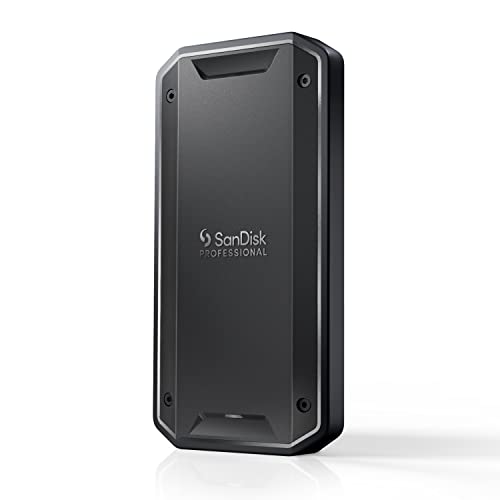
The PRO-G40 is built around the problem that makes Thunderbolt drives frustrating to buy: port fragmentation. One desk has a Thunderbolt dock, the laptop in the bag has USB-C only, and a drive that works at full speed on one is often dead weight on the other. SanDisk’s answer, as published on the product page, is a dual-mode controller that negotiates Thunderbolt 3 (40Gbps) when the host supports it and USB-C (10Gbps) when it does not. The performance figures follow the interface: up to 3000MB/s reads and 2500MB/s writes over Thunderbolt 3, which is fast enough to edit multi-stream media directly from the drive, and up to 1050MB/s reads and 1000MB/s writes over USB 3.2 Gen 2, which still beats any portable spinning disk by a wide margin.
The second half of the package is physical. The page publishes an IP68 rating, which means the enclosure is sealed against dust and rated for water immersion under the conditions of that standard, plus drop protection up to 3 meters and crush resistance up to 4,000 pounds. Those figures matter because a portable drive’s most likely failure is not electronic — it is being knocked off a desk, sat on in a bag, or soaked in a spill. The verified configuration here is the 4TB model, which is the capacity tier that suits a working media library or a full machine backup with room to grow. The drive ships formatted APFS and is positioned by SanDisk as Mac-ready, which fits the Thunderbolt audience: most Thunderbolt ports in the wild are on Macs.
Specs
- Model: SanDisk Professional PRO-G40 SSD, 4TB (SDPS31H-004T-GBCND)
- Interface: Thunderbolt 3 (40Gbps) and USB-C (10Gbps), dual-mode
- Read speed: up to 3000MB/s via Thunderbolt 3; up to 1050MB/s via USB 3.2 Gen 2
- Write speed: up to 2500MB/s via Thunderbolt 3; up to 1000MB/s via USB 3.2 Gen 2
- Ingress protection: IP68
- Drop protection: up to 3 meters
- Crush resistance: up to 4,000 pounds
- File system as shipped: APFS, Mac-ready out of the box
See the SanDisk Professional PRO-G40 on Amazon
How to choose a Thunderbolt drive
Start with the port, not the drive. Thunderbolt 3 and USB-C use the same connector shape, which causes endless confusion. A USB-C port is not automatically a Thunderbolt port, and the drive cannot give you Thunderbolt speeds through a host that lacks the controller. Before buying, confirm what your machine actually has: if it has Thunderbolt, a dual-mode drive like the PRO-G40 will run at its higher published tier; if it has USB-C only, the same drive still works, at its USB tier. A Thunderbolt-only drive, by contrast, may not mount at all on a USB-only machine, which is why dual-mode support is the single most valuable line on the spec sheet.
Read both speed tiers. Every dual-mode drive publishes two sets of numbers, and the gap between them is large — in the PRO-G40’s case, roughly triple the throughput on Thunderbolt versus USB. Neither figure is dishonest, but only one of them describes your setup. If your workflow is editing video or moving virtual-machine images, the Thunderbolt tier is the one that changes how the drive feels. If you mostly shuttle documents and photos, the USB tier is already faster than the files demand, and the Thunderbolt support is future-proofing rather than a present-day benefit.
Match capacity to the job, not the catalogue. Portable SSD pricing climbs steeply with capacity, so buy for the working set you actually carry. A drive used as a scratch disk for active projects needs to hold those projects plus headroom for renders and caches; a drive used for backup needs to hold the full source with room for version history. The 4TB configuration verified here suits a full media library or a complete machine image. Smaller configurations of the same model exist in the PRO-G40 family, but only the 4TB configuration is the verified pick in this guide — check the capacity on the listing carefully before ordering, because capacity variants share one product page.
Treat the enclosure as a spec, not a bonus. Portable drives travel, and travel is where drives die. An IP rating tells you how the enclosure handles dust and water; drop and crush figures tell you how it handles the physical side. The PRO-G40 publishes IP68 sealing, 3-meter drop protection, and 4,000-pound crush resistance, which is the full set of durability figures a buyer can ask for on one page. If a competing listing publishes none of these, that silence is information too.
Check the shipped format. The PRO-G40 arrives formatted APFS, Apple’s file system, and is Mac-ready out of the box. That is a convenience on a Mac and a small chore on Windows, where the drive will need reformatting before use — a five-minute job, but one that erases the drive, so do it before loading any files. Cross-platform households should decide on a format strategy up front rather than discovering the limitation mid-transfer.
Who should skip this pick
Skip the PRO-G40 if you need a spinning hard drive specifically — for bulk archival storage where cost per terabyte is the priority and speed is irrelevant, a desktop HDD or a NAS is the right tool, and this SSD is the wrong shape of answer. Skip it if your machines have no USB-C or Thunderbolt ports at all, since there is no USB-A fallback published for this drive. Skip it if you need a drive that works identically across Mac and Windows without reformatting decisions, because the APFS shipping format means one platform gets a plug-and-play experience and the other gets a setup step. And skip it if 4TB is far more than your working set — paying for capacity you will never fill buys nothing.
FAQ
Is the PRO-G40 a hard drive or an SSD?
It is an SSD. There are no spinning platters inside; it is solid-state storage in a portable enclosure. This guide covers it under the Thunderbolt hard drive keyword because that is the category shoppers search for, but the honest description is that the current Thunderbolt external-drive market on Amazon US is SSD-based, and no spinning-disk Thunderbolt model could be verified as currently sold for this guide.
Will it work on a computer without Thunderbolt?
Yes, at reduced speed. The product page publishes a dual-mode interface: Thunderbolt 3 (40Gbps) where the host supports it, and USB-C (10Gbps) elsewhere, with published speeds of up to 1050MB/s read and 1000MB/s write over USB 3.2 Gen 2. The host does need a USB-C port; there is no published USB-A mode.
Do I need to do anything before using it on Windows?
Expect to reformat it. The drive ships formatted APFS and Mac-ready, which is the native format for current Macs. Windows cannot write to APFS out of the box, so a Windows user should reformat the drive to a Windows-compatible file system before first use — before putting any files on it, since formatting erases the contents.
What do the durability figures actually cover?
As published on the product page: IP68 sealing against dust and water ingress, drop protection up to 3 meters, and crush resistance up to 4,000 pounds. These describe the enclosure’s tested limits, not a guarantee against every accident — a drive dropped onto concrete from above the rated height, or submerged beyond the rating’s conditions, can still fail. Treat the figures as a strong durability tier, and keep a second copy of anything irreplaceable regardless.
Final verdict
The Thunderbolt drive category has narrowed to rugged portable SSDs, and within the listings that could be fully verified on Amazon US, the SanDisk Professional PRO-G40 stands alone as the pick. Its dual-mode Thunderbolt 3 and USB-C interface removes the port-matching gamble, its published speeds are strong on both tiers, and its IP68 sealing with 3-meter drop and 4,000-pound crush ratings makes it the rare portable drive specified for the way portable drives actually get treated. Buy the 4TB configuration under ASIN B0BW6715SV if you work on Thunderbolt machines and want one drive that also behaves on everything else — and go in knowing you are buying an SSD, because in this category, that is what a Thunderbolt drive now is.
Product and ASIN Reference
| Product | Capacity | Interface | ASIN |
|---|---|---|---|
| SanDisk Professional PRO-G40 SSD | 4TB | Thunderbolt 3 (40Gbps) / USB-C (10Gbps) | B0BW6715SV |
More from Amazon
Programs that pair well with the guide above. Offers and eligibility are set by Amazon and may change.
Free shipping on eligible items, Prime Video and more. Eligible new members can start with a free trial.
Start a Prime free trialAd-free music streaming. Eligible new subscribers can start with a free trial.
Try Music Unlimited freeA Prime membership for ages 18-24 with a trial period. Eligibility is set by Amazon.
See Prime for Young AdultsAudiobooks and podcasts to listen to on the go. Eligible new members can start with a free trial.
Try Audible freeAs an Amazon Associate we earn from qualifying purchases.









