Our Short List of 3

- Channels: 2.1
- Total output: 330 W
- Subwoofer: wireless, included in the box
- Inputs: HDMI ARC, optical, Bluetooth

- Channels: 2.0, single-bar design
- Size: about 23.4 inches wide, 4.3 lb
- Inputs: HDMI ARC, optical, Bluetooth
- Dialogue tools: dedicated Dialogue mode, bass boost on the remote
- Format: powered 2.0 bookshelf pair, no receiver needed
- Output: 42 W RMS total
- Drivers: 4-inch woofer and 13 mm tweeter per speaker
- Inputs: optical, coaxial, dual RCA analog, Bluetooth 5.0
All 3 Picks at a Glance
| Product | Specs | Action |
|---|---|---|
| Sony HT-S400 — best 2.1 system with a wireless subwoofer |
| Check price on Amazon |
| Bose TV Speaker — best compact bar for dialogue |
| Check price on Amazon |
| Edifier R1280DBs — best powered bookshelf pair for a projector |
| Check price on Amazon |
Key takeaways
- The best speakers for projector rooms: soundbars and powered pairs with HDMI ARC, optical and Bluetooth links, clear dialogue and tidy cabling.
A projector solves the picture problem and creates a sound problem. The built-in drivers on most home projectors are small, fire in the wrong direction, and sit at the back of the room while the image lands on the wall in front of you. Dialogue drifts from behind the seating, action scenes flatten out, and fan noise competes with quiet lines. An external speaker fixes all three issues at once, which is why a soundbar or a powered pair is usually the first upgrade a projector room needs.
The catch is the connection. Projectors offer a mixed bag of outputs: some have HDMI ARC or eARC, many rely on optical or a 3.5 mm jack, and a growing number send audio over Bluetooth. The five picks below cover every one of those routes. Each one is a speaker bought to pair with a projector, chosen for clear dialogue, a hookup that matches real projector outputs, and sync tight enough that lips and voices stay together during films and games.
As an Amazon Associate, we earn from qualifying purchases.
Quick answer
The Polk Audio Signa S4 is the top pick for most projector rooms: a 3.1.2 soundbar with a dedicated center channel, a dialogue control that lifts voices out of the mix, HDMI eARC, optical, and Bluetooth, plus a wireless subwoofer. For true surround, the VIZIO V-Series 5.1 adds wired rear speakers; the Edifier R1280DBs pair suits rooms that favor bookshelf speakers over a bar.
Polk Audio Signa S4 — best overall soundbar for a projector
The Signa S4 earns the lead spot because it answers the three complaints projector owners repeat most: muffled dialogue, thin bass, and a hookup that does not match the projector. Its dedicated center channel carries speech, and Polk’s VoiceAdjust control lets you raise the dialogue level on its own without pushing the whole volume up, which matters in rooms where the projector fan adds a constant background hiss. Two up-firing drivers add Dolby Atmos height effects for films that carry them.
Connection flexibility is the other half of the appeal. HDMI eARC suits newer projectors and streaming sources with an ARC return path, optical covers the long list of projectors with a Toslink output, and Bluetooth handles projectors that only send audio wirelessly. The slim cabinet is roughly 2.4 inches tall, so it tucks under a screen or on a low stand without crowding the image, and the wireless subwoofer links to the bar on its own, so bass placement is not dictated by where the bar sits.
- Channels: 3.1.2 with Dolby Atmos
- Drivers: seven in the bar, including two up-firing height drivers and a center channel
- Subwoofer: wireless, included in the box
- Inputs: HDMI eARC, optical, Bluetooth, 3.5 mm auxiliary
- Dialogue tools: VoiceAdjust level control, plus BassAdjust for the subwoofer
- Extras: Movie and Music presets, Night mode, remote control included
Sony HT-S400 — best 2.1 system with a wireless subwoofer
- Channels: 2.1
- Total output: 330 W
- Subwoofer: wireless, included in the box
- Inputs: HDMI ARC, optical, Bluetooth
The HT-S400 is the straightforward two-piece answer for a projector room that wants weight in the low end without a complicated install. The bar handles the front stage, the wireless subwoofer handles explosions and scores, and Sony’s S-Force PRO Front Surround processing widens the sound beyond the width of the bar itself. A Clear Dialogue mode pushes speech forward, which helps on films mixed with quiet center content.
For projector pairing, the input set is the point: HDMI ARC for sources that support it, an optical input for the many projectors that offer Toslink and nothing else digital, and Bluetooth for a cable-free link when the projector or a streaming stick can send audio wirelessly. The bar is wall-mountable if your screen wall has no furniture under it, and a small display on the bar confirms the active input, a small mercy when the speaker sits across the room from the projector and you are troubleshooting a silent input from the couch.
Bose TV Speaker — best compact bar for dialogue
- Channels: 2.0, single-bar design
- Size: about 23.4 inches wide, 4.3 lb
- Inputs: HDMI ARC, optical, Bluetooth
- Dialogue tools: dedicated Dialogue mode, bass boost on the remote
Some projector rooms are bedrooms, dorms, and spare rooms where a long bar and a separate subwoofer simply do not fit. The Bose TV Speaker is a single compact bar, about 23.4 inches wide, built around one job: making speech easy to follow. A center tweeter aims dialogue at the listener, and the Dialogue mode on the remote lifts vocals further while trimming the parts of the mix that bury them.
It also keeps the wiring honest for small setups. Optical is the default link for most projectors and an optical cable is in the box, HDMI ARC covers compatible gear, and Bluetooth lets the bar double as a music speaker from a phone between movie nights. There is a bass boost button on the remote for action films, though the bar works without a subwoofer, so it suits rooms where the speaker has to live on a shelf, a dresser, or a narrow stand under a pull-down screen. If your projector sits on a nightstand and the screen is a blank wall, this is the least intrusive upgrade on the list.
VIZIO V-Series 5.1 (V51x-J6) — best true surround for a projector room
Virtual processing can widen a soundstage, but it cannot put a sound behind you. The V-Series 5.1 can. Alongside the 36-inch bar and a wireless subwoofer, the system includes two small surround speakers that wire into the subwoofer, so you place the sub near the seating, run short speaker cables to the rears, and get genuine rear-channel effects for games and films. For a projector room, that layout is practical: the long distance in the setup is covered by the wireless link between the bar and the sub, not by cable runs across the floor.
The bar itself connects over HDMI ARC or optical, which covers the great majority of projectors, and Bluetooth is on hand for streaming music or for projectors that only offer a wireless audio route. Dolby Audio decoding handles the soundtracks on discs and streaming services, and the remote offers EQ modes for movie, music, and game content, plus individual level control for the surround speakers and subwoofer so you can balance the system from the main seat.
- Channels: 5.1 with separate surround speakers
- Layout: 36-inch bar, wireless subwoofer, two wired rear speakers
- Inputs: HDMI ARC, optical, Bluetooth, 3.5 mm voice-assistant input
- Decoding: Dolby Audio, DTS sound modes
- Controls: remote with movie, music, and game EQ presets and channel level trim
- Fit note: surround speakers connect to the subwoofer, so plan sub placement near the seating
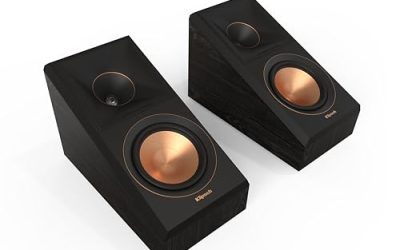
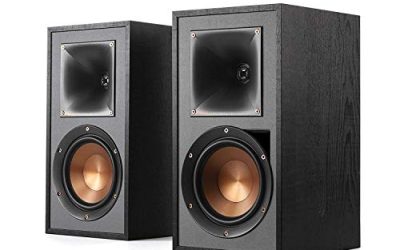
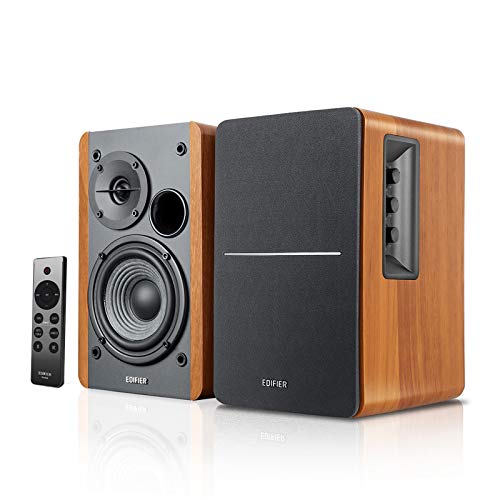
Edifier R1280DBs — best powered bookshelf pair for a projector
- Format: powered 2.0 bookshelf pair, no receiver needed
- Output: 42 W RMS total
- Drivers: 4-inch woofer and 13 mm tweeter per speaker
- Inputs: optical, coaxial, dual RCA analog, Bluetooth 5.0
A bar is not the only shape that works at the front of a room. The R1280DBs are a powered pair of bookshelf speakers that flank a screen the way stereo speakers should, giving music, games, and films a wider and more natural front stage than a single cabinet. Because the amplifiers are built in, there is no receiver to buy or house: the projector or source feeds the speakers directly and the pair handles the rest.
The input panel is why this pair suits projectors so well. Optical and coaxial digital inputs cover projectors and media players with digital outputs, dual RCA inputs take analog sources, and Bluetooth 5.0 pairs with projectors, phones, and laptops that send audio wirelessly. A subwoofer line out lets you add a powered sub later if the room grows. Side-panel knobs handle volume, treble, and bass, the included remote covers the basics from the seat, and the wood-grain cabinets look at home on stands or shelves either side of a screen. Keep in mind the two speakers join with a cable, so they fit rooms where both can sit near the screen wall.
How to choose
Check the projector’s outputs before you fall for a speaker. An HDMI ARC or eARC port is the cleanest link and lets one remote run volume, optical is the most common digital output on projectors and carries Dolby Digital fine, a 3.5 mm jack works with powered speakers and older bars, and Bluetooth is the fallback when no cable route exists. If the projector is short on outputs, remember the source can feed the speaker instead: many streaming sticks, consoles, and disc players pass audio onward, and an HDMI audio extractor can split sound off for an optical speaker.
Think about where the sound should come from, not where the projector is. The speaker belongs at the screen end of the room, so voices match the faces on the wall. With a ceiling-mounted projector at the back, that means either a long HDMI or optical run to a bar under the screen — optical cables handle long runs well and shrug off interference — or a Bluetooth link, accepting a little delay. Wireless subwoofers and systems whose rear speakers wire into the sub, like the VIZIO above, shorten the cable problem a great deal.
Latency decides how watchable the result feels. Wired HDMI and optical links keep audio and video in step. Bluetooth can trail the picture by enough to notice on close-ups of speech, and some projectors and speakers handle it better than others. If you plan to game on the big screen, treat a wired connection as close to mandatory, and look for a game or low-latency mode on the speaker. Many projectors also offer an audio delay setting that can pull a slightly late soundtrack back into line.
Finally, match the system to the room. A compact bar is plenty for a bedroom setup and keeps dialogue clear at low volume, which suits late-night viewing. A bar with a wireless subwoofer fills a living room and gives films their low-end weight. A true 5.1 system earns its extra boxes only if you can place rear speakers behind the seats; otherwise the money is better spent on a stronger front bar. Powered bookshelf speakers reward listeners who care about music as much as movies and who have stands or shelves ready at the front of the room.
Who should skip
Skip the external speaker hunt if you already run an AV receiver and passive speakers, since a receiver-based system gives you more inputs, more power, and proper room correction than any bar here. Skip it, for now, if your projector has no audio output of any kind and your sources cannot feed a speaker either; fix the signal chain first, because no speaker solves a missing output. Portable pico projectors used for occasional outdoor nights are also poor candidates: a small Bluetooth speaker you already own will travel better than a bar. And if a dedicated theater build with in-wall speakers is already planned, hold the budget for that instead of buying a stopgap.
Frequently Asked Questions
How do I connect a soundbar to a projector with no HDMI ARC?
Use the optical output if the projector has one; it carries digital surround formats and only needs a single Toslink cable. If there is no optical port either, a 3.5 mm analog output can feed powered speakers or a bar with an auxiliary input, and Bluetooth is the last resort. You can also take audio from the source device instead of the projector, or add an HDMI audio extractor between the source and the projector to split the sound off to the speaker.
Does Bluetooth audio lag behind the picture on a projector?
It can. Bluetooth adds a delay that wired HDMI and optical links do not, and on dialogue close-ups the mismatch can be visible. Some projectors offer an audio sync or delay adjustment that compensates, and newer Bluetooth versions reduce the gap. For films where lip sync matters and for gaming, a wired connection is the safer choice; keep Bluetooth for casual viewing, sports, and music.
Where should the speakers go if the projector sits behind the seating?
At the screen, always. Voices should arrive from the same direction as the image, so the bar or the pair belongs under or beside the screen even when the projector is ceiling-mounted at the back. Run one long optical or HDMI cable to the front, or use a system with a wireless subwoofer placed near the seats for the rear half of the system. Avoid putting the main speaker next to the projector; sound from behind the audience pulls attention away from the picture.
Can powered bookshelf speakers work with a projector, or do I need a soundbar?
They work well, and for music they often sound better than a bar at a similar level. A powered pair like the Edifier above takes optical, coaxial, analog, or Bluetooth audio straight from the projector or a source, with no receiver in between. The trade-offs are placement and cabling: you need room on both sides of the screen, a cable joins the two speakers, and volume runs through the speaker’s own remote rather than the projector’s.
Final verdict
For most projector rooms, the Polk Audio Signa S4 is the buy: real center-channel dialogue, Atmos height drivers, a wireless subwoofer, and the full spread of eARC, optical, and Bluetooth connections in one slim bar. The Sony HT-S400 covers rooms that want strong bass from a simple two-piece system, and the Bose TV Speaker is the compact answer when space is tight and speech clarity is the whole point. Choose the VIZIO V-Series 5.1 when the room can take rear speakers and you want effects that genuinely come from behind, and pick the Edifier R1280DBs when a stereo pair flanking the screen fits your room and your listening habits better than any bar. Whichever shape you choose, confirm the projector’s outputs first, plan the cable route to the screen wall, and keep the connection wired where you can; that is what turns a big picture into a complete theater.
Product and ASIN Reference
| Product | ASIN |
|---|---|
| Polk Audio Signa S4 | B09J753M18 |
| Sony HT-S400 | B09SQWQ4TC |
| Bose TV Speaker | B088KRPCQJ |
| VIZIO V-Series 5.1 (V51x-J6) | B08CGVTVMN |
| Edifier R1280DBs | B08865JM4N |
FAQ
How do I connect a soundbar to a projector with no HDMI ARC?
Does Bluetooth audio lag behind the picture on a projector?
Where should the speakers go if the projector sits behind the seating?
Can powered bookshelf speakers work with a projector, or do I need a soundbar?
More from Amazon
Programs that pair well with the guide above. Offers and eligibility are set by Amazon and may change.
Free shipping on eligible items, Prime Video and more. Eligible new members can start with a free trial.
Start a Prime free trialAd-free music streaming. Eligible new subscribers can start with a free trial.
Try Music Unlimited freeA Prime membership for ages 18-24 with a trial period. Eligibility is set by Amazon.
See Prime for Young AdultsAudiobooks and podcasts to listen to on the go. Eligible new members can start with a free trial.
Try Audible freeAs an Amazon Associate we earn from qualifying purchases.