Our Short List of 3

- Best for: podcasters building a studio around an audio interface who want the broadcast headset that studios have trusted for years.

- Best for: long-form podcasters who want a comfortable modern headset with a detailed condenser microphone and a detachable boom.

- Best for: solo podcasters and streamers who want to record straight into a computer, with studio headphone sound and a flip-to-mute boom microphone.
All 5 Picks at a Glance
| Product | Specs | Action |
|---|---|---|
| 1. Audio-Technica BPHS1 |
| Check price on Amazon |
| 2. Rode NTH-100M |
| Check price on Amazon |
| 3. Audio-Technica ATH-M50xSTS-USB |
| Check price on Amazon |
 4. Audio-Technica BPHS2-UT |
| Check price on Amazon |
 5. Sennheiser HMD 300 PRO |
| Check price on Amazon |
Key takeaways
- Find the best headsets for podcasting, from broadcast classics to plug-and-play USB models, comparing five boom-mic headsets for clear, consistent voice recording.
A headset built for podcasting has a different job from a gaming headset or a pair of music headphones. It has to put a microphone close to your mouth and keep it there, so your voice stays consistent through a whole episode, and it has to seal out the room around you so the keyboard, the fan and the street never make it into the episode. When a headset fails at that job, the failure is audible: levels drift, background noise creeps in, and every edit takes longer.
Podcasting has grown into a format where the audience expects broadcast-quality sound, and a headset is the simplest way to get it. A standalone microphone on a boom arm can sound superb, but it needs a treated room and careful positioning. A headset removes most of that: the microphone rides with your head, the distance to your mouth never changes, and you can record without rebuilding the room first. This guide explains what matters when you choose a headset for podcasting, compares five strong broadcast and streaming headsets, and helps you match one to the way you actually record.
Disclosure: As an Amazon Associate, we earn from qualifying purchases.
At a Glance
| Product | Key spec | Best for |
|---|---|---|
| Audio-Technica BPHS1 | Dynamic cardioid boom mic, closed-back, XLR and 1/4 in. cable | The broadcast standard for podcast studios |
| Rode NTH-100M | Detachable condenser boom mic, CoolTech gel cushions, TRRS cable | Comfortable long sessions with a modern sound |
| Audio-Technica ATH-M50xSTS-USB | 45 mm drivers, 20 Series condenser boom mic, USB-C plug-and-play | Podcasters who want to record without an interface |
| Audio-Technica BPHS2-UT | Hypercardioid dynamic boom mic, unterminated cable | Tighter pickup in noisy or shared rooms |
| Sennheiser HMD 300 PRO | Dynamic boom mic, closed-back broadcast design | A broadcast workhorse for studio and remote recording |
How to Choose a Headset for Podcasting
1. Put the microphone first
In a podcasting headset, the microphone matters more than the speakers. Your listeners judge the headset by how you sound, not by how your co-host sounds to you. Look for a boom microphone that sits close to your mouth and a pickup pattern that matches your room. A cardioid pattern focuses on the voice in front of it and reduces sound from the sides and rear, which suits a quiet room. A hypercardioid pattern narrows that focus further, which helps in a shared room where other people are talking or equipment is running nearby.
Every pick in this guide uses a boom microphone, the most reliable way to keep the microphone at a fixed distance from your mouth. Microphones built into the earcup sit further from your mouth and pick up more of the room, which is why they rarely appear in a podcasting setup.
2. Choose between dynamic and condenser microphones
The microphone in a podcasting headset is either dynamic or condenser, and the two types behave differently in a home studio. A dynamic microphone is rugged, handles loud voices without distortion, and is less sensitive to distant room noise, which is why broadcast headsets have used dynamic microphones for decades. A condenser microphone is more sensitive and captures more detail in the voice, which can sound richer, but it also picks up more of the room, so it suits a quieter recording space.
Three headsets in this guide use dynamic microphones and two use condenser microphones, and neither type is better in every situation. If your recording room has hard floors, a humming computer or people nearby, a dynamic microphone is the safer choice. If your room is quiet and treated, a condenser microphone can add a little more presence to your voice.
3. Match the connection to your recording setup
A podcasting headset connects in one of three ways, and the right choice depends on what you already own. USB headsets plug straight into a computer and work with recording software immediately, with no audio interface and no extra power supply, which makes them the simplest option for a solo podcaster starting out. XLR headsets connect to an audio interface or mixer, which gives you more control over gain, monitoring and processing, and suits a studio with more than one microphone. TRRS headsets use a single combined plug for an interface, a mixer or a mobile device through an adapter.
Check the connector before you buy, and check whether a cable is included. Some broadcast headsets ship without a cable or with an unterminated cable that needs a connector fitted, which is standard practice in broadcast studios but a surprise for a first-time buyer.
4. Weigh comfort for the hours you actually record
A podcast recording can run for two hours or more, and a headset that feels fine for ten minutes can become a problem by the end of an episode. Over-ear models enclose the ears and seal out more sound, while on-ear models rest on the ears and tend to be lighter but let in more room sound. All five headsets in this guide are closed-back over-ear designs, because isolation matters when you are monitoring your own voice while you record.
Look for a padded headband, soft ear cushions, and a boom arm that stays where you put it. A boom that drifts during a recording changes your microphone distance and your levels with it, so a firm, adjustable boom is worth more than a fancy finish.
5. Decide how much isolation you need
Isolation is the headset’s ability to keep room sound out of your ears and, just as importantly, to keep your microphone from hearing the room. Closed-back earcups are the main tool here: they seal against your ears and block a useful amount of background sound without any electronics. That seal also stops headphone audio from leaking into the microphone while you monitor a co-host or a music bed.
If you record in a quiet room, the passive isolation of closed-back earcups is enough. If you record in a shared space, a tighter microphone pattern and a closer boom position matter as much as the earcups, because the microphone is the part of the headset that hears the room.
6. Plan for monitoring and mute control
Hearing yourself while you record is part of the job. Monitoring your own voice, through your recording software or a sidetone control on the headset, helps you keep a steady distance from the microphone and a steady volume. Some headsets add a flip-to-mute boom, so raising the microphone silences it instantly, which is useful when you need to cough, take a drink or talk to someone off-mic during a live recording.
A detachable cable is also worth looking for: cables wear out faster than headsets, and a model with a replaceable cable can be repaired for the cost of a cable rather than replaced outright.
The 5 Best Headsets for Podcasting
1. Audio-Technica BPHS1
- Best for: podcasters building a studio around an audio interface who want the broadcast headset that studios have trusted for years.
podcasters building a studio around an audio interface who want the broadcast headset that studios have trusted for years.
this is an XLR headset, so it needs an audio interface or mixer. It will not plug directly into a laptop.
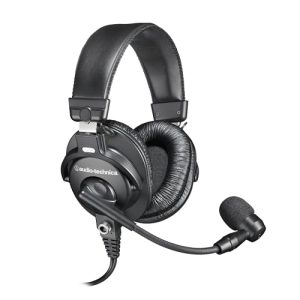
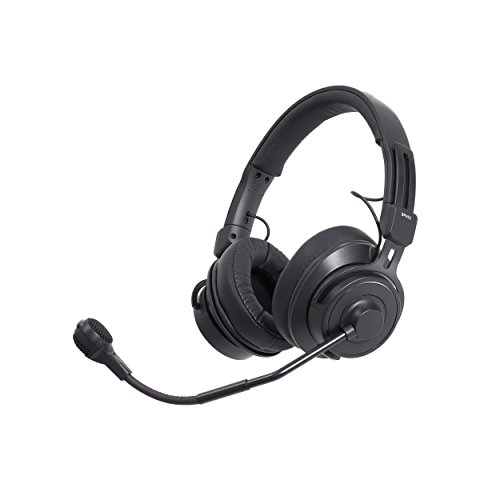
The Audio-Technica BPHS1 is the broadcast headset against which other podcasting headsets are measured, and the natural first choice if you want a proven studio tool. It pairs closed-back circumaural earcups with a dynamic cardioid boom microphone on a flexible gooseneck, a combination that has been standard in radio and broadcast booths for years. The cardioid pattern focuses on your voice and reduces sound from the sides, while the closed-back design keeps room noise out of your ears.
The BPHS1 connects with a detachable cable that terminates in an XLR connector for the microphone and a 1/4 in. connector for the headphones, so it plugs into an audio interface or mixer rather than directly into a computer. That suits podcasters who already own an interface. The microphone is dynamic, so it needs no phantom power and handles loud, close-up voices without strain. Spare windscreens are included, and the boom fits the left or the right.
Watch out for: this is an XLR headset, so it needs an audio interface or mixer. It will not plug directly into a laptop.
Check the Audio-Technica BPHS1 on Amazon
2. Rode NTH-100M
- Best for: long-form podcasters who want a comfortable modern headset with a detailed condenser microphone and a detachable boom.
long-form podcasters who want a comfortable modern headset with a detailed condenser microphone and a detachable boom.
the microphone is omnidirectional, so it picks up more room sound than a cardioid or hypercardioid boom. It suits a quiet recording space better than a shared one.
The Rode NTH-100M is the modern pick in this guide, and the one to choose if you record long episodes and feel the weight of a heavy headset by the end. It starts from Rode’s NTH-100 studio headphones and adds the NTH-Mic, a detachable boom microphone with a miniature condenser capsule that Rode describes as broadcast-grade. The microphone uses an omnidirectional pattern, so it relies on its close position near your mouth rather than a narrow pattern to keep your voice forward.
Comfort is where the NTH-100M stands out. Its CoolTech gel ear cushions absorb and dissipate heat, and the Alcantara headband spreads the weight across the top of the head, which matters when a recording runs past the hour mark. It connects over a TRRS cable to an interface, a mixer or a mobile device with the right adapter, and the microphone detaches, leaving studio headphones when the recording is done.
Watch out for: the microphone is omnidirectional, so it picks up more room sound than a cardioid or hypercardioid boom. It suits a quiet recording space better than a shared one.
Check the Rode NTH-100M on Amazon
3. Audio-Technica ATH-M50xSTS-USB
- Best for: solo podcasters and streamers who want to record straight into a computer, with studio headphone sound and a flip-to-mute boom microphone.
solo podcasters and streamers who want to record straight into a computer, with studio headphone sound and a flip-to-mute boom microphone.
this is the USB version. The XLR version sits in a separate listing, so check the listing title shows USB.
The Audio-Technica ATH-M50xSTS-USB is the simplest headset in this guide to start recording with, and the one to choose if you do not own an audio interface. It combines the 45 mm drivers of Audio-Technica’s M50x studio headphones with a cardioid condenser microphone derived from the company’s 20 Series, and it connects over USB-C with a built-in digital converter, so you plug it into a computer and record. There is no interface to buy and no phantom power to worry about.
The boom microphone flips up to mute, and the headset includes sidetone control, so you can hear your own voice in the earcups while you record. The closed-back earcups give the same isolation as the M50x headphones, which helps you monitor cleanly in an untreated room. This listing is the USB version. Audio-Technica also sells an XLR version, the ATH-M50xSTS, in a separate listing, so confirm the listing shows USB before you buy.
Watch out for: this is the USB version. The XLR version sits in a separate listing, so check the listing title shows USB.
Check the Audio-Technica ATH-M50xSTS-USB on Amazon
4. Audio-Technica BPHS2-UT
- Best for: podcasters recording in noisy or shared rooms who need the tightest microphone pattern in this guide and are comfortable fitting a connector or buying a terminated cable.
podcasters recording in noisy or shared rooms who need the tightest microphone pattern in this guide and are comfortable fitting a connector or buying a terminated cable.
this is the unterminated version. It needs a connector fitted or a terminated cable before it connects to an interface.
The Audio-Technica BPHS2-UT is the specialist pick in this guide, and the one to choose when your recording room is noisy and a standard cardioid microphone picks up too much of it. Its hypercardioid dynamic boom microphone narrows the pickup pattern further than the BPHS1, so it focuses more tightly on your voice and rejects more sound from the sides. In a shared room or a setup where another person is recording nearby, that tighter pattern is the difference between a clean track and one that needs heavy editing.
The BPHS2-UT shares the closed-back circumaural design of the BPHS1, with a flexible boom for the left or the right and a detachable cable. The important detail is in the name: UT stands for unterminated, which means the cable ends in bare wires rather than a finished connector, so it needs a connector fitted or a suitable cable before it will plug into your interface. That is standard in broadcast installations, where headsets are wired into a studio panel, but it is a real extra step for a home podcaster. If you do not want to fit a connector, the BPHS1 is the simpler choice from the same family.
Watch out for: this is the unterminated version. It needs a connector fitted or a terminated cable before it connects to an interface.
Check the Audio-Technica BPHS2-UT on Amazon
5. Sennheiser HMD 300 PRO
- Best for: podcasters who want a Sennheiser broadcast headset for studio or remote recording, with a dynamic microphone and a closed-back design.
podcasters who want a Sennheiser broadcast headset for studio or remote recording, with a dynamic microphone and a closed-back design.
variants differ in impedance and cable. Confirm the listing shows the cable version you need, because some variants ship without a cable.
The Sennheiser HMD 300 PRO is the broadcast workhorse in this guide, and the one to choose if you want a headset built for daily studio and remote recording. It pairs closed-back earcups with a dynamic boom microphone tuned for speech, built for broadcasters who wear a headset for hours. The dynamic microphone handles loud voices without strain and needs no phantom power.
The HMD 300 PRO is sold in several variants that differ in impedance and cable. Some variants ship without a cable, and the cable version is sold under its own listing, so check the listing carefully and confirm which cable, if any, is included before you buy. The headset itself is built for long sessions, with a padded headband and ear cushions that seal well without pressing hard.
Watch out for: variants differ in impedance and cable. Confirm the listing shows the cable version you need, because some variants ship without a cable.
Check the Sennheiser HMD 300 PRO on Amazon
Comparison Table
| Product | Microphone | Pickup pattern | Connection | Cable |
|---|---|---|---|---|
| Audio-Technica BPHS1 | Dynamic cardioid boom | Cardioid | XLR and 1/4 in. | Detachable, included |
| Rode NTH-100M | Condenser boom, detachable | Omnidirectional | TRRS | Detachable, included |
| Audio-Technica ATH-M50xSTS-USB | Condenser boom, 20 Series | Cardioid | USB-C | Built in |
| Audio-Technica BPHS2-UT | Dynamic boom | Hypercardioid | Unterminated | Unterminated, needs connector |
| Sennheiser HMD 300 PRO | Dynamic boom | Cardioid | Varies by variant | Check the listing |
Frequently Asked Questions
Can I use a podcasting headset with a standalone microphone as well?
Yes, and many podcasters do. A headset is the simplest way to get consistent microphone distance, which is why it suits solo recording and remote interviews. A standalone microphone on a boom arm can sound just as good in a treated room, and some podcasters keep both: the headset for remote guests and calls, and the standalone microphone for the main studio recording.
Do I need an audio interface for a podcasting headset?
It depends on the headset. USB headsets such as the ATH-M50xSTS-USB plug straight into a computer and need no interface. XLR headsets, such as the BPHS1 and the BPHS2-UT, need an audio interface or mixer. TRRS headsets, such as the NTH-100M, work with an interface, a mixer or a mobile device through an adapter. Check the connection before you buy, and match it to the equipment you already own.
What is the difference between a dynamic and a condenser microphone in a headset?
A dynamic microphone is rugged and less sensitive to distant room noise, which suits a noisy or untreated room. A condenser microphone is more sensitive and captures more detail, which can sound richer in a quiet, treated room. Three headsets in this guide use dynamic microphones and two use condenser microphones, so you can choose the type that matches your room.
Is a hypercardioid microphone better than a cardioid microphone for podcasting?
A hypercardioid pattern narrows the pickup area further, so it rejects more sound from the sides. A cardioid pattern is wider and more forgiving of head movement, which suits a quiet room and a podcaster who moves while talking. The BPHS2-UT in this guide is the hypercardioid pick, while the BPHS1 and the ATH-M50xSTS-USB use cardioid patterns.
Can I use a podcasting headset for video calls and streaming as well?
Yes. A podcasting headset is a headset with a broadcast-quality boom microphone, so it works for video calls, live streaming and voice recording without any change in setup. The USB model in this guide is the simplest for calls, while the XLR models need an interface between the headset and the computer.
Final Thoughts
The best headset for podcasting is the one that matches your room and your recording setup: a broadcast classic with an XLR connection if you already own an interface, a plug-and-play USB model if you want to record straight into a computer, or a tight-pattern dynamic microphone if your room is noisy. Start with the microphone and the connection, then choose between dynamic and condenser, and check the cable before you buy. Any of the five headsets in this guide will put a clear, consistent voice into your podcast.
FAQ
Can I use a podcasting headset with a standalone microphone as well?
Do I need an audio interface for a podcasting headset?
What is the difference between a dynamic and a condenser microphone in a headset?
Is a hypercardioid microphone better than a cardioid microphone for podcasting?
Can I use a podcasting headset for video calls and streaming as well?
More from Amazon
Programs that pair well with the guide above. Offers and eligibility are set by Amazon and may change.
Free shipping on eligible items, Prime Video and more. Eligible new members can start with a free trial.
Start a Prime free trialAd-free music streaming. Eligible new subscribers can start with a free trial.
Try Music Unlimited freeA Prime membership for ages 18-24 with a trial period. Eligibility is set by Amazon.
See Prime for Young AdultsAudiobooks and podcasts to listen to on the go. Eligible new members can start with a free trial.
Try Audible freeAs an Amazon Associate we earn from qualifying purchases.