Our Top Picks
A gaming laptop that lives in the budget class still has to survive daily life, and that is where durability matters most. It gets carried in a bag, opened and closed dozens of times a week, run for hours at full load, and sometimes knocked against a desk edge. A machine with a flimsy hinge, a flexing keyboard deck, or a cooling system that gives up under load will not last long, no matter how strong its graphics card looks on paper. A sturdy machine also keeps working long after a flimsy one starts to creak and flex, and it still feels solid.

This guide compares four gaming laptops that pair capable graphics with builds made to last, from military-tested chassis to dual-fan cooling systems and sturdy hinges. Each one was chosen from the details on its Amazon listing, and the sections that follow explain how to judge build quality, cooling, and the graphics power that fits this class.
As an Amazon Associate we earn from qualifying purchases
Quick Picks
Our Short List of 3

- Best for: Everyday gaming in a tough chassis that survives daily carrying.
- 15.6-inch Full HD display with 144Hz refresh rate
- NVIDIA GeForce RTX graphics
- AMD Ryzen 7 processor
- 16GB DDR5 memory and 512GB SSD storage
- Best for: Balanced gaming and everyday use in a discreet design.
- 15.6-inch Full HD display with 144Hz refresh rate
- NVIDIA GeForce RTX 4050 graphics
- Intel Core i5 processor
- 16GB memory and 512GB SSD storage

- Best for: Maximum durability for rough daily use and travel.
- 15.6-inch Full HD display with 144Hz refresh rate
- AMD Ryzen 5 7535HS processor
- NVIDIA GeForce RTX 2050 graphics
- 8GB DDR5 memory and 512GB SSD storage
All 4 Picks at a Glance
| Product | Specs | Action |
|---|---|---|
| Lenovo LOQ 15 |
| Check price on Amazon |
| HP Victus 15 |
| Check price on Amazon |
| ASUS TUF Gaming A15 |
| Check price on Amazon |
 Acer Nitro V 15 |
| Check price on Amazon |
How to Choose
Judge the chassis before the graphics card
In this class, the chassis decides how long the laptop lasts, so look at the build before you compare graphics cards. A rigid keyboard deck, a hinge that opens smoothly and holds the screen steady, and a lid that resists twisting all signal a machine built to survive daily use. Some makers test their laptops against military standards for drops, vibration, and temperature, which is a useful sign, though not a guarantee. Read the listing for build testing, metal reinforcement, and hinge design, because a metal lid and a reinforced frame outlast an all-plastic body.
Check the cooling system carefully
Gaming pushes a laptop hard for hours, and the cooling system decides whether it stays fast or slows down as temperatures rise. Look for a dual-fan design with heat pipes that carry warmth away from the processor and the graphics card, and vents that exhaust hot air away from your hands and the screen. Some laptops add a cooling mode that spins the fans faster during gaming, which helps when the room is warm. A machine that runs cool will keep its frame rates steady and its components healthy for longer, while a machine that overheats will throttle, stutter, and age faster.
Match the graphics card to your games
The graphics card sets which games you can play and how smoothly they run, so match it to the titles you actually play rather than the most demanding game you might try once. A card in this class handles popular competitive titles and most modern games at 1080p with sensible settings. Check the exact graphics card model in the listing, because the same laptop name can hide different cards, and a weaker card will limit you sooner. Memory matters too, because 16GB keeps modern games smooth while 8GB can stutter when a game loads large worlds.
Look at the screen and the keyboard
The screen and the keyboard are the two parts you touch and see every day, so they deserve as much attention as the internals. A 144Hz display makes motion smoother in fast games, while a 60Hz panel can feel sluggish by comparison. Check the resolution, the refresh rate, and the brightness in the listing, and remember that a dim screen washes out in a bright room. The keyboard should feel solid, with keys that travel cleanly and a layout that does not cramp your hands, and backlighting helps in dim rooms.
The 4 Best Options
Lenovo LOQ 15
- Best for: Everyday gaming in a tough chassis that survives daily carrying.
- 15.6-inch Full HD display with 144Hz refresh rate
- NVIDIA GeForce RTX graphics
- AMD Ryzen 7 processor
- 16GB DDR5 memory and 512GB SSD storage
Everyday gaming in a tough chassis that survives daily carrying.
The chassis is sturdy rather than slim, so it needs a bag with room for a full-size 15.6-inch machine, and a padded sleeve helps.
The Lenovo LOQ 15 is built around a simple idea, that a gaming laptop should be tough enough for daily life and fast enough for modern games. Its chassis is tested against military standards, with a rigid frame and a hinge built to survive years of opening and closing. Inside, an RTX graphics card and a Ryzen processor drive a 15.6-inch Full HD display with a fast refresh rate, while dual fans keep temperatures in check during long sessions. With 16GB of memory and a solid-state drive, the machine feels responsive.
Watch out for: The chassis is sturdy rather than slim, so it needs a bag with room for a full-size 15.6-inch machine, and a padded sleeve helps.
HP Victus 15
- Best for: Balanced gaming and everyday use in a discreet design.
- 15.6-inch Full HD display with 144Hz refresh rate
- NVIDIA GeForce RTX 4050 graphics
- Intel Core i5 processor
- 16GB memory and 512GB SSD storage
Balanced gaming and everyday use in a discreet design.
The speakers are modest, so use headphones or external speakers for the best sound for films and music.
The HP Victus 15 balances power and build in a design that looks at home in a classroom as well as on a gaming desk. Its 15.6-inch Full HD display runs at 144Hz, so motion stays smooth in fast games, while an RTX graphics card and an Intel Core i5 processor handle modern titles at sensible settings. The chassis feels solid without being heavy, and wide vents move heat away from the keyboard during long sessions. With 16GB of memory and a solid-state drive, the Victus 15 stays responsive through work and play.
Watch out for: The speakers are modest, so use headphones or external speakers for the best sound for films and music.
ASUS TUF Gaming A15
- Best for: Maximum durability for rough daily use and travel.
- 15.6-inch Full HD display with 144Hz refresh rate
- AMD Ryzen 5 7535HS processor
- NVIDIA GeForce RTX 2050 graphics
- 8GB DDR5 memory and 512GB SSD storage
Maximum durability for rough daily use and travel.
The 8GB of memory is the minimum for modern games, so plan a memory upgrade if you play demanding titles.
The ASUS TUF Gaming A15 is the durability specialist of this guide, with a chassis tested against military standards for drops, vibration, humidity, and temperature extremes. Its 15.6-inch Full HD display runs at 144Hz, and a Ryzen 5 processor pairs with an RTX 2050 graphics card to handle popular games smoothly. The dual-fan cooling system uses self-cleaning fans that push dust out of the chassis, which helps the machine stay cool over years of use. The keyboard is built for long sessions, with a comfortable layout and a backlight for dark rooms.
Watch out for: The 8GB of memory is the minimum for modern games, so plan a memory upgrade if you play demanding titles.
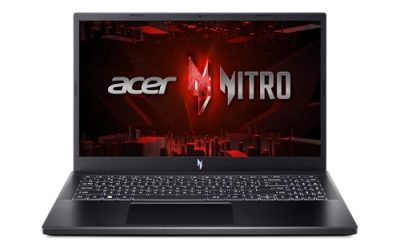
Acer Nitro V 15
- Best for: Long gaming sessions with steady cooling and consistent performance.
- 15.6-inch Full HD display with 144Hz refresh rate
- NVIDIA GeForce RTX 4050 graphics
- Intel Core i5 processor
- 16GB memory and 512GB SSD storage
Long gaming sessions with steady cooling and consistent performance.
The chassis uses more plastic than metal, so handle the lid with care when carrying it in a crowded bag.
The Acer Nitro V 15 is the cool-running pick of the group, with a dual-fan cooling system that keeps temperatures steady through long gaming sessions. Its 15.6-inch Full HD display runs at 144Hz, and an RTX 4050 graphics card with an Intel Core i5 processor handles modern games at 1080p with room to spare. With 16GB of memory and a solid-state drive, the machine loads games quickly. The chassis is sturdy without being bulky, and the keyboard stays comfortable during extended play. If you play for hours and want a laptop that stays cool, the Nitro V 15 is the steady choice.
Watch out for: The chassis uses more plastic than metal, so handle the lid with care when carrying it in a crowded bag.
Which One Fits Your Situation
A student who carries a laptop every day
If you carry your laptop to class and game in the evening, the Lenovo LOQ 15 is the best fit, with a military-tested chassis that survives a crowded bag and a hinge built for years of use. Its RTX graphics handle modern games after class, and the 16GB of memory keeps study work smooth.
A player who wants a discreet machine
If you want a gaming laptop that does not look like one, the HP Victus 15 is the understated pick, with a clean design, a solid build, and an RTX 4050 that handles modern games well. It works in a lecture hall, a library, and a living room without drawing attention, and the 144Hz screen keeps games smooth.
A traveller who needs the toughest laptop
If your laptop travels in a bag that gets thrown in cars and carried through airports, the ASUS TUF Gaming A15 is built for exactly that life, with military-standard testing and self-cleaning fans that keep the cooling system working over time. Its RTX 2050 handles popular games well, and the sturdy keyboard survives heavy use.
A player who games for hours
If your sessions run for hours and your laptop gets hot and slows down, the Acer Nitro V 15 is the steady pick, with dual-fan cooling that holds temperatures down and an RTX 4050 that keeps frame rates consistent. Its 16GB of memory keeps loading times short, and the full keyboard stays comfortable through long evenings.
Common Mistakes
- Judging a budget gaming laptop by its graphics card alone, when the chassis and the cooling decide how long it actually lasts through daily use and rough travel.
- Buying a laptop with 8GB of memory for demanding modern games, then discovering it stutters when large worlds load and the frame rate drops.
- Ignoring the hinge and the keyboard deck, which are the parts that fail first on a laptop that gets carried every day in a crowded bag and opened dozens of times a week.
- Skipping the cooling check, and watching a fast laptop slow down during long sessions because the fans cannot keep up and the heat builds.
- Choosing a laptop by its looks rather than its build testing, and ending up with a pretty machine that flexes, creaks, and ages quickly in a crowded bag and feels cheap.
Frequently Asked Questions
What makes a gaming laptop durable?
Durability comes from the chassis, the hinge, the cooling system, and the keyboard working together over years of use. A rigid frame resists flexing, a well-built hinge survives thousands of openings, and good cooling keeps temperatures low so components age slowly. Military-standard testing signals checks against drops, vibration, and temperature extremes.
Is 8GB of memory enough for gaming in this class?
For lighter and older games, 8GB is enough, but modern titles increasingly expect 16GB. The ASUS TUF A15 in this guide ships with 8GB, which is its main weakness, and a memory upgrade is worth planning. The other three laptops here ship with 16GB, which is the sensible amount for modern gaming.
Can a budget gaming laptop handle modern games?
Yes, at 1080p with sensible settings, because the graphics cards in this class are designed for exactly that workload. Popular competitive titles run smoothly, and most modern single-player games play well at medium to high settings. The most demanding titles may need lowered settings, but the experience stays enjoyable.
How important is cooling in a budget gaming laptop?
Cooling is one of the most important features, because a laptop that overheats will slow itself down to protect its components, which shows up as stuttering during long sessions. A dual-fan system with good airflow keeps temperatures steady, which protects performance and the lifespan of the processor and graphics card.
FAQ
What makes a gaming laptop durable?
Is 8GB of memory enough for gaming in this class?
Can a budget gaming laptop handle modern games?
How important is cooling in a budget gaming laptop?
More from Amazon
Programs that pair well with the guide above. Offers and eligibility are set by Amazon and may change.
Free shipping on eligible items, Prime Video and more. Eligible new members can start with a free trial.
Start a Prime free trialAd-free music streaming. Eligible new subscribers can start with a free trial.
Try Music Unlimited freeA Prime membership for ages 18-24 with a trial period. Eligibility is set by Amazon.
See Prime for Young AdultsAudiobooks and podcasts to listen to on the go. Eligible new members can start with a free trial.
Try Audible freeAs an Amazon Associate we earn from qualifying purchases.