Our Short List of 3

All 4 Picks at a Glance
| Product | Specs | Action |
|---|---|---|
 1. Logitech Keys-to-Go 2 — Best Ultra-Thin Keyboard for iPad | Check price on Amazon | |
| 2. Arteck HB030B Universal Bluetooth Keyboard — Best Slim Backlit Keyboard for iPad | Check price on Amazon | |
 3. Logitech MX Keys Mini — Best Compact Keyboard for iPad and Desk | Check price on Amazon | |
 4. iClever BK08 — Best Folding Keyboard for iPad Travel | Check price on Amazon |
Key takeaways
- Find the best wireless keyboards for iPad, from ultra-thin travel boards to full-size multi-device keyboards with iPad-friendly layouts.
An iPad is a capable writing and work machine, but the on-screen keyboard gets in the way the moment a document grows past a few paragraphs. A wireless keyboard changes that. It gives you real keys, a proper layout, and a screen that stays fully visible while you type, so the iPad starts to feel like a small laptop without losing what makes a tablet useful.
This guide covers standalone Bluetooth keyboards that pair with any iPad, rather than keyboard cases built for one specific iPad model. A standalone board has two advantages: it works with whatever iPad you own now and whatever iPad you buy next, and you can leave it behind when you only need the tablet. Every pick below connects over Bluetooth, works with iPadOS, and covers a different way of using an iPad, from ultra-thin travel boards to a full-size desk keyboard with a cradle for the tablet.
What to Look For in a Wireless Keyboard for iPad
A keyboard that works well with a laptop does not always work well with an iPad, so a few iPad-specific details matter more than the brand name on the box.
Bluetooth pairing and multi-device switching. Every keyboard here connects over Bluetooth, which is what an iPad needs. The more useful feature is multi-device pairing: several of these boards remember up to three devices and switch between them with a key press, so one keyboard can serve an iPad, a phone, and a laptop. If the iPad is your only device, a single-device board is fine. If you move between devices during the day, multi-device pairing saves constant re-pairing.
iPadOS shortcut keys and layout. iPadOS has its own keyboard shortcuts for search, switching apps, and controlling brightness and volume. Boards designed with tablets in mind include a row of shortcut keys for those functions, plus Command and Globe keys that behave the way iPad users expect. A Windows-first layout still types fine on an iPad, but the shortcut row is what makes a board feel made for the tablet rather than merely compatible with it.
Size and portability. An iPad keyboard earns its place by travelling with the tablet. Ultra-thin one-piece boards slip into a bag beside the iPad, folding boards shrink to pocket size, and compact desk boards stay at home. Think about where the typing actually happens: a board that lives on a desk can be full-size, while a board that rides in a shoulder bag every day should be light and protected.
Battery type. Bluetooth keyboards run on built-in rechargeable batteries or replaceable cells. Rechargeable boards charge over a cable every few weeks, while battery-powered boards run for months on a set of cells and never need a cable in the bag. Either approach works; the question is whether you would rather carry a cable or a spare set of batteries.
Touchpad or no touchpad. iPadOS supports cursor control, so a keyboard with a built-in touchpad lets you point, click, and drag without touching the screen. Only one pick in this guide has a touchpad, and it is the folding travel board. The other picks rely on the iPad touch screen for pointing, which is fine for writing and reading but slower for spreadsheets and document editing.
Key feel and backlighting. Backlit keys help in dim rooms, on evening flights, and in lecture halls. Low-profile scissor-style keys feel closest to a laptop, while round or membrane keys feel softer and quieter. If you type for hours, key spacing matters more than key style: a compact board with cramped keys will slow you down no matter how good the switches feel.
A stand or cradle. A standalone keyboard does not hold the iPad up, so you need a way to prop the tablet at a comfortable angle. Some iPad covers include a stand, and one pick below has a built-in cradle. If your cover has no stand, a small folding tablet stand is a cheap addition that makes any of these keyboards far more comfortable.
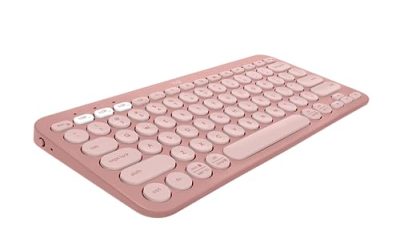
1. Logitech Keys-to-Go 2 — Best Ultra-Thin Keyboard for iPad
The Logitech Keys-to-Go 2 is the thinnest keyboard in this guide, and the one most clearly designed around an iPad. It is a one-piece slim board with a built-in cover, measuring about 250 x 105 x 8.8 mm and weighing 222 grams, so it disappears into a bag beside the tablet and the cover protects the keys in transit. It pairs over Bluetooth with up to three devices and switches between them with a key press, so it can serve an iPad, a phone, and a laptop from the same board.
The Keys-to-Go 2 is built for people who carry an iPad everywhere and type in short bursts between other tasks: students moving between classes, writers working from cafes, and anyone whose iPad is their main computer away from a desk. The compact layout keeps the board small without shrinking the keys to an unusable size, and the built-in cover means there is no separate case to remember. Logitech includes a row of shortcut keys for iPadOS functions, which keeps common actions a single press away.
The trade-off is the one that comes with every ultra-thin board. There is no touchpad, so pointing means reaching for the screen, and the slim keys have short travel compared with a desk keyboard. That is a fair exchange for a board this light, but if you write for hours at a stretch, a larger board with deeper keys will be more comfortable. The Keys-to-Go 2 is also a Bluetooth-only board, so it needs a charge now and then rather than drawing power from the iPad.
Who it suits: iPad owners who travel light and want the thinnest possible keyboard that still types properly, with a cover included and multi-device pairing for a phone and laptop as well.
2. Arteck HB030B Universal Bluetooth Keyboard — Best Slim Backlit Keyboard for iPad
The Arteck HB030B is a featherweight backlit board marketed for tablets, and it is the lightest pick here at about 0.37 pounds. It measures 9.7 x 5.9 x 0.24 inches, with a 78-key ultra-slim layout and backlit keys that make it usable in dim rooms, on night flights, and in the evening. It connects over Bluetooth to an iPad and to phones and computers, so it works as a general-purpose wireless keyboard rather than a single-device accessory.
The HB030B suits iPad owners who type in the evening and want backlighting without carrying a heavy board. The slim profile slides into a bag with the iPad, and the backlit keys are the feature that sets it apart from other boards at this size: most ultra-thin keyboards leave the backlight out to save weight and battery, while the Arteck keeps it. The layout covers the keys most people use daily, with a full number row and function keys, so it handles documents, email, and messaging without constant reaching for the touch screen.
There are limits to know about. The compact layout has no number pad and no touchpad, so number-heavy work and cursor-heavy work both mean reaching for the screen or a separate mouse. Backlighting draws on the battery, so the board needs charging more often when the lights are on. And like every standalone board in this guide, it does not hold the iPad up, so a cover with a stand or a small tablet stand completes the setup.
Who it suits: evening and low-light typists who want the lightest backlit Bluetooth keyboard for an iPad, and who are happy to trade a number pad and touchpad for size and weight.
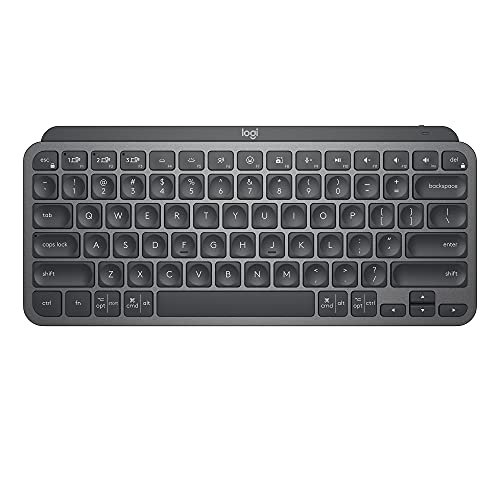
3. Logitech MX Keys Mini — Best Compact Keyboard for iPad and Desk
The Logitech MX Keys Mini is the desk keyboard of this guide, and the best pick for an iPad that spends most of its time at a desk. It is a compact low-profile board with backlit keys, a quiet and stable key feel, and Bluetooth pairing for up to three devices, so it can switch between an iPad, a laptop, and a desktop with a key press. It charges over USB-C and works with iPadOS, macOS, Windows, and other systems, which makes it the one board in this guide that genuinely serves a whole desk setup.
The MX Keys Mini suits people who use the iPad as part of a larger workspace. The keys are larger and more widely spaced than on a travel board, with a firm, quiet press that stays comfortable over long writing sessions. The backlighting adjusts to the room, and the compact layout drops the number pad while keeping a full set of letters, numbers, and function keys. For an iPad docked at a desk beside a monitor or a laptop, it feels like a proper desktop keyboard rather than a travel compromise.
The trade-off is size and weight. The MX Keys Mini is compact for a desk board, but it is heavier and larger than the travel picks here, so it is not the board to carry in a small bag every day. It has no touchpad and no cradle, so pointing and propping the iPad still need the touch screen and a stand. It is also the most desk-oriented pick in the guide: if the iPad rarely sits at a desk, one of the thinner boards will serve better.
Who it suits: iPad owners who work at a desk and want one quiet, backlit, multi-device keyboard for the iPad and a computer, with the key feel of a full-size board in a compact frame.
4. iClever BK08 — Best Folding Keyboard for iPad Travel
The iClever BK08 is the only folding keyboard in this guide, and the only one with a built-in touchpad. It is a tri-fold board with 65 keys and a multi-touch touchpad, folding down to 6.25 x 3.54 x 0.7 inches and weighing about 7.05 ounces, so it fits in a jacket pocket or a small day bag. It connects over Bluetooth only and pairs with up to three devices, switching between an iPad, a phone, and a laptop with a key press.
The touchpad is what makes the BK08 stand out for iPad use. With iPadOS cursor support, the touchpad lets you select text, drag files, and click through documents without touching the screen, which is the closest a standalone Bluetooth keyboard gets to the laptop experience. Folded, the board is smaller than any one-piece keyboard here; unfolded, it gives you a full typing surface plus a trackpad in a package that weighs less than the iPad it serves.
Folding boards ask for a compromise, and the BK08 is no exception. The keys are smaller than laptop keys, and the fold seams sit under the typing surface, so it takes a day or two to get used to the feel. It is a board for travel and short sessions rather than all-day writing: brilliant on a plane, a train, or a cafe table, and less comfortable than the MX Keys Mini for a four-hour writing stretch. The touchpad is also smaller than a laptop trackpad, so fine cursor work is slower than on a full-size board.
Who it suits: travellers who want a complete mobile workstation in a pocket, with a touchpad for cursor control and a fold that disappears into a small bag.
5. Logitech K780 Multi-Device Wireless Keyboard — Best Full-Size Keyboard for iPad
The Logitech K780 is the full-size pick, and the only board here with a built-in device cradle. It is a full-size wireless keyboard with a complete layout including a number pad, and the cradle along the top holds a phone or tablet upright at a comfortable viewing angle, so the iPad sits in the keyboard itself rather than needing a separate stand. It pairs over Bluetooth with up to three devices and switches between them with a key press, and it runs on two AAA batteries with a long rated life, so there is no charging cable to remember.
The K780 suits iPad owners who do number-heavy work or who want a single keyboard for the iPad and a desktop computer. The full-size layout with a number pad makes spreadsheets, accounting, and data entry far faster than any compact board, and the cradle solves the stand problem that every other standalone keyboard leaves open. The keys are quiet and low-profile, with a comfortable press for long sessions, and the multi-device switching means the same board can serve the iPad during the day and a desktop in the evening.
The trade-off is portability. The K780 is a full-size desk board, and it is the largest and heaviest pick in this guide, so it stays on a desk rather than travelling in a bag. It has no backlighting and no touchpad, so dim-room typing and cursor work both rely on the room light and the iPad touch screen. For a desk setup, those are small compromises; for a travel setup, the Keys-to-Go 2 or the BK08 fits better.
Who it suits: desk-based iPad owners who want a full-size layout with a number pad, a built-in cradle for the tablet, and multi-device switching to a computer.
Comparison Summary
| Keyboard | Layout | Touchpad | Backlit | Pairs With | Best For |
|---|---|---|---|---|---|
| Logitech Keys-to-Go 2 | Ultra-thin compact | No | No | Up to 3 devices | Lightest everyday carry |
| Arteck HB030B | Ultra-slim, 78 keys | No | Yes | iPad, phones, computers | Backlit typing in dim rooms |
| Logitech MX Keys Mini | Compact low-profile | No | Yes | Up to 3 devices | Desk work and long sessions |
| iClever BK08 | Tri-fold, 65 keys | Yes | No | Up to 3 devices | Travel with cursor control |
| Logitech K780 | Full-size with number pad | No | No | Up to 3 devices | Desk work with a cradle |
The short version: take the Keys-to-Go 2 if the iPad travels everywhere, the Arteck HB030B if you type in dim rooms, the MX Keys Mini if the iPad lives at a desk, the iClever BK08 if you want a folding board with a touchpad, and the K780 if you need a full-size layout with a number pad and a cradle for the tablet.
Frequently Asked Questions
Do Bluetooth keyboards work with any iPad?
Yes. Any iPad with Bluetooth pairs with a Bluetooth keyboard, and iPadOS includes keyboard support with shortcuts for search, app switching, and media control. The boards in this guide pair with any iPad model, from the base iPad to the iPad Pro, because they connect over standard Bluetooth rather than a model-specific connector. Check that your iPad runs a recent version of iPadOS for the full set of shortcuts.
Can one keyboard work with an iPad and a laptop?
Yes, if it supports multi-device pairing. The Keys-to-Go 2, MX Keys Mini, BK08, and K780 each pair with up to three devices and switch between them with a key press, so one board can serve an iPad, a laptop, and a phone. The Arteck HB030B also connects over Bluetooth to an iPad, a phone, and a computer. Pair each device once, then switch with the dedicated keys instead of re-pairing.
Do I need a trackpad on an iPad keyboard?
It depends on how you work. A trackpad helps with spreadsheets, document editing, and file management, because it gives you cursor control without touching the screen. The iClever BK08 is the only pick here with a built-in touchpad. If you mostly write, read, and answer email, the touch screen handles pointing well enough, and a board without a trackpad is lighter and simpler.
How do I pair a Bluetooth keyboard with an iPad?
Turn the keyboard on and put it in pairing mode, then open Settings on the iPad, tap Bluetooth, and tap the keyboard name when it appears in the list. The iPad may show a code to type on the keyboard to confirm the pairing. Once paired, the keyboard reconnects automatically when it is on and nearby. If the keyboard stops responding, turn Bluetooth off and on again on the iPad, or remove the keyboard from the Bluetooth list and pair it again.
Conclusion
A wireless keyboard turns an iPad from a reading tablet into a writing machine, and the right one depends on where the typing happens. The Logitech Keys-to-Go 2 is the pick for an iPad that travels everywhere, the Arteck HB030B is the pick for backlit typing in dim rooms, the Logitech MX Keys Mini is the pick for desk work and long sessions, the iClever BK08 is the pick for a folding board with cursor control, and the Logitech K780 is the pick for a full-size desk setup with a number pad and a cradle. Match the board to the way you actually use the iPad, check that the layout covers the keys you use daily, and add a stand if your cover does not include one.
Disclosure: As an Amazon Associate, we earn from qualifying purchases.
More from Amazon
Programs that pair well with the guide above. Offers and eligibility are set by Amazon and may change.
Free shipping on eligible items, Prime Video and more. Eligible new members can start with a free trial.
Start a Prime free trialAd-free music streaming. Eligible new subscribers can start with a free trial.
Try Music Unlimited freeA Prime membership for ages 18-24 with a trial period. Eligibility is set by Amazon.
See Prime for Young AdultsAudiobooks and podcasts to listen to on the go. Eligible new members can start with a free trial.
Try Audible freeAs an Amazon Associate we earn from qualifying purchases.