Our Short List of 3
All 3 Picks at a Glance
| Product | Specs | Action |
|---|---|---|
 1. Logitech Pebble Keys 2 K380s | Check price on Amazon | |
 2. Microsoft Designer Compact Keyboard | Check price on Amazon | |
 3. Logitech MX Keys S | Check price on Amazon |
Our Top Picks
Typing on an Android phone or tablet is fast enough for short replies, but long messages, documents, and chats are easier with a real keyboard. The problem is that emoji are part of everyday messaging, and most Bluetooth keyboards give you no quick way to reach them. You end up tapping the screen, switching input methods, or hunting through a character map.
A small group of keyboards solves this properly. Each board in this guide pairs with Android over Bluetooth and has a genuine emoji key or emoji shortcut built in, not just decorative keycaps. The class is small, because most keyboard makers treat emoji as a software feature, so the three picks below are the boards that actually combine Android pairing with a real emoji control.
One honest note before the picks: an emoji key is implemented differently on each platform. On a Windows computer or a Mac, the key opens the emoji panel directly. On Android, the board still pairs and types normally, and emoji are reached through the on-screen emoji panel of the phone or tablet, or through the board shortcut where the platform supports it. The picks below are ordered from the most portable to the most desk-focused, and each section explains exactly how its emoji control works.
What to Look for in an Android Keyboard With Emoji
A real emoji key, not just emoji keycaps
The feature that matters is a key that does something. Look for a dedicated expressive input key, like the one on the Microsoft board below, or a function-row shortcut that opens the emoji menu, like the ones on the two Logitech boards. Swappable keycaps printed with smiley faces do not count on their own, because they change how the board looks without changing what any key does. Check the manufacturer’s feature list for the words emoji key, emoji menu, or expressive input before buying.
Android compatibility
Every pick here lists Android among its supported systems and connects over Bluetooth, so no dongle or cable is needed for a phone or tablet. Still, read the fine print. Some features need companion software that only runs on Windows or macOS. Logitech’s Logi Options+ app, which customizes shortcut keys, is a Windows and macOS app. Microsoft’s expressive input key is tied to Windows features. That does not stop the board from working with Android, but it does mean the emoji key may behave differently on a phone or tablet than it does on a computer. Basic typing, pairing, and switching work across systems either way.
Bluetooth multi-device switching
If the keyboard will move between a phone, a tablet, and a computer, multi-device pairing matters more than almost anything else. All three boards below pair with up to three devices and switch between them with a dedicated key, so one board can cover a whole setup. Look for this feature by name: Logitech calls it Easy-Switch, and Microsoft describes it as pairing with up to three devices.
Size and layout
A compact board slips into a bag next to a tablet, while a full-size board with a number pad suits a desk where the tablet sits in a stand. Compact boards drop the number pad and shrink the navigation cluster, which is fine for messaging and documents but less convenient for spreadsheet work. Full-size boards are heavier and need more desk space. Decide where the keyboard will live most of the time before choosing a size.
Battery and charging
Two designs dominate this class. Some boards run on replaceable batteries and last for months or years between changes, which suits a board that travels. Others have a built-in rechargeable battery and charge over USB-C, which suits a board that stays on a desk near a charger. Neither is better in general, but a rechargeable board with the backlight left on will need charging far more often than the headline battery figure suggests.
Typing feel
All three picks use low-profile scissor keys with a short, quiet travel, similar to a laptop keyboard. That is the right feel for a board that will be used for messaging and documents on a tablet. Mechanical switches are louder and taller, and none of the boards with a genuine emoji key in this class use them, so if quiet typing matters, the scissor design here is a good match.
1. Logitech Pebble Keys 2 K380s
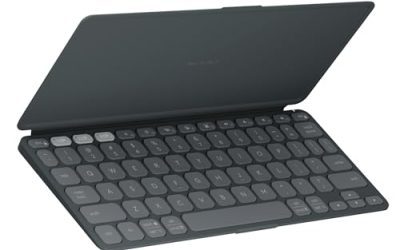
Logitech Pebble Keys 2 K380s is the most portable board in this guide, and the best fit for someone whose main device is an Android phone or tablet. It is a slim Bluetooth keyboard that pairs with up to three devices across Windows, macOS, iPadOS, iOS, ChromeOS, and Android, switching between them with dedicated Easy-Switch buttons. The Tonal Rose color covered here is the same K380s board sold in several colors, so the typing experience and shortcut layout are identical across them.
The emoji feature is built into the function row. Out of the box, ten Fn shortcut keys cover search, screen capture, voice dictation, and the emoji menu, and all ten can be remapped in the Logi Options+ app on Windows or macOS. That makes the K380s the only truly portable board in this guide with an emoji shortcut that works without any extra hardware. Logitech documents that shortcut behavior varies by platform, so treat the emoji menu key as a fast route to emoji on a computer and as a handy shortcut key on Android, where emoji are also a tap away in the on-screen panel.
Typing is quiet and laptop-like. The keys are scooped and low-profile, with a scissor mechanism, and the board measures 279.5 by 124.2 by 16.4 millimeters and weighs 415 grams with batteries fitted. It is small enough to carry in a bag with a tablet and light enough to use on a lap or a train table. Logitech rates battery life at up to three years, with an auto-sleep mode that saves power between sessions, and the batteries are included.
The K380s is also worth distinguishing from the original Logitech K380, which looks similar and is easy to confuse with it. The K380s adds the emoji menu, dictation, and screenshot shortcuts, Bluetooth 5.1, Logi Options+ support, and longer rated battery life. The original K380 has no emoji shortcut, so if emoji access is the reason for buying, the K380s is the model to look for, with model number 920-011777 on the Tonal Rose listing.
This board suits Android users who message a lot, carry a tablet, or switch between a phone and a computer during the day. It is less suited to heavy spreadsheet work, because the compact layout has no number pad, and it connects over Bluetooth only, with no USB receiver in the box for a computer without Bluetooth.
2. Microsoft Designer Compact Keyboard
Microsoft Designer Compact Keyboard is the only board in this guide with a dedicated key whose entire job is emoji. The expressive input key sits on the board as a single-purpose control, next to a screen snipping key, so inserting an emoji or capturing part of the screen is one press rather than a menu hunt. The Matte Black version covered here is model 21Y-00001.
The board is a compact 78-key design that drops the number pad to pull the mouse hand closer, measuring 284.07 by 110.77 by 9.05 millimeters and weighing 288 grams. The keys are a scissor design with 1.35 millimeters of travel, which gives a short, crisp, quiet keystroke similar to a laptop. It connects over Bluetooth Low Energy 5.0 and pairs with up to three devices, switching between them with a dedicated Bluetooth button. Microsoft lists compatibility with Windows, macOS, Android 6.0 or later, iOS, and iPadOS, so an Android phone or tablet pairs the same way a computer does.
Battery life is a strong point. The board runs on four pre-installed CR2032 coin-cell batteries, and Microsoft rates battery life at up to 36 months. There is no charging cable to carry and no battery to remember to top up, which fits a board that mostly stays on a desk or moves between rooms rather than travelling far.
The main limitation to understand is platform behavior. Microsoft describes the expressive input key as opening emoji and symbols, and its own guidance ties that key to Windows features, so on a Windows computer it opens the emoji picker directly. On Android, the board pairs and types normally, and emoji are reached through the phone or tablet on-screen emoji panel. That is still a good result for an Android user who also works on a Windows computer, because the same board gives one-press emoji on the computer and full typing on the phone or tablet.
This board suits someone who wants the tidiest possible desk, types on both a Windows computer and an Android device, and likes the idea of a dedicated emoji key rather than a remappable shortcut. It is less suited to anyone who wants backlighting, because it has none, or a number pad, because the compact layout leaves it out. It is also an older design, first sold in 2020, so check the listing details before ordering, as availability can change over time.
3. Logitech MX Keys S
Logitech MX Keys S is the full-size desk option in this guide. It is a low-profile wireless keyboard with a number pad, smart backlighting, and a function row that adds three keys for modern work: dictation, microphone mute, and emoji. The Graphite version covered here is model 920-011558.
The emoji key is one of the smarter Fn keys on the board. Pressing it opens the emoji window on a paired computer, and the same row handles dictation and muting the microphone on calls. These smarter Fn keys need the Logi Options+ app, which runs on Windows and macOS, so on those systems the emoji key works exactly as labelled. On Android, the board is supported with basic functions, without the companion software, so it pairs over Bluetooth and types normally while emoji come from the on-screen panel. That split is worth knowing before buying, and it is the same split that applies to most software-driven shortcut keys.
For typing, the MX Keys S uses spherically dished keys shaped to fit fingertips, with a quiet, stable keystroke and a low-profile design that encourages a natural wrist position. The backlighting is genuinely useful: the keys light up as hands approach and brighten or fade to suit the room, with brightness and duration adjustable in Logi Options+. The board is 430.2 by 131.63 by 20.5 millimeters and weighs 810 grams, so it is a desk board rather than a travel board, and the weight keeps it planted during long sessions.
Connectivity covers Bluetooth Low Energy and the included Logi Bolt USB receiver, with Easy-Switch pairing across up to three devices. It is compatible with Windows, macOS, Linux, ChromeOS, iPadOS, iOS, and Android, with basic functions supported on systems other than Windows and macOS. Power comes from a rechargeable 1500 mAh battery that charges over the included USB-C cable, and Logitech rates it at up to 10 days on a full charge with backlighting in use. Turning the backlight off extends that considerably.
This board suits an Android tablet user who also works at a desk computer and wants one full-size keyboard for both, with a number pad, backlighting, and a real emoji key for the computer side. It is less suited to travel, because of its size and weight, and to anyone who wants a board that runs on replaceable batteries rather than a built-in rechargeable cell.
Android Keyboards With Emoji at a Glance
The three boards cover three different uses, so the choice comes down to where the keyboard will spend its time.
The Logitech Pebble Keys 2 K380s is the travel pick. It is the smallest and lightest board here, pairs with three devices, and puts the emoji menu on a function-row shortcut out of the box. It runs on replaceable batteries with a long rated life, and its quiet scissor keys suit messaging anywhere.
The Microsoft Designer Compact Keyboard is the tidy-desk pick. It is the only board here with a dedicated expressive input key built for emoji, plus a screen snipping key, in a compact 78-key layout that saves desk space. It pairs with three devices and runs on coin-cell batteries rated for a long life, and it is the simplest board to live with.
The Logitech MX Keys S is the full-desk pick. It is the only full-size board here, with a number pad, smart backlighting, and an emoji key alongside dictation and microphone mute. It pairs with three devices over Bluetooth or the included receiver and charges over USB-C, and it is the best choice for long typing sessions at a desk.
If only one board is needed for an Android phone or tablet that travels, the K380s is the natural choice. If the keyboard will sit on a desk next to a Windows computer as well as an Android device, the Microsoft board gives the most direct emoji key, while the MX Keys S gives the most complete desk setup.
Frequently Asked Questions
Do emoji keys on a Bluetooth keyboard work on Android?
It depends on the board and the key. The emoji keys in this guide are real features of the keyboards, and they open the emoji panel directly on a Windows computer or a Mac. On Android, the boards pair over Bluetooth and type normally, but the emoji key may not open the Android emoji panel, because that behavior is controlled by the operating system and the companion software, which is usually Windows and macOS only. In practice, Android users get fast typing from the physical board and reach emoji through the on-screen emoji panel on the phone or tablet.
Can one keyboard work with an Android phone, a tablet, and a computer?
Yes, all three boards in this guide pair with up to three devices and switch between them with a dedicated key. Pair the phone on one channel, the tablet on another, and the computer on the third, then tap the switch key to move between them. The connection is Bluetooth, so no dongle is needed for the Android devices, although the MX Keys S also includes a USB receiver for computers.
Do I need an app to use the emoji key?
No app is needed for basic typing and pairing, and the Microsoft board’s emoji key is a hardware key that needs no software at all on a Windows computer. The Logitech boards use the Logi Options+ app on Windows or macOS to remap shortcut keys and to enable the smarter Fn keys, including emoji, dictation, and microphone mute. That app is not available on Android, so customization happens on a computer and the board keeps its layout when moved to a phone or tablet.
What is the difference between the Logitech K380s and the original K380?
The K380s is the newer model, and it adds the features that matter for this guide: an emoji menu shortcut, dictation, and screenshot shortcuts on the function row, Bluetooth 5.1, support for the Logi Options+ app, and longer rated battery life. The original K380 looks similar and types well, but it has no emoji shortcut. When buying, check for the K380s name and the model number on the listing, because the two boards are easy to confuse.
Final Thoughts
Android keyboards with emoji keys are a small class, because most keyboards leave emoji to software. The three boards in this guide are the ones that genuinely combine Android pairing with a real emoji control: the Logitech Pebble Keys 2 K380s for portable use, the Microsoft Designer Compact Keyboard for a tidy desk with a dedicated emoji key, and the Logitech MX Keys S for a full-size desk setup with an emoji key alongside dictation and microphone mute.
Before choosing, decide where the keyboard will live. A board that travels should be small, light, and long-lived on its batteries, which points to the K380s. A board that stays on a desk should match the work done there, which points to the Microsoft board for compact simplicity or the MX Keys S for a full layout with backlighting. And remember the platform note: the emoji key is at its best on a Windows computer or a Mac, while on Android the board still delivers fast physical typing with emoji a tap away on screen. Check the listing details before ordering, as availability can change, and pick the board whose size and emoji control fit the way the Android device is actually used.
Disclosure: As an Amazon Associate, we earn from qualifying purchases.
FAQ
Do emoji keys on a Bluetooth keyboard work on Android?
Can one keyboard work with an Android phone, a tablet, and a computer?
Do I need an app to use the emoji key?
What is the difference between the Logitech K380s and the original K380?
More from Amazon
Programs that pair well with the guide above. Offers and eligibility are set by Amazon and may change.
Free shipping on eligible items, Prime Video and more. Eligible new members can start with a free trial.
Start a Prime free trialAd-free music streaming. Eligible new subscribers can start with a free trial.
Try Music Unlimited freeA Prime membership for ages 18-24 with a trial period. Eligibility is set by Amazon.
See Prime for Young AdultsAudiobooks and podcasts to listen to on the go. Eligible new members can start with a free trial.
Try Audible freeAs an Amazon Associate we earn from qualifying purchases.