
Our Short List of 3

- Best for: All-day typists who want a quiet, comfortable board with smart backlighting.
- Full-size layout with dedicated number pad
- Low-profile spherically dished keys
- Smart backlighting with proximity and ambient light sensors
- Connects to up to 3 devices via Bluetooth or Logi Bolt receiver
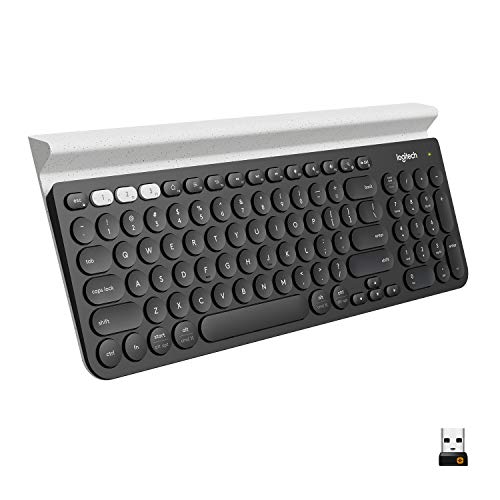
- Best for: People who copy figures between a computer, a phone, and a tablet.
- 96 keys with full number pad
- Quiet membrane keys
- Built-in cradle for a phone or tablet
- Bluetooth and Unifying receiver connectivity

- Best for: Data entry workers who want a mechanical, tactile key feel.
- 104 keys with full number pad
- K Pro Brown tactile switches
- Hot-swappable switch sockets
- Bluetooth 5.1 and USB-C wired connectivity
All 4 Picks at a Glance
| Product | Specs | Action |
|---|---|---|
| Logitech MX Keys S |
| Check price on Amazon |
| Logitech K780 Multi-Device |
| Check price on Amazon |
| Keychron K10 |
| Check price on Amazon |
 Logitech Signature K650 |
| Check price on Amazon |
Our Top Picks
Spreadsheet work punishes a bad keyboard faster than almost any other kind of typing. You enter hundreds of numbers, jump between cells with the arrow keys, and lean on shortcuts all day, so a cramped layout or a mushy number pad slows every task down. A good Excel keyboard gives you a full-size number pad, keys that feel distinct under your fingers, and a layout that keeps your hands in one place instead of reaching across the desk. Comfort matters just as much as layout, because a keyboard that tires your hands by mid-afternoon costs you accuracy as well as speed.
This guide is for accountants, analysts, and office workers who live in spreadsheets, for students building budgets and lab tables, and for anyone setting up a home desk for heavy data entry. Every keyboard below was chosen from the name and specifications shown on its Amazon page, with the number pad, key feel, and multi-device support weighed for long days of number work.
Quick Picks
As an Amazon Associate we earn from qualifying purchases
| Product | Best for | Key spec from title |
|---|---|---|
| Logitech MX Keys S | All-day typing and shortcuts | Low-profile keys with number pad |
| Logitech K780 Multi-Device | Desk plus phone and tablet | Built-in cradle for devices |
| Keychron K10 | Mechanical feel for data entry | Hot-swappable Brown switches |
| Logitech Signature K650 | Comfort on a long workday | Soft-touch wrist rest |
How to Choose
Insist on a full number pad
A full number pad is the most useful feature on an Excel keyboard, because it turns number entry into a one-hand job. Look for a board with a pad on the right, with its enter key and arithmetic keys, so you can type figures without shifting your hand. The pad should feel like the rest of the board, with keys that are easy to find by touch. Compact boards that drop the pad save desk space but force you to hunt for numbers across the top row, which slows data entry. If desk space is tight, a number pad is an option, but one built into the board keeps everything in one place.
Key feel decides your accuracy
Key feel shapes both speed and accuracy across a long day of data entry. Low-profile scissor keys give a short, quiet press that suits fast typists and shared offices, while mechanical switches give a distinct bump or click that helps you feel each press land. Brown-style switches are a popular middle ground, offering a tactile bump without loud noise. Whatever style you choose, the keys should feel consistent from one end of the board to the other, with no wobble or dead spots. If you type thousands of cells a day, a board that feels good at hour one and still feels good at hour six is worth more than any extra feature.
Quiet keys keep the office calm
Spreadsheet work often happens in shared rooms, and a loud keyboard can wear on everyone nearby, including you. Membrane and low-profile scissor boards are naturally quiet, while mechanical boards vary by switch type, with linear and tactile switches far quieter than clicky ones. A board with dampened keys or a soft-touch frame keeps the sound down further. Test the sound level in your head before buying: if the listing mentions quiet typing, it is usually a deliberate design choice. Your colleagues will notice the difference, and so will your concentration during long sessions.
Multi-device support saves desk space
Many spreadsheet workers switch between a computer, a tablet, and a phone during the day, and a keyboard that follows you across devices saves real time. Boards with Bluetooth and a wireless receiver can pair with up to three devices and switch between them with a single key press. A built-in cradle that holds a phone or tablet at a readable angle is a genuine help when you copy figures from one screen to another. Check the battery or power arrangement too: rechargeable boards need a cable nearby, while battery boards can run for months on a pair of cells. Either way, the keyboard should stay connected without fuss.
The 4 Best Options
Logitech MX Keys S
- Best for: All-day typists who want a quiet, comfortable board with smart backlighting.
- Full-size layout with dedicated number pad
- Low-profile spherically dished keys
- Smart backlighting with proximity and ambient light sensors
- Connects to up to 3 devices via Bluetooth or Logi Bolt receiver
All-day typists who want a quiet, comfortable board with smart backlighting.
The low-profile keys feel different from a mechanical board, so give yourself a day to adjust.
The MX Keys S is the most polished typing board in this guide, built for people who spend their whole day in documents and spreadsheets. Its low-profile keys are shaped to fit your fingertips, and the smart backlighting brightens as your hands approach and dims when you move away. The full-size layout includes a number pad for fast data entry, and the board connects to up to three devices, switching between them with a key press. A USB-C rechargeable battery keeps it running for days with the backlight on and far longer with it off. It is the board to pick when typing comfort and a clean desk matter most.
Logitech K780 Multi-Device
- Best for: People who copy figures between a computer, a phone, and a tablet.
- 96 keys with full number pad
- Quiet membrane keys
- Built-in cradle for a phone or tablet
- Bluetooth and Unifying receiver connectivity
People who copy figures between a computer, a phone, and a tablet.
The compact layout moves some keys from their usual spots, so check the layout before you buy.
The K780 is the clever desk organiser of this guide, a keyboard that holds your phone and tablet as well as your computer. Its built-in cradle props up a mobile device at a comfortable reading angle, so you can copy figures from a phone screen into a spreadsheet without juggling devices. The board pairs with up to three devices over Bluetooth or the Unifying receiver and switches between them with a key press. Two AAA batteries power it for up to two years, and the quiet membrane keys suit shared rooms. Ninety-six keys keep the layout compact without losing the number pad.
Keychron K10
- Best for: Data entry workers who want a mechanical, tactile key feel.
- 104 keys with full number pad
- K Pro Brown tactile switches
- Hot-swappable switch sockets
- Bluetooth 5.1 and USB-C wired connectivity
Data entry workers who want a mechanical, tactile key feel.
The board is heavier and taller than a low-profile board, so it takes more desk space and a different wrist angle.
The K10 brings a mechanical feel to spreadsheet work, with switches that give each key press a clear tactile bump. Its full 104-key layout includes a proper number pad, and the hot-swappable design lets you change switches later without soldering, which is handy if your taste in key feel changes. Bluetooth 5.1 and a USB-C cable cover both wireless and wired use, and the large battery runs for up to 240 hours with the backlight off. White LED backlighting keeps the legends readable in dim rooms, and two-level adjustable feet let you set the typing angle that suits your wrists.
Logitech Signature K650
- Best for: Long workdays where wrist comfort and quiet keys matter most.
- 104 keys with full number pad
- Soft-touch wrist rest
- Bluetooth and Logi Bolt connectivity
- 24 shortcut commands
Long workdays where wrist comfort and quiet keys matter most.
The wrist rest is built in, so the board takes up more depth on the desk than a board without one.
The K650 is the comfort-first pick in this guide, a board designed for long workdays that end with tired hands. Its soft-touch wrist rest supports your palms through hours of data entry, and the full 104-key layout includes a number pad and a row of shortcut keys for common tasks. It connects over Bluetooth or the Logi Bolt receiver, and two AA batteries last up to three years, so you will rarely think about power. The frame uses recycled plastic, and the quiet keys keep the room calm. For anyone whose current keyboard leaves their wrists aching by afternoon, this is the board to try.
Which One Fits Your Situation
You type in spreadsheets all day
Pick the Logitech MX Keys S. Its low-profile keys stay comfortable across long sessions, the smart backlighting adapts to your room, and the number pad keeps data entry fast. Multi-device switching lets you move between your computer and a tablet without re-pairing, and the rechargeable battery means no hunting for cells.
You copy figures from a phone or tablet
Pick the Logitech K780 Multi-Device. The built-in cradle holds your mobile device at a readable angle while you type, and switching between three paired devices takes one key press. Two years of battery life from a pair of AAA cells means the board simply works whenever you sit down.
You prefer a mechanical key feel
Pick the Keychron K10. Its tactile Brown switches give each press a clear bump, the full layout keeps the number pad where your hand expects it, and the hot-swappable sockets let you change switches later. The large battery and wired option cover both desk setups, and the adjustable feet set your angle.
Your wrists ache by the afternoon
Pick the Logitech Signature K650. The soft-touch wrist rest and quiet keys are built for exactly this problem, and the full layout keeps your workflow intact. Three years of battery life from two AA cells is a bonus, and the shortcut row puts common commands within easy reach.
Common Mistakes
- Buying a compact board without a number pad and then typing figures across the top row all day.
- Choosing clicky switches for a shared office and disturbing everyone nearby.
- Ignoring wrist support and wondering why your hands ache by mid-afternoon.
- Picking a board that only connects to one device when you work across a computer and a tablet.
- Forgetting to check the battery arrangement and ending up with a dead board on a deadline day.
Frequently Asked Questions
Do I really need a number pad for Excel?
Yes, a number pad makes a large difference for anyone who enters figures regularly. It lets you type numbers with one hand while the other stays on the mouse or arrow keys. Boards without a pad force you to reach for the top row. If your desk is too small, a separate number pad is a workable alternative.
Are mechanical keyboards good for spreadsheet work?
Yes, mechanical keyboards suit spreadsheet work well, especially tactile switches with a clear bump. The distinct feel helps you sense each press landing, which reduces missed presses. Choose tactile or linear switches rather than clicky ones if you share a room, since clicky switches are loud. A full-size mechanical board with a number pad is a strong choice for heavy Excel use.
What is the quietest type of keyboard for an office?
Low-profile scissor keyboards and membrane boards are the quietest options, since their short key travel makes little noise. Mechanical boards with tactile or linear switches are also reasonably quiet, while clicky switches are the loudest by far. Boards that mention quiet typing in their listing are designed with office noise in mind.
Can one keyboard work with my computer and my tablet?
Yes, many modern keyboards pair with up to three devices over Bluetooth and switch between them with a single key press. Some also include a cradle that holds a phone or tablet at a readable angle. Check that the board lists your devices as compatible before buying, since shortcut keys may behave differently across operating systems.
FAQ
Do I really need a number pad for Excel?
Are mechanical keyboards good for spreadsheet work?
What is the quietest type of keyboard for an office?
Can one keyboard work with my computer and my tablet?
More from Amazon
Programs that pair well with the guide above. Offers and eligibility are set by Amazon and may change.
Free shipping on eligible items, Prime Video and more. Eligible new members can start with a free trial.
Start a Prime free trialAd-free music streaming. Eligible new subscribers can start with a free trial.
Try Music Unlimited freeA Prime membership for ages 18-24 with a trial period. Eligibility is set by Amazon.
See Prime for Young AdultsAudiobooks and podcasts to listen to on the go. Eligible new members can start with a free trial.
Try Audible freeAs an Amazon Associate we earn from qualifying purchases.









