Our Short List of 3
All 4 Picks at a Glance
| Product | Specs | Action |
|---|---|---|
 Logitech K380 Multi-Device Bluetooth Keyboard | Check price on Amazon | |
 Logitech K780 Multi-Device Wireless Keyboard | Check price on Amazon | |
 Logitech MX Keys S | Check price on Amazon | |
 Arteck HB030B Universal Slim Keyboard | Check price on Amazon |
Our Top Picks
- Arteck Universal Backlit Wireless Bluetooth Keyboard for iPad9.72 x 0.24 x 5.91 inches0.4 poundsCheck on Amazon
The best coding keyboards for Android are the ones that make writing code on a phone or tablet feel like real work instead of a workaround. Android now runs capable editors, remote shells, and even full Linux environments, but the on-screen keyboard is a poor tool for code: brackets, symbols, and shortcuts are buried, and the screen fills with keys instead of code. A physical keyboard changes that, and this guide compares the best ones on layout, shortcuts, connectivity, and how they travel.
Coding on Android asks for specific things from a keyboard. You need easy access to brackets, quotes, and symbols. You need arrow keys and shortcuts that work in your editor. You need a board that pairs quickly, holds its connection, and switches between a phone, a tablet, and a computer when your work moves. The picks below cover the main shapes of Android coding keyboard: a compact travel board, a multi-device full-size board, a premium backlit board, and a slim value board.
How to Choose
1. Layout and symbol access
Code needs brackets, braces, quotes, and symbols constantly, so check that those keys are easy to reach and not buried behind a function layer. A full-size layout keeps the number row and symbols where your fingers expect them. A compact layout saves space but may hide the keys you use most.
2. Arrow keys and shortcuts
Arrow keys, Home, End, and Page Up and Down matter for moving through code without touching the screen. Check that your editor supports the keyboard shortcuts you rely on, such as copy, paste, find, and undo, and that the keyboard sends the modifier keys Android expects. Some Android apps map shortcuts differently from a desktop, so check your editor first.
3. Connectivity and switching
Bluetooth is the standard link for Android, and a board that pairs with three devices and switches between them with one key saves time when you move between a phone and a tablet. A stable connection matters more than range: a keyboard that drops its link mid-line is worse than a slower one that stays connected.
4. Portability and battery
A coding keyboard for Android often travels with the tablet it serves, so weight and size matter. A compact board fits in a bag beside a tablet, while a full-size board suits a desk. Battery life measured in weeks beats a board that needs charging every few days.
5. Key feel for long sessions
Coding sessions run long, so the keys should be comfortable for hours. Chiclet keys suit a light touch and keep the board slim, while low-profile mechanical keys give more feedback. Check the spacebar and the modifier keys in particular, because those take the most use in code.
6. Editor and system compatibility
Check that your editor supports an external keyboard well, including shortcuts and symbol input. Some Android editors handle hardware keyboards better than others, and a remote shell or a Linux environment may need specific key mappings. A keyboard that works well with your editor is worth more than one with extra features your editor cannot use.
Top Picks
Logitech K380 Multi-Device Bluetooth Keyboard
Check the Logitech K380 Multi-Device Bluetooth Keyboard on Amazon
The Logitech K380 is a compact Bluetooth keyboard that pairs with three devices and switches between them with one key, which makes it a natural fit for coding on Android. Its round chiclet keys are quiet and comfortable, and its small size fits in a bag beside a tablet or phone. It runs for months on two AAA batteries, so charging is rarely a thought, and its light weight makes it easy to carry to a cafe, a library, or a client site.
This keyboard fits a mobile coding setup where a tablet or phone is the main machine. It suits students, travelers, and anyone who writes code in short sessions away from a desk. It also fits a desk where space is tight and a compact board leaves room for a mouse and a notebook.
Its compact layout has no number pad and no dedicated function row, so some shortcuts need a modifier key. Its keys are light and quiet, which suits most typists but gives less feedback than a firmer board. Its Bluetooth-only connection needs a device with Bluetooth, and its small size can feel cramped for large hands during long sessions.
Logitech K780 Multi-Device Wireless Keyboard
Check the Logitech K780 Multi-Device Wireless Keyboard on Amazon
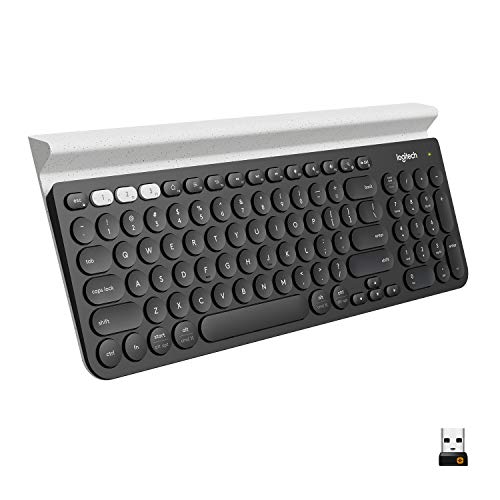
The Logitech K780 is a full-size Bluetooth keyboard with a built-in cradle that holds a phone or tablet upright above the keys. Its quiet chiclet keys type comfortably for long sessions, and its full layout keeps the number row, symbols, and arrow keys where your fingers expect them. It pairs with three devices and switches between them with one key, so moving from a phone to a tablet to a PC takes a single press.
This keyboard fits a desk where a phone or tablet is the coding machine. It suits anyone who writes code on a tablet propped in the cradle while a phone stays visible for messages. It also fits a shared desk where different people use different devices and one keyboard must serve them all.
Its keys are soft and quiet, which some coders find less precise than a firmer board. Its cradle holds a phone well but a heavy tablet can tip the balance on a light desk. Its battery-powered design means keeping spare batteries nearby rather than plugging in a cable.
Logitech MX Keys S
Check the Logitech MX Keys S on Amazon
The Logitech MX Keys S is a full-size backlit keyboard with a metal top plate, a low profile, and keys shaped to guide fingers home. Its backlight adjusts to the room and switches off when your hands leave, which helps late-night coding sessions. It connects over Bluetooth or a USB receiver, pairs with three devices, and its battery lasts for weeks between charges over USB-C. Its full layout keeps symbols, brackets, and arrow keys exactly where a coder expects them.
This keyboard fits a main desk where coding is the main job and the machine is an Android tablet, a Chromebook, or a PC. It suits writers of code who type for hours and want a quiet, comfortable board with a number pad. It also fits anyone who switches between a desktop and a tablet, because one key moves the connection between devices.
Its full-size layout needs real desk space, so it is not a travel board. Its key feel is soft and short, which mechanical fans may find too light at first. Its software adds useful shortcuts, but the board works well without it if you prefer a simple setup.
Arteck HB030B Universal Slim Keyboard
Check the Arteck HB030B Universal Slim Keyboard on Amazon
The Arteck HB030B is a slim Bluetooth keyboard with a stainless steel body, low-profile keys, and a rechargeable battery that lasts for months between charges. It connects to a phone, tablet, or computer over Bluetooth, and its thin frame slips into a bag easily. Its keys are quiet and evenly spaced, and its simple design keeps the focus on typing rather than on extra features.
This keyboard fits a travel bag or a spare desk where a simple, quiet board is enough for coding on Android. It suits buyers who want a slim keyboard for a tablet without paying for backlighting or multi-device hardware they will not use. It also fits a living-room setup where the keyboard rests on a lap and a light, flat board matters.
It has no backlight, so dim-room coding relies on the room light. Its Bluetooth-only connection needs a compatible device, and its slim frame can slide on a very smooth desk unless the feet grip well. Its compact layout has no number pad, so number-heavy work is slower.
Comparison Table
| Product | Best for | Key specs |
|---|---|---|
| Logitech K380 | Travel, tablet coding | Compact, Bluetooth, 3-device, light |
| Logitech K780 | Tablet in cradle, full-size | Full-size, device cradle, 3-device |
| Logitech MX Keys S | Main desk, long sessions | Full-size, backlit, 3-device, USB-C |
| Arteck HB030B | Travel, value, slim | Slim, steel body, Bluetooth, rechargeable |
Which One Is Right for You?
Start with where you code. For a mobile setup with a tablet or phone, the K380 is the compact choice, and the Arteck HB030B covers the same ground at a lower tier. For a desk where the tablet sits in front of you, the K780 adds its cradle and a full-size layout. For a main desk and long coding sessions, the MX Keys S is the strongest pick: full-size, backlit, and built to stay put. If you code in a dim room, backlighting narrows the choice to the MX Keys S. If you switch between three devices all day, any of the Logitech models handles that with one key. In every case, check that your editor supports the shortcuts you rely on before you commit.
A final point worth weighing is the editor you actually use, because the keyboard is only half of the setup. A board with a good layout still frustrates you if your editor buries brackets behind a long press or ignores the shortcuts you rely on. Before you commit, open your editor, pair a keyboard if you can borrow one, and check the keys you use most: brackets, quotes, arrow keys, copy, paste, find, and undo. Also check the screen setup: a phone or tablet propped at eye level, with the keyboard in front of it, keeps your neck comfortable during a long session, while a tablet flat on the desk forces you to look down. A stand or a cradle, like the one built into the K780, solves that without extra gear. Finally, think about the sessions you will actually run. A compact board suits short sessions away from a desk, while a full-size backlit board suits long evenings of code at a main desk.
Frequently Asked Questions
Can I code on Android with a Bluetooth keyboard?
Yes. Android supports Bluetooth keyboards, and many editors, remote shells, and Linux environments work well with one. Check that your editor supports the shortcuts you rely on, such as copy, paste, find, and undo, and that symbol keys and arrow keys behave as you expect.
What layout is best for coding on Android?
A full-size layout keeps the number row, symbols, and arrow keys where your fingers expect them, which matters for code. A compact layout saves space and travels well but may hide the keys you use most behind a function layer. For long sessions, full-size wins; for travel, compact wins.
Do I need a special keyboard for Android, or will any Bluetooth keyboard work?
Any Bluetooth keyboard that pairs with Android will type, but a board with multi-device switching, a good layout, and comfortable keys makes coding far easier. Check that the board supports Android’s key mappings and that your editor handles its shortcuts well.
How do I keep my phone or tablet visible while coding?
A keyboard with a built-in cradle, like the K780, holds a phone or tablet upright above the keys. A separate tablet stand works just as well with a compact board like the K380. Keep the screen at eye level to avoid neck strain during long sessions.
Disclosure: As an Amazon Associate, we may earn from qualifying purchases.
FAQ
Which One Is Right for You?
Can I code on Android with a Bluetooth keyboard?
What layout is best for coding on Android?
Do I need a special keyboard for Android, or will any Bluetooth keyboard work?
How do I keep my phone or tablet visible while coding?
More from Amazon
Programs that pair well with the guide above. Offers and eligibility are set by Amazon and may change.
Free shipping on eligible items, Prime Video and more. Eligible new members can start with a free trial.
Start a Prime free trialAd-free music streaming. Eligible new subscribers can start with a free trial.
Try Music Unlimited freeA Prime membership for ages 18-24 with a trial period. Eligibility is set by Amazon.
See Prime for Young AdultsAudiobooks and podcasts to listen to on the go. Eligible new members can start with a free trial.
Try Audible freeAs an Amazon Associate we earn from qualifying purchases.