Our Short List of 3
All 4 Picks at a Glance
| Product | Specs | Action |
|---|---|---|
 Logitech MX Keys S | Check price on Amazon | |
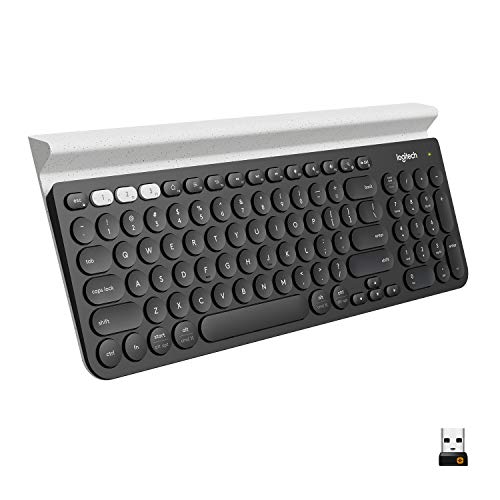 Logitech K780 Multi-Device Wireless Keyboard | Check price on Amazon | |
 Logitech K380 Multi-Device Bluetooth Keyboard | Check price on Amazon | |
 Arteck HB030B Universal Slim Keyboard | Check price on Amazon |
Our Top Picks
- Arteck Universal Backlit Wireless Bluetooth Keyboard for iPad9.72 x 0.24 x 5.91 inches0.4 poundsCheck on Amazon
The best chiclet style keyboards share one idea: low, flat keys with a small gap between them, like the keyboard built into a laptop. Chiclet keys, also called island-style keys, travel a short distance and bottom out softly, which makes them quiet and easy to type on for long stretches. This guide compares chiclet keyboards on key feel, layout, connectivity, and how they hold up on a desk day after day.
Chiclet keyboards suit a different hand than a tall mechanical board. They ask for a light touch, they keep wrist angles low, and they take up little desk space. The picks below cover the main shapes of chiclet keyboard: a premium backlit model for a main desk, a multi-device model for switching between a computer and a phone, a compact travel model, and a value model for a spare desk or a shared computer.
How to Choose
1. Key feel and travel
Chiclet keys have short travel, usually well under a tall mechanical switch, and a soft landing. The best ones give a clear actuation point so you know a key registered without pressing hard. Avoid boards where the keys feel mushy or where the spacebar needs more force than the letter keys.
2. Layout and size
A full-size layout keeps the number pad for spreadsheets; a compact layout saves desk space and suits a laptop beside it. Check that the keys you use most are full-size: some compact boards shrink the arrow keys or the right Shift, which slows touch typing.
3. Backlighting
Backlighting matters if you type in a dim room. Look for adjustable brightness and a light that spreads evenly across the legends. A board with a light sensor that adjusts automatically is a small luxury that pays off every evening.
4. Connectivity
Bluetooth lets one keyboard serve a laptop, a tablet, and a phone, while a USB receiver gives a stable link for a desktop. A board that pairs with three devices and switches between them with one key saves desk space and cable clutter. Check battery life and whether the board charges over USB-C.
5. Build and stability
A chiclet keyboard should sit flat and stay put while you type. A metal top plate adds weight and stiffness, while rubber feet stop the board sliding on a smooth desk. A board that flexes in the middle will feel cheap within a week, however good the keys are.
6. Noise
Chiclet keyboards are quiet by design, which suits shared rooms, offices, and late-night typing. Check the spacebar and the larger keys in particular, because those are the ones that rattle on a poorly built board. A quiet board is also the polite choice for video calls.
Top Picks
Logitech MX Keys S
Check the Logitech MX Keys S on Amazon
The Logitech MX Keys S is a full-size chiclet keyboard with backlit keys, a metal top plate, and a low profile that keeps wrists comfortable. Its keys have a dished shape that guides fingers home, and the backlight adjusts to the room and switches off when your hands leave. It connects over Bluetooth or a USB receiver, pairs with three devices, and its battery lasts for weeks between charges over USB-C.
This keyboard fits a main desk where typing is the main job. It suits writers, coders, and office workers who type for hours and want a quiet, comfortable board with a number pad. It also fits anyone who switches between a desktop and a laptop, because one key moves the connection between devices.
Its full-size layout needs real desk space, so it is not a travel board. Its key feel is soft and short, which mechanical fans may find too light at first. Its software adds useful shortcuts, but the board works well without it if you prefer a simple setup.
Logitech K780 Multi-Device Wireless Keyboard
Check the Logitech K780 Multi-Device Wireless Keyboard on Amazon
The Logitech K780 is a full-size chiclet keyboard with a built-in cradle that holds a phone or tablet upright above the keys. Its round, low-profile keys type quietly, and its quiet action suits a shared room. It pairs with three devices over Bluetooth or a USB receiver, and a single key switches between them. Two AAA batteries power it for a long stretch, so charging is rarely a thought.
This keyboard fits a desk where a phone or tablet sits beside the computer. It suits anyone who answers messages on a phone while working on a PC, or who types on a tablet in the evening. It also fits a family computer where different people use different devices and one keyboard must serve them all.
Its keys are quiet and soft, which some typists find less precise than a firmer chiclet board. Its cradle holds a phone well but a heavy tablet can tip the balance on a light desk. Its battery-powered design means keeping spare batteries nearby rather than plugging in a cable.
Logitech K380 Multi-Device Bluetooth Keyboard
Check the Logitech K380 Multi-Device Bluetooth Keyboard on Amazon
The Logitech K380 is a compact chiclet keyboard that pairs with three devices over Bluetooth and switches between them with one key. Its round keys are quiet and comfortable, and its small footprint fits in a bag beside a laptop or tablet. It runs for months on two AAA batteries, and its light weight makes it easy to carry between rooms or on a trip.
This keyboard fits a mobile setup where a laptop or tablet needs a real keyboard. It suits travelers, students, and anyone who types on a tablet and wants a full keyboard without a full-size board. It also fits a small desk where a compact keyboard leaves room for a mouse and a notebook.
Its compact layout has no number pad, so spreadsheet work is slower. Its keys are light and quiet, which suits most typists but gives less feedback than a firmer board. Its Bluetooth-only connection means a desktop without Bluetooth needs an adapter, and its small size can feel cramped for large hands.
Arteck HB030B Universal Slim Keyboard
Check the Arteck HB030B Universal Slim Keyboard on Amazon
The Arteck HB030B is a slim chiclet keyboard with a stainless steel body, low-profile keys, and a rechargeable battery that lasts for months between charges. It connects over Bluetooth to a computer, tablet, or phone, and its thin frame slips into a bag easily. Its keys are quiet and evenly spaced, and its backlight-free design keeps the battery drain low and the price tier modest.
This keyboard fits a spare desk, a travel bag, or a shared computer where a simple, quiet board is enough. It suits buyers who want a slim keyboard without paying for backlighting or multi-device switching hardware they will not use. It also fits a living-room PC where the keyboard rests on a lap and a light, flat board matters.
It has no backlight, so dim-room typing relies on the room light. Its Bluetooth-only connection needs a compatible device, and its slim frame can slide on a very smooth desk unless the feet grip well. Its key feel is light, which suits gentle typists more than heavy-handed ones.
Comparison Table
| Product | Best for | Key specs |
|---|---|---|
| Logitech MX Keys S | Main desk, long typing | Full-size, backlit, 3-device, USB-C |
| Logitech K780 | Phone and tablet beside PC | Full-size, device cradle, 3-device |
| Logitech K380 | Travel, tablet typing | Compact, Bluetooth, 3-device, light |
| Arteck HB030B | Spare desk, travel, value | Slim, steel body, Bluetooth, rechargeable |
Which One Is Right for You?
Start with where the keyboard will live. For a main desk and long typing sessions, the MX Keys S is the strongest pick: full-size, backlit, and built to stay put. For a desk where a phone or tablet joins the computer, the K780 adds its cradle and the same easy switching. For travel or a small desk, the K380 is the compact choice, and the Arteck HB030B covers the same ground at a lower tier with a slim steel body. If you type in a dim room, backlighting narrows the choice to the MX Keys S. If you switch between three devices all day, any of the Logitech models handles that with one key.
A final point worth weighing is how the keyboard will age on your desk. A chiclet board with a metal top plate, like the MX Keys S, resists flex and keeps its feel after months of daily use, while a very light plastic board can develop a hollow sound in the keys it uses most. Check the feet and the weight: a board that slides when you reach for the mouse will annoy you every day, however good its keys are. Battery design matters too. A rechargeable board with USB-C charging, such as the MX Keys S and the Arteck HB030B, means one cable already on your desk keeps it running, while a battery-powered board like the K780 and the K380 means keeping spare batteries in a drawer. Neither design is wrong, but the one that matches your habits is the one you will keep charged. Finally, think about the devices the keyboard must serve in a year, not just today. A board that pairs with three devices covers a desktop, a laptop, and a tablet, so adding a tablet later costs nothing. A board that pairs with one device may need replacing when your setup grows.
Frequently Asked Questions
What is a chiclet keyboard?
A chiclet keyboard has low, flat keys separated by small gaps, like the keyboard on a laptop. The name comes from the keys looking like small square sweets. Chiclet keys travel a short distance and land softly, which makes them quiet and comfortable for long typing sessions.
Are chiclet keyboards good for typing all day?
Yes, for most people. Their low profile keeps wrists at a gentle angle, and their quiet action suits shared rooms. Typists who press hard or who love a tall, clicky key may prefer a mechanical board, but for documents, email, and code, a good chiclet board is comfortable for hours.
Do chiclet keyboards work with a tablet or phone?
Most Bluetooth chiclet keyboards pair with tablets and phones as well as computers. Check that the board supports your device’s system and that it can switch between devices easily. A board with a device cradle, like the K780, holds a phone or tablet where you can see it while you type.
How do I clean a chiclet keyboard?
Turn it off, tip it upside down and tap it gently to loosen dust, then wipe the keys with a slightly damp cloth. Avoid sprays and harsh cleaners, and never let liquid pool between the keys. A soft brush reaches the gaps between keys without pushing dust further in.
Disclosure: As an Amazon Associate, we may earn from qualifying purchases.
FAQ
Which One Is Right for You?
What is a chiclet keyboard?
Are chiclet keyboards good for typing all day?
Do chiclet keyboards work with a tablet or phone?
How do I clean a chiclet keyboard?
More from Amazon
Programs that pair well with the guide above. Offers and eligibility are set by Amazon and may change.
Free shipping on eligible items, Prime Video and more. Eligible new members can start with a free trial.
Start a Prime free trialAd-free music streaming. Eligible new subscribers can start with a free trial.
Try Music Unlimited freeA Prime membership for ages 18-24 with a trial period. Eligibility is set by Amazon.
See Prime for Young AdultsAudiobooks and podcasts to listen to on the go. Eligible new members can start with a free trial.
Try Audible freeAs an Amazon Associate we earn from qualifying purchases.