Our Short List of 3

- Smart Connector attachment; backlit scissor-switch keys; built-in trackpad with multi-touch gesture support; floating cantilever hinge; USB-C pass-through charging port; fits iPad Pro 11-inch (1st, 2nd, 3rd, 4th generation) and iPad Air (4th, 5th generation); US English layout; black finish.

- Smart Connector attachment; detachable backlit keyboard; large precision trackpad; adjustable kickstand with multiple viewing angles; full row of iPadOS shortcut keys; fits iPad 10th generation and iPad A16; Oxford Gray finish.

- Smart Connector attachment; detachable backlit keyboard; precision trackpad; adjustable kickstand; iPadOS shortcut key row; fits iPad 7th, 8th, and 9th generation; Graphite finish.
All 5 Picks at a Glance
| Product | Specs | Action |
|---|---|---|
| 1. Apple Magic Keyboard for iPad Pro 11-inch and iPad Air — Best Overall |
| Check price on Amazon |
| 2. Logitech Combo Touch for iPad 10th Generation and A16 — Best Detachable Case |
| Check price on Amazon |
| 3. Logitech Combo Touch for iPad 7th, 8th, and 9th Generation — Best for Older Base iPads |
| Check price on Amazon |
 4. Apple Smart Keyboard Folio for 11-inch iPad Pro and iPad Air — Best Lightweight Apple Keyboard |
| Check price on Amazon |
 5. Logitech K380 Multi-Device Bluetooth Keyboard — Best Compact Bluetooth Keyboard |
| Check price on Amazon |
Key takeaways
- The best Apple iPad keyboards for typing, study, and work, from Apple's own Magic Keyboard to detachable Logitech cases and compact Bluetooth options.
The best Apple iPad keyboards turn a tablet into a machine you can write on for hours. A good iPad keyboard gives you real keys, a sensible layout, and a way to hold the screen at a comfortable angle, so long documents, school assignments, and email stop feeling like a chore. The wrong one leaves you fighting a cramped layout, a wobbly stand, or a connection that drops at the worst moment.
This guide compares five keyboards that work with Apple iPad models, from Apple’s own Magic Keyboard and Smart Keyboard Folio to detachable Logitech cases and a compact Bluetooth board. Every pick below is a keyboard made for iPad use, with its own strengths, its own limits, and a clear idea of who it suits. Before the picks, the buying section explains the seven things that matter most: fit, connection, trackpad, keys, battery and charging, weight, and layout. Read that first, check your exact iPad model, and then match the pick to how you actually type.
How to Choose
1. Fit and Compatibility
Fit is the first thing to check, because iPad keyboards are made for specific models. An iPad Pro 11-inch keyboard case will not fit an iPad Pro 12.9-inch, and a case made for the iPad Air 4th generation may not line up with the camera cutout on a later Air. Check the model name and generation printed on the back of your iPad or in its settings, then match it against the keyboard listing before you buy. Apple keyboards and Logitech cases both list the exact iPad generations they fit, and that list is the single most useful line in the whole product page. If your iPad is a base model iPad, an iPad mini, or an older Pro, narrow the search to cases built for that exact size.
2. Connection Type
iPad keyboards connect in two main ways. Smart Connector keyboards attach magnetically and draw power from the iPad, so there is no Bluetooth pairing and no separate charging. Bluetooth keyboards pair wirelessly and work with almost any iPad, plus phones, laptops, and desktops. A Smart Connector keyboard is simpler day to day, because it is always ready, while a Bluetooth keyboard is more flexible, because one board can serve several devices. If you want a keyboard that lives on the iPad and never needs charging, choose Smart Connector. If you want one keyboard for the iPad and a laptop, choose Bluetooth.
3. Trackpad
A trackpad changes how the iPad feels. With one, you can move a cursor, click, drag, and use multi-finger gestures without touching the screen, which makes spreadsheets, document editing, and web research much faster. Without one, you will reach for the screen often, which is fine for short notes but tiring during long sessions. Apple’s Magic Keyboard and Logitech’s Combo Touch both include a trackpad. The Smart Keyboard Folio and the Logitech K380 do not. If your iPad is your main computer, a trackpad is worth having. If it is a second device for notes and reading, you can live without one.
4. Key Feel and Layout
Key feel decides whether you enjoy typing or merely endure it. Backlit keys help in dim rooms, and a full-size layout with a proper number row and function row helps when you type for hours. Scissor-switch keys, the kind Apple uses in the Magic Keyboard, feel crisp and stable. Membrane keys, common on compact Bluetooth boards, feel softer and quieter. Think about your hands: people with large hands often prefer a full-size layout, while people who carry the iPad everywhere often accept smaller keys to save space. If you type in another language, check that the layout matches the language you use.
5. Battery and Charging
Smart Connector keyboards need no battery of their own, because they take power from the iPad. Bluetooth keyboards run on built-in rechargeable batteries or replaceable cells, and a long battery life means fewer interruptions. The Logitech K380, for example, runs for months on two AAA batteries, while rechargeable boards need a cable every few weeks. Check how the keyboard charges and how long a charge lasts, and make sure the charging port matches the cables you already carry.
6. Weight and Portability
An iPad keyboard case adds weight, and the total matters when the iPad travels in a bag all day. A Magic Keyboard with an iPad Pro feels close to a small laptop in weight, which is fine on a desk but noticeable in a shoulder bag. A folio keyboard is lighter, and a separate Bluetooth board lets you leave the keyboard at home when you only need the tablet. If you carry the iPad everywhere, weigh the keyboard against how much typing you will actually do away from a desk.
7. Protection and Stand
A keyboard case is also a cover. Some cases protect the front and back of the iPad, some only guard the screen, and some leave the edges exposed. A good stand holds the iPad steady at several angles for typing, watching, and drawing. The Logitech Combo Touch adds a kickstand that works on a lap and a desk, while Apple’s Magic Keyboard uses a floating cantilever hinge that adjusts smoothly. If you use the iPad on a train, a sofa, or a lecture hall seat, a stable stand matters as much as the keys.
Top Picks
1. Apple Magic Keyboard for iPad Pro 11-inch and iPad Air — Best Overall
- Smart Connector attachment; backlit scissor-switch keys; built-in trackpad with multi-touch gesture support; floating cantilever hinge; USB-C pass-through charging port; fits iPad Pro 11-inch (1st, 2nd, 3rd, 4th generation) and iPad Air (4th, 5th generation); US English layout; black finish.
The Apple Magic Keyboard is the most complete iPad keyboard Apple makes. It attaches magnetically through the Smart Connector, so there is no pairing and no charging, and it holds the iPad on a floating cantilever hinge that adjusts to the angle you want. The backlit keys use a scissor mechanism with a satisfying, stable press, and the built-in trackpad brings full cursor support and multi-touch gestures to iPadOS. A USB-C port on the hinge charges the iPad while you type, leaving the iPad’s own port free for another accessory.
Who it is for: Anyone who uses an iPad Pro 11-inch or iPad Air as a main computer for writing, study, or office work, and who wants the closest thing to a laptop experience without buying a laptop.
Caveats: It adds noticeable weight, it only fits the listed iPad Pro 11-inch and iPad Air generations, and it has no function row, so brightness and volume controls live in Control Center or on screen. Confirm your iPad generation before ordering, because the 11-inch Magic Keyboard for newer M4 models is a different product.
2. Logitech Combo Touch for iPad 10th Generation and A16 — Best Detachable Case
- Smart Connector attachment; detachable backlit keyboard; large precision trackpad; adjustable kickstand with multiple viewing angles; full row of iPadOS shortcut keys; fits iPad 10th generation and iPad A16; Oxford Gray finish.
Logitech Combo Touch for iPad (10th gen and A16)
The Logitech Combo Touch is a detachable keyboard case for the base iPad, and it is the strongest choice for the 10th generation iPad and the A16 model. The keyboard detaches from the case, so you can use the iPad as a pure tablet, prop it on the kickstand for watching, or attach the keyboard for typing. It connects through the Smart Connector, so there is no Bluetooth pairing and no battery to charge, and it includes a large precision trackpad, backlit keys, and a full row of iPadOS shortcut keys for volume, brightness, search, and media.
Who it is for: Base iPad owners who want laptop-style typing and a trackpad, plus the freedom to remove the keyboard and use the tablet on its own.
Caveats: It is built for the 10th generation iPad and the A16 model only, so it will not fit an iPad Air or iPad Pro. The case adds bulk, and the keyboard is not usable when detached from the case. Check the generation carefully, because the 9th generation iPad uses a different Combo Touch model.
3. Logitech Combo Touch for iPad 7th, 8th, and 9th Generation — Best for Older Base iPads
- Smart Connector attachment; detachable backlit keyboard; precision trackpad; adjustable kickstand; iPadOS shortcut key row; fits iPad 7th, 8th, and 9th generation; Graphite finish.
Logitech Combo Touch for iPad (7th, 8th and 9th generation)
If your iPad is a 7th, 8th, or 9th generation base model, this is the matching Combo Touch. It works the same way as the newer version: a detachable keyboard, a trackpad, a kickstand, and a Smart Connector link that needs no pairing and no charging. The keys are backlit, the layout includes iPadOS shortcut keys, and the case guards the iPad front and back when closed. For owners of these older iPads, it is the most practical way to add serious typing without replacing the tablet.
Who it is for: Owners of a 7th, 8th, or 9th generation iPad who want a full keyboard case with a trackpad and do not plan to upgrade the tablet soon.
Caveats: It fits only the three listed generations, and it will not work with the 10th generation iPad or any iPad Air or Pro. The keyboard and trackpad stop working when the keyboard is detached, so the tablet mode relies on touch alone.
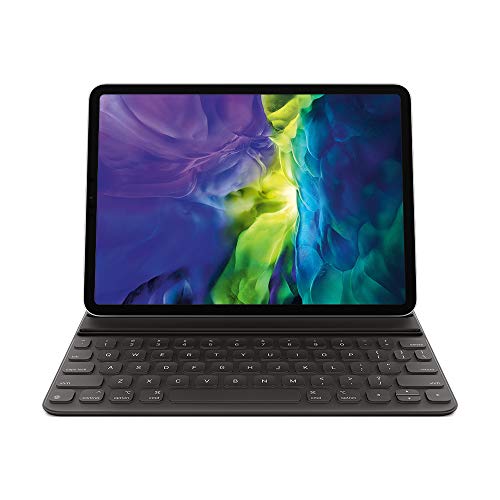
4. Apple Smart Keyboard Folio for 11-inch iPad Pro and iPad Air — Best Lightweight Apple Keyboard
- Smart Connector attachment; full-size keyboard with two viewing angles; front and back protection; no trackpad; no battery or charging needed; fits iPad Pro 11-inch (1st, 2nd, 3rd, 4th generation) and iPad Air (4th, 5th generation); US English layout; black finish.
The Smart Keyboard Folio is Apple’s lighter, simpler iPad keyboard. It folds into a cover that protects the front and back of the iPad, opens into a keyboard at one of two viewing angles, and connects through the Smart Connector, so there is no pairing and no battery to manage. The keys are full-size and comfortable for long typing sessions, and the whole folio is thinner and lighter than the Magic Keyboard. It has no trackpad, which keeps it slim, and the fabric-covered keys are quiet and resistant to spills and crumbs.
Who it is for: iPad Pro 11-inch and iPad Air owners who want Apple’s own keyboard in the lightest form, who type mostly at a desk or table, and who are happy to use touch for pointing.
Caveats: There is no trackpad, no backlight, and only two viewing angles, so it is less flexible than the Magic Keyboard or the Combo Touch. It also fits only the listed iPad generations, so check the model before ordering.
5. Logitech K380 Multi-Device Bluetooth Keyboard — Best Compact Bluetooth Keyboard
- Bluetooth connection; Easy-Switch pairing for up to three devices; compact layout with round low-profile keys; two AAA batteries with long battery life; compatible with iPadOS, macOS, Windows, ChromeOS, Android, and Apple TV; dark grey finish.
Logitech K380 Multi-Device Bluetooth Keyboard
The Logitech K380 is a small Bluetooth keyboard that pairs with an iPad and up to two other devices, switching between them with a press of a button. It is a good pick when the iPad is one of several devices you type on, because the same board can serve a phone, a laptop, and a desktop as well. The round keys are quiet and comfortable, the board is light enough to slip into a bag beside the iPad, and it runs for months on two AAA batteries. It works with iPadOS, macOS, Windows, ChromeOS, and Android, so it suits households with mixed devices.
Who it is for: People who want one small keyboard for an iPad plus a laptop or phone, travellers who pack light, and anyone who prefers a separate keyboard they can leave behind when the iPad goes out alone.
Caveats: It has no trackpad, no backlight, and no case or stand, so you will need a separate iPad stand or cover for a good typing angle. It also has no number pad, and the compact layout takes a short while to get used to if you come from a full-size board.
Comparison Table
| Keyboard | Connection | Trackpad | Backlit Keys | Fits |
|---|---|---|---|---|
| Apple Magic Keyboard | Smart Connector | Yes | Yes | iPad Pro 11-inch (1st–4th gen), iPad Air (4th–5th gen) |
| Logitech Combo Touch (10th gen / A16) | Smart Connector | Yes | Yes | iPad 10th gen, iPad A16 |
| Logitech Combo Touch (7th–9th gen) | Smart Connector | Yes | Yes | iPad 7th, 8th, 9th gen |
| Apple Smart Keyboard Folio | Smart Connector | No | No | iPad Pro 11-inch (1st–4th gen), iPad Air (4th–5th gen) |
| Logitech K380 | Bluetooth | No | No | Any iPad with Bluetooth, plus phones and computers |
Which One Is Right for You?
Start with your iPad model, because it narrows the list fast. iPad Pro 11-inch and iPad Air owners choose between the Apple Magic Keyboard for the full laptop feel and the Smart Keyboard Folio for the lightest Apple option. Base iPad owners pick the Combo Touch that matches their generation: the 10th generation and A16 model take one version, the 7th, 8th, and 9th generations take the other.
Next, decide whether you need a trackpad. If the iPad is your main computer, the Magic Keyboard or a Combo Touch will save you time every day. If the iPad is a second device for notes, email, and reading, the Smart Keyboard Folio or the K380 will do, and both are lighter and simpler.
Finally, think about how you carry the iPad. A keyboard case is always with you, which is convenient, but it adds weight. A separate Bluetooth board like the K380 stays behind when you only need the tablet, which suits travellers and students who move between classes. Match the keyboard to the way you actually use the iPad, not to the way you imagine using it, and check the exact model fit one more time before you order.
Frequently Asked Questions
Do I need a specific keyboard for my iPad model?
Yes, in most cases. Keyboard cases are shaped for one iPad size and generation, with cutouts for the camera and buttons in exact places. A case made for the iPad Pro 11-inch will not fit an iPad Air 11-inch M2 or a base iPad 10th generation, even though the screens look similar. Bluetooth keyboards are the exception, because they pair with any iPad that supports Bluetooth. Always check the listed compatible models against your iPad’s model name and generation before ordering.
Is a trackpad worth it on an iPad keyboard?
It is worth it if the iPad is your main computer. A trackpad lets you select text, drag files, and use gestures without touching the screen, which speeds up document work, spreadsheets, and research. If you mostly take notes, read, and watch, you can manage without one and save weight and money. The Magic Keyboard and both Combo Touch models include a trackpad, while the Smart Keyboard Folio and the K380 do not.
Can one keyboard work with an iPad and a laptop?
Yes, if it is a Bluetooth keyboard. The Logitech K380 pairs with up to three devices and switches between them at the press of a button, so it can serve an iPad, a laptop, and a phone. Smart Connector keyboards only work with the iPad they attach to, because they draw power and data through the connector. If you want one board for everything, choose Bluetooth.
How do I keep an iPad keyboard clean?
Wipe the keys and case with a slightly damp, lint-free cloth, and avoid harsh cleaners. For a fabric-covered keyboard like the Smart Keyboard Folio, a soft brush removes dust from between the keys. Keep food and drinks away from the board, and store the iPad closed in its case when you carry it, so the keys and screen stay protected.
Disclosure: As an Amazon Associate, we may earn from qualifying purchases.
FAQ
Which One Is Right for You?
Do I need a specific keyboard for my iPad model?
Is a trackpad worth it on an iPad keyboard?
Can one keyboard work with an iPad and a laptop?
How do I keep an iPad keyboard clean?
More from Amazon
Programs that pair well with the guide above. Offers and eligibility are set by Amazon and may change.
Free shipping on eligible items, Prime Video and more. Eligible new members can start with a free trial.
Start a Prime free trialAd-free music streaming. Eligible new subscribers can start with a free trial.
Try Music Unlimited freeA Prime membership for ages 18-24 with a trial period. Eligibility is set by Amazon.
See Prime for Young AdultsAudiobooks and podcasts to listen to on the go. Eligible new members can start with a free trial.
Try Audible freeAs an Amazon Associate we earn from qualifying purchases.