Key takeaways
- Compare the best home energy monitors to track electricity use in real time, spot wasteful circuits, and make smarter choices about your power every month.
Most households have no idea where their electricity actually goes. The bill arrives once a month as a single number, and the water heater, the air conditioner, the dryer, and the always-on devices all hide inside it. A home energy monitor changes that by showing your electricity use in real time, circuit by circuit, so you can see which appliances cost the most and which ones waste power when nobody is using them. It also helps you spot a faulty appliance early, because a sudden jump in use often points to a heater or fridge that is failing.

This guide compares three whole-home energy monitors that install inside your electrical panel and report to an app on your phone. Each one tracks your total use and breaks it down by device or circuit, and the sections that follow explain how they work, how to install them safely, and which one fits your home.
As an Amazon Associate we earn from qualifying purchases
Quick Picks
Our Short List of 3
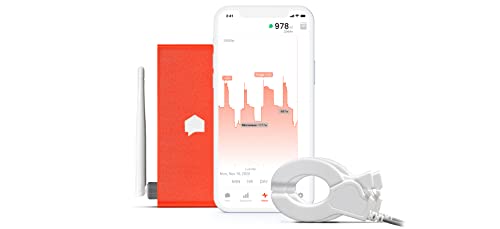
- Best for: Whole-home tracking with automatic device detection and a live power meter that shows use in real time.
- Two current transformer clamps for whole-home monitoring
- Fits split-phase 120/240V panels up to 200A service
- Machine learning device detection for individual appliances
- Real-time power meter and usage history in the app
- Best for: Larger homes, solar setups, and dedicated high-use circuits such as chargers and heat pumps.
- Two main clamps plus two flex sensors for extra circuits
- Supports 400A service, solar, or dedicated circuit monitoring
- Machine learning device detection across the whole home
- Solar production and consumption shown together in the app

- Best for: Certain per-circuit tracking from day one, with no learning period and per-circuit cost estimates.
- 16 branch circuit sensors plus main clamps
- Fits split-phase 120/240V panels up to 200A service
- Per-circuit real-time tracking with no learning period
- App shows watts, history, and cost estimates per circuit
All 3 Picks at a Glance
| Product | Specs | Action |
|---|---|---|
| Sense Energy Monitor |
| Check price on Amazon |
| Sense Flex |
| Check price on Amazon |
| Emporia Vue Gen 3 |
| Check price on Amazon |
How to Choose
Decide between device detection and circuit tracking
Home energy monitors take two different approaches, and the right one depends on how you think about your home. The Sense monitors watch the whole home through two clamps and use software to recognise appliances by their electrical signatures, naming the dryer, the fridge, and the water heater. The Emporia Vue takes the other path, with a sensor on every circuit, so it tells you exactly what each breaker uses. Device detection feels clever, but circuit tracking is certain from day one. Choose circuit tracking to learn what each room costs, and device detection to identify appliances for you.
Check your panel size and service type
Before you buy a whole-home monitor, check your electrical panel, because it must match the service it measures. Most North American homes use a split-phase 120/240V panel with a 200A main breaker, which all three here support. Larger homes may have a 400A service, which needs the extra sensors of the Sense Flex, while homes with solar need a monitor that measures power flowing in both directions. Open the panel door, read the main breaker rating, and note solar or a sub-panel. A monitor that does not match your service will miss part of your use or fail to install at all.
Put safety first during installation
A home energy monitor installs inside your electrical panel, where live wires carry enough current to injure or kill. Every model here meets rigorous safety standards for panel-mounted equipment. Switch off the main breaker before you open the panel, confirm the bus bars are dead with a tester, and never touch the main service wires that stay live even with the main breaker off. If you are not confident working inside a panel, hire a licensed electrician. Keep the panel door closed when the monitor is running, and never install one in a wet or damaged panel.
Compare the app and the data
A monitor is only as useful as the app that shows its data, so compare the software before you buy. The Sense app shows a real-time power meter, a bubble view of running devices, and weekly usage charts, which spots a device that stays on too long. The Emporia app shows per-circuit history, cost estimates, and alerts when a circuit uses more than expected. Check whether the app needs a subscription for its full features and whether it exports data. A clear, honest app will get used every week, while a confusing one will sit forgotten after the first month.
The 3 Best Options
Sense Energy Monitor
- Best for: Whole-home tracking with automatic device detection and a live power meter that shows use in real time.
- Two current transformer clamps for whole-home monitoring
- Fits split-phase 120/240V panels up to 200A service
- Machine learning device detection for individual appliances
- Real-time power meter and usage history in the app
Whole-home tracking with automatic device detection and a live power meter that shows use in real time.
Device detection takes weeks to learn your appliances, and some devices may stay unnamed for a long time.
The Sense Energy Monitor watches your whole home through two clamps on the main service wires and learns to recognise individual appliances by their electrical signatures. Over the first few weeks it starts naming the devices it finds, and the app shows a live power meter that rises and falls as appliances switch on and off. It works with a standard split-phase 200A panel, meets ETL and Intertek safety standards, and connects over Wi-Fi. The learning process takes patience, but for households that want a clear picture of total use, Sense is the most elegant option.
Watch out for: Device detection takes weeks to learn your appliances, and some devices may stay unnamed for a long time.
Sense Flex
- Best for: Larger homes, solar setups, and dedicated high-use circuits such as chargers and heat pumps.
- Two main clamps plus two flex sensors for extra circuits
- Supports 400A service, solar, or dedicated circuit monitoring
- Machine learning device detection across the whole home
- Solar production and consumption shown together in the app
Larger homes, solar setups, and dedicated high-use circuits such as chargers and heat pumps.
The extra sensors add installation steps, so plan the panel layout and sensor placement before you start.
The Sense Flex builds on the original Sense monitor with two extra flex sensors that extend its reach to larger and more complex homes. Those sensors can monitor a second 200A panel for a 400A service, track solar production alongside consumption, or watch a dedicated circuit such as a charger or a heat pump. The same machine learning identifies appliances across the whole home, and the app shows solar generation and consumption side by side. If your home has a big service, solar panels, or a circuit you want to watch closely, the Flex is the version that covers it.
Watch out for: The extra sensors add installation steps, so plan the panel layout and sensor placement before you start.
Emporia Vue Gen 3
- Best for: Certain per-circuit tracking from day one, with no learning period and per-circuit cost estimates.
- 16 branch circuit sensors plus main clamps
- Fits split-phase 120/240V panels up to 200A service
- Per-circuit real-time tracking with no learning period
- App shows watts, history, and cost estimates per circuit
Certain per-circuit tracking from day one, with no learning period and per-circuit cost estimates.
Installing 16 sensors takes time and care, so label each circuit and keep the list handy before you start.
The Emporia Vue Gen 3 takes the direct approach to energy monitoring, with 16 sensors that clamp onto individual circuits so you know exactly what each breaker uses. There is no learning period and no guessing, because the app shows each circuit by name, with real-time watts, daily history, and cost estimates. The 16-sensor kit covers a typical panel with room to spare, and the system works with solar. Installation takes longer than a two-clamp monitor, because each sensor must be placed on the right circuit. If you want answers rather than estimates, the Vue is the most thorough monitor here.
Watch out for: Installing 16 sensors takes time and care, so label each circuit and keep the list handy before you start.
Which One Fits Your Situation
A family that wants to cut the monthly bill
If your goal is to spend less on electricity, the Sense Energy Monitor is the easiest starting point, because it shows your total use in real time and learns which appliances cost the most. Watch the live meter while you switch devices on and off, and find the always-on loads that run all night.
A home with solar panels
If you have solar panels and want to know how much of your own power you use, the Sense Flex is the right fit, because its flex sensors measure solar production alongside consumption. The app shows both flows together, so you can shift laundry and charging into the sunny hours when your panels produce the most.
A homeowner who wants exact answers
If you want to know precisely what the kitchen, the air conditioner, and the water heater each cost, the Emporia Vue Gen 3 gives you that certainty from the first day, with a sensor on every circuit. Label each circuit during installation, and the app will show you a complete breakdown that no learning algorithm can match.
A large home with a big service
If your home runs on a 400A service or has a sub-panel feeding a workshop or an addition, the Sense Flex covers the whole setup with its extra sensors. Place the main clamps on the primary panel and the flex sensors on the second service, and the app will show the full picture in one place.
Common Mistakes
- Opening the electrical panel without switching off the main breaker, which puts live bus bars within reach of your hands and risks a serious shock before you touch anything inside the panel.
- Buying a monitor that does not match your service size, and discovering too late that a 400A panel needs the extra Flex sensors to measure the full load, and part of your use goes untracked.
- Expecting device detection to name every appliance on the first day, when the learning process takes weeks of normal use before the picture fills in, and you give up on the monitor too soon.
- Installing sensors on the wrong circuits and then trusting data that does not match the labels in the app, so the readings mislead you and your savings plan targets the wrong appliances.
- Forgetting to check whether the app needs a subscription, and losing features you assumed were included in the purchase when the trial ends and the full history disappears.
Frequently Asked Questions
How does a home energy monitor save money?
It saves money by showing you where your electricity actually goes, so you can act on the biggest uses first. A monitor reveals always-on devices that waste power overnight and appliances that run longer than they should. Once you see the real numbers, small changes such as shifting laundry add up over months.
Do I need an electrician to install a home energy monitor?
It depends on your comfort with electrical work. The installation involves opening your electrical panel and clamping sensors onto live service wires, which carries real risk. If you have worked inside a panel before and own a voltage tester, follow the instructions carefully. If you have any doubt, hire a licensed electrician.
How long does Sense take to detect my appliances?
Sense usually starts naming common appliances within the first few weeks. Large, distinctive devices such as a water heater, a dryer, and an air conditioner are often recognised first, while smaller or similar devices can take longer. The Emporia Vue avoids the wait entirely by measuring each circuit directly.
Can a home energy monitor track solar production?
Yes, when it has sensors for the solar feed. The Sense Flex uses its flex sensors to measure solar generation alongside household consumption, and the Emporia Vue Gen 3 is solar-compatible. The app shows how much power your panels produce, how much your home uses, and how much flows back to the grid.
FAQ
How does a home energy monitor save money?
Do I need an electrician to install a home energy monitor?
How long does Sense take to detect my appliances?
Can a home energy monitor track solar production?
More from Amazon
Programs that pair well with the guide above. Offers and eligibility are set by Amazon and may change.
Free shipping on eligible items, Prime Video and more. Eligible new members can start with a free trial.
Start a Prime free trialAd-free music streaming. Eligible new subscribers can start with a free trial.
Try Music Unlimited freeA Prime membership for ages 18-24 with a trial period. Eligibility is set by Amazon.
See Prime for Young AdultsAudiobooks and podcasts to listen to on the go. Eligible new members can start with a free trial.
Try Audible freeAs an Amazon Associate we earn from qualifying purchases.