Key takeaways
- Find the best z170 motherboards for a Skylake rebuild. Compare the last verifiable boards, what to check before buying, and how to spot a used listing.
The Z170 chipset dates from 2015, when it launched beside the Skylake generation of Intel Core processors, and every Z170 board has left production. That makes buying one in 2026 a different job: the question is not which model is newest, but which listing is genuine, complete, and in working order. A good Z170 board can bring a Skylake system back to life with modern storage and USB, while a bad listing can leave you with a dead board and no return.
This guide is for owners of a 6th or 7th generation Intel Core processor who need a replacement board, rebuilders restoring a 2016 gaming PC, and anyone weighing a Z170 board against a newer platform. The single board below was chosen from the name and specifications shown on its Amazon product page, and it is the only Z170 board with a verifiable Amazon US listing found during research. Every other classic Z170 board has no Amazon US listing, so this guide stays honest about the thin market.
Quick Picks
As an Amazon Associate we earn from qualifying purchases
| Product | Best for | Key spec from title |
|---|---|---|
| ASUS Z170-A | A Skylake rebuild with modern storage | LGA1151, DDR4, M.2, USB 3.1 |
How to Choose
Confirm the socket and chipset first
The Z170 chipset uses the LGA1151 socket and supports 6th and 7th generation Intel Core processors, which is the detail that decides everything else. A Z170 board will not run 8th or 9th generation chips even though they share the same socket name, because Intel changed the power delivery between generations. Check your processor model before ordering: a Core i7-6700K or i5-6600K fits, while a Core i7-8700K does not. Also confirm the board is genuinely Z170 and not a nearby chipset such as Z270, H110, or B150, since those boards look similar but support different features and memory speeds. A board that looks right but uses the wrong chipset wastes a return.
Check memory support and slots
Memory is the next detail to verify, because a Z170 board only takes DDR4 and the slot count limits your ceiling. The ASUS Z170-A carries four DDR4 slots supporting up to 64GB, which covers gaming, office work, and light content creation on this platform. Check whether the listing states the supported memory speeds and whether XMP profiles are supported, since faster DDR4 makes a real difference to integrated graphics and to minimum frame rates in some games. Faster memory also helps integrated graphics, which matters if the rebuild runs without a separate card. If you already own DDR4 sticks, confirm they match the board’s supported speeds before ordering.
Count storage and expansion
A Z170 board earns its place in a rebuild by offering storage and expansion that a cheaper chipset of the same era lacks. The Z170-A includes an M.2 slot and SATA Express, which let you fit a fast NVMe or SATA solid state drive beside older hard drives. Count the PCIe slots as well: a graphics card needs a full-length slot, and a capture card or sound card needs a spare. Check the rear panel, since USB 3.1 Boost speeds up external drives, and too few USB ports will frustrate a desk full of peripherals. Count the USB ports on the listing first, since a shortfall means a hub on the desk.
Read the listing like a used-parts buyer
Z170 boards are out of production, so most listings come from third-party sellers rather than the original maker, and some are used boards sold as open-box stock. Read the condition note on the listing before ordering, and check whether the board ships with its I/O shield, SATA cables, and manual, since missing parts are common with older boards. Confirm the return terms and the seller’s feedback, and ask which BIOS version is installed if the listing does not say. A missing I/O shield leaves a gap that lets dust into the case. A board with an old BIOS may need an update before it recognises a 7th generation processor.
The 1 Best Option
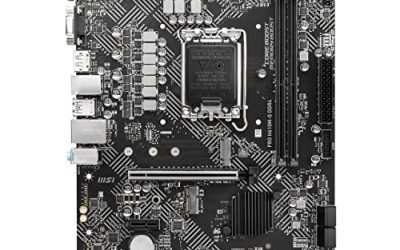
ASUS Z170-A

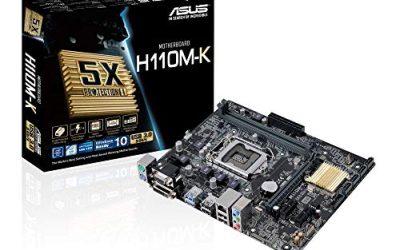
The ASUS Z170-A is the one Z170 board in this guide with a verifiable Amazon US listing, and it remains a sensible choice for a Skylake rebuild. Its LGA1151 socket takes 6th and 7th generation Intel Core processors, and four DDR4 slots support up to 64GB of memory. An M.2 slot and SATA Express cover modern storage, while USB 3.1 Boost speeds up external transfers. Dual Intelligent Processors 5 with 5-Way Optimization tunes the system automatically, and 5X Protection II guards the board against electrical stress. DTS Studio Sound rounds out a board built for gaming and everyday use. The ATX form factor fits standard cases without adapter brackets.
Specs
- Socket: LGA1151
- Chipset: Intel Z170
- Form factor: ATX
- Memory: 4 DDR4 slots, up to 64GB
- Storage: M.2 slot, SATA Express
- USB: USB 3.1 Boost
- Audio: DTS Studio Sound
- Tuning: Dual Intelligent Processors 5, 5-Way Optimization
- Protection: 5X Protection II
Best for: A Skylake rebuild with modern storage and USB 3.1.
Watch out for: Z170 boards are out of production, so confirm the listing condition, seller, and return terms before ordering.
Which One Fits Your Situation
You own a Skylake CPU and need a replacement board
Pick the ASUS Z170-A. Its LGA1151 socket fits 6th and 7th generation Intel Core processors, so a Core i7-6700K or i5-6600K drops straight in without a platform change. The four DDR4 slots take the memory you already own, and the M.2 slot adds fast storage to an ageing system. Check the BIOS version first if you run a 7th generation chip, since early boards may need an update.
You are rebuilding a 2016-era gaming PC
Pick the ASUS Z170-A. It gives a period-correct board with the features that made Z170 the enthusiast choice: overclocking support, M.2 storage, SATA Express, and USB 3.1. The 5-Way Optimization tuning handles fan curves and power settings automatically, which suits a rebuild that should simply work. 5-Way Optimization handles fan curves automatically. Pair it with a graphics card from the same era or a modest modern card for a faithful restoration.
You want M.2 storage on an old platform
Pick the ASUS Z170-A. Its M.2 slot and SATA Express connectors let you fit a modern solid state drive into a system that started life on spinning disks. A fast drive transforms boot times and game loading on an old platform more than any other single upgrade. Confirm the M.2 slot supports the drive length and interface you plan to use before ordering. A fast drive transforms boot times.
You are weighing a Z170 board against a newer platform
Pick the ASUS Z170-A only if you already own a compatible processor and memory. A new platform with a current processor costs more but brings faster memory, more cores, and a warranty. The Z170-A makes sense when the goal is to revive a working CPU and DDR4 kit, not when you are buying every part from scratch. Add up the full rebuild cost before committing to old hardware.
Common Mistakes
- Assuming any LGA1151 board fits any LGA1151 processor, when 8th and 9th generation chips need a 300-series board. Check the processor generation on the listing before ordering.
- Buying a Z170 board without checking the BIOS version, then finding it will not boot a 7th generation processor. Ask the seller which BIOS version is installed.
- Ignoring the listing condition and receiving a used board missing its I/O shield, cables, or manual. Ask what is in the box before ordering.
- Choosing DDR3 memory for a DDR4-only board, or buying memory faster than the board supports. Confirm the memory type on the listing first.
- Skipping the return terms on a third-party listing, then having no way back when the board arrives faulty. Read the return terms before paying.
Frequently Asked Questions
Will a Z170 motherboard work with an 8th generation Intel CPU?
No. Z170 boards support 6th and 7th generation Intel Core processors only, even though 8th and 9th generation chips use the same LGA1151 socket name. Intel changed the power delivery between generations, so a Core i7-8700K will not run on a Z170 board. Check the processor generation before ordering, since the socket name alone does not confirm support.
Is it safe to buy a Z170 motherboard in 2026?
It can be, with care. These boards are out of production, so most listings come from third-party sellers and some are used. Read the condition note, check the seller feedback, confirm the return terms, and ask which BIOS version is installed. Prefer a listing with a clear return policy, since a faulty board leaves you with no easy fix.
How much memory does the ASUS Z170-A support?
The board carries four DDR4 slots supporting up to 64GB of memory. That ceiling covers gaming, office work, and light content creation on this platform. Check the listing for supported memory speeds and XMP support, since faster DDR4 helps integrated graphics and some games. If you already own DDR4 sticks, confirm they match the supported speeds before ordering.
Does the Z170-A support M.2 SSDs?
Yes. The board includes an M.2 slot alongside SATA Express connectors, so you can fit a modern solid state drive into a Skylake rebuild. A fast drive is the single upgrade that most improves boot times and game loading on an old platform. Confirm the M.2 slot supports the drive length and interface you plan to use.
FAQ
Will a Z170 motherboard work with an 8th generation Intel CPU?
Is it safe to buy a Z170 motherboard in 2026?
How much memory does the ASUS Z170-A support?
Does the Z170-A support M.2 SSDs?
More from Amazon
Programs that pair well with the guide above. Offers and eligibility are set by Amazon and may change.
Free shipping on eligible items, Prime Video and more. Eligible new members can start with a free trial.
Start a Prime free trialAd-free music streaming. Eligible new subscribers can start with a free trial.
Try Music Unlimited freeA Prime membership for ages 18-24 with a trial period. Eligibility is set by Amazon.
See Prime for Young AdultsAudiobooks and podcasts to listen to on the go. Eligible new members can start with a free trial.
Try Audible freeAs an Amazon Associate we earn from qualifying purchases.